
導入
This manual provides detailed instructions for the installation, operation, and maintenance of your AWESAFE Android 12.0 Car Radio. This device features a 9-inch touchscreen, 2GB RAM, 64GB ROM, and supports wireless CarPlay/Android Auto, GPS navigation, Bluetooth, and Wi-Fi connectivity.
互換性のあるメルセデスベンツモデル:
- A-Class W169 (A150/A160/A170/A180/A200) 2004-2012
- B-Class W245 (B160/B170/B180/B200) 2004-2012
- V-Class W639 Vito/Viano 2006-2014
- Sprinter W906 (2500/3000) 2006-2012
Please confirm your vehicle's model and year before installation. The unit's dimensions are approximately 24.5cm x 13cm.
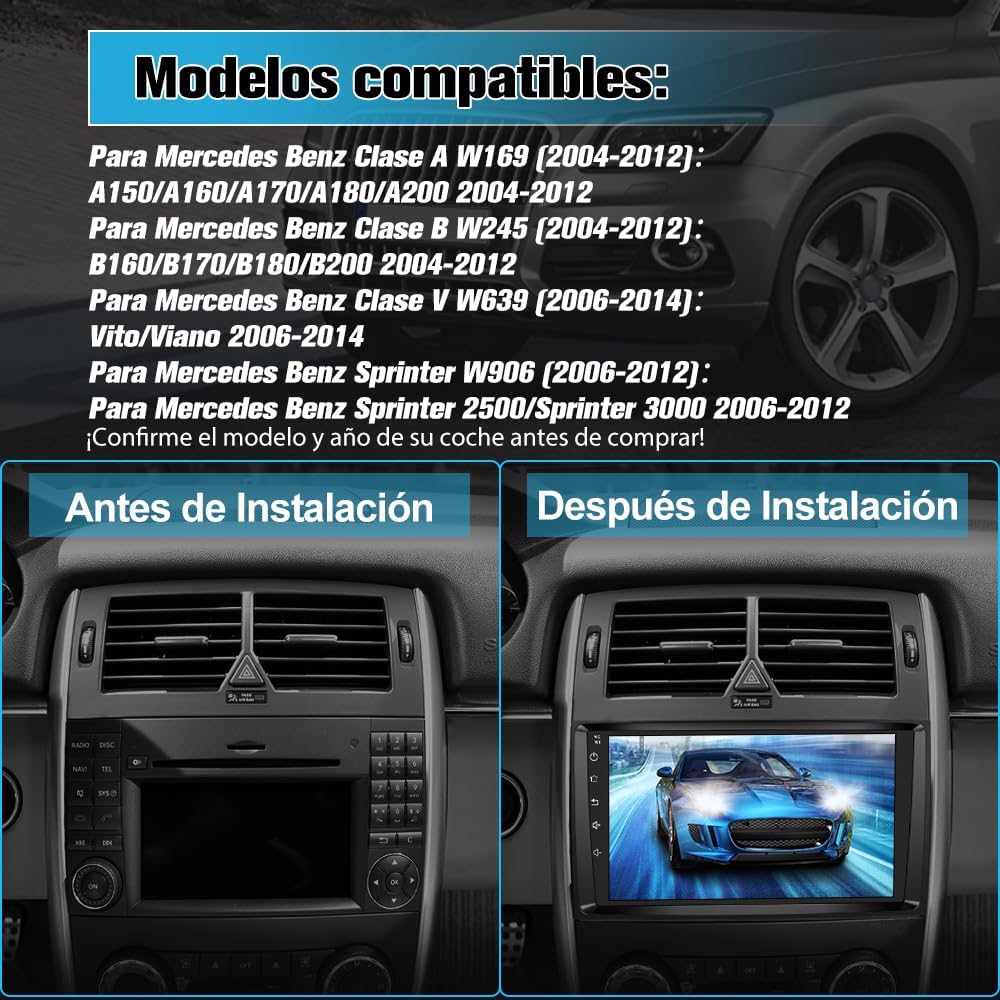
画像: 正面 view of the AWESAFE Android 12.0 Car Radio, showcasin9インチのタッチスクリーンディスプレイを搭載。
セットアップとインストール
Careful installation is crucial for optimal performance. It is recommended to have the unit installed by a professional if you are unfamiliar with car audio systems.
インストール前のチェック
- Verify the compatibility of the car radio with your vehicle model and year.
- Ensure the unit's dimensions (24.5cm x 13cm) fit your car's dashboard opening.
- If your vehicle has a fiber optic ampライファイアーまたはその他の外部 amplifier system, an additional adapter may be required (not included).
接続コンポーネント
The package includes various connectors and accessories for installation:
- 電源コネクタ: ユニットを車両の電源に接続します。
- RCAコネクタ: サブウーファー接続を含むオーディオ/ビデオ入出力用。
- GPSアンテナ: For navigation functionality. Position it in a location with clear sky view.
- 外部マイク: Connect this if you experience low voice volume during hands-free calls.
- USB ケーブル: For connecting external devices and wired CarPlay/Android Auto.
- キャンバス: For integrating with your vehicle's steering wheel controls and other systems.
- 無線アンテナ: FM/RDSラジオ受信用。
- カメラ入力: For connecting an optional rear camera (not included).
- インストールツール: Basic tools to assist with the installation process.

Image: A visual representation of all components included in the package, such as power connectors, RCA cables, GPS antenna, external microphone, USB cables, Canbus, radio antenna, camera input, and installation tools.
インストールプロセス終了view
The images below illustrate the typical appearance of a dashboard before and after the installation of the AWESAFE car radio. Ensure all cables are securely connected and routed properly to avoid interference or damage.
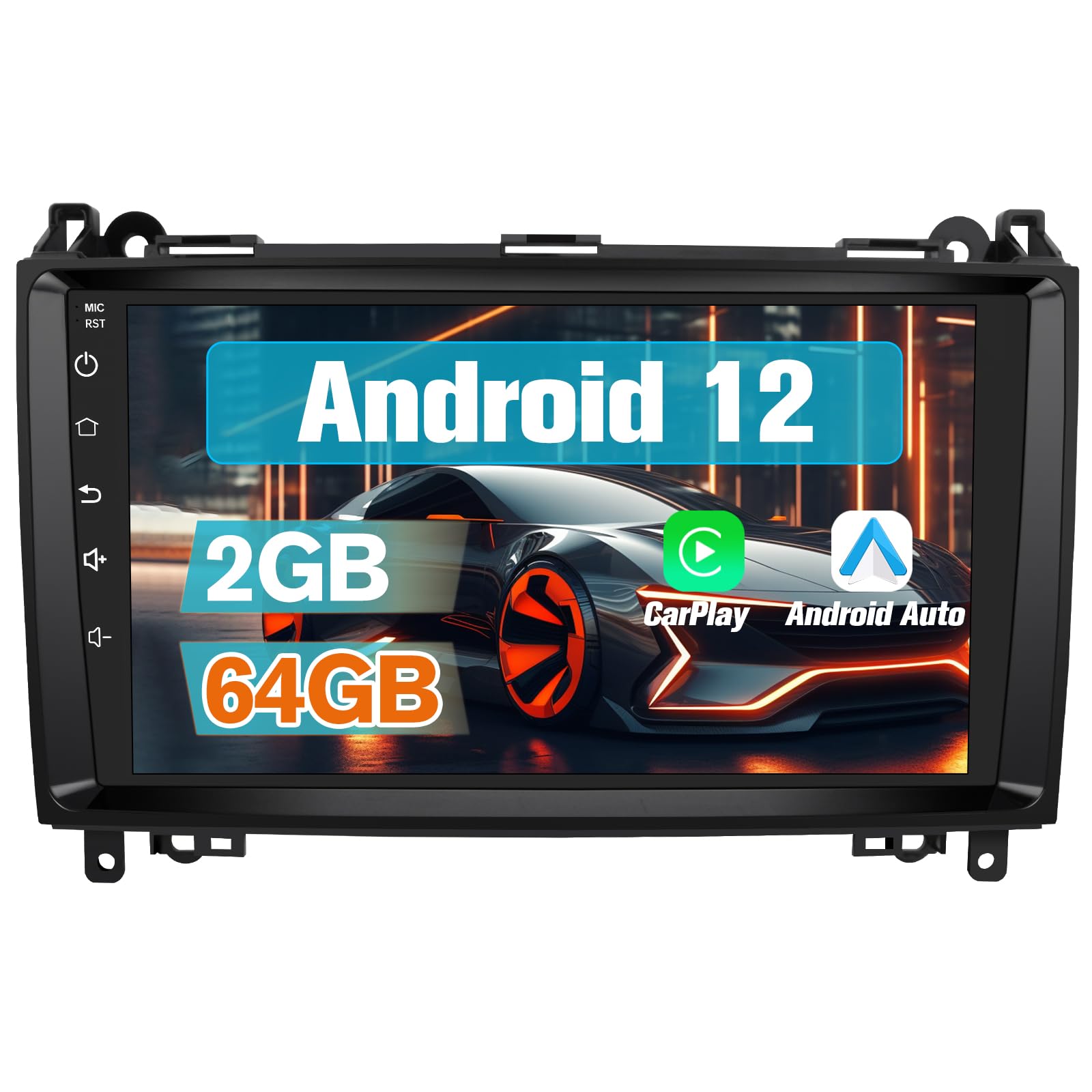
Image: A split image showing a car dashboard with the original radio (left, 'Before Installation') and the same dashboard with the AWESAFE 9-inch car radio installed (right, 'After Installation').
操作手順
マルチメディア再生
The unit supports various multimedia playback options:
- ブルートゥース: スマートフォンやその他の Bluetooth 対応デバイスからオーディオをストリーミングします。
- USB: Play music or videos from USB storage devices connected via the USB ports.
- FM/RDSラジオ: クリアな受信と RDS 情報表示で、お気に入りのラジオ局を聴くことができます。
- Wi-Fi: Connect to a Wi-Fi hotspot to access online streaming services for music and video, or download content for offline use.
CarPlayとAndroid Auto
The car radio features built-in wireless CarPlay and Android Auto. These functions allow seamless integration with your smartphone for navigation, calls, messages, and music.
- ワイヤレス接続: Connect your smartphone via Bluetooth and Wi-Fi for a cable-free experience.
- 有線接続: Alternatively, connect your phone using a USB cable to the 4-pin USB port on the radio.
- 特徴: Use intelligent voice assistants, get directions, make calls, send/receive messages, and enjoy music directly from your phone's interface displayed on the car radio screen.

Image: The car radio display showing the CarPlay and Android Auto interfaces, with icons for phone, music, maps, messages, and other applications. Two smartphones are shown below, illustrating the connection options.
GPS Navigation and Wi-Fi Functionality
The unit includes a GPS antenna and supports various navigation programs.
- オンラインナビゲーション: With Wi-Fi connectivity and 64GB memory, you can download navigation applications directly to the radio and use them online.
- オフラインマップ: The radio supports downloading specific offline maps for navigation without an internet connection.
- Phone Navigation: Use your mobile phone's navigation apps by connecting via CarPlay, Android Auto, or MirrorLink.

Image: A split image showing the car radio display. The left side ('GPS Navegación') shows a map with navigation routes. The right side ('Función de WiFi') shows the display with various app icons like YouTube, TikTok, and Facebook, indicating internet connectivity.
BluetoothとFMラジオ
Enjoy hands-free communication and diverse radio entertainment.
- Bluetooth ハンズフリー: Make and receive calls safely via Bluetooth. The system is compatible with both Android and iOS phones. If call volume is low, connect the external microphone provided.
- FMラジオ: Access a wide range of FM stations. The RDS feature provides additional information like station name and song title.

Image: A split image. The left side ('Bluetooth') shows the car radio display with a phone dial pad and an incoming call notification, along with an illustration of a microphone for hands-free calling. The right side ('FM Radio') shows the radio tuning interface with frequency display and station presets.
Control Methods and Parking Assistance
Control your multimedia system through multiple interfaces and enhance your parking safety.
- 制御オプション: Operate the unit using the responsive touchscreen, basic buttons on the panel, or your vehicle's original steering wheel controls (most are supported).
- 音声コマンド: Please note that this unit does not support voice commands.
- 駐車支援: If a rear camera (not included) is connected via the RCA connector, the screen will automatically display parking assistance lines when reversing, aiding in safer parking maneuvers.

Image: The car radio display showing a rear camera view with parking assistance lines, integrated into a car dashboard.
Sound Customization and Display
- DSPサウンドエフェクト: Customize your audio experience with various DSP stereo settings (Jazz, Rock, Pop, Classical, etc.). RCA ports are available for connecting a subwoofer.
- テーマ: Choose from 28 different themes to personalize the visual appearance of your display.
- 分割画面: 分割画面機能を利用して、2 つのアプリケーションを同時に実行します。
メンテナンス
To ensure the longevity and optimal performance of your AWESAFE car radio, follow these general maintenance guidelines:
- クリーニング: Use a soft, dry cloth to clean the touchscreen and exterior surfaces. Avoid abrasive cleaners or solvents that could damage the display or finish.
- ソフトウェアアップデート: Periodically check for available software updates via Wi-Fi to ensure you have the latest features and performance enhancements. Follow the on-screen prompts for any updates.
- 環境条件: ユニットを極端な温度、長時間の直射日光、過度の湿気にさらさないでください。
- ケーブル接続: すべてのケーブル接続が安全で損傷がないことを定期的に確認してください。
トラブルシューティング
If you encounter issues with your AWESAFE car radio, refer to the following common solutions:
- 電源なし/ユニットがオンにならない:
- すべての電源接続がしっかりと固定されていることを確認してください。
- Verify your vehicle's fuse box for any blown fuses related to the car radio.
- 音が出ない/音質が悪い:
- スピーカーの配線が正しく接続されていることを確認します。
- Check volume settings on the unit and any connected devices.
- If your vehicle has a fiber optic ampライファイアーまたはその他の外部 amplifier system, an additional adapter may be required.
- Adjust DSP sound settings.
- Bluetooth 接続の問題:
- カーラジオとスマートフォンの両方で Bluetooth が有効になっていることを確認します。
- 以前のペアリングを削除し、デバイスを再度ペアリングしてみてください。
- If voice volume is low during calls, connect the external microphone.
- GPSが機能しない/不正確:
- GPSアンテナが正しく接続され、明確な位置に配置されていることを確認してください。 view 空の。
- ユニット内のGPS設定を確認してください。
- Verify that navigation apps are up to date.
- CarPlay/Android Autoが接続されない:
- For wireless connection, ensure both Bluetooth and Wi-Fi are active on your phone and the radio.
- For wired connection, ensure the USB cable is connected to the correct 4-pin USB port and is not damaged.
- Update your phone's operating system and the CarPlay/Android Auto apps.
- ステアリングホイールコントロールが反応しない:
- Ensure the Canbus adapter is correctly installed and configured.
- Refer to the installation guide for specific Canbus wiring instructions.
- ユニットがフリーズ/応答しない:
- リセット ボタン (ある場合) を押すか、車両のイグニッションをオフにして再起動することにより、ソフト リセットを実行します。
- If the issue persists, consider a factory reset (note: this will erase all user data and settings).
製品仕様
| ブランド | 素晴らしい |
| モデル番号 | B0FKMTC92W |
| ASIN | B0FKMTC92W |
| 欧州連合 | 759973261412 |
| オペレーティング·システム | アンドロイド12.0 |
| メモリ | 2GB RAM + 64GB ROM |
| 画面サイズ | 9インチ |
| 寸法(パッケージ) | 28.7 x 22.3 x 14.1 cm |
| 重量(パッケージ) | 1.7キロ |
| 接続技術 | Bluetooth、USB、Wi-Fi |
| ワイヤレステクノロジー | Bluetooth wifi |
| コントローラータイプ | Touchscreen, Steering Wheel Controls |
| 特集 | Android 12 Support, Wireless/Wired CarPlay & Android Auto, GPS Navigation, Bluetooth Connection, Touch Interface |
| 対応デバイス | Smartphone, Tablet, Personal Computer, Television |
| コネクタタイプ | USB Type A, RCA |
| オーディオ出力モード | ステレオ |
| サラウンドサウンドチャンネル構成。 | 5.1 |
| ビデオエンコーディング | MPEG-4、H.264、H.265/HEVC |
| チャンネル数 | 2 |
| オーディオ出力タイプ | Speakers, Headphones, Bluetooth, RCA |
| オーディオフォーマット | ドルビー |
| 原産国 | 中国 |
| 箱の内容 | カーラジオ |
保証情報
This AWESAFE car radio comes with a 2年間の保証 ご購入日から1年間有効です。保証は、製造上の欠陥および通常の使用における故障を対象としています。保証請求の際は、購入証明書を保管してください。
The warranty does not cover damages caused by improper installation, misuse, accidents, unauthorized modifications, or normal wear and tear.
カスタマーサポート
For technical assistance, troubleshooting not covered in this manual, or warranty claims, please contact AWESAFE customer support through the retailer where you purchased the product or visit the official AWESAFE web連絡先情報のサイト。
When contacting support, please have your product model number (B0FKMTC92W) and proof of purchase readily available.