
導入
Thank you for choosing the MAVOKIS M337 Portable Karaoke Machine. This device is designed to provide high-quality audio entertainment with its powerful speaker, dynamic LED lights, and dual wireless microphones. This manual will guide you through the setup, operation, maintenance, and troubleshooting of your new karaoke machine, ensuring you get the most out of your product.
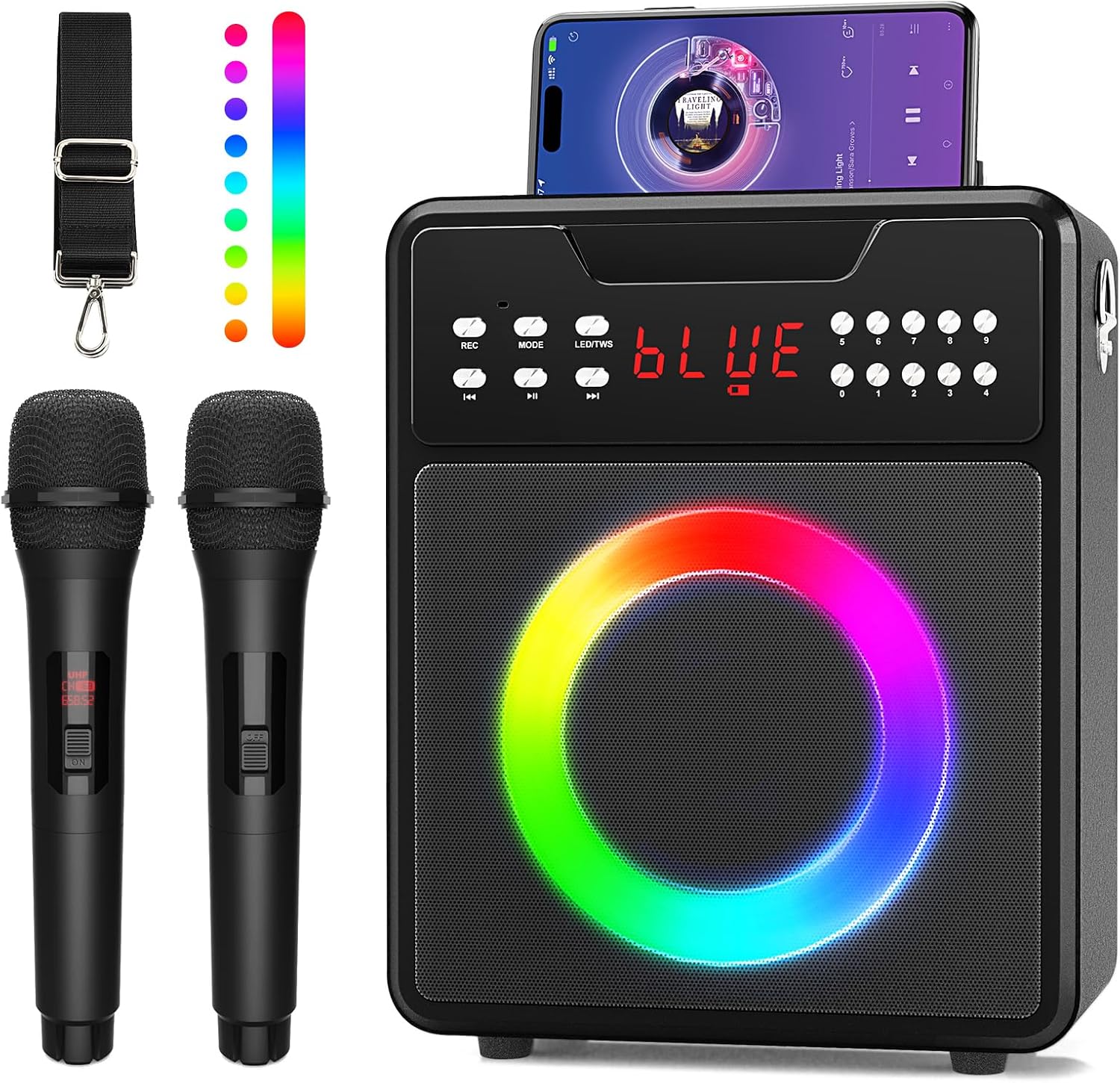
The MAVOKIS M337 Portable Karaoke Machine features a compact design with a front-facing speaker, dynamic LED lights, and a top panel for controls and smartphone docking. It is designed for portability and ease of use.
パッケージ内容
パッケージの内容をよくご確認ください。不足品や破損品がございましたら、カスタマーサポートまでご連絡ください。
- 1 x MAVOKIS M337 Karaoke Machine
- 2xワイヤレスマイク
- 1 xショルダーストラップ
- USB充電ケーブル x 1
- 1 x AUXケーブル
- リモコン x 1
- Batteries for Microphones (9V, included)

This image displays all items included in the MAVOKIS M337 Portable Karaoke Machine package: the main speaker unit, two wireless microphones, a detachable shoulder strap, USB charging cables, an AUX cable, and a remote control. Batteries for the microphones are also included.
製品終了view
Familiarize yourself with the main components and controls of your MAVOKIS M337 Karaoke Machine.
コントロールパネルとポート

This image highlights the control panel of the MAVOKIS M337 Karaoke Machine. It includes rotary knobs for adjusting microphone volume, echo effect, bass, treble, and master volume. Buttons are present for recording, mode selection (Bluetooth, USB, AUX, TF Card), LED light control, and track navigation. Various input ports such as USB, TF Card slot, AUX IN, and two MIC IN ports are also visible.
- MIC VOL: マイクの音量を調整します。
- エコー: マイクのエコー効果を制御します。
- ベース: 低周波オーディオ出力を調整します。
- 高音: 高周波オーディオ出力を調整します。
- マスター: スピーカー全体の音量をコントロールします。
- REC: Initiates recording (requires USB or TF card).
- モード: Switches between input modes (Bluetooth, USB, AUX, TF Card).
- LED/TWS: Controls LED light modes and activates True Wireless Stereo (TWS) pairing.
- USBポート: For USB drive input or charging.
- TFカードスロット: For TF (MicroSD) card input.
- AUX入力: 外部デバイス用の 3.5mm オーディオ入力。
- マイク入力 1/2: 6.35mm inputs for wired microphones (if used).
設定
Charging the Karaoke Machine
- Connect the USB charging cable to the machine's charging port.
- もう一方の端を標準の USB 電源アダプタ (別売) またはコンピュータの USB ポートに差し込みます。
- The charging indicator will illuminate. Allow 5-6 hours for a full charge.
- A full charge provides approximately 10-20 hours of playing time, depending on usage.
マイクの設定
- 各ワイヤレス マイクの下部のキャップを外します。
- 付属の 9V 電池を正しい極性に注意しながら挿入します。
- キャップをしっかりと締め直してください。
- Turn on the microphone using the power switch located on the microphone body.
操作手順
電源オン/オフ
Press and hold the power button on the karaoke machine to turn it on or off. The display will light up.
Bluetooth接続
- Turn on the karaoke machine. It will automatically enter Bluetooth pairing mode, indicated by 'BLUE' flashing on the display.
- スマートフォン、タブレット、その他の Bluetooth 対応デバイスで、Bluetooth 設定に移動します。
- 検索する available devices and select 'MAVOKIS M337' (or similar name).
- Once connected, 'BLUE' will stop flashing and remain solid. You can now play audio from your device through the karaoke machine.
This video demonstrates the process of connecting a device to the MAVOKIS M337 Karaoke Machine via Bluetooth, showcasing the ease of wireless pairing.
マイクの操作
- Ensure microphones have batteries and are powered on.
- Adjust the 'MIC VOL' knob on the karaoke machine to control the microphone volume.
- Use the 'ECHO' knob to add or reduce the echo effect for vocals.
LEDライトコントロール
Press the 'LED/TWS' button to cycle through 12 different dynamic LED light modes. Press and hold to turn the lights off or on.
USB/TF Card/AUX Input
- Insert a USB drive or TF card into the corresponding port, or connect an external device via the AUX IN port.
- Press the 'MODE' button to switch to the desired input mode. The display will show 'USB', 'TF', or 'AUX'.
- Use the track control buttons (previous/next) to navigate through your media.
録音機能
To record your performance, ensure a USB drive or TF card is inserted. Press the 'REC' button to start recording. Press it again to stop. Recordings will be saved to the inserted storage device.
This video illustrates the MAVOKIS M337 Karaoke Machine in use, demonstrating singing with the wireless microphones and the dynamic LED lights.
メンテナンス
- クリーニング: 本体とマイクの外側は、柔らかく乾いた布で拭いてください。液体クリーナーや研磨剤は使用しないでください。
- ストレージ: Store the karaoke machine and accessories in a cool, dry place away from direct sunlight and extreme temperatures.
- バッテリーのケア: If the microphones will not be used for an extended period, remove the batteries to prevent leakage.
トラブルシューティング
| 問題 | 解決 |
|---|---|
| 電源なし | Ensure the machine is charged. Check the power button. |
| スピーカーから音が出ない | Check master volume. Ensure correct input mode is selected. Verify source device volume. |
| マイクが機能しない | Check microphone batteries and power switch. Adjust MIC VOL knob. |
| Bluetoothが接続されない | Ensure the machine is in Bluetooth mode. Turn off and on Bluetooth on your device. Move closer to the machine. |
| LEDライトが動作しない | Press the LED/TWS button to cycle modes or turn them on. |
仕様
| 特徴 | 詳細 |
|---|---|
| モデル番号 | M337 |
| アイテム重量 | 9.02ポンド |
| パッケージ寸法 | 15.79 x 11.65 x 7.17インチ |
| スピーカー数 | 1 |
| Battery Type (Main Unit) | リチウムイオン |
| マイクの電池 | 9Vバッテリー1個必要(付属) |
| 電源 | 電池駆動 |
| 特集 | Portable, LED Lights, Wireless Microphones |
| 接続性 | Bluetooth、USB、AUX、TFカード |
| 推奨用途 | Home, Parties, Outdoor Events |
保証とサポート
For warranty information or technical support, please refer to the contact details provided with your purchase or visit the official MAVOKIS webサイト。 保証請求に備えて購入時のレシートを保管しておいてください。