
1. はじめに
Thank you for choosing the THOMSON WS902DUO Cosy Bookshelf Speakers. These active stereo speakers deliver a powerful 150W audio experience with deep bass from two 10 cm woofers. They offer versatile connectivity options including Bluetooth 5.3, Optical, HDMI (ARC), RCA, and USB playback. The included remote control and side panel adjustments provide precise control over your audio. Please read this manual carefully before use to ensure proper operation and to maximize your listening experience.

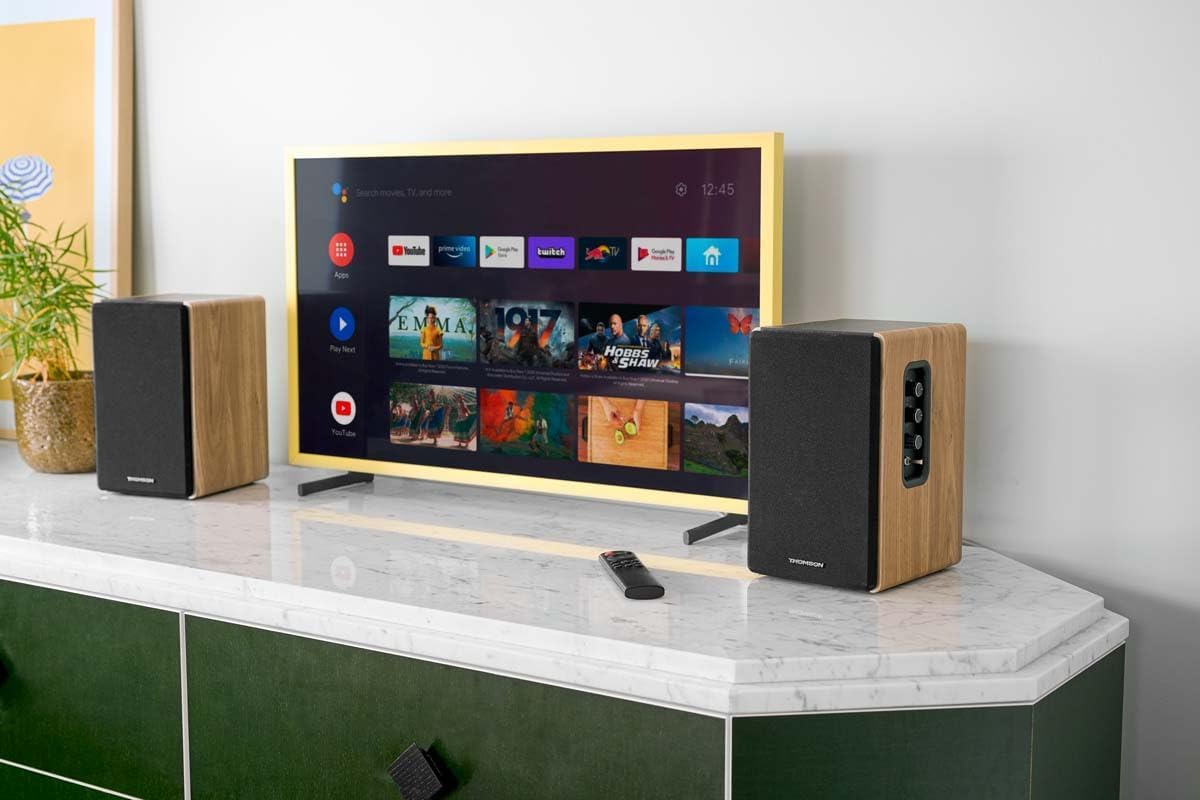
Image 1.1: THOMSON WS902DUO Bookshelf Speakers in a living space, showcasing their elegant wood finish.
2. 重要な安全上の注意事項
- 製品を操作する前に、これらの手順をよくお読みください。
- 今後の参照用にこれらの手順を保管してください。
- 製品および取扱説明書のすべての警告に注意してください。
- すべての指示に従ってください。
- この装置を水の近くで使用しないでください。
- 乾いた布でのみ清掃してください。
- 通気口を塞がないでください。メーカーの指示に従って設置してください。
- ラジエーター、暖房レジスター、ストーブ、その他の機器(以下を含む)などの熱源の近くに設置しないでください。 amp熱を発生する装置。
- 有極プラグまたはアース プラグの安全上の目的を無効にしないでください。有極プラグには、片方がもう片方よりも幅広の 2 つの刃があります。アース プラグには、2 つの刃と 3 つ目のアース プロングがあります。幅広の刃または 3 つ目のプロングは、安全のために用意されています。用意されたプラグがコンセントに合わない場合は、電気技師に相談して、古いコンセントを交換してください。
- 特にプラグ、コンセント、および装置から出ている部分で、電源コードが踏まれたり挟まれたりしないように保護してください。
- メーカー指定のアタッチメント/アクセサリのみを使用してください。
- 製造元が指定した、または装置と一緒に販売されているカート、スタンド、三脚、ブラケット、またはテーブルのみを使用してください。カートを使用する場合は、転倒による怪我を避けるために、カートと装置の組み合わせを移動する際に注意してください。
- 雷雨のときや長期間使用しない場合は、この装置のプラグを抜いてください。
- すべての修理は資格のあるサービス担当者に依頼してください。電源コードやプラグが破損している、液体がこぼれた、装置内に物が落ちた、装置が雨や湿気にさらされた、正常に動作しない、装置を落としたなど、装置が何らかの損傷を受けた場合は修理が必要です。
3. パッケージ内容
下記のすべてのアイテムがパッケージに含まれていることを確認してください。
- THOMSON WS902DUO Bookshelf Speakers (2 units)
- リモートコントロール
- 電源ケーブル
- スピーカー接続ケーブル
- 3.5mm Jack to RCA Adapter Cable
- ユーザーマニュアル(このドキュメント)

Image 3.1: Packaging of the THOMSON WS902DUO Bookshelf Speakers.
4.製品オーバーview
4.1. Side Control Panel (Active Speaker)
The active speaker features a side control panel for easy access to essential functions.

Image 4.1: Side control panel.
- 低音コントロール: 低周波出力を調整します。
- 高音コントロール: 高周波出力を調整します。
- 音量コントロール: 全体的な音量を調整します。
- 電源スイッチ: スピーカーのオン/オフを切り替えます。
- LEDインジケーター: Shows the current status or selected input.
4.2. Rear Panel (Active Speaker)
The rear panel of the active speaker provides all necessary input and output connections.
画像 4.2: 背面パネルの接続。
- 光入力: For connecting digital audio sources like TVs, game consoles, or Blu-ray players.
- 補助入力(RCA): For connecting analog audio sources such as turntables, CD players, or PCs. A 3.5mm jack adapter is provided.
- TV Audio (HDMI ARC): For connecting to a TV's HDMI ARC port, allowing TV remote control of the speaker volume.
- USBプレイ: MP3を再生するには fileUSB フラッシュドライブから直接。
- サブ出力: For connecting an external active subwoofer for enhanced bass.
- スピーカー出力: パッシブスピーカーに接続します。
- 電源入力: 主電源に接続します。
4.3. リモートコントロール
The remote control provides convenient access to all speaker functions from a distance.

Image 4.3: Remote control.
- 電源ボタン: スピーカーのオン/オフを切り替えます。
- 消音ボタン: サウンドをミュート/ミュート解除します。
- ボリューム+/-: 音量レベルを調整します。
- 再生コントロール(再生/一時停止、スキップ): USB再生用。
- Source Selection Buttons (OPT, BT, ARC, USB, LINE): オーディオ入力ソースを選択します。
- EQ Mode Buttons (MOVIE, MUSIC, DIALOG): Selects preset equalization modes.
5. セットアップ
5.1. スピーカーの配置
Place the speakers on a stable, flat surface such as a bookshelf, desk, or speaker stands. For optimal stereo imaging, position the speakers equidistant from your listening position and at ear level. Ensure there is adequate space around the speakers for ventilation.
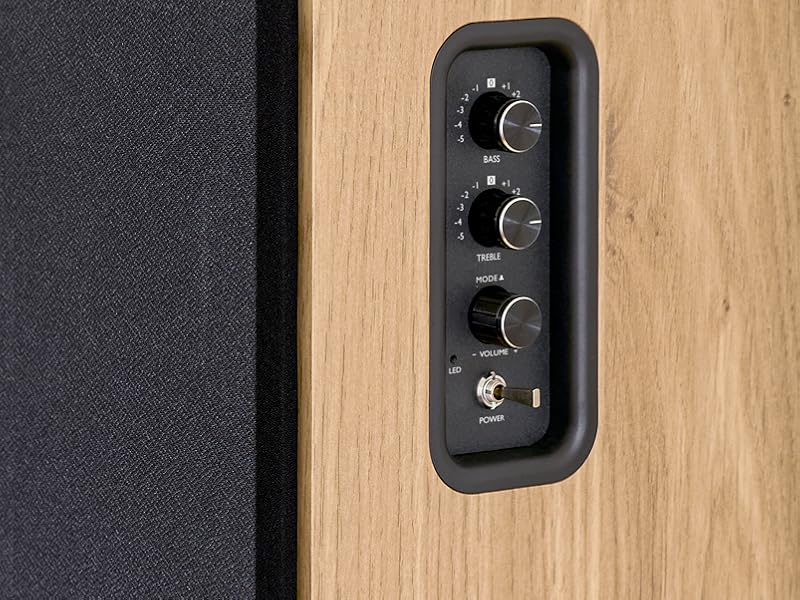
Image 5.1: Recommended speaker placement on a desk.
5.2. スピーカーの接続
- アクティブ スピーカー (コントロールと入力付き) とパッシブ スピーカーを識別します。
- Connect the included speaker cable from the speaker output terminals on the active speaker to the input terminals on the passive speaker. Ensure correct polarity (+ to + and - to -).
5.3. オーディオソースの接続
Connect your desired audio sources to the active speaker using the appropriate cables.
- 光入力: Use an optical cable to connect your TV, game console, or Blu-ray player to the OPTICAL IN port.
- HDMI(ARC)入力: Use an HDMI cable to connect your TV's HDMI ARC port to the TV AUDIO (HDMI) port on the speaker. This allows your TV remote to control the speaker volume.
- RCA(AUX)入力: Use an RCA cable (or the provided 3.5mm jack to RCA adapter) to connect devices like a turntable, CD player, or PC to the AUX IN (RCA) ports.
- USB入力: MP3が入ったUSBフラッシュドライブを挿入します files into the USB PLAY port.

Image 5.2: Speakers connected to a television via HDMI ARC.
5.4.Bluetoothペアリング
- スピーカーの電源がオンになっていることを確認してください。
- Press the 'BT' button on the remote control or the side panel to select Bluetooth input. The LED indicator will flash, indicating pairing mode.
- スマートフォン、タブレット、またはコンピューターで Bluetooth を有効にし、利用可能なデバイスを検索します。
- Select "THOMSON WS902DUO" from the list of devices.
- ペアリングが完了すると、LEDインジケーターの点滅が消えて点灯に変わります。これでワイヤレスでオーディオをストリーミングできるようになります。
5.5. サブウーファーの接続(オプション)
If you wish to enhance bass further, connect an active subwoofer to the 'Sub Out' port on the rear panel of the active speaker using an RCA cable.
6. 操作手順
6.1. 電源のオン/オフ
Use the power switch on the side control panel or the power button on the remote control to turn the speakers on or off.
6.2.ソースの選択
Press the corresponding source button on the remote control (OPT, BT, ARC, USB, LINE) to switch between connected audio inputs. The LED indicator will change to reflect the selected source.
6.3. 音量コントロール
Adjust the volume using the 'Volume' knob on the side control panel or the 'VOL+/-' buttons on the remote control.
6.4. オーディオ調整
Fine-tune the sound to your preference:
- 低音/高音: Use the 'Bass' and 'Treble' knobs on the side control panel to adjust the low and high frequencies.
- EQモード: Press the 'MOVIE', 'MUSIC', or 'DIALOG' buttons on the remote control to select preset equalization settings optimized for different content types.
6.5.USB再生
When a USB flash drive with MP3 files is inserted and USB source is selected, the speakers will automatically begin playing. Use the playback control buttons on the remote control (Play/Pause, Skip) to manage your music.
6.6.Bluetoothの操作
After successful pairing (see Section 5.4), you can stream audio from your Bluetooth device. Use your device's controls or the speaker's remote control for playback and volume adjustments.
7. メンテナンス
適切なメンテナンスを行うことで、スピーカーの寿命とパフォーマンスが保証されます。
- クリーニング: Wipe the speaker surfaces with a soft, dry cloth. Do not use liquid cleaners or abrasive materials.
- 換気: 過熱を防ぐため、通気口がふさがれていないことを確認してください。
- ストレージ: スピーカーを長期間保管する場合は、電源コンセントから抜いて、涼しく乾燥した場所に保管してください。
- 湿気を避ける: Keep the speakers away from water and high humidity.
8。 トラブルシューティング
問題が発生した場合は、次のトラブルシューティング ガイドを参照してください。
| 問題 | 考えられる原因 | 解決 |
|---|---|---|
| 電源なし | Power cable not connected; Power switch off; Wall outlet not working. | Ensure power cable is securely connected. Turn on the power switch. Test the wall outlet with another device. |
| 音が出ない | Incorrect input source selected; Volume too low; Mute function active; Audio cable not connected properly. | Select the correct input source. Increase volume. Press Mute button on remote. Check all audio cable connections. |
| Bluetoothペアリングが失敗する | Speakers not in pairing mode; Device too far; Bluetooth disabled on source device. | Ensure speakers are in Bluetooth pairing mode (flashing LED). Move device closer to speakers. Enable Bluetooth on your source device. |
| USB再生が機能しない | USB drive not formatted correctly; Files not MP3; USB drive not inserted properly. | Ensure USB drive is FAT32 formatted. Verify files are in MP3 format. Re-insert USB drive firmly. |
| 音の歪み | Volume too high; Source audio quality poor; Bass/Treble settings too extreme. | Lower the volume. Test with a different audio source. Adjust Bass and Treble controls. |
9. 仕様
| 特徴 | 仕様 |
|---|---|
| ブランド | トムソン |
| モデル番号 | WS902DUO |
| 最大スピーカー出力 | 150ワット |
| 周波数応答 | 60Hz |
| 接続技術 | Bluetooth, HDMI (ARC), Optical, RCA, USB |
| Bluetoothバージョン | 5.3 |
| オーディオ出力モード | Stereo (2.0 channels) |
| 入力ボリュームtage | 230ボルト(AC) |
| 取り付けタイプ | シェルフマウント |
| スピーカータイプ | Multimedia Bookshelf |
| 特集 | Stereo Pairing, USB Port, Sub-Out, Remote Control, EQ Modes |
| 推奨用途 | Smartphone, Tablet, PC, TV, Game Console, DVD Player, Turntable |
| 色 | 天然木仕上げ |
| 制御方法 | Remote Control, Side Panel Knobs |
| ウーファーサイズ | 10センチメートル |
| 寸法(高さ×幅×奥行き) | 28 cm x 24 cm x 47 cm(スピーカー1台あたり約) |
| 重さ | 5048 Grams (total for pair) |
| アイテム数 | 2 |
| 原産国 | 中国 |
10. 保証情報
This THOMSON WS902DUO product comes with a 1年間の限定保証 ご購入日から1年間有効です。本保証は、通常の使用における製造上の欠陥および仕上がりの品質を保証するものであり、誤用、事故、不正な改造、または通常の摩耗や損耗による損傷は保証の対象外となります。保証請求のために、購入証明書を保管してください。
11. カスタマーサポート
For technical assistance, warranty claims, or any questions regarding your THOMSON WS902DUO speakers, please contact your retailer or visit the official THOMSON support website. Please have your model number (WS902DUO) and proof of purchase ready when contacting support.
オンラインサポート: www.thomsonconsumer.com (地域ごとのサポート連絡先をご確認ください)