
導入
Welcome to the user manual for your new HP OMEN 16-ae0002TX Gaming Laptop. This document provides essential information to help you set up, operate, maintain, and troubleshoot your device. Designed for high-performance gaming and demanding tasks, this laptop features a 14th Gen Intel Core i7 processor, NVIDIA GeForce RTX 4060 graphics, 16GB DDR5 RAM, and a 1TB SSD, all presented on a vibrant 16.1-inch FHD 165Hz display.
1. 初期設定
1.1 ノートパソコンの開梱
すべての部品をパッケージから慎重に取り出します。以下のものがすべて揃っていることを確認してください。
- HP OMEN 16-ae0002TX Gaming Laptop
- 電源アダプター
- 電源コード
- ユーザーマニュアル(このドキュメント)
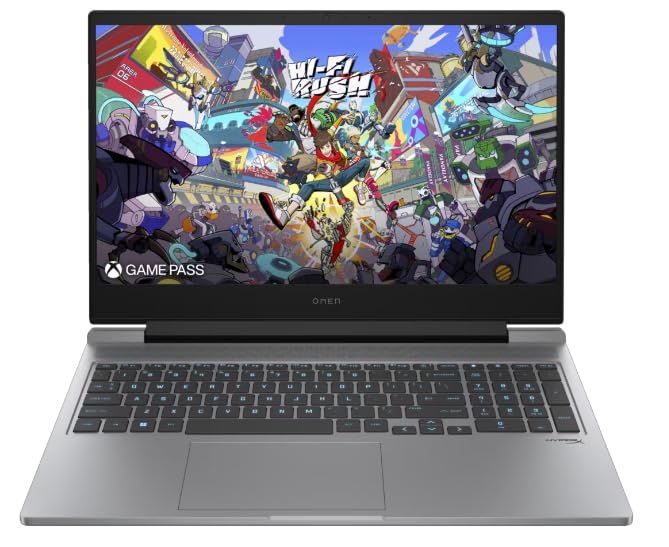
Figure 1: HP OMEN 16-ae0002TX Gaming Laptop overview.
1.2 電源アダプタの接続
- 電源コードを電源アダプタに接続します。
- 電源アダプタを壁のコンセントに差し込みます。
- Connect the adapter's output plug to the power port on your laptop.
初めて使用する前に、ラップトップを完全に充電することをお勧めします。
1.3 最初の起動とWindowsのセットアップ
Press the power button located on the laptop chassis. The laptop will boot up, and you will be guided through the Windows 11 Home setup process. Follow the on-screen instructions to configure your operating system, network settings, and user account.
1.4 外部機器の接続
Your HP OMEN laptop provides various ports for connecting external devices:
- USB ポート: マウス、キーボード、外部ストレージ、その他の USB デバイス用。
- HDMIポート: 外部ディスプレイやテレビに接続します。
- オーディオジャック: ヘッドフォンまたは外部スピーカー用。
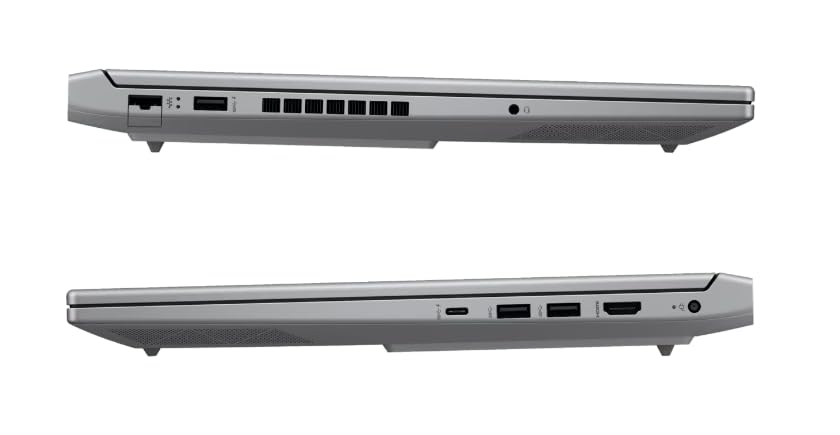
図2:側面 view 利用可能なポートを示します。
2. ノートパソコンの操作
2.1 電源のオン/オフとスリープモード
- 電源オン: 電源ボタンを押します。
- シャットダウン: Windows の [スタート] ボタンをクリックし、[電源] > [シャットダウン] を選択します。
- スリープモード: カバーを閉じるか、[スタート] メニューから [電源] > [スリープ] を選択します。
2.2 キーボードとタッチパッド
The laptop features a 1-zone RGB backlit full-size keyboard with HyperX tactile feedback for an enhanced gaming and typing experience. The integrated touchpad supports multi-touch gestures for navigation.
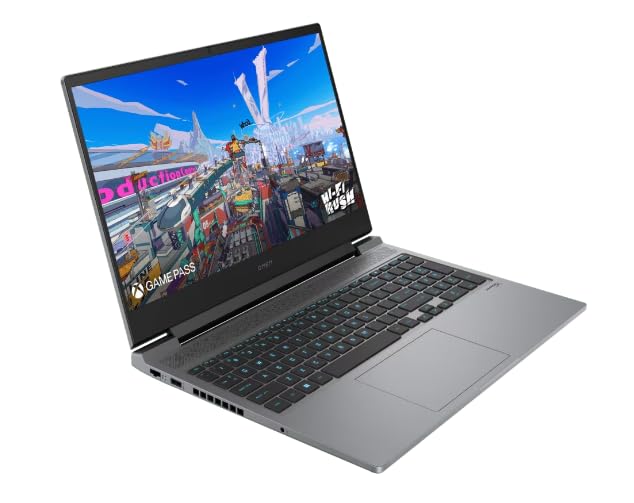
図 3: キーボードとタッチパッドのレイアウト。
2.3 表示機能
The 16.1-inch FHD (1920 x 1080) IPS display offers a 165Hz refresh rate and 7ms response time, providing smooth and responsive visuals for gaming and multimedia. Adjust brightness and display settings through Windows display options.
2.4 ネットワークとワイヤレス接続
- Wi-Fi: Windows ネットワーク設定を介してワイヤレス ネットワークに接続します。
- ブルートゥース: Pair Bluetooth-enabled devices such as headphones, mice, or game controllers.
2.5 HP True Vision 1080p FHD Camera
The integrated 1080p FHD webcam is suitable for video calls, online meetings, and streaming. Ensure proper lighting for optimal image quality.
3. メンテナンスとケア
3.1一般的なクリーニング
- 画面: 柔らかく糸くずの出ない布を軽く拭いてください。amp水またはスクリーンクリーナーで拭いてください。刺激の強い化学薬品は使用しないでください。
- キーボードとシャーシ: Use a soft cloth. For dust, use compressed air.
- 掃除する前に、ノートパソコンの電源がオフになっており、プラグが抜かれていることを確認してください。
3.2バッテリーケア
The laptop is equipped with a Lithium Ion battery. To maximize battery lifespan:
- 極端な温度を避けてください。
- バッテリーを頻繁に完全に放電させないでください。
- ノートパソコンを長期間保管する場合は、バッテリーが約 50% まで充電されていることを確認してください。
3.3ソフトウェアアップデート
Regularly update your Windows operating system, drivers, and HP software to ensure optimal performance, security, and compatibility. These updates often include performance enhancements and bug fixes.
4. 一般的な問題のトラブルシューティング
このセクションでは、発生する可能性のある一般的な問題について説明します。より複雑な問題については、HPサポートにお問い合わせください。 webサイト。
4.1 電源の問題
- ノートパソコンが起動しない: 電源アダプターがノートパソコンと電源コンセントの両方にしっかりと接続されていることを確認してください。電源アダプターのインジケーターランプが点灯しているかどうかを確認してください。
- バッテリーが充電されない: Verify the power adapter connection. Try a different outlet.
4.2 表示の問題
- 画面に画像が表示されない: ノートパソコンの電源が入っていることを確認してください。外付けモニターを接続して、ノートパソコンのディスプレイに問題があるかどうかを確認してください。
- 画像のちらつきや歪み: グラフィックドライバーを更新してください。Windowsの設定でディスプレイのリフレッシュレートを調整してください。
4.3 接続の問題
- Wi-Fi が接続されない: Check if Wi-Fi is enabled in Windows settings. Restart your router and laptop.
- Bluetoothデバイスがペアリングされない: Bluetoothデバイスがペアリングモードになっており、範囲内にあることを確認してください。ノートパソコンのBluetooth設定を確認してください。
5. 製品仕様
| 特徴 | 仕様 |
|---|---|
| ブランド | HP |
| モデル名 | HP laptopOMEN (ae0002tx) |
| プロセッサ | 14th Gen Intel® Core™ i7-14650HX (up to 5.2 GHz) |
| RAMメモリ | 16 GB DDR5 (最大 32 GB) |
| ストレージ | 1 TB SSD(ソリッドステートドライブ) |
| グラフィックカード | NVIDIA GeForce RTX 4060 (8 GB GDDR6 専用) |
| 画面 | 16.1-inch FHD (1920 x 1080) IPS, 165Hz, 7ms, 300 nits |
| オペレーティング·システム | Windows 11 ホーム |
| キーボード | 1-zone RGB Backlit, HyperX tactile feedback |
| Webカム | HP True Vision 1080p FHD |
| 接続性 | Wi-Fi、ブルートゥース |
| ポート | USB (Total: 1), HDMI (Total: 1) |
| Dimensions (L x W x Thickness) | 30L x 25W x 6Th Centimeters |
| アイテム重量 | 1.9キログラム |
| 電池のタイプ | Lithium Ion (2.6 Watt Hours) |
6. 保証情報
Your HP OMEN 16-ae0002TX Gaming Laptop comes with an onsite warranty. Please retain your proof of purchase for warranty claims. For detailed terms and conditions, refer to the warranty card included with your product or visit the official HP support webサイト。
7. カスタマーサポート
For technical assistance, service, or further inquiries, please contact HP customer support:
- メーカー/輸入業者: HP India Sales Pvt. Ltd., 24 Salarpuria Arena, Hosur Main Road, Adugodi, Bangalore-560030
- オンラインサポート: 公式サイトをご覧ください HPサポート Webサイト ドライバー、マニュアル、トラブルシューティング ガイド。