
1. はじめに
This manual provides detailed instructions for the JTEMAN L41 Cell Phone Stand, which integrates a Bluetooth speaker and wireless charging functionality. Please read this manual thoroughly before use to ensure proper operation and to maximize the product's features.
2. パッケージ内容
以下にリストされているすべてのアイテムがパッケージに含まれていることを確認してください。
- Audio Wireless Charger (Main Unit)
- USB-C Adapter (Power Adapter)
- USB-C から USB-C へのケーブル
- ユーザーマニュアル
3.製品オーバーview
The JTEMAN L41 is a versatile 3-in-1 device designed to streamline your desktop. It combines a stable phone stand, a wireless charging station, and a Bluetooth speaker into one compact unit.
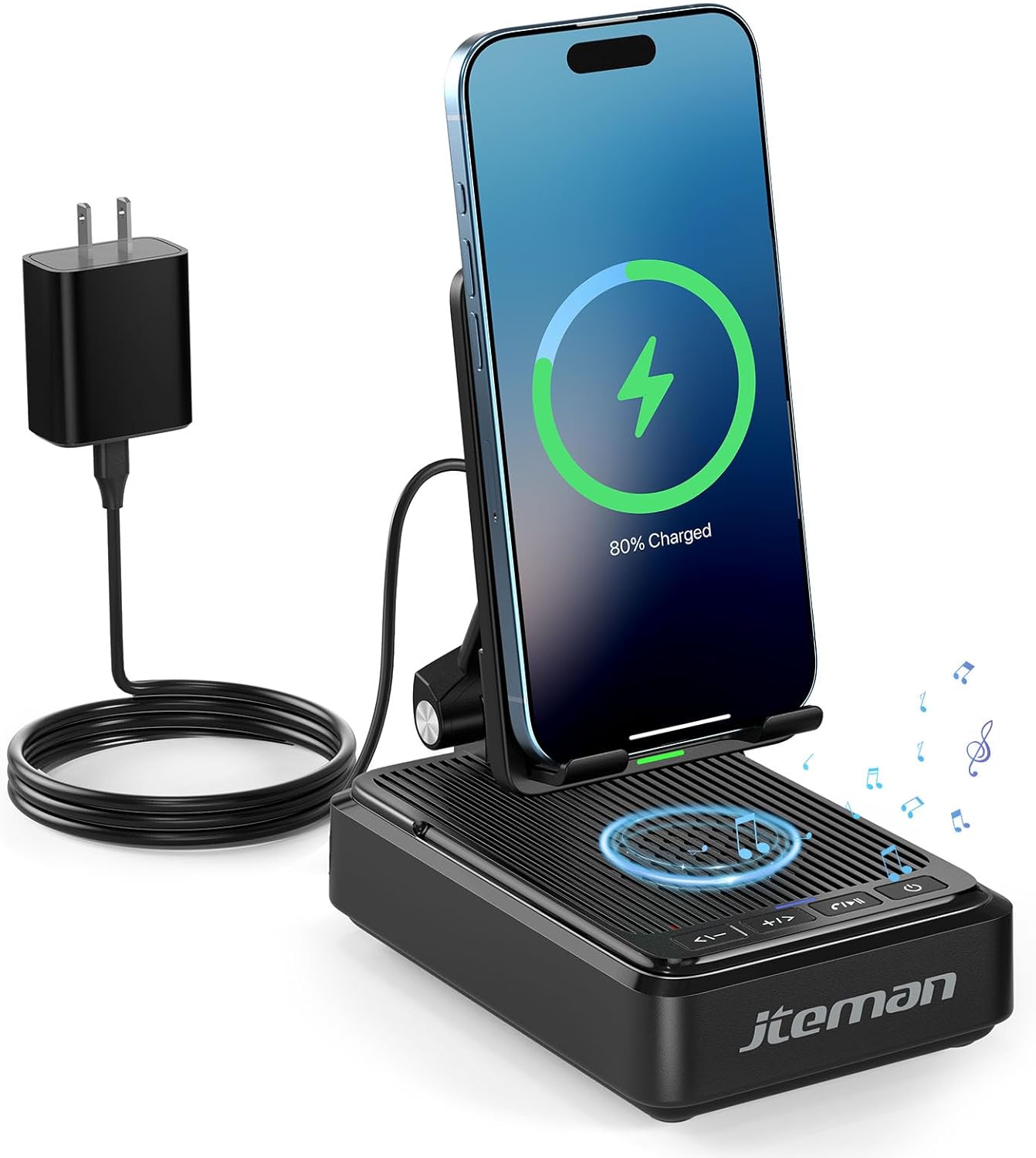
図1: JTEMAN L41 Main Unit with Phone Charging
This image displays the JTEMAN L41 device in black, with a smartphone placed vertically on its stand, actively wirelessly charging. The device is connected to a power adapter via a USB-C cable. Musical notes are depicted around the speaker area, indicating its audio function.
主な特徴:
- 3-in-1 機能: Integrates a phone stand, wireless charger, and Bluetooth speaker.
- 調節可能な電話ホルダー: 最適な viewing angles and supports both horizontal and vertical phone placement.
- Stable Wireless Charging: Features dual-coil design for flexible phone positioning and multiple safety protections.
- Bluetooth 5.3スピーカー: Provides clear sound quality and stable connection for audio playback and hands-free calls.
- 折りたたみ式デザイン: Enhances portability and saves space.
4. セットアップ手順
- デバイスを開梱します。 パッケージからすべてのコンポーネントを慎重に取り出します。
- 接続電源:
- Connect one end of the provided USB-C to USB-C cable to the USB-C port on the back of the JTEMAN L41 unit.
- Connect the other end of the USB-C cable to the provided USB-C power adapter.
- 電源アダプタを標準の壁コンセントに差し込みます。
注記: For optimal wireless charging performance, always use the included 9V2A adapter and USB-C cable.
- Adjust Phone Stand: Unfold the phone stand to your desired viewing angle. The stand is designed to be adjustable for comfortable viewing。
5. 操作手順
5.1ワイヤレス充電
- Ensure the JTEMAN L41 is connected to a power source.
- Place your wireless charging-compatible smartphone onto the phone stand. The phone can be placed either horizontally or vertically.
- Align your phone's wireless charging coil with the charging area on the stand. Charging will begin automatically, indicated by a charging icon on your phone's screen.

図2: ワイヤレス充電の互換性
This image illustrates the wireless charging function and its compatibility. It shows a smartphone in a case being wirelessly charged on the stand. Important notes indicate that cases should be ≤ 0.15 inches thick, and cases with metal rings, pockets, or magnets should be avoided for proper charging.
Important Notes for Wireless Charging:
- Supports phone cases with a thickness of ≤ 0.15 inches (approximately 3.8mm).
- Avoid using cases with metal rings, pop sockets, credit cards, or magnets, as these can interfere with wireless charging.
- The dual-coil design allows for flexible placement, but ensure proper alignment for efficient charging.
5.2 Bluetoothスピーカーの操作
- 電源オン: 電源ボタン (⏻) on the front of the unit to turn on the speaker. A voice prompt or indicator light will confirm it's in pairing mode.
- ペアリング:
- スマートフォンまたはその他の Bluetooth 対応デバイスで、Bluetooth 設定に移動します。
- 検索する available devices and select "JTEMAN41" (or similar name) from the list.
- 接続されると確認音が鳴ります。
- オーディオ再生: Play music or audio from your connected device. Use the volume controls on the JTEMAN L41 or your device to adjust the sound level.
- ハンズフリー通話: When a call comes in, press the Play/Pause button (⏸) to answer. Press again to end the call.

図3: Enjoying Music with the Bluetooth Speaker
This image shows a woman in a kitchen setting, holding a mug and smiling while a smartphone plays music on the JTEMAN L41 stand. Musical notes emanate from the speaker, highlighting its audio playback capability.
5.3 電話スタンド機能
The integrated phone stand is adjustable to provide optimal viewさまざまなアクティビティに角度を付けます。
- 調整可能な角度: Gently pivot the phone rest up or down to achieve your preferred view角度。
- オリエンテーション: The stand supports both vertical and horizontal placement of your smartphone, ideal for video calls, watching movies, or browsing.
- 安定性: The stable, non-slip base and weighted structure prevent tipping, ensuring your device remains secure.
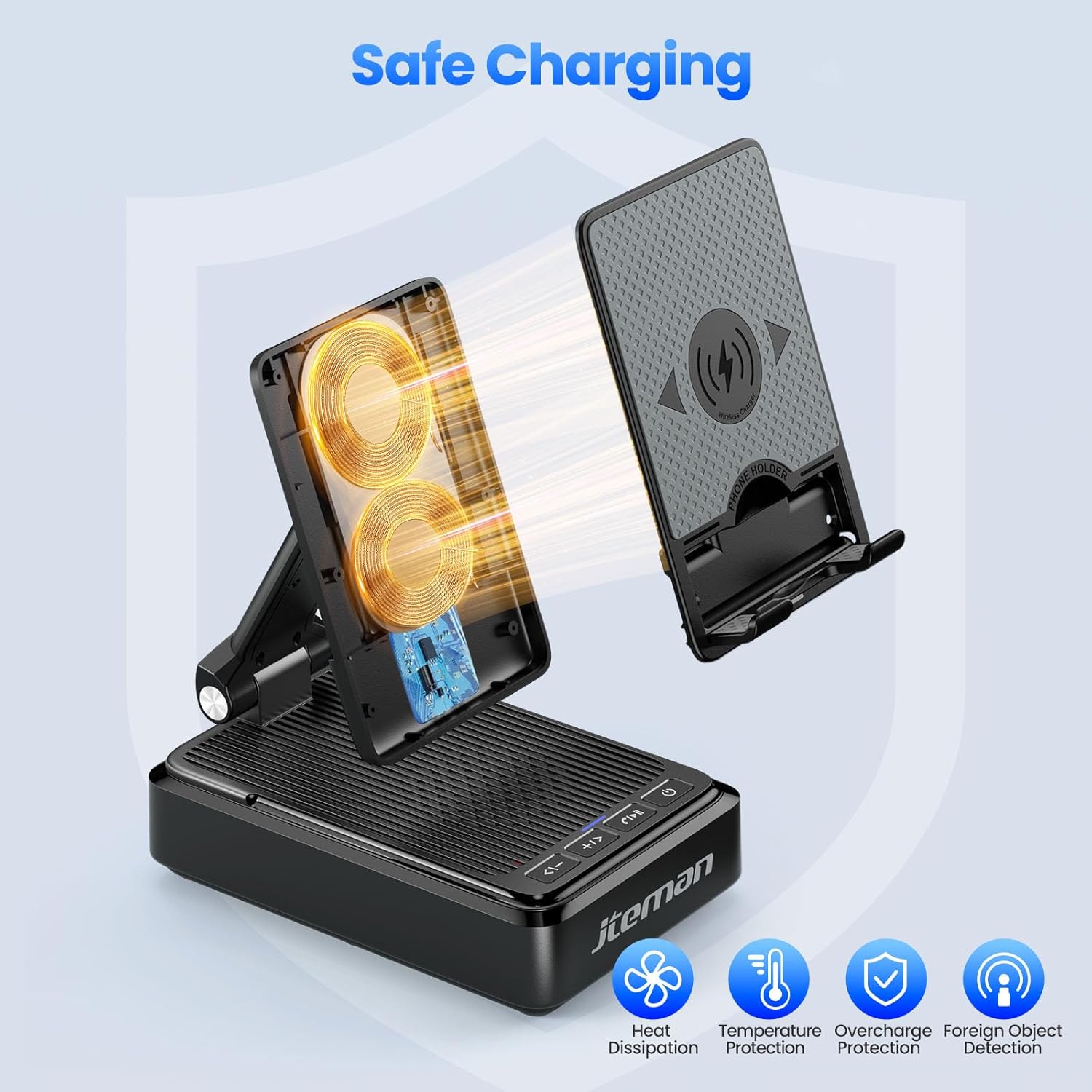
図4: Adjustable Desktop Charging Stand
This image depicts a man sitting at a desk, interacting with a smartphone placed on the JTEMAN L41 stand. The stand is shown with an adjustable angle feature, and a diagram illustrates how the USB-C charging cable connects to the phone while on the stand.
5.4 ボタンの機能
The control buttons are located on the front of the unit:
| ボタンアイコン | 関数 |
|---|---|
| <- | 音量を下げる / 前のトラック |
| + / > | ボリュームアップ/次のトラック |
| ⏸ | 再生 / 一時停止 / 通話応答 / 通話終了 |
| ⏻ | 電源オン/オフ |
6. 重要な安全情報
- デバイスを水や過度の湿気にさらさないでください。
- 極端な温度、直射日光、熱源を避けてください。
- 本製品を分解、修理、または改造しないでください。保証が無効になります。
- お子様の手の届かない場所に保管してください。
- Use only the provided power adapter and cable to prevent damage and ensure safe operation.
- 使用中はデバイスの周囲に適切な換気を確保してください。
7. メンテナンス
- クリーニング: 柔らかく乾いた布で拭いてください。研磨剤入りの洗剤や溶剤は使用しないでください。
- ストレージ: When not in use for extended periods, store the device in a cool, dry place. The foldable design allows for compact storage.
8。 トラブルシューティング
| 問題 | 考えられる原因 | 解決 |
|---|---|---|
| デバイスの電源がオンになっていません。 | Not connected to power; Power button not pressed. | Ensure the power adapter is securely plugged into the unit and a working outlet. Press and hold the Power button. |
| ワイヤレス充電が機能しません。 | Phone not aligned; Case too thick; Foreign object; Phone not wireless charging compatible. | Re-align phone; Remove thick/metal cases; Remove foreign objects; Verify phone supports wireless charging. Use the included power adapter. |
| Bluetoothスピーカーが接続されません。 | Speaker not in pairing mode; Bluetooth off on device; Device too far. | Ensure speaker is on and in pairing mode; Enable Bluetooth on your device; Move device closer to the speaker (within 10 meters). |
| 音質が悪い。 | Low battery; Device too far; Obstructions. | Ensure the unit is powered; Move device closer; Remove obstructions between device and speaker. |
9. 仕様
| 特徴 | 詳細 |
|---|---|
| モデル番号 | L41 |
| 製品寸法 | 5.59 x 3.78 x 2.32インチ |
| アイテム重量 | 14.9オンス |
| 入力ボリュームtage | 9ボルト |
| 出力電流 | 2 Amps |
| コネクタタイプ | USBタイプC |
| Bluetoothバージョン | 5.3 |
| 材料 | アクリロニトリルブタジエンスチレン |
| 対応デバイス | Smartphones, Tablets (with wireless charging capability) |
| Wireless Charging Case Thickness | ≤ 0.15 inches (3.8mm) |
10. 保証とサポート
JTEMAN provides the following support for this product:
- 12ヶ月交換: The product is covered by a 12-month replacement policy from the date of purchase.
- 24時間サポート: For any inquiries or assistance, please contact JTEMAN customer support.
To contact support, please refer to the contact information provided on the product packaging or the official JTEMAN webサイト。