
1. はじめに
The NZXT H2 Flow (CI-H21FB-01) is a compact vertical Mini-ITX PC case designed to maximize airflow and save space while accommodating high-performance components. It features smart cable management, tool-less access, and includes dual top fans and a premium PCIe 5.0 riser cable for a streamlined building experience.
主な特徴:
- Hybrid Glass-and-Mesh Side Panel: Showcases your build while supporting up to a 280 mm radiator for efficient cooling.
- コンパクトなデザイン: A 20.7 L volume fits most GPUs up to 331 mm, offering high-end power in a small footprint.
- High Airflow Panels: Ultra-fine mesh panels on multiple sides maximize fresh air intake and filter dust, keeping components cooler and cleaner.
- Effortless Building: Tool-less panels, integrated cable routing Velcro straps, and intuitive wire management channels simplify installation.
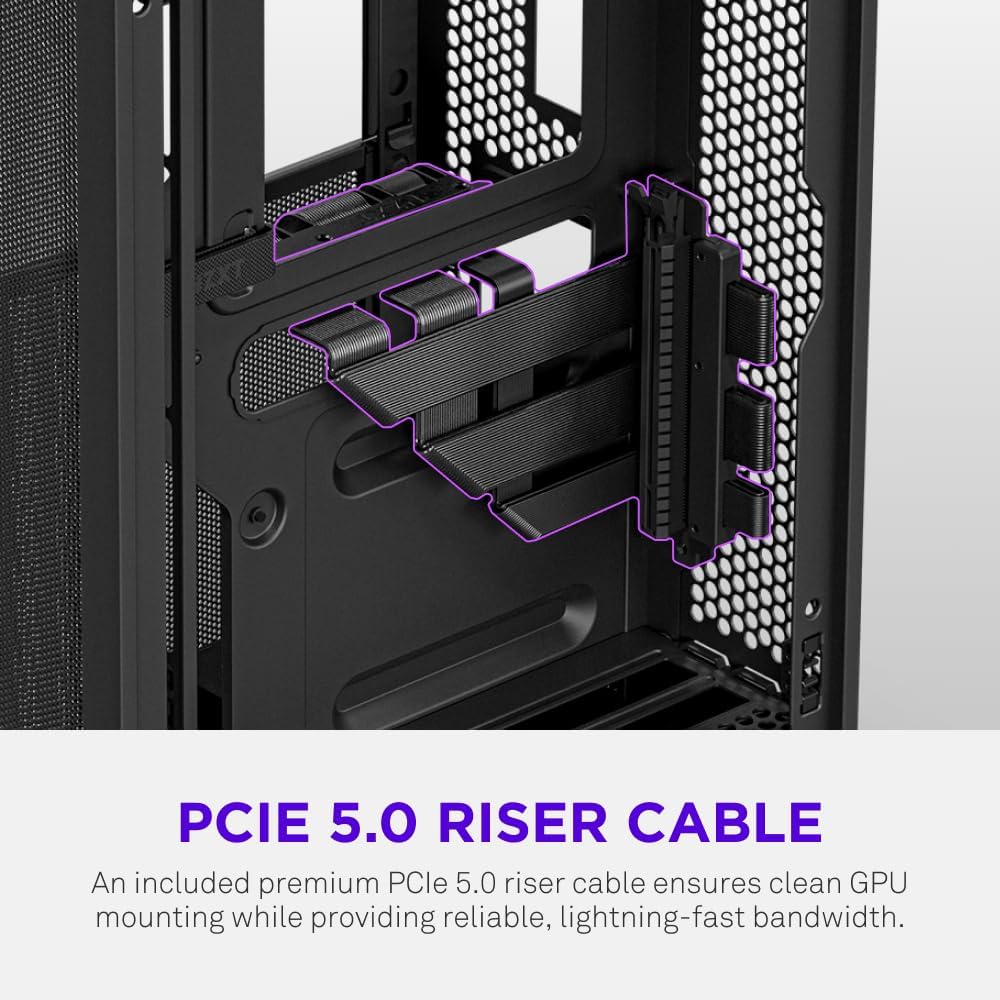
- Pre-Installed Performance: Includes a premium PCIe 5.0 riser cable for vertical GPU mounting and dual F120Q CV fans for immediate exhaust cooling.
2. 安全情報
WARNING: Always disconnect power from your PC before performing any installation, maintenance, or troubleshooting. Failure to do so may result in personal injury or damage to components.
- インストールする前に、すべての手順を注意深くお読みください。
- 静電気放電 (ESD) によるコンポーネントの損傷を防ぐために、静電気防止リスト ストラップを着用するか、接地された金属物体に頻繁に触れてください。
- Handle components with care. Avoid touching pins or exposed circuitry.
- 小さな部品や梱包材は子供の手の届かないところに保管してください。
- 過熱を防ぐために、PC ケースの周囲に適切な換気を確保してください。
3. パッケージ内容
Verify that all items are present in your NZXT H2 Flow package:
- NZXT H2 Flow Mini-ITX PC Case
- 2 x 120mm F120Q CV Top Fans (pre-installed)
- Premium PCIe 5.0 Riser Cable (pre-installed)
- アクセサリーボックス(ネジ、ケーブルタイ、その他の小さな部品が含まれています)
4. コンポーネントの互換性
The NZXT H2 Flow case is designed to accommodate specific component sizes for optimal performance and fit:
- マザーボード: ミニITX
- グラフィックカード(GPU): Up to 331 mm in length
- ラジエーター: Up to 280 mm (for liquid cooling solutions)
- 電源装置 (PSU): SFX/SFXL form factor is recommended for best compatibility and cable management.
- ファン: Includes 2 x 120mm top fans. Additional fan mounting options may be available depending on other component choices.
5. セットアップとインストール
Follow these steps to assemble your PC within the NZXT H2 Flow case. Refer to your individual component manuals for specific installation details.
5.1. Case Overview および寸法
The NZXT H2 Flow is a compact vertical Mini-ITX case. Understanding its dimensions is crucial for planning your build.

5.2. Accessing the Case Interior
The H2 Flow features tool-less panels for easy access to the interior.

5.3. Motherboard and CPU Installation
Install your Mini-ITX motherboard and CPU (with cooler) before placing it into the chassis.
5.4. 電源ユニット(PSU)の取り付け
The case supports SFX/SFXL power supplies. Mount the PSU in its designated area, typically at the bottom of the case.

5.5.ケーブル管理
Utilize the integrated cable routing channels and Velcro straps for a clean and organized interior.
5.6. グラフィックカード(GPU)のインストール
The H2 Flow supports GPUs up to 331 mm in length and includes a premium PCIe 5.0 riser cable for vertical mounting.

5.7. 冷却システム
The case comes with two pre-installed 120mm F120Q CV fans at the top for exhaust. It also supports up to a 280mm radiator for liquid cooling.


5.8.製品オーバーview ビデオ
ビジュアルについてはこの公式ビデオをご覧くださいview of the NZXT H2 Flow Mini-ITX PC Gaming Case.
6. 操作手順
6.1. 電源のオン/オフ
Press the power button located on the front I/O panel to turn your PC on or off.
6.2. フロントI/Oポート
フロント I/O パネルでは、次の機能に簡単にアクセスできます。
- USB 3.0 ポート
- USB-Cポート
- Audio Jack (if applicable)
Connect your peripherals such as keyboards, mice, and headsets to these ports.
7. メンテナンス
7.1. ダストフィルターの清掃
The NZXT H2 Flow features ultra-fine mesh panels that act as dust filters. Regularly clean these panels to maintain optimal airflow and prevent dust buildup inside your PC.
- Gently remove the mesh panels from the case.
- 圧縮空気または柔らかいブラシを使用して、蓄積したほこりを取り除きます。
- パネルをしっかりと取り付け直します。
7.2.一般的なクリーニング
柔らかくてamp ケースの外側を拭く際は布を使用してください。研磨剤入りの洗剤や溶剤は使用しないでください。
8。 トラブルシューティング
PC ビルドで問題が発生した場合は、次の一般的なトラブルシューティング手順を検討してください。
- 電源なし: すべての電源ケーブル(電源ユニットから壁、電源ユニットからマザーボード、CPU、GPU)がしっかりと接続されていることを確認してください。電源ユニットの電源スイッチを確認してください。
- 表示なし: Verify that your monitor is connected to the graphics card (not the motherboard I/O unless using integrated graphics) and that the GPU has proper power connections. Reseat the GPU and RAM.
- 過熱: Check fan connections and orientation. Ensure mesh panels are clean and not obstructed. Verify CPU cooler installation and thermal paste application.
- コンポーネントが検出されません: Reseat the component (GPU, RAM, storage drives). Check power and data connections.
For more complex issues, consult your individual component manuals or NZXT customer support.
9. 仕様
| 特徴 | 詳細 |
|---|---|
| ブランド | NZXT |
| モデル名 | NZXT H2 Flow |
| ケースタイプ | ミニタワー |
| マザーボードの互換性 | ミニITX |
| GPU 長さのサポート | 最大331mm |
| ラジエーターサポート | 最大280mm |
| 付属ファン | 2 x 120mm F120Q CV Top Fans |
| Included Riser Cable | Premium PCIe 5.0 |
| 電源取付タイプ | Bottom Mount (SFX/SFXL recommended) |
| 冷却方法 | Air, Liquid |
| 色 | 黒 |
| 材料 | ガラス、金属 |
| アイテム重量 | 4.55キログラム |
| Total USB 3.0 Ports | 1 |
| Other Special Features | Tool-less Installation, Integrated Cable Management |
10.保証とサポート
10.1. 保証情報
The NZXT H2 Flow Mini-ITX PC Case comes with a 2年間のメーカー保証保証請求のために購入証明書を保管してください。
10.2. カスタマーサポート
For technical assistance, troubleshooting, or warranty inquiries, please visit the official NZXT support webサイトにアクセスするか、カスタマー サービス チームに連絡してください。
NZXT Store: AmazonのNZXTストアをご覧ください