
1. はじめに
Thank you for choosing the Transformers GM04 Lightweight Wireless Gaming Mouse. This manual provides essential information for setting up, operating, and maintaining your new gaming mouse. Designed for precision and comfort, the GM04 features a high-precision PAW3311 sensor, triple connection modes (2.4G wireless, Bluetooth 5.3, and USB-C wired), 5 programmable buttons, and up to 100 hours of battery life. Its ergonomic design and lightweight construction ensure a comfortable and responsive experience for gaming, work, and study.
2. 箱の中身
- TF-GM04 Wireless Gaming Mouse x 1
- USB Wireless Dongle x 1
- USB-Cケーブルx1
- ユーザーマニュアル x 1
3.製品オーバーview
Familiarize yourself with the key features and components of your Transformers GM04 gaming mouse.
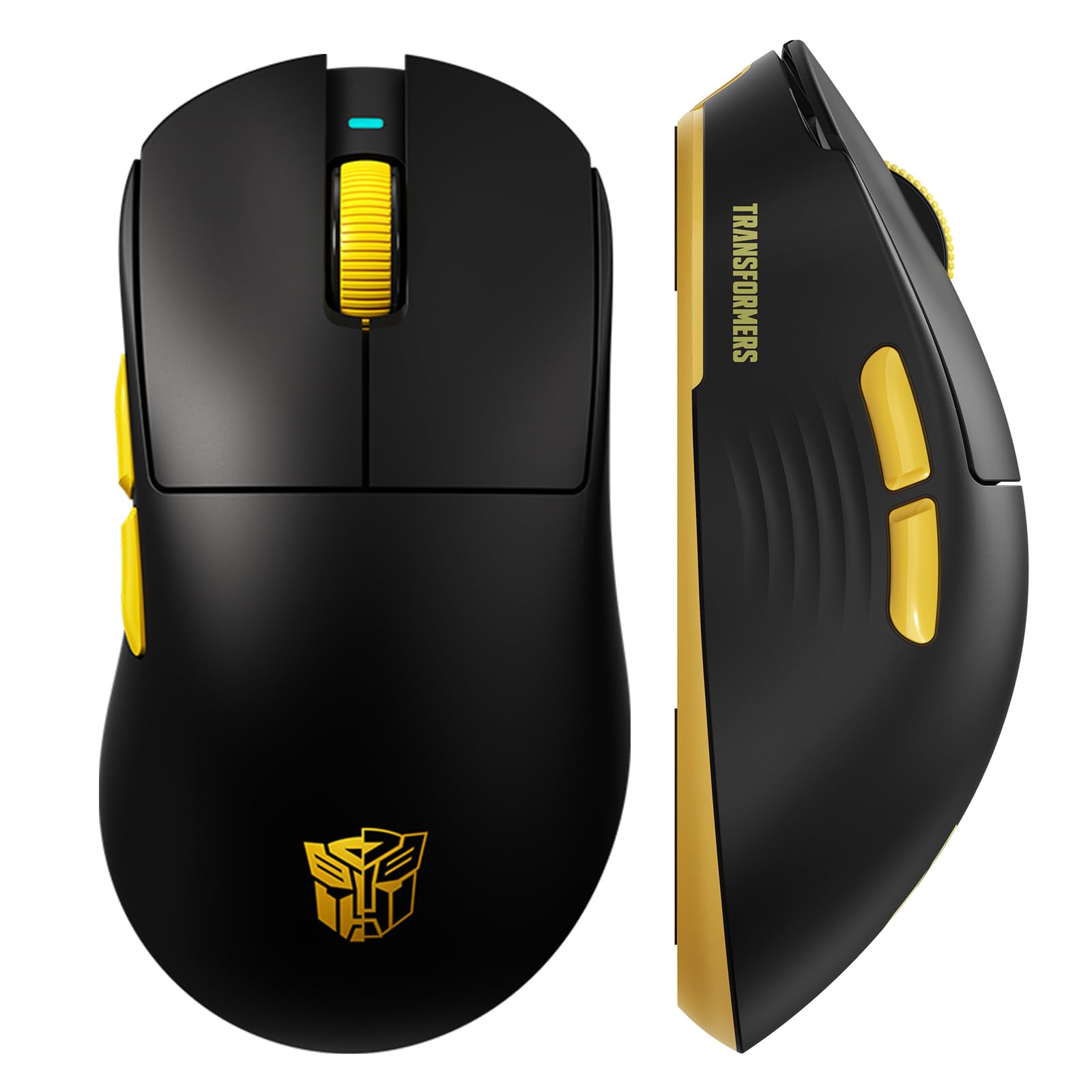
画像1: The Transformers GM04 Wireless Gaming Mouse, showcasing its sleek black and yellow design, along with icons highlighting its core features such as PixArt PAW3311 sensor, up to 12000 DPI, 1000Hz polling rate, 20 million clicks, Tri-Mode connectivity, custom macros, 63g lightweight design, and up to 100 hours of battery life. A USB wireless dongle is also visible next to the mouse.

画像2: A hand demonstrating the ergonomic design of the Transformers GM04 mouse. The image highlights how the mouse fits comfortably in the palm, promoting more comfort and less fatigue during extended use, thanks to its non-slip texture.

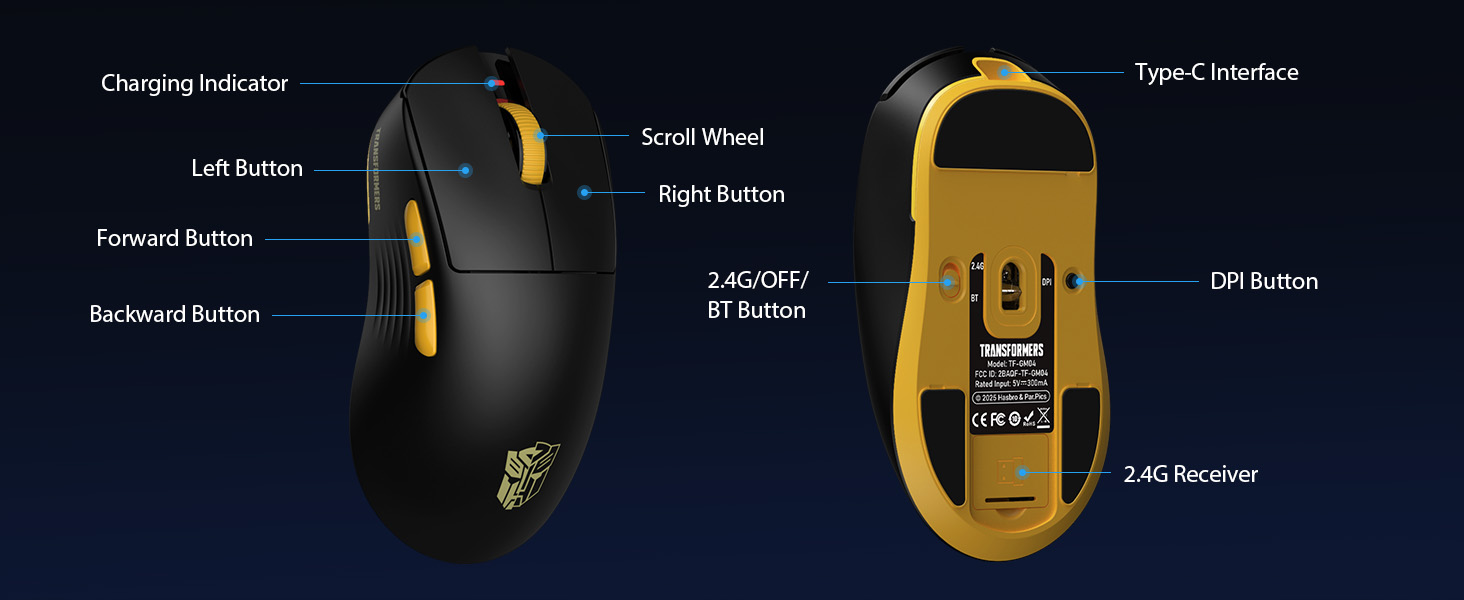
画像3: The underside of the Transformers GM04 mouse, detailing the 2.4G/OFF/BT switch for connection modes, the DPI button, and the storage compartment for the 2.4G wireless receiver. This view is crucial for understanding how to switch modes and adjust settings.

画像4: An illustration of the 6-level adjustable DPI settings for the Transformers GM04 mouse. It shows the DPI values (1200, 2400, 3200, 4800, 6400, 12000) and their corresponding LED indicator colors (Red, Green, Blue, Purple, Yellow, Cyan), which helps users identify the current DPI level.
画像5: 爆発した view diagram of the Transformers GM04 mouse, highlighting the HUANO micro switches. This image emphasizes the precision-engineered mechanical switches designed for crisp feedback and a lifespan of over 20 million clicks, ideal for rapid gaming actions.
ビデオ1: An official product video from Transformers Keyboard showcasing the GM04 Lightweight Wireless Gaming Mouse. This short video provides a dynamic overview of the mouse's design and features.
4. セットアップ
4.1. マウスの充電
Before first use, it is recommended to fully charge your GM04 mouse. Connect the provided USB-C cable to the mouse's front port and the other end to a USB power source (e.g., computer USB port, USB wall adapter). The LED indicator will show charging status.
4.2. マウスの接続
The GM04 mouse supports three connection modes: 2.4G Wireless, Bluetooth 5.3, and USB-C Wired. Use the switch on the bottom of the mouse to select your desired mode.
4.2.1. 2.4Gワイヤレスモード
- Remove the USB wireless dongle from its storage slot on the bottom of the mouse.
- Plug the USB wireless dongle into an available USB-A port on your computer.
- マウスの底面にあるモードスイッチを「2.4G」の位置にスライドします。
- マウスは自動的にコンピューターに接続されます。
4.2.2.Bluetoothモード
- マウスの底面にあるモードスイッチを「BT」の位置にスライドします。
- コンピューターまたはデバイスで Bluetooth 設定を開き、新しいデバイスを検索します。
- Select "TF-GM04 BT" from the list of available devices to pair.
- The mouse should connect and be ready for use.
4.2.3. USB-C有線モード
- Connect the provided USB-C cable to the mouse's front port and the other end to a USB-A port on your computer.
- マウスは自動的に有線モードに切り替わり、充電を開始します。
5.運用
5.1. DPI調整
The GM04 mouse offers 6 default DPI settings. To cycle through these settings, press the DPIボタン located on the bottom of the mouse. The LED indicator will change color to reflect the current DPI level:
- 赤: 1200DPI
- 緑: 2400DPI
- 青: 3200DPI
- 紫: 4800DPI
- 黄: 6400DPI
- シアン: 12000DPI
5.2. プログラム可能なボタン
The mouse features 5 programmable buttons. To customize these buttons with macro commands, shortcut keys, or other functions, you will need to use the dedicated driver software. This software is typically available for Windows systems under 2.4G wireless and wired modes. Bluetooth mode may not support full software customization.
5.3. Connection Mode Switching
Easily switch between 2.4G Wireless, Bluetooth, and Wired modes using the dedicated switch on the bottom of the mouse. This allows for seamless transitions between multiple devices.
5.4.LEDインジケーター
- DPIインジケーター: Changes color according to the current DPI setting (see 5.1).
- 充電インジケーター: A green LED near the scroll wheel indicates charging. It turns off when fully charged.
6. メンテナンス
6.1. 清掃
最適なパフォーマンスと外観を維持するために、マウスを定期的に清掃してください。表面は柔らかく乾いた布で拭いてください。頑固な汚れには、軽く湿らせた布で拭いてください。amp 布などを使用することで、内部部品に水分が入り込むのを防ぐことができます。刺激の強い化学薬品や研磨剤は使用しないでください。
6.2. バッテリーのお手入れ
The GM04 mouse is equipped with a 500mAh high-capacity battery. To prolong battery life:
- バッテリーを頻繁に完全に放電することは避けてください。
- マウスを長期間使用しない場合は、涼しく乾燥した場所に保管してください。
- If using wired mode, the mouse will charge automatically.
7。 トラブルシューティング
7.1. マウスが反応しない
- バッテリーを確認してください: マウスが充電されていることを確認してください。USB-Cケーブルで接続してください。
- 接続モードを確認してください: Verify the switch on the bottom is set to the correct mode (2.4G, BT, or Wired).
- Re-pair (2.4G/Bluetooth): For 2.4G, try plugging the dongle into a different USB port. For Bluetooth, unpair and re-pair the device in your computer's settings.
- 有線モードを試す: Connect the mouse directly via USB-C cable to see if it functions.
7.2. DPIが変化しない
- マウスの下部にある正しい DPI ボタンを押していることを確認してください。
- Observe the LED indicator for color changes to confirm DPI cycles.
- カスタム ソフトウェアを使用する場合は、設定が正しく適用されていることを確認してください。
7.3. Lag or Disconnection in Wireless Mode
- 干渉を減らす: Move the mouse closer to the receiver/device. Avoid obstacles or other wireless devices that may cause interference.
- バッテリーを確認してください: バッテリー残量が少ないとワイヤレス パフォーマンスに影響する可能性があります。
- ドライバーの更新: コンピュータの Bluetooth または USB ドライバーが最新であることを確認してください。
8. 仕様
| 特徴 | 詳細 |
|---|---|
| 製品寸法 | 4.68 x 2.52 x 0.1インチ |
| アイテム重量 | 2.22オンス(約63g) |
| 商品型番 | TF-GM04 |
| 接続技術 | 2.4Gワイヤレス、Bluetooth 5.3、USB-C有線 |
| 動き検出技術 | 光学式(PAW3311センサー) |
| DPI設定 | 1200/2400/3200/4800/6400/12000 (Adjustable) |
| ポーリングレート | 1000Hz (1ms latency) |
| 追跡速度 | 300 IPS |
| 加速度 | 35G |
| ボタン | 5つのプログラム可能なボタン |
| スイッチタイプ | HUANO Micro Switches (20 Million Clicks) |
| バッテリー容量 | 500mAh |
| バッテリー寿命 | 最大100時間(Bluetoothモード) |
| 互換性 | Windows, Mac OS, and other systems |
9.保証とサポート
9.1. 保証情報
The Transformers GM04 Lightweight Wireless Gaming Mouse comes with a standard manufacturer's warranty. Please refer to the packaging or the official Transformers web保証条件の詳細については、ウェブサイトをご覧ください。保証請求の際は、購入証明としてレシートを保管してください。
9.2. カスタマーサポート
For technical assistance, troubleshooting, or any questions regarding your Transformers GM04 mouse, please contact Transformers customer support. Contact details can typically be found on the product packaging or the official brand webサイト。