
導入
This manual provides detailed instructions for the safe and effective use of your HIKMICRO D01 Thermal Imager. Please read this manual thoroughly before operating the device and keep it for future reference. The HIKMICRO D01 is designed for various applications, including home inspections, electrical fault detection, and temperature monitoring, featuring SuperScene smart scene recognition and SuperIR enhanced resolution for clear and accurate thermal imaging.
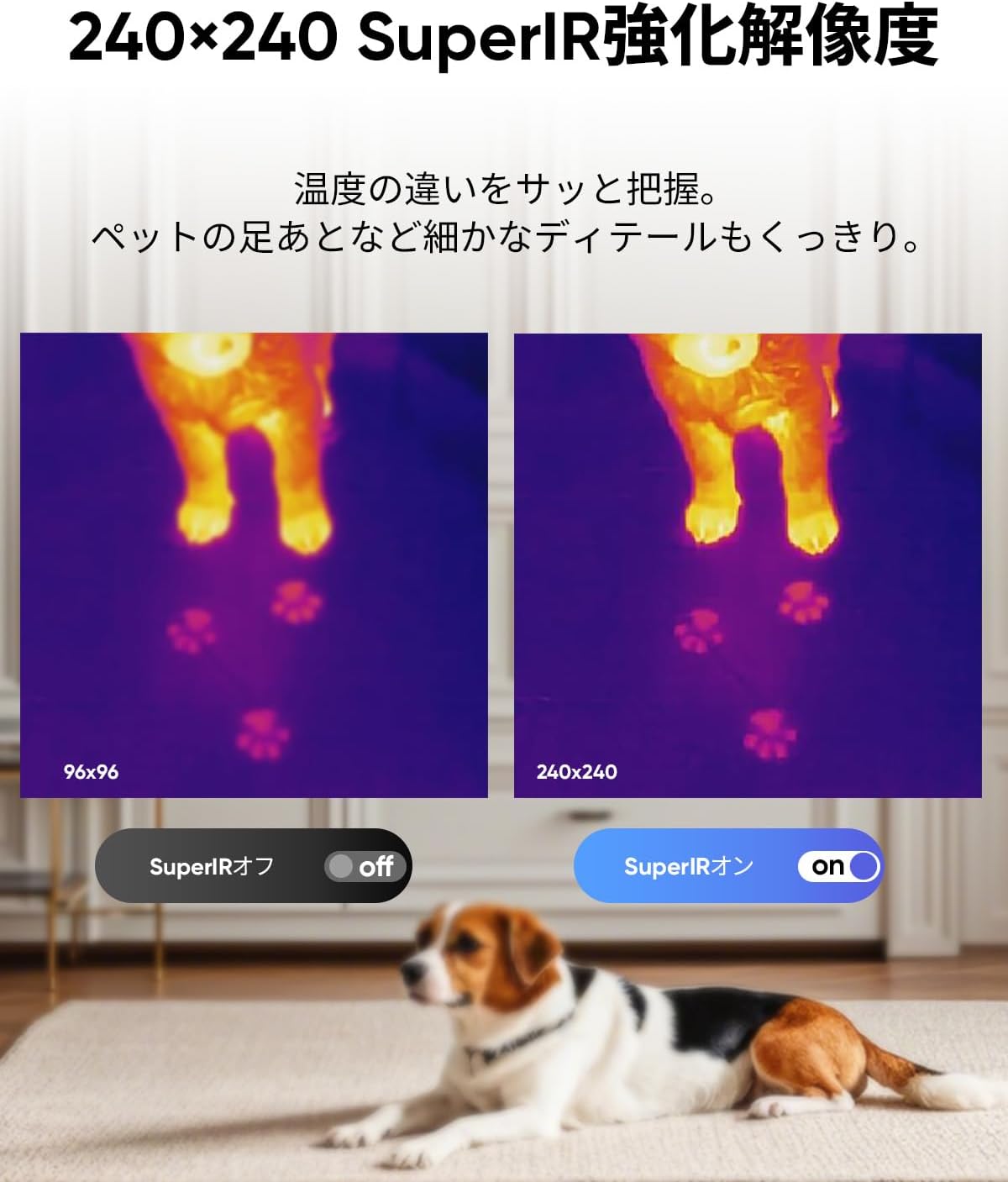
Figure 1: HIKMICRO D01 Thermal Imager
1. セットアップ
1.1 開梱とパッケージの内容
Carefully unpack your HIKMICRO D01 Thermal Imager and verify all contents. The standard package includes:
- HIKMICRO D01 Thermal Imager (with wrist strap)
- USB-A - USB-C ケーブル
- クイックスタートガイド
- 校正証明書

Figure 2: Included items with the HIKMICRO D01 Thermal Imager.
1.2デバイスの充電
Before first use, fully charge the device using the provided USB-A to USB-C cable and a compatible 5VDC/2A (10W) AC adapter (not included). The device features a 3350mAh battery, providing up to 11 hours of continuous operation.

Figure 3: The HIKMICRO D01 features a long-lasting 3350mAh battery.
1.3 Power On/Off and Initial Language Setting
To power on the device, press and hold the power button. Upon first startup, the menu may be in English. Navigate to the settings to change the language to Japanese or your preferred language.
2. 操作手順
2.1 基本操作とボタンデザイン
The D01 features an intuitive button design for ease of use. You can immediately operate functions such as power on, menu navigation, photo/video capture, and color palette switching without extensive learning.
- 電源ボタン: 長押しして電源のオン/オフを切り替えます。
- トリガーボタン: Short press to capture a still image. Long press to record video.
- ナビゲーションボタン: 上/下/左/右ボタンを使用してメニューを移動し、設定を調整します。
- 戻るボタン: 前の画面に戻るか、メニューを終了します。

Figure 4: The D01's intuitive button layout for easy operation.
2.2 SuperSceneスマートシーン認識
The HIKMICRO D01 incorporates proprietary SuperScene technology for smart scene recognition. This feature automatically detects common household issues like water leaks or insulation gaps within seconds, making inspections simple even for beginners.

Figure 5: SuperScene technology automatically identifies potential issues like water leaks and insulation gaps.
2.3 SuperIR Enhanced Resolution
Utilizing HIKMICRO's SuperIR image enhancement algorithm, the D01 upgrades the thermal image resolution from 96x96 to 240x240 pixels in live view, revealing finer details for more precise inspections.

Figure 6: Comparison of 96x96 vs 240x240 resolution with SuperIR enhancement.
2.4 温度測定とアラーム
The D01 offers accurate temperature measurements with a range of -20°C to 400°C (-4°F to 752°F) and an accuracy of ±3.6°F. It features automatic tracking of hot, cold, and center spots, instantly displaying key temperature points. You can also set high and low-temperature alarms to receive immediate notifications when thresholds are exceeded.

Figure 7: Instant temperature display with automatic hot, cold, and center spot tracking.
2.5 Adjusting Measurement Settings
Improve measurement accuracy by adjusting emissivity and distance settings. The device supports various material emissivity values and distance ranges.

Figure 8: Table showing common material emissivity values and distance settings for accurate measurements.
2.6 広い視野 View and Color Palettes
The D01 features a 50°x50° wide field of view, allowing you to capture more thermal information at a glance. Choose from 5 different color palettes to optimize visualization for various scenarios.

Figure 9: The 50°x50° wide field of view helps capture extensive thermal data.
2.7 Automatic Scheduled Thermal Imaging
Set up the D01 to automatically capture thermal images at scheduled intervals. This is particularly useful for monitoring temperature changes over time, such as in reptile enclosures, to prevent overheating or hypothermia stress.

Figure 10: The D01 can be mounted on a tripod for automatic scheduled thermal imaging.
3. メンテナンス
3.1 データの保存と転送
The D01 has 4GB of internal storage, capable of storing over 30,000 thermal images or 14 hours of video. Easily transfer captured images and videos to your PC for analysis and sharing using the provided USB-C to USB-A cable.

Figure 11: The D01's 4GB internal storage for extensive image and video capture.

Figure 12: Transferring data from the D01 to a laptop for analysis.
3.2 Durability and Environmental Protection
The D01 is designed for durability with an IP54 rating, providing protection against dust and splashes. This ensures reliable performance even in challenging field conditions.

Figure 13: The D01's robust design with IP54 dust and splash resistance.
4。 トラブルシューティング
4.1 よくある問題
If you encounter any issues with your HIKMICRO D01, please refer to the detailed PDF manual available via QR code (mentioned in reviews) or contact customer support. Common issues may include:
- Device not powering on: Ensure the battery is charged.
- Inaccurate readings: Verify emissivity and distance settings are correct for the target material.
- Difficulty transferring files: Ensure the correct USB cable (USB-A to USB-C) is used and the device is properly connected to the PC.
4.2 Advanced Thermal Analysis Software
For in-depth analysis of thermal images and videos, HIKMICRO provides 'Analyzer' software for Windows. This software supports image analysis, real-time monitoring, 3D plotting, and report generation, aiding in efficient inspections and rapid decision-making.

Figure 14: Using HIKMICRO Analyzer software for advanced thermal image analysis on a laptop.
5. 仕様
| 特徴 | 仕様 |
|---|---|
| ブランド | ヒクマイクロ |
| モデル名 | D01 |
| 製品型番 | D01 |
| フォトセンサー技術 | シーモス |
| ビデオキャプチャ解像度 | 4K (3840 x 2160) |
| フラッシュメモリタイプ | Built-in Flash Memory (4GB) |
| ビデオキャプチャフォーマット | MP4 |
| 特集 | SuperIR Resolution, SuperScene Smart Scene Recognition, Long Battery Life |
| レンズ構成 | ズーム |
| 含まれるコンポーネント | Wrist strap, USB cable, Calibration Certificate, Quick Start Guide |
| バッテリー付属 | Yes (3350mAh internal) |
| パッケージサイズ | 25 x 15 x 9.9 cm; 580 g |
| 測定精度 | ±3.6°F |
| 測定範囲 | -20°C ~ 400°C (-4°F ~ 752°F) |
| IP 定格 | IP54 |
6. 保証とサポート
6.1 保証情報
The HIKMICRO D01 Thermal Imager comes with a comprehensive warranty:
- 本体: 1年
- バッテリー: 2年
- センサー: 10年
Lifetime firmware updates are also provided.
6.2 カスタマーサポート
For any questions or technical assistance, please contact HIKMICRO customer support. 24-hour technical support is available. You can reach out through the store or the official webサイト。