
1. はじめに
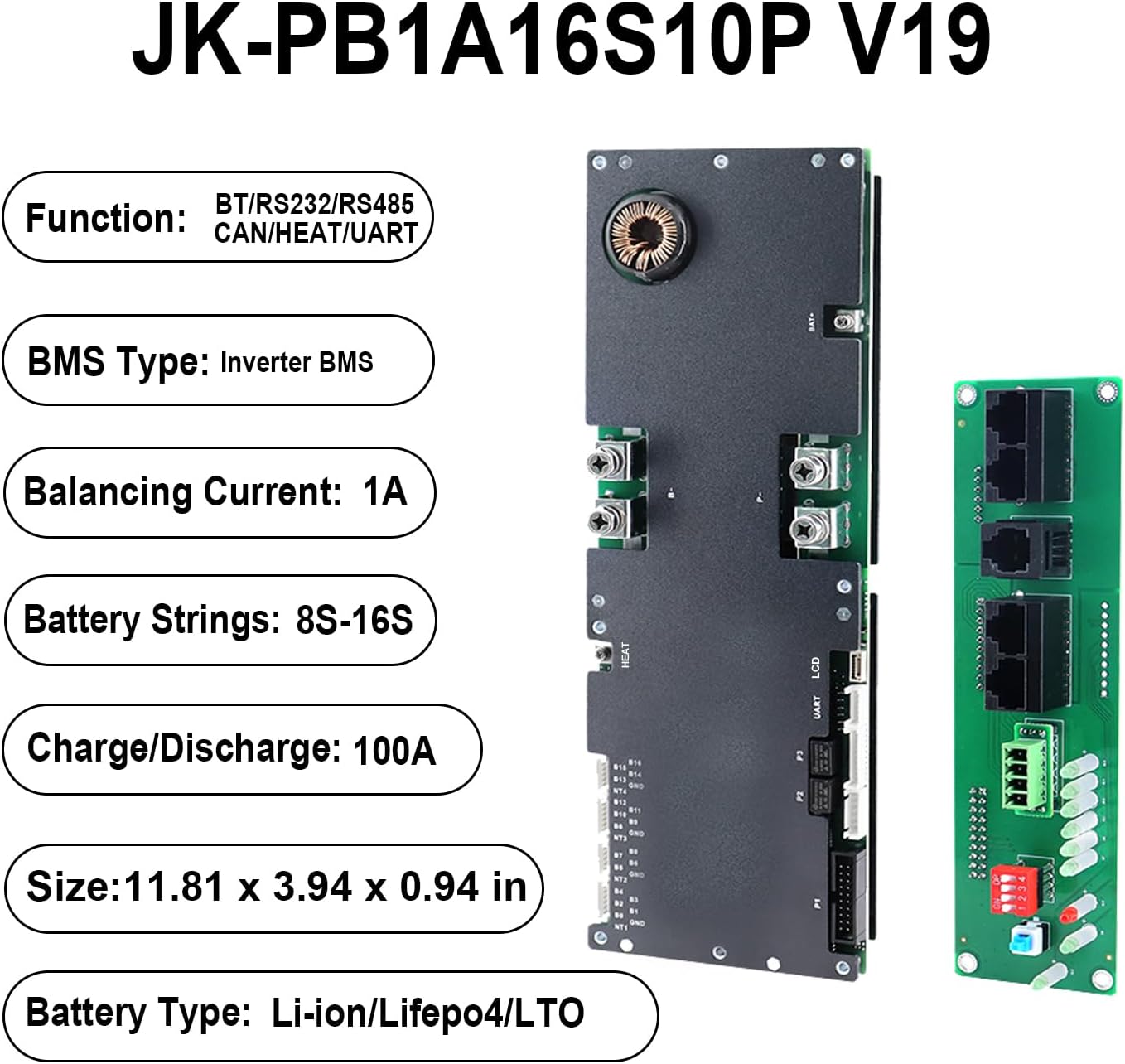
The JKBMS Inverter BMS JK-PB1A16S10P V19 is a sophisticated Battery Management System designed for home energy storage and solar applications. This V19 version includes an additional UART port for enhanced display capabilities, allowing detailed monitoring of parallel battery packs. It supports various battery chemistries including LiFePO4, Li-ion, and LTO, offering robust protection and communication features essential for reliable power systems.
主な特徴
- 安全性の強化: Comprehensive protection against overcharge, over-discharge, overcurrent, short circuit, and reverse connection.
- 多用途アプリケーション: Suitable for solar energy systems, home batteries, telecom base stations, and backup power.
- 高度なコミュニケーション: Features UART for new display, CAN, RS485, RS232, and Bluetooth app/PC configuration.
- 並列拡張: Supports multiple battery packs in parallel with built-in 10A current limiting for safe energy expansion.
- Active Balance: 1A active balancing current for optimal cell health.
- 高精度: 巻tage acquisition with ±3mV accuracy and high precision current acquisition.
- 温度管理: Supports heating function and includes charge/discharge over-temperature and low-temperature protection.
2. 仕様
The following table details the technical specifications of the JKBMS Inverter BMS JK-PB1A16S10P V19.
| 特徴 | 仕様 |
|---|---|
| ブランド | JKBMS |
| モデル | JK-PB1A16S10P V19 |
| 寸法 | 300 x 100 x 24 mm (11.81 x 3.94 x 0.94 インチ) |
| 互換性のあるバッテリータイプ | LiFePO4, Li-ion, LTO |
| Active Balance Current | 1A |
| Battery Strings Supported | Li-ion: 7-16S, LiFePO4: 8-16S, LTO: 14S-16S |
| Continuous Discharge/Charge Current | 100A |
| 最大放電電流(最大2分) | 200A |
| 通信インターフェース | UART, Bluetooth, RS485, CAN, RS232 |
| 重さ | 1.54ポンド |

3. パッケージ内容
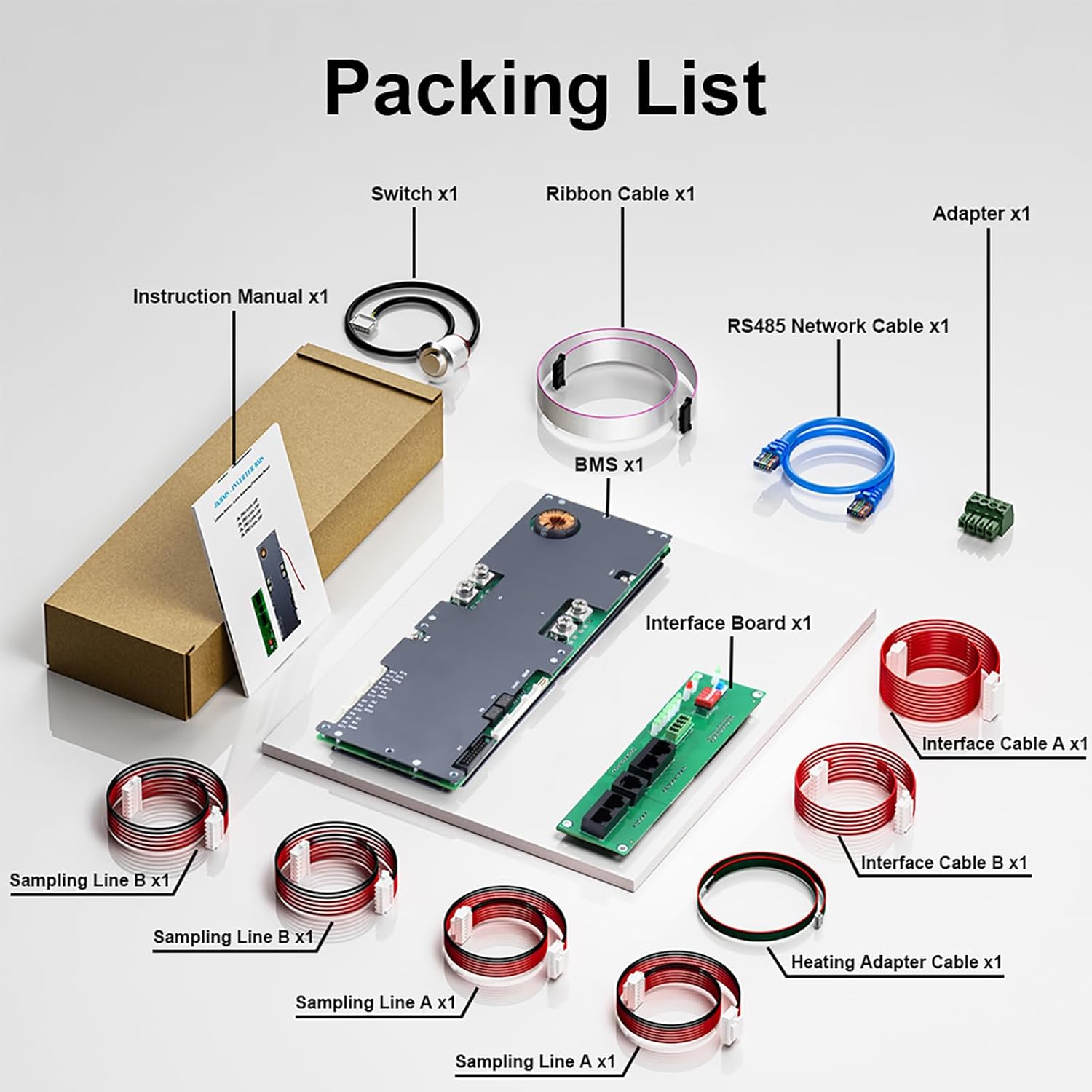
パッケージを開封したら、以下のコンポーネントがすべて含まれていることを確認してください。
- JK Inverter BMS (Main Protection Board)
- インターフェースボード
- 通信ケーブル
- バランスケーブル
- アクティベーションスイッチ
- リボンケーブル
- RS485 Network Cable
- アダプタ
- Sampling Lines (various)
- Heating Adapter Cable
4.設置と配線
Careful adherence to the wiring sequence is crucial for proper function and safety.
配線順序
- Solder the B- and P- terminals first.
- Follow with the B+ and P+ terminals.
- Connect battery sampling wires in ascending voltag注文。
システム起動
- システムの電源を入れます。
- Press the activation button to initiate the BMS.
切断中
- Remove the charger or load first.
- Disconnect battery sampling wires in descending voltag注文。
- Remove B+ and P+ terminals, then B- and P- terminals.

5. 操作手順
Bluetooth App Operation
The JKBMS can be monitored and configured in real-time using the dedicated "JK BMS" mobile application. This app provides access to battery status, parameters, and allows for adjustments to various settings.
通信インターフェース
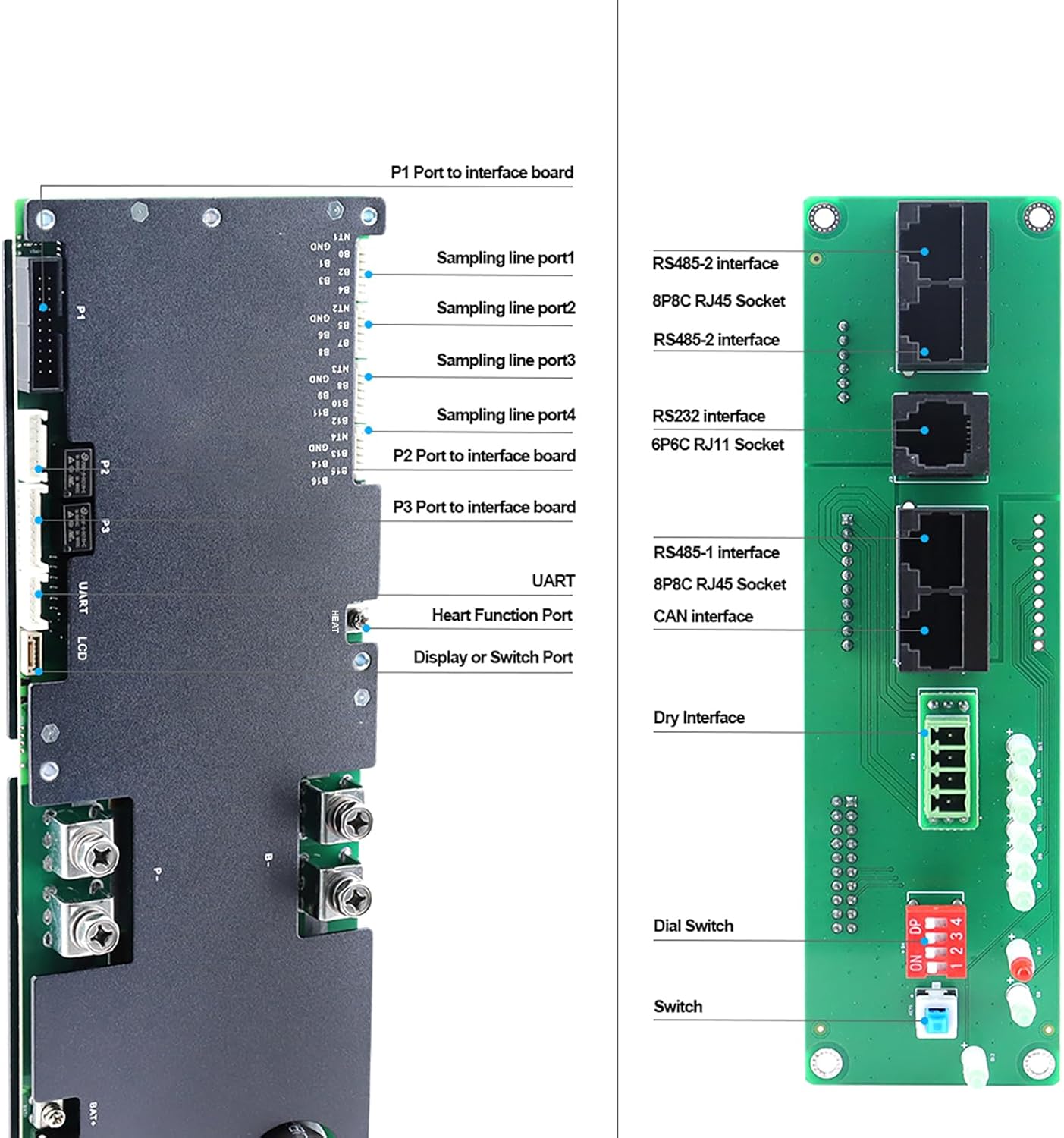
The BMS supports multiple communication protocols for integration with other system components:
- UART: An additional port for connecting to the latest JK display, providing detailed data for parallel battery packs.
- RS485: For robust industrial communication and integration with compatible devices.
- できる: Supports Controller Area Network communication for automotive and industrial applications.
- RS232: A standard serial communication interface for various devices.
6. メンテナンス
To ensure the longevity and optimal performance of your JKBMS Inverter BMS, consider the following maintenance guidelines:
- 定期点検: すべての配線接続部の締め付け具合や腐食や損傷の兆候がないか定期的に確認してください。
- 環境条件: Ensure the BMS operates within its specified temperature and humidity ranges to prevent premature wear.
- ソフトウェアアップデート: Check the official JKBMS website or app for any available firmware updates to ensure you have the latest features and bug fixes.
- クリーニング: Keep the BMS free from dust and debris. Use a soft, dry cloth for cleaning; avoid liquids.
7。 トラブルシューティング
If you encounter issues with your JKBMS, refer to the following basic troubleshooting steps:
- システムが起動しない: Verify all wiring connections are correct and secure. Ensure the activation button has been pressed after power-up.
- コミュニケーションの問題: Check cable connections for UART, RS485, CAN, or RS232. Ensure Bluetooth is enabled on your mobile device and the "JK BMS" app is correctly installed and paired.
- 保護が起動しました: If the BMS shuts down, check the app or display for error codes indicating overcurrent, overvoltage、undervoltage, or over-temperature conditions. Address the root cause (e.g., reduce load, check charger settings, ensure proper ventilation).
- 不正確な読み取り: Confirm that sampling wires are correctly connected and in ascending voltag注文。
For more detailed diagnostics, consult the "JK BMS" mobile application or contact customer support.
8. 安全ガイドライン
Always observe the following safety precautions when installing, operating, or maintaining the JKBMS Inverter BMS:
- 専門家による設置: Installation should be performed by qualified personnel familiar with battery systems and electrical safety.
- 正しい配線: Follow the wiring instructions precisely. Incorrect wiring can lead to damage, fire, or electric shock.
- 絶縁: Ensure all exposed terminals and connections are properly insulated to prevent short circuits.
- 換気: Install the BMS in a well-ventilated area to prevent overheating.
- 緊急時の対応: Know how to safely disconnect power in an emergency.
- 水を避ける: Do not expose the BMS to water or excessive moisture.
- ツールの安全性: Use insulated tools when working with battery systems.
9. 保証とサポート
The JKBMS Inverter BMS JK-PB1A16S10P V19 comes with a one-year service warranty. For any technical assistance, troubleshooting, or warranty claims, please contact JKBMS dedicated customer support. Real-time monitoring and configuration are also available through the "JK BMS" mobile app.