
1. はじめに
Thank you for choosing the Schneider 43A1 4K UHD LED TV. This television combines advanced display technology with smart features to provide an immersive viewing experience. Featuring a 4K Ultra High Definition display, QLED-LCD technology with Direct LED backlighting, and the VIDAA Smart TV platform, your new TV offers vibrant colors, deep blacks, and access to a wide range of entertainment.
This manual provides essential information for the safe and efficient use of your television. Please read it thoroughly before operating the device and retain it for future reference.
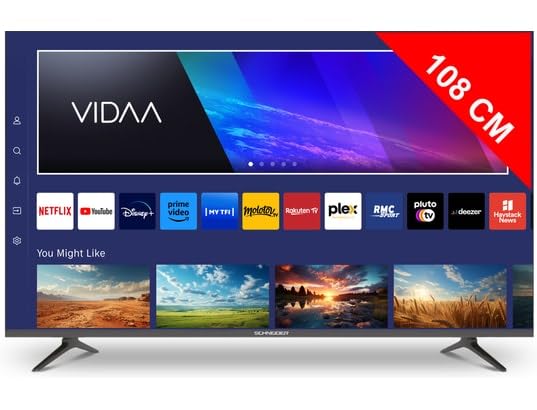
画像1.1:正面 view of the Schneider 43A1 TV with VIDAA interface.
2. 安全情報
安全な操作を確保し、損傷を防ぐために、次の安全上の注意事項を守ってください。
- 配置: Position the TV on a stable, level surface. Avoid placing it in direct sunlight, near heat sources, or in environments with high humidity or dust.
- 換気: Ensure adequate ventilation around the TV. Do not block ventilation openings. Maintain a minimum distance of 10 cm from walls or other objects.
- 電源: 指定された電源のみを使用してくださいtage. Ensure the power cord is not pinched or walked on. Disconnect the power plug during lightning storms or when unused for extended periods.
- クリーニング: 清掃する前にテレビの電源プラグを抜いてください。柔らかく乾いた布を使用してください。液体洗剤やエアゾール洗剤は使用しないでください。
- 液体: テレビに液体が滴ったり飛び散ったりする場所に置かないでください。花瓶など、液体の入った物をテレビの上に置かないでください。
- 子供たち: 子供がテレビや家具の上に登らないように注意してください。
- 壁掛け: If wall-mounting, use a VESA compatible bracket (200 x 200 mm) and ensure proper installation by qualified personnel to prevent injury.
3. パッケージ内容
すべての品物が揃っていて良好な状態であることを確認してください。
- Schneider 43A1 4K UHD LED TV
- リモートコントロール
- 電源ケーブル
- テレビ台(2台)
- テレビスタンド用ネジ
- ユーザーマニュアル(このドキュメント)
4. セットアップ
4.1 開梱
Carefully remove the TV from its packaging. It is recommended to keep the original packaging for potential future transport or service needs.
4.2 スタンドの取り付け
If you are not wall-mounting the TV, attach the included stand pieces to the bottom of the TV using the provided screws. Ensure the stand is securely fastened before placing the TV upright.
4.3 壁掛け(オプション)
The Schneider 43A1 is compatible with VESA 200 x 200 mm wall mounts. For safe installation, it is highly recommended to use a professional installer. Refer to your wall mount's instructions for specific details.
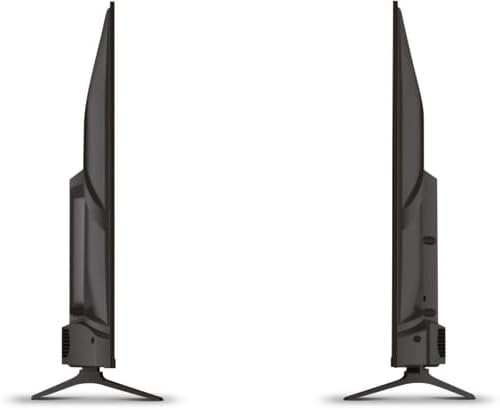
画像4.1: 側面 view of the Schneider 43A1 TV, illustrating its profile for placement or wall mounting.
4.4 外部機器の接続
テレビにはさまざまな接続オプションがあります。
- HDMI: Connect up to three HDMI 2.0 devices (e.g., Blu-ray player, game console, set-top box) to the HDMI ports.
- USB: Two USB ports are available for connecting USB storage devices to play media.
- AV/Audio Input: 複合ビデオとステレオオーディオを必要とする古いデバイス向け。
- 同軸出力: 外部オーディオシステムに接続します。
- アンテナ/ケーブル入力: DVB-T/T2/C/S2 受信用にアンテナまたはケーブル TV 信号を接続します。
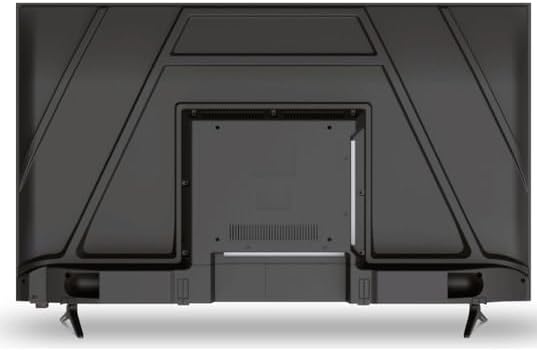
画像4.2:リア view of the Schneider 43A1 TV, highlighting connection ports.
4.5 電源の接続
Plug the power cable into the TV's power input, then into a suitable wall outlet.
4.6 初期セットアップウィザード
Upon first power-on, the TV will guide you through an initial setup process. This includes selecting your language, connecting to a Wi-Fi network, and scanning for available channels (DVB-T/T2/C/S2).
5.運用
5.1リモコン機能
リモコンを使用してテレビの機能を操作できます。
- 電源ボタン: テレビの電源をオンまたはオフにします。
- 音量を上げる/下げる: 音のレベルを調整します。
- チャンネルアップ/ダウン: テレビのチャンネルを変更します。
- 入力/ソース: Selects the input source (HDMI, USB, TV Tuner).
- ナビゲーションボタン: メニューナビゲーション用。
- スマートテレビのボタン: Direct access to popular apps like Netflix, Prime Video, YouTube.
5.2 Smart TV (VIDAA)
The integrated VIDAA Smart TV platform provides access to a variety of applications and streaming services. Connect your TV to the internet via Wi-Fi to enjoy features like Netflix, Prime Video, and YouTube. Bluetooth connectivity allows for wireless connection to compatible audio devices.

画像5.1: 斜め正面 view of the Schneider 43A1 TV, displaying the VIDAA Smart TV interface.
5.3入力の選択
Press the 'Input' or 'Source' button on your remote control to switch between connected devices (HDMI 1, HDMI 2, HDMI 3, USB, AV, TV Tuner).
5.4 画像とサウンドの設定
Access the TV's menu to adjust picture and sound settings. The 4K UHD resolution, QLED-LCD technology, and Direct LED backlighting ensure a high-quality visual experience. The TV also features upscaling to enhance lower-resolution content. Audio is delivered via 2 x 8 W RMS stereo speakers with Dolby Audio support.
5.5 PC Monitor Mode
The TV can be used as a PC monitor by connecting your computer via an HDMI cable. This mode optimizes the display for computer use.
6. メンテナンス
6.1 テレビの掃除
Before cleaning, ensure the TV is unplugged from the power outlet.
- 画面: 柔らかく糸くずの出ない布で画面を優しく拭いてください。頑固な汚れには、軽くamp布に水または専用のスクリーンクリーナーを含ませます(スクリーンに直接スプレーしないでください)。
- 外観: テレビの表面を拭くときは、柔らかく乾いた布を使用してください。asing. 研磨剤入りの洗剤や溶剤は使用しないでください。
6.2ソフトウェアアップデート
テレビは、パフォーマンスの向上や新機能の追加のためにソフトウェアアップデートを受け取る場合があります。これらのアップデートを自動的に受信するには、テレビがインターネットに接続されていることを確認してください。または、設定メニューから手動でアップデートを確認してください。
7。 トラブルシューティング
テレビで問題が発生した場合は、次の一般的な問題と解決策を参照してください。
- 電源なし:
- 電源ケーブルがテレビと壁のコンセントにしっかりと差し込まれているかどうかを確認してください。
- 壁のコンセントが機能していることを確認します(別のデバイスでテストします)。
- リモコンまたはテレビ本体の電源ボタンを押します。
- 画像/音声なし:
- 正しい入力ソースが選択されていることを確認します (例: HDMI 1、TV)。
- テレビと外部デバイス間のすべてのケーブル接続を確認してください。
- 音量がミュートまたは最小に設定されていないことを確認してください。
- アンテナを使用している場合は、アンテナの接続を確認し、チャンネルスキャンを実行してください。
- リモコンが動作しない:
- リモコンの電池を交換してください。
- リモコンとテレビの赤外線センサーの間に障害物がないことを確認してください。
- Smart TV/Network Issues:
- Wi-Fiルーターとインターネット接続を確認してください。
- Go to the TV's network settings to re-connect to your Wi-Fi network.
- テレビとルーターを再起動します。
これらの解決策を試しても問題が解決しない場合は、カスタマー サポートにお問い合わせください。
8. 仕様
| 特徴 | 仕様 |
|---|---|
| モデル | Schneider 43A1 |
| 表示サイズ | 109 cm (43 インチ) |
| 解決 | 4K ウルトラ HD (3840 x 2160 ピクセル) |
| ディスプレイ技術 | QLED-LCD with Direct LED Backlight |
| コントラスト比 | 1100:1 |
| 輝度 | 200 cd/m² |
| オーディオ出力 | 2 x 8 W RMS Stereo |
| オーディオ技術 | ドルビーオーディオ |
| HDMIポート | 3(HDMI 2.0) |
| USBポート | 2 |
| その他の入力 | AV/Audio Input |
| 出力 | 同軸出力 |
| チューナー | DVB-T/T2/C/S2 |
| スマートTVプラットフォーム | VIDAA (Netflix, Prime Video, YouTube) |
| ワイヤレス接続 | Wi-Fi、ブルートゥース |
| VESA互換性 | 200×200ミリ |
| 重さ | 7.5キログラム |