
1. はじめに
This manual provides essential instructions for the safe and effective use of your DOAO A3 Pro Electric Razor. Please read this manual thoroughly before first use and retain it for future reference.
The DOAO A3 Pro is designed for men's shaving, offering both wet and dry shaving capabilities. It features 3D floating heads, powerful dual-track blades, a pop-up trimmer, and a waterproof design for easy cleaning.
2. パッケージ内容
以下にリストされているすべてのアイテムがパッケージに含まれていることを確認してください。
- DOAO A3 Pro Electric Shaver
- 保護蓋
- クリーニングブラシ
- 旅行用バッグ
- USB-C電源ケーブル
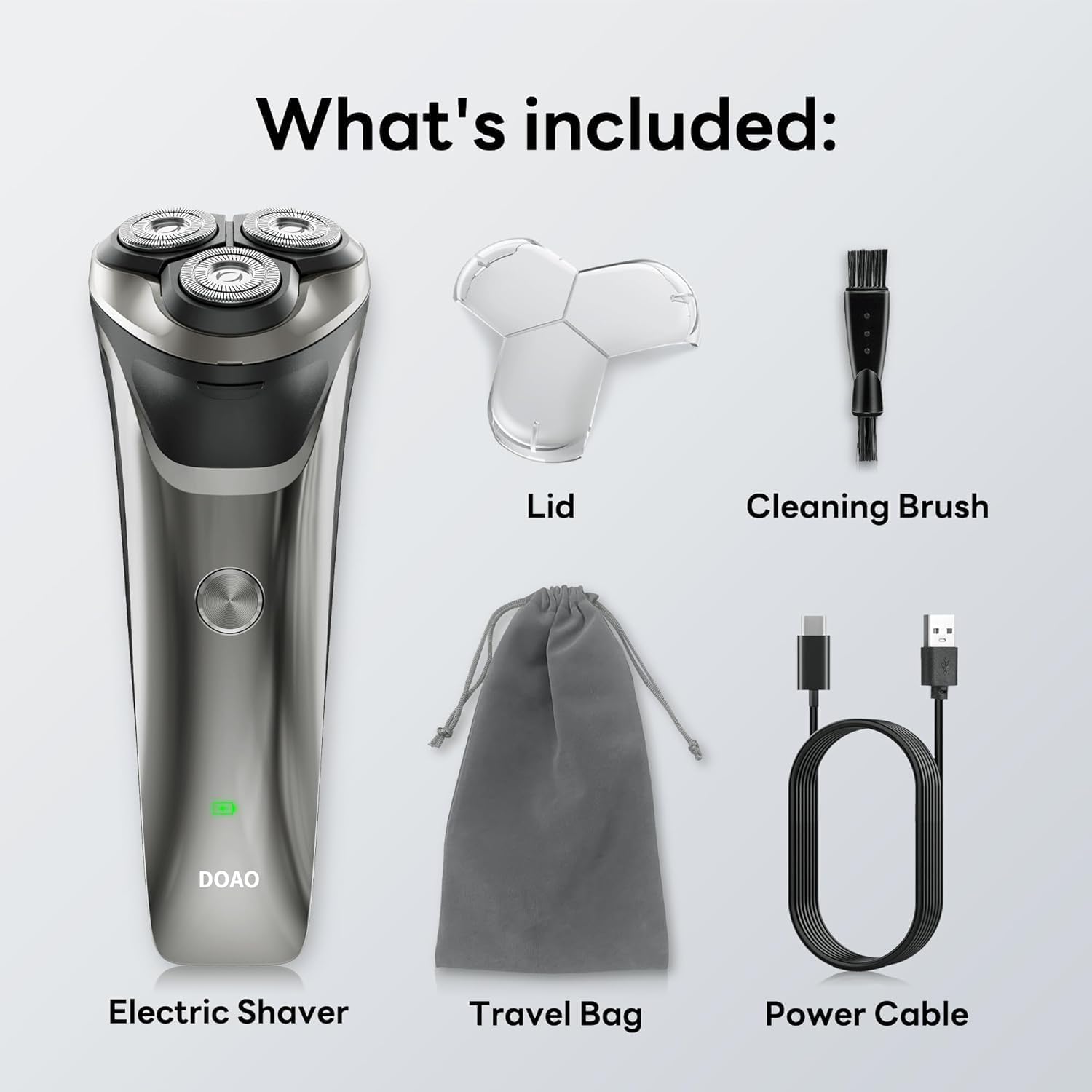
Image: All components included in the DOAO A3 Pro Electric Razor package.
3 製品の特徴
- 3Dフローティングヘッド: Ergonomically designed to adapt to facial contours for a close shave.
- Powerful Dual-Track Blades: High-speed motor with blades cutting up to 56,000 times per minute for efficient shaving.
- 100%防水設計: Suitable for wet or dry shaving and easy cleaning under running water.
- ポップアップトリマー: Integrated trimmer for precise grooming of sideburns, mustaches, and beard edges.
- 長持ちバッテリー: Provides up to 120 minutes of continuous use on a 1.5-hour charge.
- USB-C充電: 便利で急速充電。

Image: Illustration of the shaver's 3D floating heads and powerful dual-track blades.
4. セットアップ
4.1 初期充電
- 初めて使用する前に、シェーバーを完全に充電してください。
- Connect the USB-C power cable to the charging port on the shaver.
- USB-C ケーブルのもう一方の端を、互換性のある USB 電源アダプター (別売) またはコンピューターの USB ポートに差し込みます。
- LEDインジケーターが充電状態を示します。フル充電には通常1.5時間かかります。
- 完全に充電されたら、シェーバーを電源から外します。

Image: The shaver connected to its USB-C charging cable, illustrating battery life and charging time.
5. 操作手順
5.1 シェービング
The DOAO A3 Pro supports both wet and dry shaving.
ドライシェービング:
- 顔が清潔で乾燥していることを確認してください。
- 電源ボタンを押してシェーバーの電源を入れます。
- Move the shaver in small, circular motions over your skin, applying gentle pressure.
- Stretch your skin with your free hand to ensure hairs stand upright for a closer shave.
ウェットシェービング:
- シェービングフォームまたはジェルを顔に塗ります。
- 電源ボタンを押してシェーバーの電源を入れます。
- シェーバーを肌の上で小さく円を描くように動かします。
- 目詰まりを防ぐため、シェービング中はシェーバーヘッドを流水で洗い流してください。

Image: A user demonstrating wet shaving with the DOAO A3 Pro electric razor.
5.2 ポップアップトリマーの使用
- シェーバーの背面にあるポップアップ トリマー スイッチを見つけます。
- Slide the switch upwards to activate the trimmer.
- Use the trimmer to shape sideburns, mustaches, or to define beard lines.
- 使用後はスイッチを下方にスライドさせてトリマーを収納します。

Image: The integrated pop-up trimmer in use for precise grooming.
6. メンテナンス
6.1 シェーバーのクリーニング
定期的な清掃により、最適なパフォーマンスと衛生が確保されます。
毎日の清掃(使用後):
- シェーバーをオフにします。
- Open the shaver head by pressing the release button (if applicable) or gently pulling it open.
- シェーバーヘッドとヘアーチャンバーを温かい流水で十分にすすいでください。
- Shake off excess water and allow the shaver head to air dry before closing or attaching the protective lid.
Thorough Cleaning (Weekly or as Needed):
- Turn off the shaver and detach the shaver head.
- Use the provided cleaning brush to remove any trapped hairs from the blades and inner chamber.
- すべての部品を温かい流水で洗い流してください。
- 再組み立てする前に、すべての部品が完全に乾いていることを確認してください。

Image: The shaver head being rinsed under running water, highlighting its waterproof feature.
6.2 ブレード交換
For optimal shaving performance, it is recommended to replace the shaver heads every 12 months, or sooner if you notice reduced performance or discomfort.
- シェーバーをオフにします。
- Gently twist and pull the old shaver head upwards to remove it.
- 新しいシェーバーヘッドをシェーバー本体に合わせて、カチッと音がするまで押し下げます。
7。 トラブルシューティング
| 問題 | 考えられる原因 | 解決 |
|---|---|---|
| シェーバーの電源が入りません。 | 電池が消耗しています。 | シェーバーを完全に充電します。 |
| 剃り味が悪い / 毛が引っ張られる。 | 刃が鈍くなっていたり、髪の毛が詰まっていたりする。 | シェーバーヘッドを丁寧に清掃してください。性能が改善されない場合は、シェーバーヘッドの交換をご検討ください。 |
| 使用中にシェーバーが停止します。 | バッテリー残量が少なくなっています。 | シェーバーを充電してください。 |
| 充電インジケータが機能しません。 | ケーブルまたは電源アダプターに障害があります。 | 別のUSB-Cケーブルまたは電源アダプターをお試しください。しっかりと接続されていることを確認してください。 |
これらの解決策を試しても問題が解決しない場合は、カスタマー サポートにお問い合わせください。
8. 仕様
- モデル: A3プロ
- 電源: 電池駆動(1A電池付属)
- 電池のタイプ: リチウムイオン
- 充電時間: 約1.5時間
- 営業時間: Up to 120 minutes (approx. 60 days of daily use)
- 防水等級: 100%防水
- 特集: Cordless, Pop-up Trimmer
- 推奨用途: 顔
- メーカー: ドアオ
- パッケージ寸法: 8.03 x 6.1 x 2.52インチ
- 商品の重量: 9.88オンス
9. 保証とサポート
Your DOAO A3 Pro Electric Razor comes with comprehensive support and warranty:
- 生涯保証: Enjoy peace of mind with a lifetime warranty on your product.
- 365日間の保証: Specific warranty details may apply, refer to product registration for full terms.
- 生涯にわたる技術サポート: 製品の寿命期間中、技術サポートにアクセスできます。
- Free Return & 100% Refund: Hassle-free returns and full refunds if you are not satisfied.
- 24時間7日の迅速なサポート: Responsive customer support available within 12 hours.
For any inquiries, technical assistance, or warranty claims, please contact DOAO customer support through the platform where you purchased the product.

Image: DOAO customer support information.