
FLEXISPOT V9-Max-AR
FLEXISPOT V9-Max-AR エクササイズバイク(2Dデスクトップ付き)ユーザーマニュアル
Model: V9-Max-AR (Exercise Bike with Desk)
1. はじめに
This manual provides essential information for the safe and effective use of your FLEXISPOT V9-Max-AR Exercise Bike with 2D Desktop. Please read all instructions carefully before assembly and operation. Retain this manual for future reference.
重要な安全情報
- 使用する前に、すべての部品がしっかりと固定されていることを確認してください。
- 最大推奨重量 300 ポンドを超えないようにしてください。
- エクササイズバイクの使用中は、子供やペットを近付けないでください。
- 新しい運動プログラムを始める前に医師に相談してください。
- Use the product on a stable, level surface.
2.製品オーバーview およびコンポーネント
The FLEXISPOT V9-Max-AR is a versatile exercise bike designed for indoor use, featuring an integrated 2D adjustable desktop. It combines a stationary bike with a functional workspace, allowing for simultaneous exercise and productivity.

Figure 2.1: User operating the FLEXISPOT V9-Max-AR Exercise Bike with the desktop in use.
Key features include an 8-level quiet magnetic resistance system, an LCD display for tracking workout metrics, and a robust design supporting up to 300 lbs. The adjustable seat and desktop accommodate various user heights and preferences.
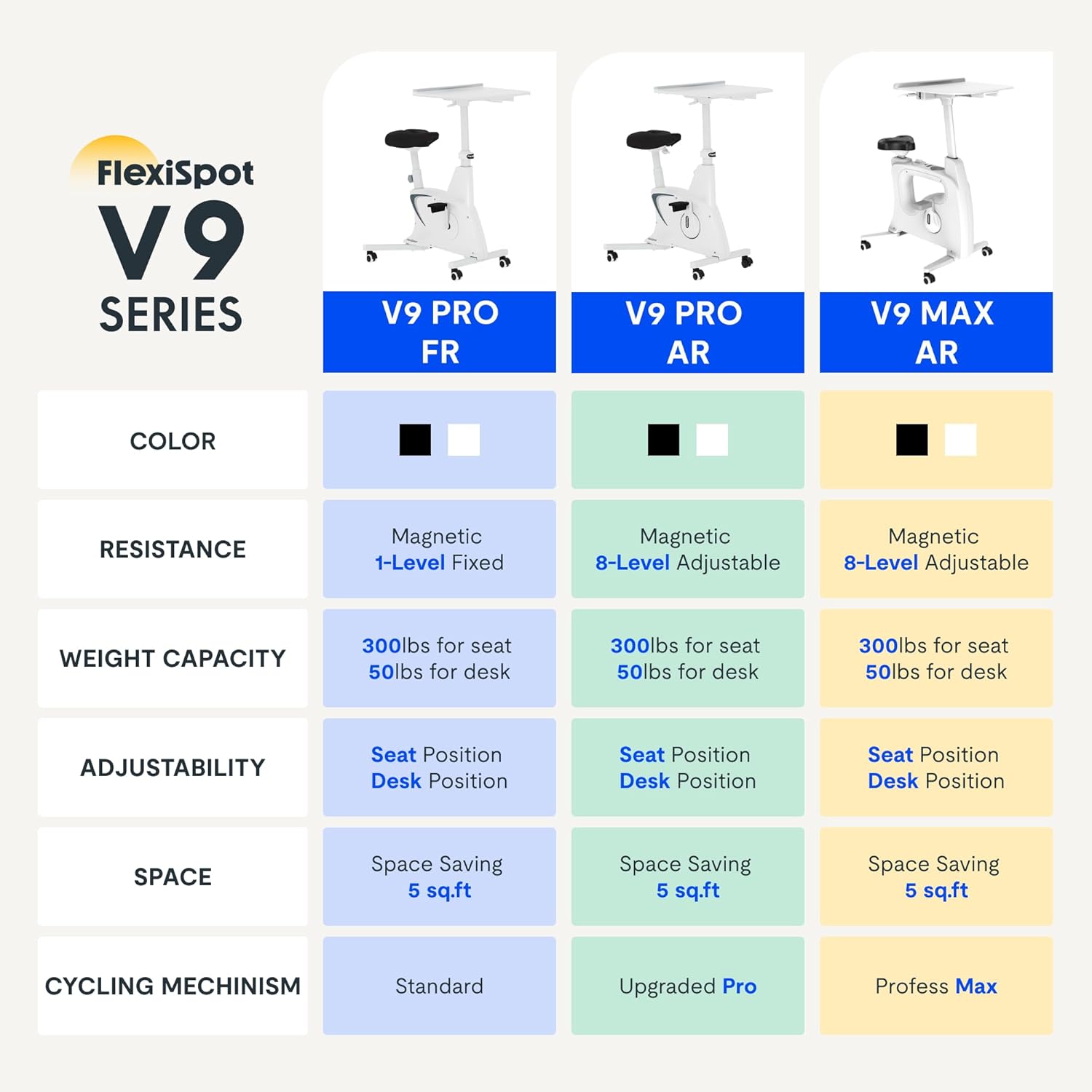
Figure 2.2: Comparison of FlexiSpot V9 series models, highlighting features like resistance and adjustability.
メインコンポーネント:
- Main Frame with Flywheel and Resistance Mechanism
- 調節可能なシート
- Adjustable Desktop
- ペダル
- LCDディスプレイコンソール
- 輸送用車輪
3. セットアップと組み立て
The FLEXISPOT V9-Max-AR is designed for quick and straightforward assembly, typically requiring about 10 minutes.
組み立て手順:
- すべてのコンポーネントを開梱し、梱包リストと照合します。
- Attach the front and rear stabilizers to the main frame using the provided screws.
- ペダルを取り付け、左のペダルは反時計回りに、右のペダルは時計回りに締め付けていることを確認します。
- Mount the seat post and seat onto the main frame, securing them firmly.
- Attach the desktop support column to the main frame.
- Secure the desktop to its support column.
- Insert batteries into the LCD display (batteries not included) and connect the sensor wire.
- Ensure all screws and connections are tightened before first use.

Figure 3.1: Illustration of adjustable components for personalized setup.
4. 操作手順
Adjusting Seat and Desktop:
- シートの高さ: Use the quick-release lever located on the seat post to adjust the seat to a comfortable height. Ensure your leg has a slight bend at the knee when the pedal is at its lowest point.
- Desktop Height: The desktop can be adjusted vertically. Locate the adjustment lever beneath the desktop and raise or lower the desktop to your desired working height.
- デスクトップの深さ: The desktop can also be adjusted horizontally (forward/backward) to optimize your working posture.
抵抗レベル:
The V9-Max-AR features 8 levels of quiet magnetic resistance. Rotate the resistance knob, located below the desktop, clockwise to increase resistance and counter-clockwise to decrease it.

Figure 4.1: LCD display and resistance control knob.
LCD ディスプレイの使用:
The built-in LCD display monitors your workout statistics. It tracks:
- 時間
- スピード
- 距離
- 消費カロリー
- Total Distance Covered (Odometer)
- 回転速度
Press the button on the display to cycle through different metrics or hold it to reset values (refer to display specific instructions for exact operation).
Using the 2D Desktop:
The spacious desktop (20" x 22.8") is designed to hold a laptop, notebook, mobile phone, or water cup. It provides a stable surface for working or entertainment while exercising.

Figure 4.2: Desktop in use for studying or working.
移植性:
Equipped with movable silent wheels, the exercise bike can be easily relocated within your home or office. Simply tilt the bike and roll it to your desired position.
5. メンテナンス
Regular maintenance ensures the longevity and optimal performance of your FLEXISPOT V9-Max-AR Exercise Bike.
- クリーニング: 定期的にバイクを拭き掃除するamp 布と中性洗剤を使用してください。研磨剤入りの洗剤や溶剤は使用しないでください。
- 検査: すべてのボルト、ナット、可動部品の締め付け具合を定期的に点検してください。緩んでいる部品はすぐに締め直してください。
- 潤滑: 磁気抵抗システムには特別な潤滑は必要ありません。
- ストレージ: 自転車は直射日光や極端な温度を避け、乾燥した涼しい場所に保管してください。
6。 トラブルシューティング
このセクションでは、エクササイズ バイクで発生する可能性のある一般的な問題について説明します。
| 問題 | 考えられる原因 | 解決 |
|---|---|---|
| LCDディスプレイが機能しない | 電池が切れているか、正しく取り付けられていません。 | Replace batteries (AAA, not included) or ensure correct polarity. |
| 不安定な自転車 | ボルトが緩んでいる、または表面が平らでない。 | Check and tighten all assembly bolts. Ensure the bike is on a flat, stable surface. |
| 抵抗は変化しない | 抵抗メカニズムの問題。 | 抵抗ノブが正しく固定されていることを確認してください。問題が解決しない場合は、カスタマーサポートにお問い合わせください。 |
| きしみ音や異常な音 | 緩んだ部品または摩擦。 | Inspect all connections and tighten any loose parts. Ensure no foreign objects are interfering with moving parts. |
7. 仕様
Detailed specifications for the FLEXISPOT V9-Max-AR Exercise Bike:
- モデル: V9-Max-AR (Exercise Bike with Desk)
- ブランド: フレキシポット
- 色: 黒
- 抵抗メカニズム: 磁気
- 抵抗レベルの数: 8
- 最大重量推奨: 300 ポンド
- 製品寸法(奥行き x 幅 x 高さ): 37.6インチ x 23.2インチ x 47.2インチ
- デスクトップの寸法: Approximately 20" x 22.8"
- Minimum Height (Seat): 29.6インチ
- Maximum Height (Overall): 47.2 Inches (desktop height can go up to 47.2")
- 電源: ペダル駆動(非電動)
- 駆動システム: ベルト
- 特集: Adjustable Seat, Adjustable Desktop
- 推奨用途: 屋内
- Space Occupied: 約5平方フィート

図7.1: 製品の寸法。
8. 保証とサポート
FLEXISPOT は、高品質の製品と顧客満足を提供することに尽力しています。
- 戻り値: この商品は30日間返品可能です。詳しくは、ご購入いただいたプラットフォームの返品ポリシーをご確認ください。
- 保証: For specific warranty terms and conditions, please refer to the official FLEXISPOT webサイトをご覧いただくか、カスタマー サポートに直接お問い合わせください。
- カスタマーサポート: For any questions, assistance, or troubleshooting not covered in this manual, please contact FLEXISPOT customer support. Contact information can typically be found on the manufacturer's webサイトまたは購入書類をご覧ください。
9. 追加情報
While no specific official product videos were provided in the product data, users may find helpful assembly or usage guides on the manufacturer's official website or their authorized channels. Always ensure the source is official for accurate information.
Ask a question about this manual
Ask about setup, troubleshooting, compatibility, parts, safety, or missing instructions. Manuals+ will review the question and use this page’s manual context to help answer it.