
1. はじめに
The Baseus Bass BH1 NC headphones are designed to provide an immersive audio experience with advanced noise cancellation technology. Featuring Real-Time Adaptive Hybrid ANC, SuperBass 2.0, LDAC Hi-Res Sound, and an extended 80-hour playtime, these headphones are engineered for comfort and superior sound quality. This manual provides detailed instructions for setup, operation, maintenance, and troubleshooting to ensure optimal performance.
2. 箱の中身

Image: The product packaging displaying the headphones, charging cable, and quick start guide.
- Baseus Bass BH1 NC ノイズキャンセリングヘッドホン
- USB-Cデータケーブル
- ユーザーマニュアル
3.製品オーバーview
Familiarize yourself with the physical components and controls of your Baseus Bass BH1 NC headphones.

画像: 正面からのアングル view of the Baseus Bass BH1 NC headphones in Moon White, highlighting the earcups and headband.
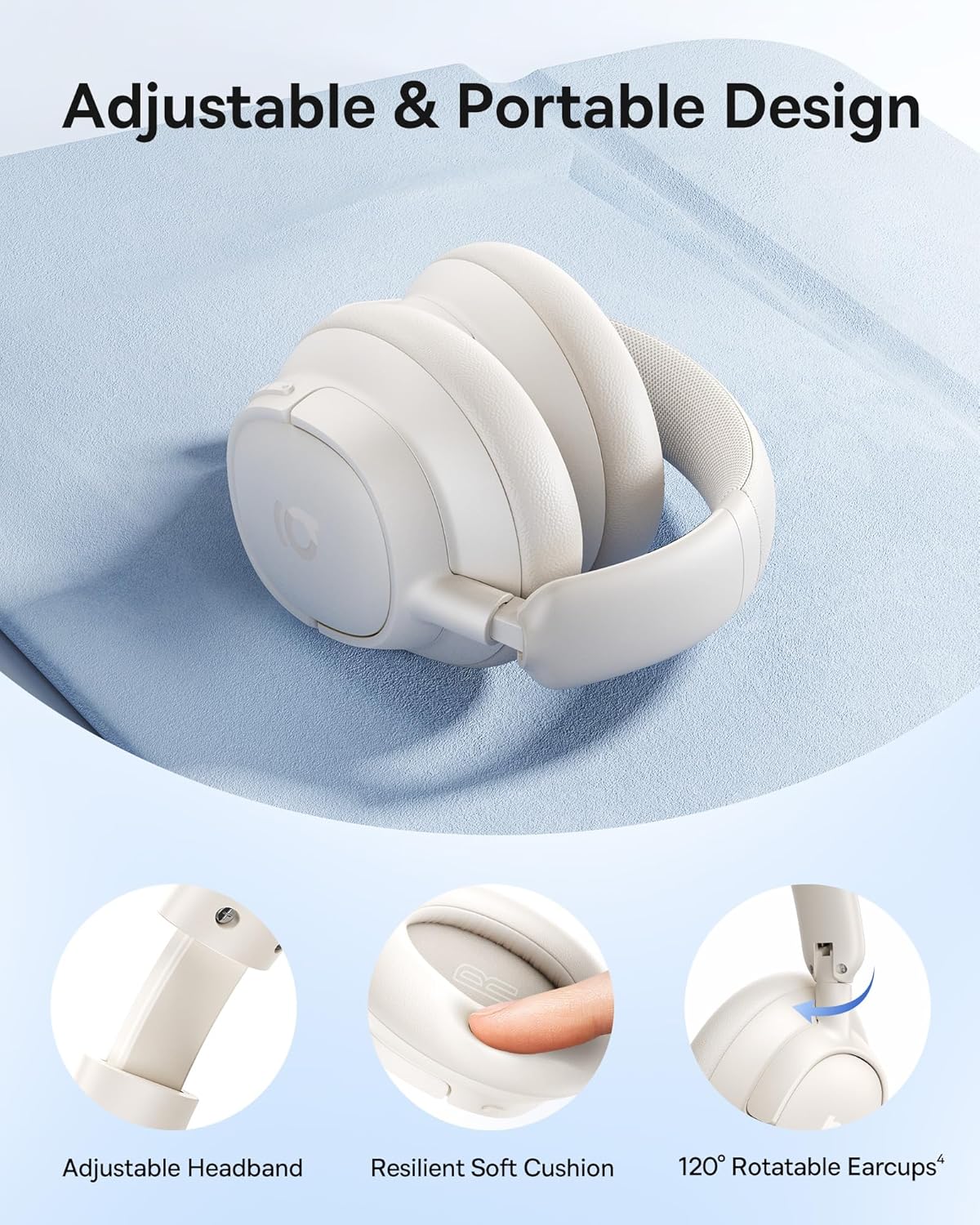
画像: 詳細 view of the adjustable headband, resilient soft cushion, and 120-degree rotatable earcups, illustrating the ergonomic design.
コントロールとポート:

Image: An illustration detailing the functions of each physical button on the headphones, including controls for music playback, call management, and ANC mode switching.
- 電源ボタン: 電源のオン/オフや Bluetooth ペアリングの開始に使用します。
- 音量アップ/次のトラックボタン: 短く押すと音量が上がり、長く押すと次のトラックに進みます。
- 音量ダウン/前のトラックボタン: 短く押すと音量が下がり、長く押すと前のトラックに戻ります。
- 多機能ボタン: 音楽の再生/一時停止、通話の応答/終了、音声アシスタントの起動。
- ANCボタン: Toggles between ANC On, Transparency Mode, and ANC Off.
- USB-Cポート: ヘッドホンの充電用。
4. セットアップ
4.1 ヘッドホンの充電
Before first use, fully charge your headphones. Connect the provided USB-C cable to the charging port on the headphones and the other end to a USB power adapter (not included) or a computer's USB port. The LED indicator will show charging status.
- フル充電すると、最大 80 時間 (ANC オフ) または 55 時間 (ANC オン) の再生が可能です。
- A quick 10-minute charge can provide approximately 10 hours of playtime.

Image: Visual representation of the headphones' battery life, indicating 80 hours with ANC off and 55 hours with ANC on, along with the rapid charging capability.
4.2Bluetoothペアリング
- ヘッドフォンの電源がオフになっていることを確認してください。
- LED インジケーターが青と赤に点滅してペアリング モードになるまで、電源ボタンを約 3 ~ 5 秒間押し続けます。
- デバイス(スマートフォン、タブレット、ラップトップ)で Bluetooth を有効にし、利用可能なデバイスを検索します。
- 見つかったデバイスのリストから「Baseus Bass BH1 NC」を選択します。
- 接続されると、LED インジケーターが青色に点灯するか、青色でゆっくり点滅します。
4.3 スマートアプリコントロール
For enhanced functionality and personalization, download the Baseus app from your device's app store. The app allows you to fine-tune sound settings, adjust EQ modes, manage noise reduction settings, and more.

Image: A visual guide to the Baseus app, showcasing its various control options for sound customization and headphone management.
5. 操作手順
5.1 電源オン/オフ
- 電源オン: 電源ボタンを2秒間押し続けます。
- 電源を切る: 電源ボタンを3秒間押し続けます。
5.2音楽の再生
- 再生/一時停止: 多機能ボタンをXNUMX回押します。
- ボリュームアップ: 音量アップボタンを短く押します。
- ボリュームダウン: 音量ダウンボタンを短く押します。
- 次のトラック: 音量アップボタンを2秒間長押しします。
- 前のトラック: 音量ダウンボタンを2秒間長押しします。
5.3 通話管理
- 通話の応答/終了: 多機能ボタンをXNUMX回押します。
- 通話を拒否: 多機能ボタンを 2 秒間押し続けます。
- 音声アシスタントを有効にする: 多機能ボタンをXNUMX回押します。

Image: A user demonstrating the call clarity feature of the headphones, emphasizing the AI-powered voice boost and 5-mic sound sensors.
5.4 騒音制御モード
The Baseus Bass BH1 NC headphones feature Adaptive Hybrid ANC, offering up to -45dB noise reduction. Use the ANC button to cycle through modes:

Image: A visual representation of the noise cancellation capabilities, showing the headphones within a bubble indicating -45dB noise reduction.
- ANCオン: Activates active noise cancellation to reduce ambient sound.
- 透明モード: Allows you to hear your surroundings without removing the headphones. Press and hold the ANC button for 2 seconds for Quick Attention.
- ANC オフ: ノイズキャンセルを無効にします。
5.5 マルチポイント接続
The headphones support Instant Multipoint Connection, allowing seamless switching between two connected devices without manual re-pairing.
5.6 オーディオ機能
Experience pristine audio with:
- スーパーベース 2.0: Dynamically enhances low frequencies for rich, punchy bass.
- LDAC Hi-Res Sound: Transmits 3X more data than standard Bluetooth codecs for ultra-clear, lossless audio.
- 40mmダイナミックドライバー: Equipped with bio-cellulose diaphragms for immersive depth and detailed clarity.

Image: A profile view of a person wearing the headphones, with text overlays emphasizing the SuperBass 2.0 and Hi-Res audio features.
6. メンテナンス
- クリーニング: ヘッドホンは柔らかく乾いた布で拭いてください。刺激の強い化学薬品や研磨剤は使用しないでください。
- ストレージ: ヘッドフォンは直射日光や極端な温度を避け、涼しく乾燥した場所に保管してください。
- バッテリーのケア: バッテリー寿命を延ばすには、ヘッドフォンを頻繁に完全に放電させないでください。長期間使用しない場合でも、定期的に充電してください。
- 耐水性: このヘッドフォンは防水ではありません。水や過度の湿気にさらさないでください。
7。 トラブルシューティング
7.1 電源が入らない
- ヘッドホンが充電されていることを確認してください。USB-Cケーブルを使って電源に接続してください。
- 電源ボタンを数秒間押し続けて、短く押しただけではないことを確認します。
7.2 デバイスとペアリングできない
- ヘッドフォンがペアリング モードになっていることを確認します (LED が青と赤で点滅します)。
- デバイスで Bluetooth が有効になっており、範囲内(通常は 10 メートル)にあることを確認します。
- 携帯電話の Bluetooth 設定からデバイスを削除し、再度ペアリングを試みてください。
- ヘッドフォンとデバイスの両方を再起動します。
7.3 音が出ない、または音量が低い
- ヘッドフォンと接続されたデバイスの両方の音量レベルを確認します。
- ヘッドフォンがデバイスに正しく接続されていることを確認してください。
- 別のアプリケーションまたはソースからオーディオを再生してみてください。
7.4 ANCが効果的に機能しない
- Ensure ANC mode is activated (not Transparency Mode or ANC Off).
- イヤーカップが耳にきちんとフィットし、しっかりと密閉されているかどうかを確認します。
- Environmental factors can affect ANC performance; it is most effective against low-frequency, constant noise.
8. 仕様
| モデル名 | ベースス ベース BH1 NC |
| 接続技術 | Bluetooth 6.0、ワイヤレス |
| 無線通信技術 | ブルートゥース6.0 |
| 材料 | プラスチック |
| 製品の具体的な用途 | エンターテイメント、フィットネス、旅行 |
| 製品の推奨用途 | 通話、サイクリング、エクササイズ、音楽、ランニング、旅行、ワークアウト |
| 対応デバイス | 携帯電話、Bluetoothオーディオ機能搭載デバイス(iOS、Android、Windows、Mac OS、Switch)、ノートパソコン、タブレット |
| コントロールタイプ | ボタンコントロール |
| 制御方法 | プッシュボタン |
| アイテム数 | 1 |
| オーディオドライバータイプ | ダイナミックドライバ |
| Bluetoothバージョン | 6.0 |
| オーディオドライバーのサイズ | 40ミリメートル |
| 欧州連合 | 810196181533 |
| メーカー | ベースス |
| アイテム重量 | 15.2オンス |
| 商品型番 | ベースス ベース BH1 NC |
| バッテリー | 非標準バッテリーが必要です。(付属) |
| 色 | ムーンホワイト |
| 耳の位置 | オーバーイヤー |
| フォームファクター | オーバーイヤー |
| 騒音制御 | アダプティブノイズキャンセレーション |

Image: A technical drawing illustrating the precise measurements of the headphones, including earcup dimensions and overall weight.
9. 保証とサポート
Baseus products are designed and manufactured to the highest quality standards. For warranty information, please refer to the warranty card included with your product or visit the official Baseus webサイト。問題が発生した場合や技術的なサポートが必要な場合は、Baseusの公式チャネルを通じてカスタマーサポートにお問い合わせください。
さらに詳しいサポートについては、 AmazonのBaseusストア.