
1. はじめに
This manual provides essential information for setting up, operating, maintaining, and troubleshooting your realme Note 70T smartphone. Please read this guide thoroughly to ensure optimal performance and longevity of your device.
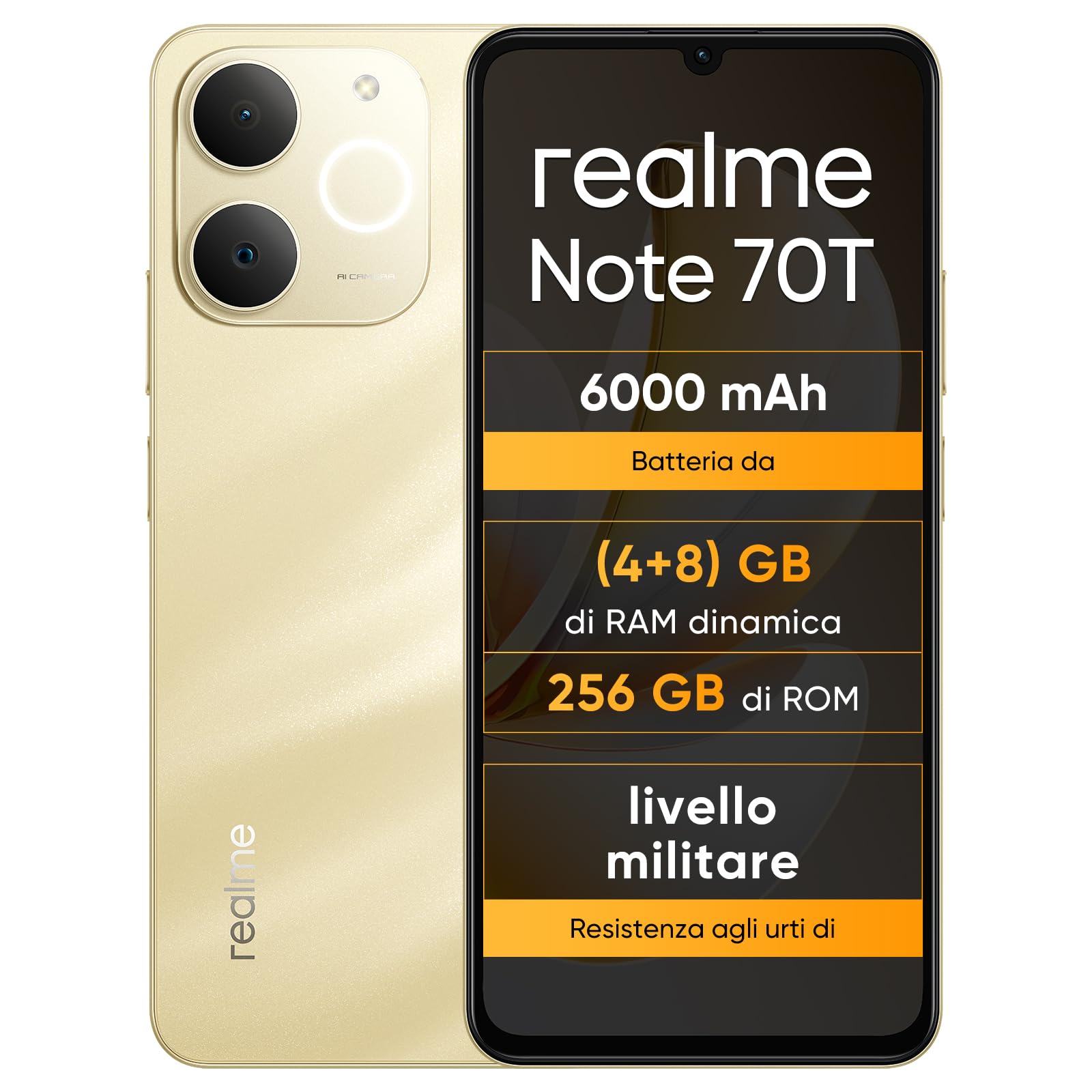
画像: 前面と背面 view of the realme Note 70T smartphone.
2.セットアップガイド
2.1 パッケージ内容
パッケージに次のアイテムが含まれていることを確認してください。
- realme Note 70Tスマートフォン
- USBケーブル
- 携帯ケース
- 保護フィルム
2.2 SIMカードの挿入と電源のオン
- Locate the SIM card tray on the side of the device. Use the provided SIM ejector tool to open the tray.
- Carefully place your Nano-SIM card(s) and/or microSD card into the tray, ensuring correct orientation. The realme Note 70T supports Dual SIM.
- トレイを携帯電話本体と同じ高さになるまでゆっくりとスロットに押し戻します。
- Press and hold the Power button (located on the right side) until the realme logo appears on the screen.

画像: サイド view of the realme Note 70T, illustrating the location of the SIM card tray.
2.3 初期充電
初めてご使用になる前に、デバイスを完全に充電することをお勧めします。USBケーブルをスマートフォンのUSB-Cポートに接続し、もう一方の端を対応する電源アダプター(別売)またはパソコンのUSBポートに接続してください。

画像: 下 view of the realme Note 70T, highlighting the USB-C charging port.
3. 操作手順
3.1 基本機能
- 電源オン/オフ: 電源ボタンを長押しします。「電源を切る」または「再起動」を選択します。
- 音量コントロール: デバイスの側面にある音量アップボタンと音量ダウンボタンを使用します。
- 画面のロック/ロック解除: 電源ボタンを短く押すと、画面がロックまたはロック解除されます。
- 顔認識: Configure facial recognition in Settings for quick and secure unlocking.

画像: サイド view of the realme Note 70T, showing the power and volume buttons.
3.2 表示機能
The realme Note 70T features a 6.75-inch Eye Comfort Display with a 90Hz refresh rate. This provides smooth visuals and reduces eye strain. The display offers vivid clarity and comfortable viewing。

Image: The realme Note 70T display showcasing its 90Hz refresh rate and eye comfort features with a vibrant beach scene.
3.3 カメラ機能
Capture every moment with the 13MP rear camera and 5MP front camera. The device includes advanced AI features to enhance your photography:
- AIクリアフェイス: Improves blurry portraits for sharper results.
- AI消しゴム: Removes unwanted elements from photos.
- AI画像マッティング: Allows you to easily remove subjects from backgrounds.

Image: Demonstration of the AI Clear Face feature, showing a blurry portrait before and after AI enhancement.

Image: Demonstration of the AI Eraser feature, showing an object removed from a photo.

Image: Demonstration of the AI Image Matting feature, showing a person isolated from the background.
3.4 バッテリー管理
The 6000mAh battery provides up to two days of usage on a single charge. It supports extended standby and includes 38 levels of charging protection for long-term battery health.

Image: Illustration of the realme Note 70T's 6000mAh battery capacity and estimated usage times for various activities.
3.5 Performance and Audio
Powered by an octa-core chipset with speeds up to 1.8 GHz, the realme Note 70T ensures smooth performance for gaming and applications. It supports fast app launch times and keeps up to 16 apps active in the background.
Experience enhanced audio with 300% ultra volume and AI Call 2.0, which provides intelligent noise reduction for clear calls.

Image: Visual representation of the realme Note 70T's octa-core processor.

Image: Illustration of the AI Call 2.0 feature, demonstrating noise reduction during calls.
4. メンテナンス
4.1 防水・防塵性能(IP54)
The realme Note 70T is rated IP54 for water and dust resistance, protecting against splashes and dust ingress. The speaker vibrates at a specific frequency to expel accumulated water. This feature ensures the device remains functional in various daily situations.

Image: The realme Note 70T being splashed with water, demonstrating its IP54 water resistance.
4.2 アーマーシェル保護
The device features ArmorShell protection, having passed the MIL-STD 810H military-grade shock resistance test. This includes multi-angle drop tests and high-intensity impact tests, ensuring durability against accidental drops from up to 1.8 meters.

Image: The realme Note 70T being dropped onto a rocky surface, illustrating its military-grade resistance.
4.3一般的なケア
- Keep the device clean using a soft, dry cloth. Avoid abrasive materials.
- 携帯電話を長時間、極端な温度や直射日光にさらさないでください。
- 自分でデバイスを分解または修理しないでください。保証が無効になり、損傷が発生する可能性があります。
5。 トラブルシューティング
5.1 一般的な問題と解決策
- デバイスの電源が入らない: バッテリーが充電されていることを確認してください。充電器に接続してもう一度お試しください。
- 画面が反応しない: 電源ボタンを長押し(通常 10 ~ 15 秒)してデバイスを再起動します。
- アプリがクラッシュしたりパフォーマンスが低下したりする: Close background applications. Utilize the AI Optimization feature to improve app smoothness.

Image: Screenshot of the AI Optimization feature on the realme Note 70T, showing options to improve app smoothness.
5.2 工場出荷時設定へのリセット
問題が解決しない場合は、工場出荷時の設定にリセットすることを検討してください。 警告: This will erase all data on your device. Back up important information before proceeding. Navigate to 設定 > システム > リセット オプション > すべてのデータを消去 (工場出荷時設定にリセット).
6. 仕様
| 特徴 | 仕様 |
|---|---|
| ブランド | リアルミー |
| モデル名 | リアルミーノート70T |
| オペレーティング·システム | アンドロイド15 |
| RAMサイズ | 4ギガバイト |
| ストレージ容量 | 256ギガバイト |
| 画面サイズ | 6.75インチ |
| 解決 | 720×1600 |
| リフレッシュレート | 90Hz |
| セルラーテクノロジー | 4G |
| 接続技術 | ブルートゥース |
| 色 | サンディゴールド |
| Number of SIM Card Slots | デュアルSIM |
| 充電ポートタイプ | USB-C |
| Biometric Identification Features | 顔認識 |
| 耐水性レベル | 防水(IP54) |
| ヘッドホンジャック | No 3.5 mm Jack |
| Maximum Supported Flash Memory Size | 256ギガバイト |
| Front Camera Sensor Resolution | 5 MP |
| Rear Camera Sensor Resolution | 13 MP |
| Number of Rear Cameras | 1 |
| Number of Front Cameras | 1 |
| 最大バッテリー電力 | 6000ミリamper-hour (mAh) |
| アイテムの寸法 | 15.7 x 7.4 x 0.9 cm |
| 平均バッテリー寿命 | 2日間 |
| ビデオキャプチャ解像度 | 1080p |
| フレームレート | 30fps |
| GPS and Georeferencing Features | 真実 |
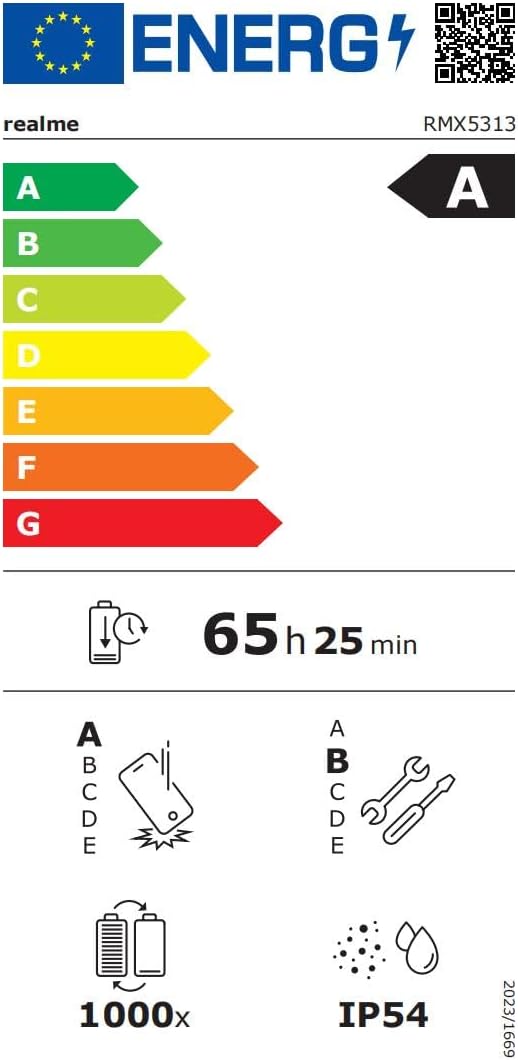
Image: EU Energy Label for realme Note 70T, showing energy efficiency, battery life, and IP54 rating. For more details, visit eprel.ec.europa.eu/qr/2361473.
7. 保証情報
Your realme Note 70T smartphone comes with a limited manufacturer's warranty. Please refer to the warranty card included in your package or visit the official realme web保証範囲、期間、およびサービス手順に関する詳細な条件については、サイトをご覧ください。
8. カスタマーサポート
さらに詳しいサポート、技術サポート、またはサービスに関するお問い合わせは、公式のRealmeカスタマーサポートまでお問い合わせください。 website or the contact information provided in your product documentation. You can also find FAQs and troubleshooting tips on the realme support portal.
Additional resources, including a Data Transparency Declaration, can be found ここ.


