
1. はじめに
Thank you for choosing the roborock Q10 S5 Robot Vacuum and Mop Cleaner. This manual provides essential information for setting up, operating, and maintaining your device to ensure optimal performance and longevity. Please read this manual thoroughly before using the product and keep it for future reference.
2. 安全情報
To reduce the risk of injury, electric shock, fire, or damage, please observe the following safety precautions:
- この機器は、機器の安全な使用に関する監督または指導を受けており、関連する危険性を理解している場合、8 歳以上の子供、および身体、感覚、精神能力が低下している人、または経験と知識が不足している人でも使用できます。
- 子供が機器で遊ばないように監督する必要があります。
- 清掃やユーザーメンテナンスは、監督なしで子供に行わせないでください。
- 火気や壊れやすい物のある場所でロボットを使用しないでください。
- 充電ドックが壁に沿った平らな面に置かれていることを確認してください。
- デバイスに付属の純正電源アダプターのみを使用してください。
- Do not expose the robot to direct sunlight or moisture.
- Before cleaning, remove power cords, small objects, and fragile items from the floor.
3.製品オーバーview
Familiarize yourself with the components of your roborock Q10 S5 robot vacuum.
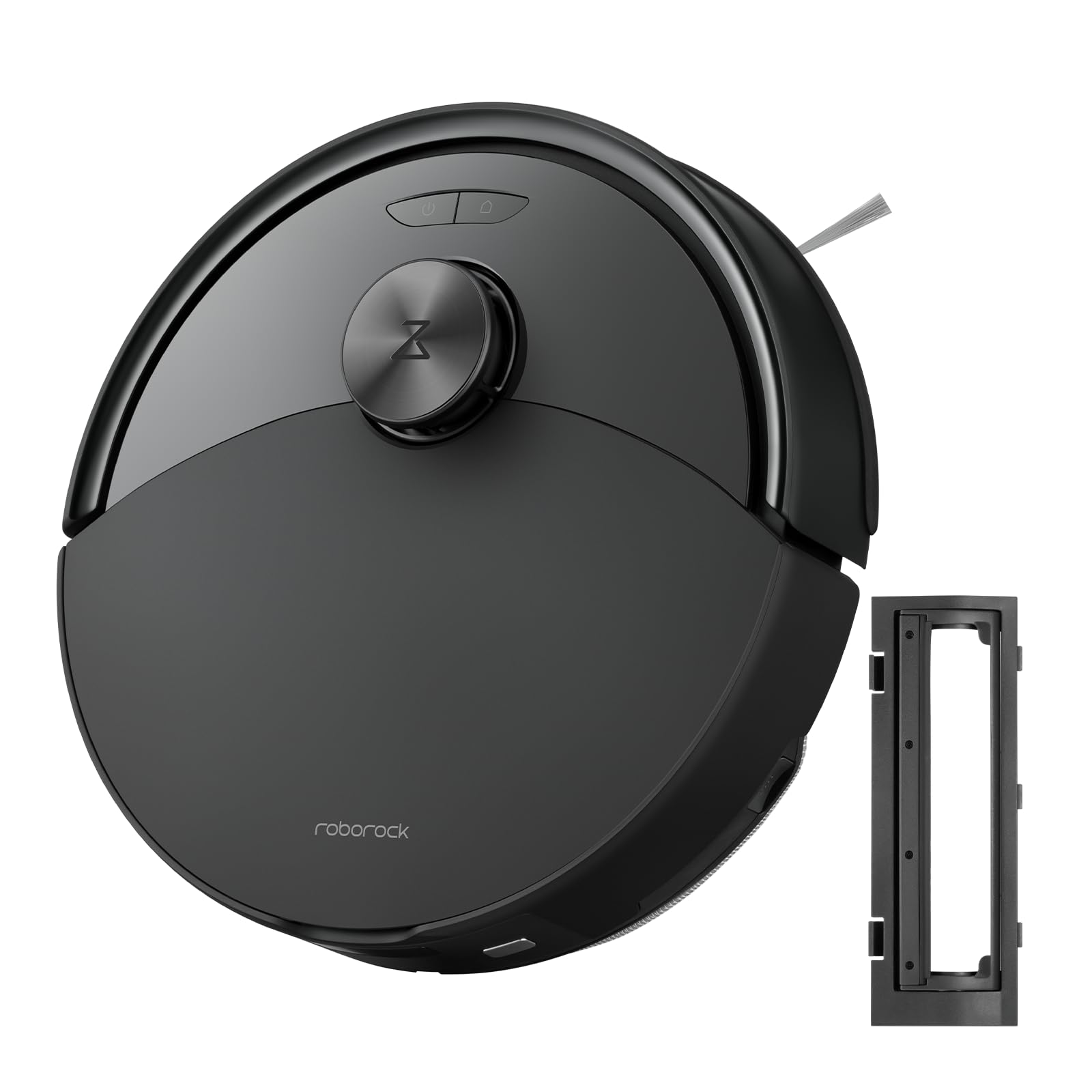
図1: The roborock Q10 S5 Robot Vacuum and Mop Cleaner. This image shows the top view of the robot, highlighting its sleek black design and main control buttons.
ロボットコンポーネント:
- トップカバー: Lifts to reveal the dustbin and Wi-Fi indicator.
- 電源/クリーンボタン: Press to start/pause cleaning, hold to turn on/off.
- Dock/Spot Clean Button: Press to send the robot back to the dock, hold for spot cleaning.
- LDS Sensor: ナビゲーションとマッピング用。
- バンパー: 障害物を検知します。
- サイドブラシ: 端や角からゴミを取り除きます。
- メインブラシ: Collects dirt and debris from floors. Features a floating design for better contact.
- 全方向ホイール: 動きのために。
- 充電接点: 充電ドックに接続します。
- 崖センサー: ロボットが階段から落ちるのを防ぎます。
- 水タンクとモップパッド: モップ機能用。
充電ドック:
- Dock Location Beacon: Helps the robot locate the dock.
- 充電接点: Transfers power to the robot.
- 電源ケーブルポート: 電源アダプタを接続します。
4. セットアップ
- ロボットを開梱する: Carefully remove the robot and all accessories from the packaging. Remove any protective films or shipping materials.
- サイドブラシを取り付けます。 Press the side brush onto its post until it clicks into place.
- 充電ドックを設置します。
- Place the charging dock on a hard, level surface against a wall.
- Ensure there is at least 0.5 meters (1.6 feet) of clear space on both sides and 1.5 meters (4.9 feet) in front of the dock.
- 電源ケーブルを充電ドックに接続し、壁のコンセントに差し込みます。
- 初期費用: Place the robot on the charging dock. The robot will automatically turn on and begin charging. For first-time use, fully charge the robot before operation (approximately 4-6 hours). The power indicator light will breathe white during charging and turn solid white when fully charged.
- アプリをダウンロード: 検索する "Roborock" in the App Store or Google Play Store, or scan the QR code on the packaging to download and install the app.
- Wi-Fiに接続します:
- Open the Roborock app and follow the on-screen instructions to add your device.
- 携帯電話が 2.4 GHz Wi-Fi ネットワークに接続されていることを確認してください。
- を押し続けます ドック そして 力 buttons simultaneously for 3 seconds until you hear the "Resetting Wi-Fi" voice alert.
- Follow the app's instructions to complete the connection.
5. 操作手順
クリーンアップの開始:
- ロボットより: を押す 力 button once. The robot will start cleaning.
- アプリから: Open the Roborock app and tap the "Clean" button.
Pausing/Resuming/Stopping:
- 一時停止: ロボットの任意のボタンを押すか、アプリで「一時停止」をタップします。
- 再開する: を押す 力 button or tap "Resume" in the app.
- 停止します。 To stop a cleaning cycle, press the ドック button to send the robot back to the charging dock, or tap "Stop" in the app.
モップ機能:
- 水タンクに水を入れる: Open the water tank cover, fill with clean water, and close securely.
- モップパッドを取り付ける: Wet the mop pad and wring it out. Slide it into the mop pad slot until it is securely attached.
- Start Mopping: The robot will automatically detect the mop module and switch to mopping mode. You can adjust water flow levels in the app.
アプリの機能:
- マップ管理: Create and save maps, set no-go zones, virtual walls, and invisible barriers.
- 選択的な部屋の清掃: Choose specific rooms to clean.
- 定期清掃: Set cleaning schedules for different times and days.
- Custom Cleaning Modes: 吸引力と水の流れのレベルを調整します。
- リモートコントロール: ロボットの動きを手動で制御します。
6. メンテナンス
Regular maintenance ensures your roborock Q10 S5 operates efficiently. Always turn off the robot and unplug the charging dock before performing any maintenance.
Dustbin and Filter (Weekly):
- ロボットの上部カバーを持ち上げます。
- ゴミ箱を取り外します。
- ゴミ箱のカバーを開けて、中身をゴミ箱に捨てます。
- Remove the filter. Tap it gently to remove dust. The filter can be rinsed with water; ensure it is completely dry before reinstallation (allow 24 hours).
- Rinse the dustbin with water if necessary and allow it to dry completely.
- Reinstall the dry filter and dustbin.
Main Brush (Weekly):
- ロボットをひっくり返します。
- Press the tabs to remove the main brush cover.
- メインブラシを持ち上げます。
- Use the cleaning tool (if provided) or scissors to cut and remove any hair or debris tangled around the brush.
- Reinstall the main brush and cover, ensuring it clicks into place.
Side Brush (Monthly):
- サイドブラシを外します。
- 髪の毛やゴミを取り除きます。
- Reattach and tighten the screw.
Sensors and Charging Contacts (Monthly):
- すべてのセンサー (崖センサー、壁センサー、LDS センサー ウィンドウ) と、ロボットとドックの充電用接点を、柔らかく乾いた布で拭きます。
Mop Pad (After Each Use):
- 水タンクからモップパッドを取り外します。
- Rinse thoroughly with water and allow it to air dry completely before next use.
7。 トラブルシューティング
If you encounter issues with your robot, please refer to the following table before contacting support.
| 問題 | 考えられる原因 | 解決 |
|---|---|---|
| ロボットが起動しません。 | バッテリー残量が少ないか、充電されていません。 | ロボットを充電ドックに置き、充電されていることを確認します。 |
| ロボットはWi-Fiに接続できません。 | Wi-Fi パスワードが間違っている、5GHz ネットワークである、または信号が弱い。 | Ensure correct 2.4GHz Wi-Fi, reset Wi-Fi on robot, move closer to router. |
| ロボットが頻繁に動けなくなります。 | 障害物、絡まったケーブル、または汚れたセンサー。 | Clear floor, clean sensors, use no-go zones in app. |
| 洗浄性能が悪い。 | Full dustbin, dirty filter, tangled brushes. | Empty dustbin, clean/replace filter, clean main/side brushes. |
| ロボットが異常な音を立てます。 | Debris in main brush, side brush, or wheels. | Inspect and clean all brushes and wheels for obstructions. |
If the problem persists, please refer to the Roborock app for more detailed error messages or contact customer support.
8. 仕様
| 特徴 | 詳細 |
|---|---|
| モデル | Q10 S5 |
| 寸法 | 約353 x 350 x 96.5 mm(13.9 x 13.8 x 3.8インチ) |
| 重さ | 約3.7kg(8.16ポンド) |
| バッテリー | Lithium-Ion (Capacity not specified, typical for robot vacuums) |
| 定格出力 | Approx. 60W (Typical for robot vacuums) |
| ゴミ箱容量 | Approx. 470 ml (Typical for robot vacuums) |
| 水タンク容量 | Approx. 300 ml (Typical for robot vacuums) |
| 吸引力 | Up to 10,000 Pa (HyperForce Suction Power from feature bullets) |
| Wi-Fi接続 | 2.4GHz帯 |
注:仕様は予告なく変更される場合があります。
9. 保証とサポート
roborock products are manufactured to the highest quality standards. For detailed warranty information, please refer to the warranty card included in your product packaging or visit the official roborock website. For technical support, troubleshooting assistance, or to purchase replacement parts, please contact roborock customer service through the app or their official webサイト。
正式 Webサイト: www.roborock.com