
DF Models 3145
DF Models Z-10 コンペティショントラギー BR ブラッシュド RTR ユーザーマニュアル
モデル: 3145
導入
This manual provides essential information for the safe and effective operation, maintenance, and troubleshooting of your DF Models Z-10 Competition Truggy BR. Please read this manual thoroughly before operating the vehicle.

Figure 1: The DF Models Z-10 Competition Truggy BR.
安全情報
Always prioritize safety when operating your RC vehicle. Failure to follow safety guidelines can result in injury or damage to the product or property.
- 操作推奨年齢は14歳以上です。
- 人、ペット、障害物の近くで操作しないでください。
- Ensure the battery is fully charged and securely installed before use.
- Avoid operating in wet conditions to prevent damage to electronic components.
- 使用していないときは必ず車両とリモコンの電源をオフにしてください。
- 手やゆったりとした衣服を可動部分に近づけないでください。
- The motor and electronic speed controller (ESC) can become hot during operation. Avoid touching them immediately after use.
パッケージ内容
パッケージにすべてのコンポーネントが含まれていることを確認します。
- Z-10 Competition Truggy BR (RTR)
- 2.4GHzリモコン
- NiMH 7.2 V 3500 mAh Battery
- USB充電ケーブル
- 取扱説明書(本書)
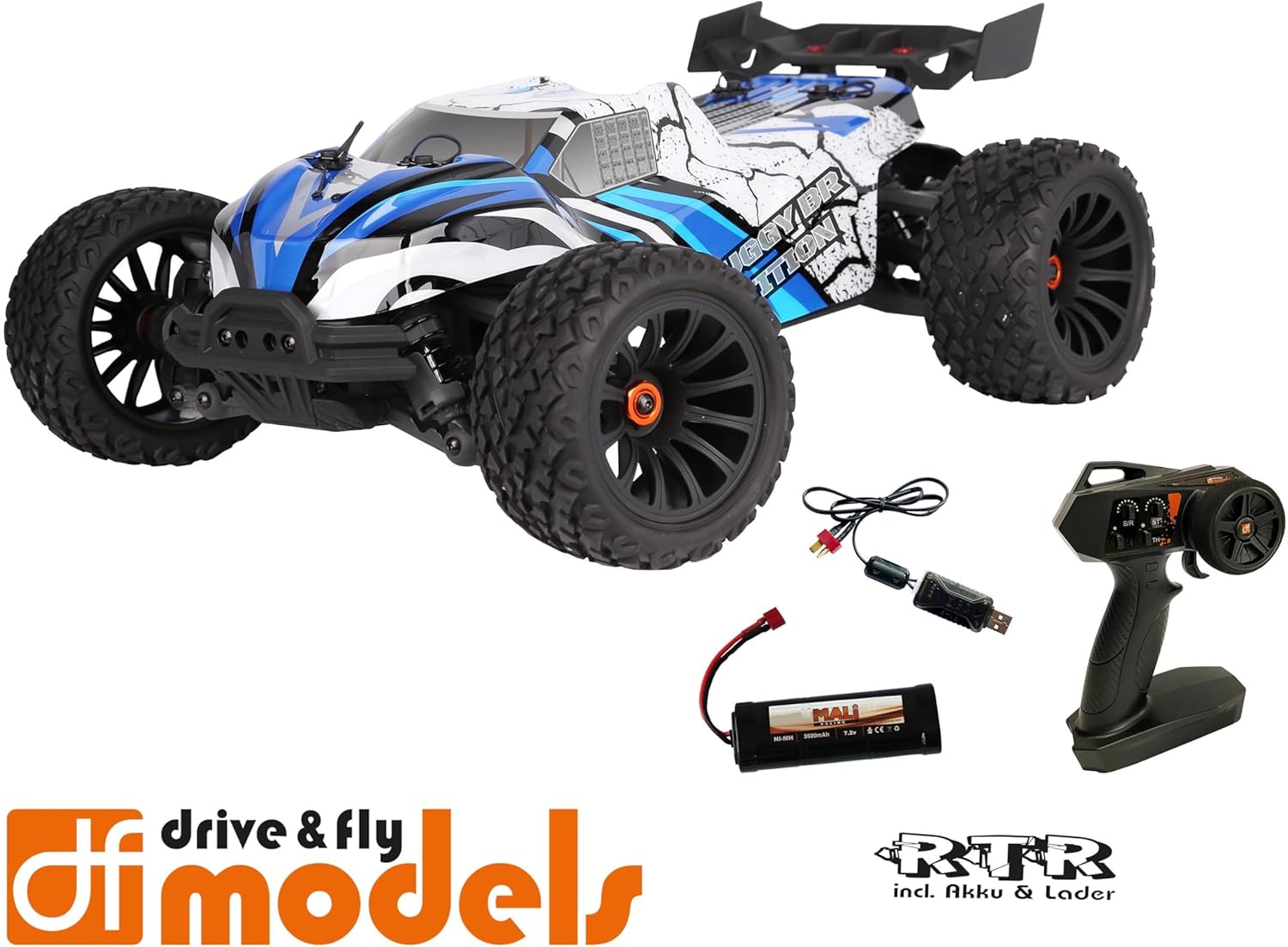
Figure 2: Included components: Truggy, remote control, battery, and USB charging cable.
設定
1. バッテリーの充電
Before first use, fully charge the included NiMH 7.2V 3500 mAh battery using the provided USB charging cable. Connect the USB cable to a compatible USB power source (e.g., computer USB port, USB wall adapter) and the battery connector.
- 充電時間は電源によって異なる場合があります。
- 充電中はバッテリーを放置しないでください。
- バッテリーが完全に充電されたら充電器を外してください。
2。 バッテリーの取り付け
Locate the battery compartment on the Truggy. Securely insert the charged battery and connect it to the vehicle's power connector. Ensure the battery is properly seated and secured with the retention clip.

Figure 3: Battery retention clip for secure battery installation.
3. リモコンの準備
Install the required batteries (not included) into the 2.4 GHz remote control. Ensure correct polarity. The remote control features a speed adjustment switch (100%, 75%, 50%) for different skill levels.

Figure 4: Remote control with adjustable speed settings (100%, 75%, 50%).
操作手順
1. 電源を入れる
- まずリモコンをオンにしてください。
- Then, turn on the power switch on the Truggy.
- The vehicle and remote control should automatically pair.
2. Driving the Truggy
- Use the trigger on the remote control to control forward and reverse movement.
- Use the steering wheel to control left and right turns.
- Adjust the speed limit switch on the remote control as needed (100% for maximum speed, 75% or 50% for reduced speed, ideal for beginners).
3.電源を切る
- Turn off the power switch on the Truggy first.
- Then, turn off the remote control.
- Disconnect the battery from the Truggy for storage.

Figure 5: The Truggy in operation on varied terrain.
メンテナンス
Regular maintenance ensures the longevity and optimal performance of your Truggy.
- クリーニング: After each use, especially in dusty or dirty conditions, clean the vehicle to remove debris. Use a soft brush or compressed air. Avoid using water directly on electronic components.
- コンポーネントの検査: 緩んだネジ、損傷した部品、摩耗したタイヤがないか定期的に点検し、緩んだ留め具があれば締め直してください。
- バッテリーのケア: 電池は涼しく乾燥した場所に保管してください。過充電や過放電はしないでください。
- モーターとESC: Ensure proper ventilation. The motor and ESC can get hot; allow them to cool down between runs.
- Oil Pressure Shock Absorbers: Check for leaks and ensure smooth operation. Refill or replace oil as needed (advanced maintenance).
- 差額: Inspect for smooth operation and proper lubrication.

Figure 6: Internal components including the motor and ESC, which require occasional inspection.
トラブルシューティング
| 問題 | 考えられる原因 | 解決 |
|---|---|---|
| 車両が応答しません。 | Battery not charged or connected. Remote control batteries low/dead. Vehicle/remote not powered on. Not paired. | Charge vehicle battery. Replace remote control batteries. Ensure both are powered on. Re-pair vehicle and remote. |
| 速度またはパワーが低下します。 | Low vehicle battery. Speed limit switch on remote set to 50% or 75%. | Recharge vehicle battery. Adjust speed limit switch to 100% for full power. |
| ステアリングの問題。 | Steering trim incorrect. Damaged steering servo or linkage. | Adjust steering trim on remote control. Inspect steering components for damage. |
| モーター/ESCが過熱しています。 | Continuous heavy use. Insufficient airflow. | Allow vehicle to cool down between runs. Ensure chassis is clear of debris for airflow. |
仕様
| 特徴 | 詳細 |
|---|---|
| モデル | DF Models Z-10 Competition Truggy BR |
| モデル番号 | 3145 |
| 規模 | 1:10XL RTR |
| ドライブ | 4WD Brushed |
| 長さ | 500 mm(50 cm) |
| 幅 | 360 mm(36 cm) |
| 身長 | 230 mm(23 cm) |
| ホイールベース | 300ミリメートル |
| 最高速度 | 最大40 km / h |
| バッテリー | NiMH 7.2 V 3500 mAh (included) |
| ステアリングサーボ | 10 kg with metal gear |
| ESC | 60A DF-1060 controller |
| 推奨年齢 | 14歳以上 |
| 材料 | プラスチック |

Figure 7: Key dimensions of the Truggy.
保証とサポート
For warranty information, technical support, or spare parts, please contact DF Models customer service. Refer to the official DF Models web連絡先の詳細については、サイトまたは購入書類をご覧ください。
注記: Unauthorized modifications or improper use may void the product warranty.
Ask a question about this manual
Ask about setup, troubleshooting, compatibility, parts, safety, or missing instructions. Manuals+ will review the question and use this page’s manual context to help answer it.