
1. はじめに
This manual provides detailed instructions for the Loutoc SRC4526 Universal Remote Control, designed for seamless compatibility with Philips Ambilight Smart TVs. Please read this guide thoroughly to ensure optimal use and longevity of your remote control.
1.1 製品終了view
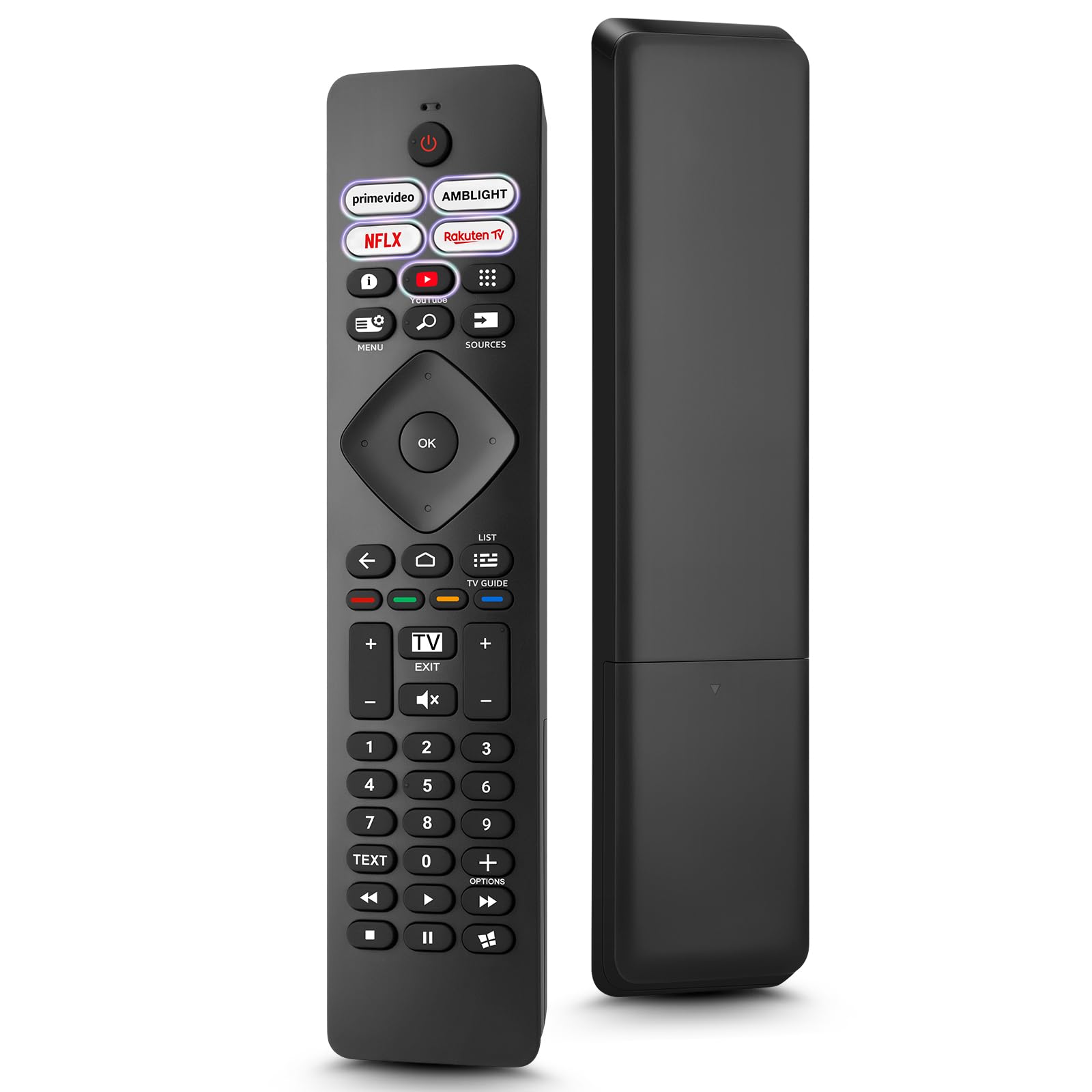
Image: The Loutoc SRC4526 Universal Remote Control, showcasin人間工学に基づいたデザインとボタンレイアウト。
1.2 主な特徴
- Convenient Plug-and-Play: No complex setup or programming required. Simply insert batteries and the remote is ready for use.
- ワイドテレビ互換性: Fully compatible with Philips Ambilight TVs, including 4K Ambilight LED, OLED, FHD, and Full Ultra HD models.
- 専用ショートカットボタン: Features 5 direct access buttons for popular streaming platforms: Ambilight, Video, NFLX (Netflix), Rakuten TV, and YouTube.
- 信頼性の高いパフォーマンス: Offers an effective operating range of 8 meters (26 feet) and an ultra-fast response time of 0.2 seconds.
2. セットアップ
2.1 バッテリーの取り付け
The Loutoc SRC4526 remote control requires two AAA batteries (not included) for operation.
- リモコンの背面にある電池収納部を見つけます。
- バッテリーコンパートメントカバーをスライドさせて開きます。
- 単 4 電池 2 本を挿入し、プラス (+) とマイナス (-) の端子がコンパートメント内のインジケータと正しく揃っていることを確認します。
- 電池カバーをしっかりと閉じてください。
2.2最初の使用
This remote control is designed for immediate use with compatible Philips Ambilight TVs. No programming or pairing is required. Once batteries are installed, point the remote at your TV and begin operation.
3. 操作手順
3.1 ボタンの機能view
Refer to the image below for a visual guide to the remote control's buttons and their corresponding functions.

Image: Detailed diagram of the Loutoc SRC4526 remote control, illustrating each button and its primary function.
| ボタン | 関数 |
|---|---|
| 力 | Switches the TV on or off (Standby mode). |
| Prime Video, Ambilight, Netflix, Rakuten TV | Quickly launches the corresponding application. |
| メニュー | Opens the Quick Menu with typical TV functions. Hold to show Gaming control bar. |
| 検索 | Opens the Search tab on the Home screen. |
| 出典 | Opens or closes the TV's input sources menu. |
| OK | Confirms a selection or setting. |
| Arrow/Navigation Keys | Navigates up, down, left, or right through menus and options. |
| 戻る | 前の画面またはチャンネルに戻ります。 |
| 家 | Opens the TV's Home menu. |
| テレビガイド | Opens or closes the TV Guide. Long press to open the channel list. |
| Color Keys (Red, Green, Yellow, Blue) | Provides direct selection of on-screen options. The blue key typically opens Help. |
| 音量(+/-) | テレビの音量レベルを調整します。 |
| チャンネル(+/-) | Switches to the next or previous channel. |
| 出口 | Exits current menu/application or returns to live TV. From standby, goes to last viewed source. |
| ミュート | テレビの音声をミュートまたはミュート解除します。 |
| 数字キー (0 ~ 9) | テレビチャンネルを直接選択します。 |
| 文章 | Opens or closes Text/Teletext. |
| 再生コントロール | Controls media playback: Play, Pause, Stop, Rewind, Fast Forward. |
| アプリ | Opens the Apps tab on the Home screen. |
3.2 Ambilight Functionality
For Philips TVs equipped with Ambilight functionality, the dedicated Ambilight button on your remote allows you to control the lighting effects.
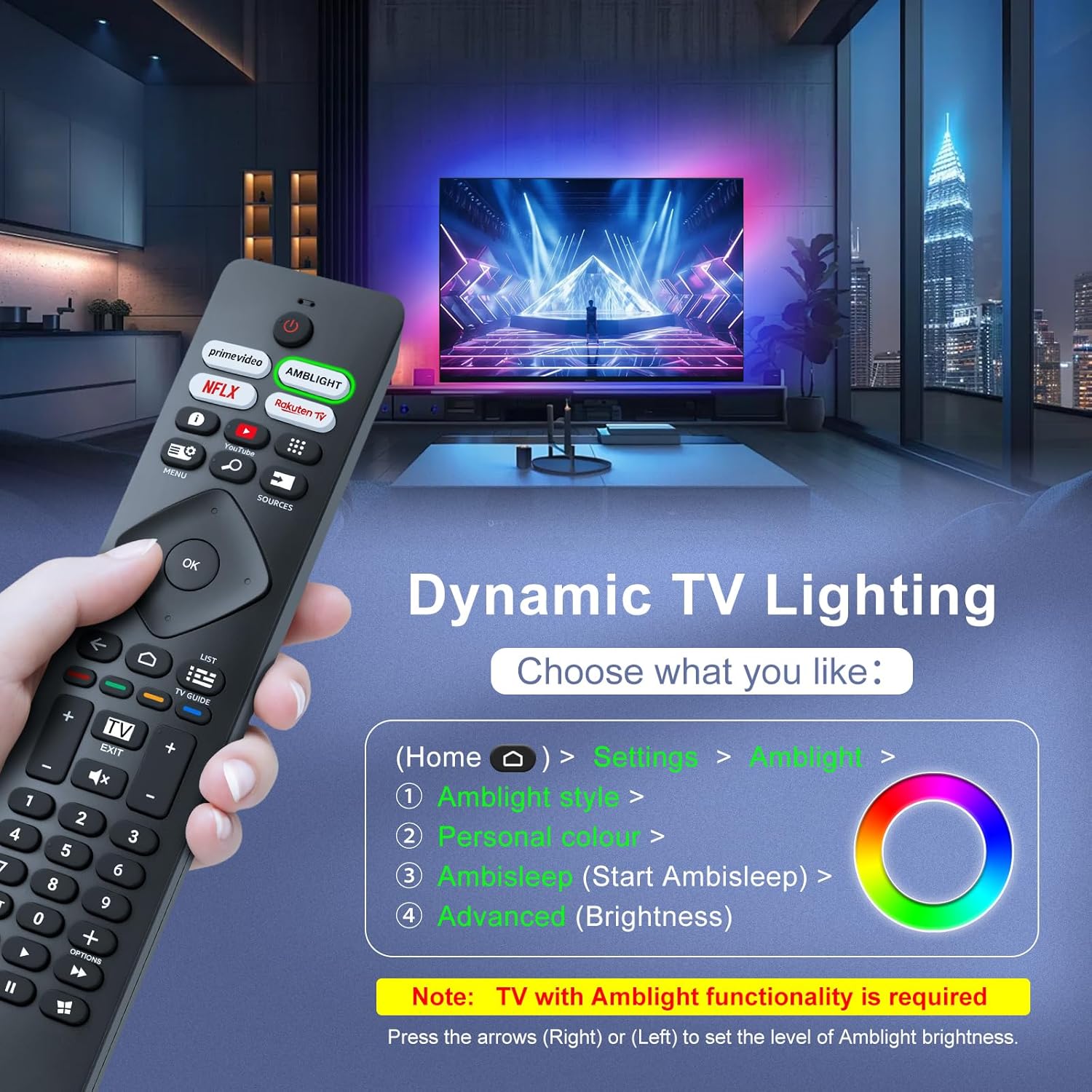
Image: A hand holding the remote control, with an overlay showing Ambilight settings on a TV screen.
After pressing the Ambilight button, you can navigate through the TV's menu to:
- Select different Ambilight display styles.
- Adjust personal color preferences.
- Initiate AmbiSleep mode.
- Adjust Ambilight brightness levels (using the right or left arrow keys).
Note: This feature requires a Philips TV with built-in Ambilight functionality.
4. メンテナンス
4.1 クリーニング
To clean your remote control, gently wipe it with a soft, dry cloth. Avoid using liquid cleaners, aerosols, or harsh chemicals, as these can damage the remote's surface or internal components.
4.2 ストレージ
リモコンは、直射日光や極端な温度を避け、涼しく乾燥した場所に保管してください。長期間使用しない場合は、液漏れを防ぐため、電池を取り外しておくことをお勧めします。
4.3バッテリーケア
- すべての電池を同時に交換してください。 古い電池と新しい電池を混ぜないでください。
- 異なる種類の電池(アルカリ電池と充電式電池など)を混ぜて使用しないでください。
- 使用済みバッテリーは地域の規制に従って責任を持って廃棄してください。
5。 トラブルシューティング
5.1 一般的な問題と解決策
- リモコンが応答しない:
- 電池が正しい極性で正しく挿入されているかどうかを確認してください。
- 電池を新しい単4電池に交換してください。
- リモコンとテレビの赤外線受信機の間に障害物がないことを確認してください。
- 有効な動作範囲(最大 8 メートル)内にいることを確認してください。
- 特定のボタンが機能しない:
- Clean the remote control, especially around the non-functioning buttons, to remove any dirt or debris.
- If only Ambilight functions are not working, ensure your Philips TV model supports Ambilight.
5.2 サポートにお問い合わせください
If you encounter persistent issues that cannot be resolved with the troubleshooting steps above, please contact Loutoc customer support directly. We aim to respond to all inquiries within 12 working hours.
6. 仕様
| 特徴 | 詳細 |
|---|---|
| ブランド | Loutoc |
| モデル名 | SRC4526-FBA |
| 商品型番 | SRC6500 |
| 色 | 黒 |
| 接続技術 | 赤外線 |
| 特集 | No programming required, Ergonomic, Lightweight |
| 対応デバイス | Television (Philips Ambilight TVs) |
| サポートされるデバイスの最大数 | 1 |
| コントローラータイプ | ボタンコントロール |
| 最大範囲 | 8メーター(26フィート) |
| バッテリーの説明 | AAA(2本必要、付属していません) |
| メーカー | Loutoc |
| 原産国 | 中国 |
| Amazon.com.be で最初に入手可能になった日 | 31年2025月XNUMX日 |
7. 保証とサポート
7.1 保証情報
This Loutoc remote control comes with a manufacturer's warranty of 30 days from the date of purchase. Please retain your proof of purchase for any warranty claims.
7.2 カスタマーサポート
For any questions, technical assistance, or warranty inquiries, please contact Loutoc customer support. We are committed to providing timely assistance and will respond to your queries within 12 working hours.