
1. はじめに
Thank you for choosing the ANCHEER Electric Tricycle. This manual provides essential information for the safe assembly, operation, and maintenance of your new tricycle. Please read it thoroughly before your first ride and keep it for future reference.
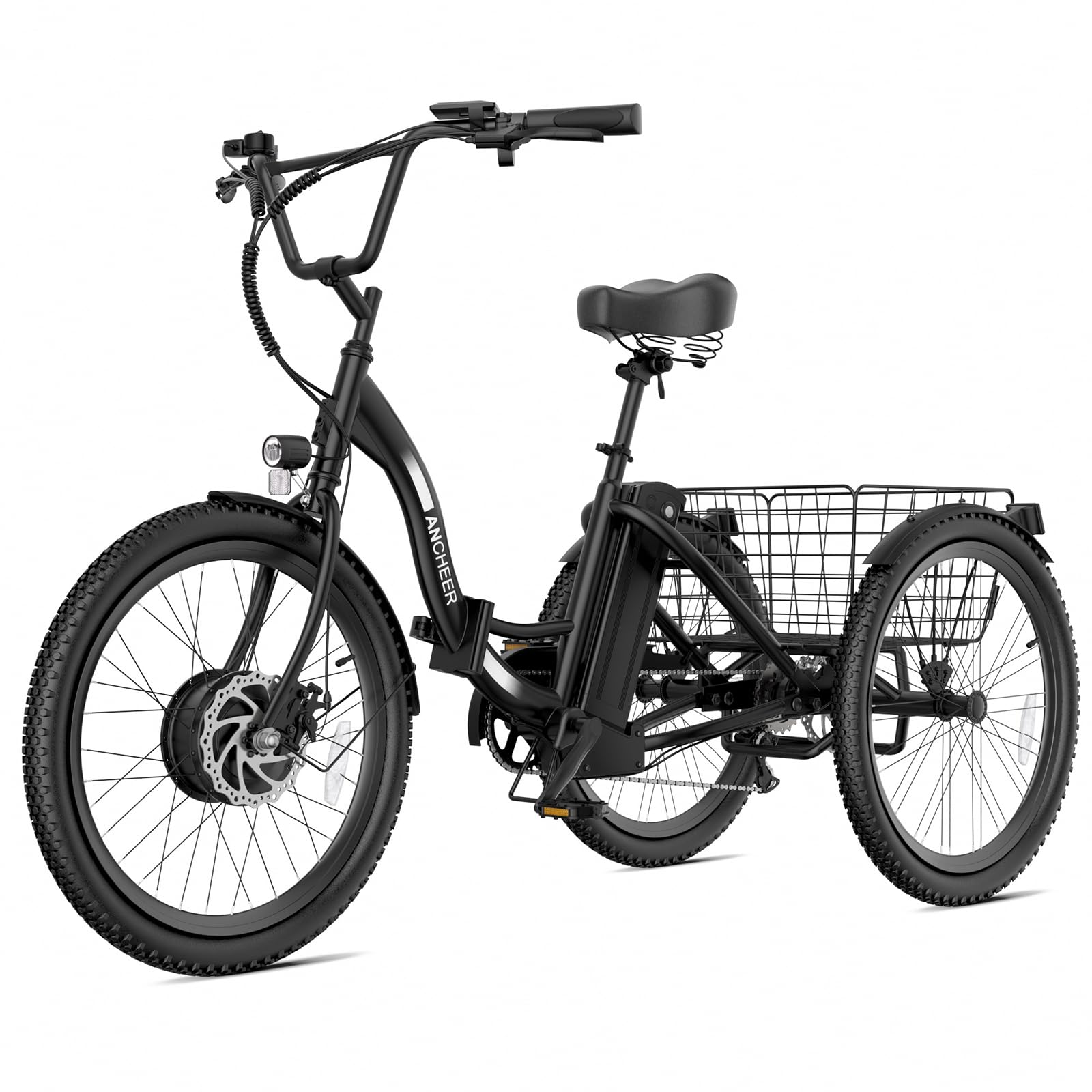
Image 1: The ANCHEER Electric Tricycle, a 24-inch folding three-wheel electric bike with a rear basket, shown in black.
2. 安全ガイドライン
- 乗車中は必ずヘルメットと適切な安全装備を着用してください。
- 地元の交通法規をよく理解しておきましょう。
- 毎回使用する前に、ブレーキ、タイヤ、バッテリーなどの乗車前安全点検を行ってください。
- アルコールや薬物の影響下で乗らないでください。
- Ensure the tire pressure reaches 40 psi before riding.
- The tricycle supports up to 265 lbs (seat) and 220 lbs (rear basket). Do not exceed these limits.
- Utilize the two parking brakes to ensure a reliable hold when parked on uneven ground or inclines.
3.製品オーバーview
The ANCHEER Electric Tricycle is designed for adults, featuring a 350W brushless motor (peak 600W) and a 48V 499Wh removable battery. It offers versatile riding modes and enhanced safety features for commuting and recreational rides.
主要コンポーネント:
- Frame (Aluminum)
- 電動フロントホイール
- 後輪
- リアフェンダー
- リアバスケットフレーム
- フロントフェンダー
- 充電器
- ベル
- サドル
- ペダル
- デジタルLCDディスプレイ
- フロントとリアの機械式ディスクブレーキ
- 7速ギアシステム
- Headlight, Taillights, and Reflectors

画像2: 詳細 view of the tricycle's control panel, braking system, gear mechanism, and seat design.
4. セットアップと組み立て
The ANCHEER Electric Tricycle is 80% pre-assembled. Please follow these steps for final assembly:
組み立てビデオガイド:
Video 1: ANCHEER 24" Electric Tricycle Unboxing and Assembly Guide. This video provides a step-by-step visual guide for assembling your tricycle.
段階的な組み立て:
- Install the Stem: Insert the handlebar stem into the front fork tube and tighten the bolt securely.
- Connect the Rear Axle to the Frame: Remove the protective rod from the rear axle connection points. Align the rear axle with the frame and insert the bolts. Tighten the four screws securely using a wrench and hex key.
- Install the Rear Tires: Remove the protective tape from the rear axle. Slide the rear tires onto the axle, ensuring proper alignment. Secure them by tightening the nuts.
- リアブレーキの取り付け: Clamp the rear brake caliper onto the brake disc. Align the screws and twist them by hand, then lock them securely with a tool. Connect the brake cable.
- Front Fender and Front Light Installation: Remove the protective rod from the front fork. Attach the front fender to the front fork using the provided screws and tools. Install the front light onto the fender.
- 前輪の取り付け: Carefully place the front wheel into the front fork, ensuring the brake disc aligns with the caliper. Secure the wheel by tightening the nuts on both sides of the axle.
- Motor Cable Installation: Connect the motor cable, ensuring the connectors are fully engaged and secured. Use a cable tie to manage the cable neatly.
- Connect the Light Cable: Connect the front light cable to the main wiring harness, ensuring a secure connection.
- チェーンの取り付け: Carefully route the chain around the front chainring and the rear cassette. Ensure it is properly seated on all gears.
- ディレイラーの取り付け: Press the shift button to adjust the transmission to "7". Lift up the transmission on the rear axle and connect the transmission hook.
- リアフェンダーの取り付け: Attach the rear fender to the frame. Adjust the fender to maintain a certain gap with the rear wheel for optimal clearance. Insert two screws in the middle and one screw at each end to secure it.
- バスケットの取り付け: Assemble the rear basket by connecting its sides. Secure the basket to the rear rack using the provided bolts and tools.
- クッションの取り付け: Install the seat cushion onto the seat post and adjust its height and angle for comfort.
- ペダルの取り付け: Identify the "R" (Right) and "L" (Left) pedals. Twist the "R" pedal clockwise into the right crank arm and the "L" pedal counter-clockwise into the left crank arm. Tighten them securely with a tool.
- Install the Bell: Attach the bell to the handlebar in a comfortable and accessible position.
5. 操作手順
5.1 バッテリーウェイクアップ
To activate the battery, insert the key into the battery lock and turn it to the 'ON' position. Press the power button on the battery to wake it up. The battery level indicator will light up.
5.2 LCDディスプレイの操作
The LCD display provides essential riding information and control over the tricycle's electric functions.
- 電源オン/オフ: Press the power button on the display to turn the tricycle on or off.
- アシストレベルを調整: Use the "+" and "-" buttons to cycle through the 5 pedal assist levels (L1-L5). Level 0 is manual pedaling.
- ヘッドライトコントロール: Long press the "+" button to turn the headlight on or off.
- Walk Push Mode: Long press the "-" button to activate walk push mode, which moves the tricycle slowly forward (1.9 MPH) for easy maneuvering.

Image 3: The digital LCD display showing various riding data and control buttons.
5.3 Riding Modes and Functions
- 7速ギアシステム: Utilize the 7-speed gear system to adjust pedaling resistance for different terrains, from climbing hills to cruising on flat roads.
- ペダルアシスト(PAS): Provides electric assistance while pedaling, with 5 levels of support.
- フル電動モード: Engage the throttle for full electric power without pedaling.
- クルーズコントロール: Activates when riding above 6 MPH by pressing the "-" button.
- ブースト機能: Engages at 1.9 MPH with a long press of the "-" button for easy starts.
5.4 One-Step Parking
To prevent the tricycle from sliding accidentally, engage the one-step parking feature. This ensures the tricycle remains stationary when parked.
5.5 Inflate the Tire
Before riding, ensure the tire pressure reaches 40 psi for optimal performance and safety. Use a bicycle pump with a pressure gauge.
6. メンテナンス
6.1バッテリーケア
- The 48V 499Wh battery is removable for convenient charging.
- Charge the battery fully before your first ride. Charging typically takes 4-5 hours.
- バッテリーを使用しないときは、涼しく乾燥した場所に保管してください。
- Avoid fully discharging the battery to prolong its lifespan.

Image 4: The removable 48V 499Wh lithium battery, highlighting its features and specifications.
6.2 一般的なメンテナンス
- ブレーキ: Regularly check the front and rear mechanical disc brakes for wear and proper function. Adjust as needed to ensure efficient braking.
- タイヤ: Inspect tires for wear, punctures, and proper inflation (40 psi).
- 鎖: スムーズに動作し、錆を防ぐために、チェーンを清潔に保ち、潤滑してください。
- 留め具: Periodically check all bolts and nuts for tightness, especially after the first few rides.
- クリーニング: 広告で三輪車を掃除するamp 布で拭いてください。高圧の水を電気部品に直接当てないでください。
7。 トラブルシューティング
If you encounter issues with your ANCHEER Electric Tricycle, refer to the following common troubleshooting tips:
- Tricycle not powering on: Ensure the battery is fully charged, properly installed, and activated (wake-up procedure). Check all cable connections.
- モーターがアシストしない: Verify the pedal assist level on the LCD display is set above 0. Check motor cable connections.
- ブレーキが弱いように感じる: Inspect brake pads for wear and replace if necessary. Adjust brake cable tension. Ensure brake calipers are properly aligned with the discs.
- 異常なノイズ: Check for loose components, especially around the wheels, chain, and motor. Lubricate the chain if it's squeaking.
- エラーコード: The digital LCD display can show error codes to facilitate troubleshooting. Refer to the display for specific codes and consult the manufacturer's support if needed.
8. 仕様
| 特徴 | 仕様 |
|---|---|
| モデル名 | AMAK00045 |
| バイクの種類 | 電動三輪車 |
| 年齢範囲 | アダルト |
| モーター | 350W ブラシレス(ピーク 600W) |
| バッテリー | 48V 499Wh Removable Lithium |
| 最高速度 | 時速15.5マイル |
| 最大範囲 | 最大55マイル(ペダルアシスト) |
| 充電時間 | 4~5時間 |
| ホイールサイズ | 24インチ |
| フレーム素材 | アルミニウム |
| ブレーキスタイル | フロントとリアの機械式ディスクブレーキ |
| 速度の数 | 7 |
| 最大トルク | 45N·m |
| Max Load Capacity (Seat) | 265ポンド |
| Max Load Capacity (Rear Basket) | 220ポンド |
| 特集 | Rear Differential, Dual Shock Absorbers, Safety Lighting System (Headlight, Taillights, Reflectors) |
9. 保証とサポート
ANCHEER provides a 1-year warranty on the motor, battery, and key components of your electric tricycle. Additionally, lifetime technical support is available from ANCHEER. For assistance, please contact ANCHEER customer service.