
1. はじめに
The SecuFirst CWL401S.32G is a comprehensive outdoor surveillance camera kit designed for reliable security monitoring. It features a 2K outdoor camera and a 7-inch indoor touchscreen monitor, offering a standalone surveillance solution that operates without requiring an internet connection or smartphone for basic functions. The system includes 32GB of local storage, expandable up to 2TB, and supports remote access via an optional smartphone application when connected to the internet.
2. パッケージ内容
以下にリストされているすべてのアイテムがパッケージに含まれていることを確認してください。
- 1 x Outdoor Camera
- 1 x 7-inch Touchscreen Monitor
- 2 x AC Power Adapters (1.8m cable)
- 1 x Power Extension Cable (1.8m)
- 1 x 32GB SD Card (pre-installed in monitor)
- 1 xイーサネットケーブル

画像: 上view of the SecuFirst surveillance camera kit components, including the camera, monitor, and accessories.
3.製品オーバーview
3.1. 7-inch Touchscreen Monitor
The monitor serves as the central control unit for your surveillance system. It features a responsive touchscreen for easy navigation and viewライブと録音されたフードのtage.

Image: Detailed diagram of the 7-inch touchscreen monitor, highlighting its various ports and indicators such as the recording indicator, power indicator, monitor microphone, power button, antenna connector, USB jack, speaker, monitor stand, Ethernet port, and SD card slot.
- Monitor Touchscreen: インタラクティブな制御と viewing。
- 記録インジケーター: Lights up when recording is active.
- 電源インジケーター: 電源の状態を表示します。
- Monitor Microphone: 双方向の音声通信用。
- 電源ボタン: 電源をオン/オフするには、3秒間押し続けます。
- アンテナコネクタ: 無線信号受信用。
- USBジャック: 外部ストレージまたはアクセサリ用。
- スピーカー: オーディオ出力用。
- モニタースタンド: Integrated for desktop placement.
- Ethernet Connection (Network Jack): For optional internet connectivity.
- SDカードスロット: For inserting the 32GB SD card (included) or an expandable card.
3.2. Outdoor Surveillance Camera
The 2K outdoor camera is designed for robust performance in various weather conditions, featuring an IP66 weatherproof metal casing.

Image: Detailed diagram of the outdoor surveillance camera, showing its components such as the power status LED, light sensor, IR LEDs, passive infrared motion sensor, audio speaker, microphone, adjustable camera stand, antenna, and power connections.
- 電源ステータスLED: Indicates camera operational status.
- 光センサー: 周囲の光を検知して昼夜モードを自動的に切り替えます。
- IR LED: 夜間視力用の赤外線 LED。
- Passive Infrared Motion Sensor: Detects thermal motion for accurate alerts.
- オーディオスピーカー: 双方向オーディオ出力用。
- マイクロフォン: 双方向オーディオ入力用。
- Adjustable Camera Stand: Allows for flexible mounting and angle adjustment.
- アンテナ: For wireless signal transmission to the monitor.
- AC電源ケーブル: 電源アダプタに接続します。
4. セットアップ
4.1. Initial Setup (No Wi-Fi Required)
The SecuFirst system is designed for easy plug-and-play installation. The camera and monitor are pre-paired at the factory, allowing for immediate use without complex network configuration.
- Connect the provided AC power adapters to the camera and the monitor.
- Plug both adapters into power outlets.
- The camera and monitor will automatically connect within seconds. Live video will appear on the monitor.

Image: Illustration showing the SecuFirst system operating without the need for internet or a smartphone, emphasizing its direct wireless connection.
The wireless range in open spaces is approximately 200 meters. This range may be reduced by walls, windows, and other obstructions. Avoid installing the outdoor camera near large metal objects, as this can interfere with the wireless signal.
4.2.カメラの設置
The camera is designed for wall mounting with screw-in installation.
- 希望する環境を提供する適切な屋外の場所を選択してください viewing angle and is within range of the monitor.
- 付属のネジとアンカーを使用して、カメラを壁または天井にしっかりと取り付けます。
- Adjust the camera stand to achieve the optimal view角度。
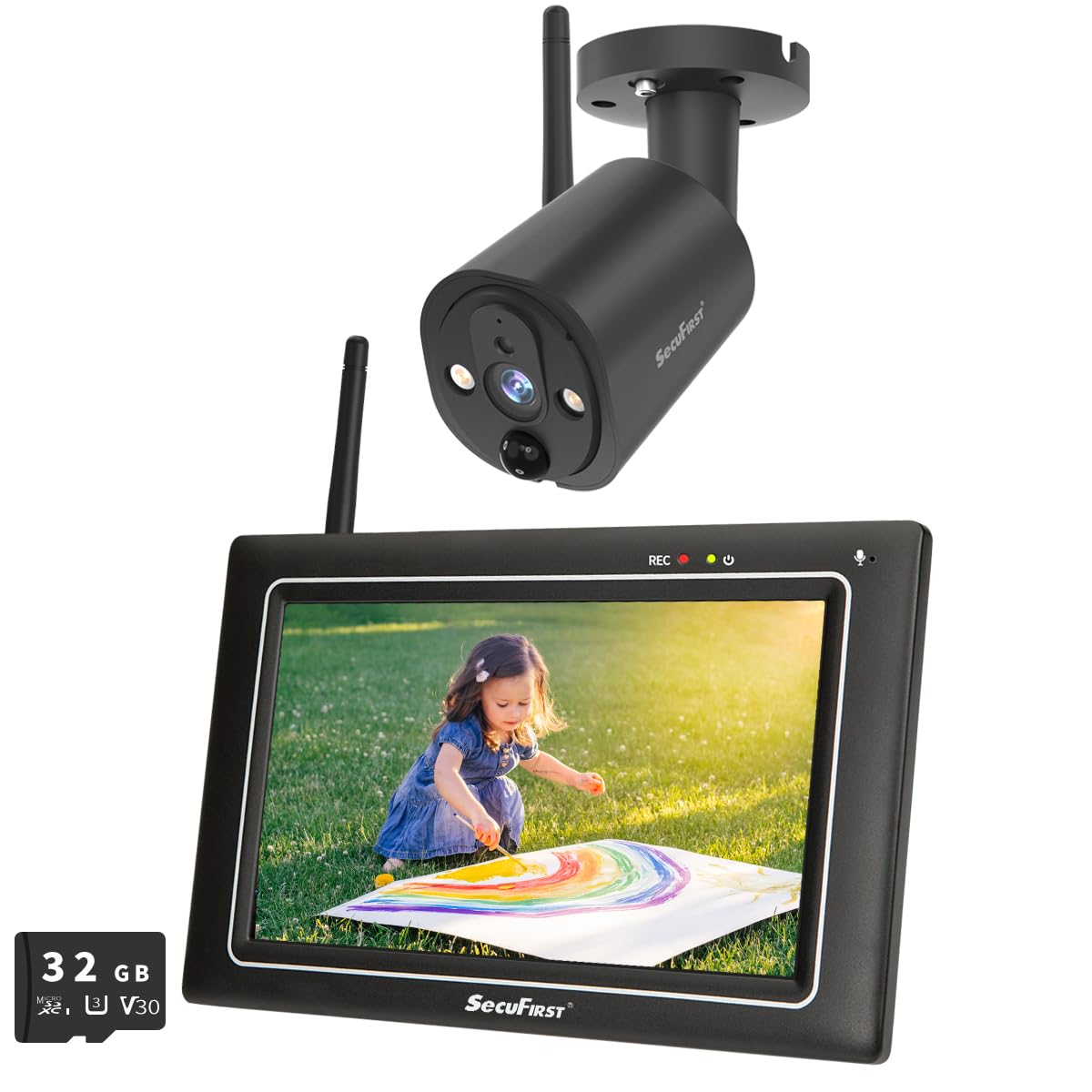
Image: The SecuFirst outdoor camera mounted securely under an eave, demonstrating a typical installation scenario.
4.3. モニターの配置
Place the 7-inch touchscreen monitor in a convenient indoor location where you can easily view and interact with it. The integrated stand allows for stable placement on a desk or table.

Image: The SecuFirst monitor placed on a wooden surface indoors, displaying a live feed of a child playing, with a smartphone showing the companion app in the foreground.
5. 操作手順
5.1.ライブ View 録音
Once powered on, the monitor will automatically display the live feed from the camera. You can navigate through different view複数のカメラが接続されている場合は、
- ライブ View: 7インチのタッチスクリーンで、 view live video directly.
- 録音: The system automatically records based on motion detection. Recordings are stored on the included 32GB local memory within the monitor.
- 再生: 記録された foo にアクセスするtage directly from the monitor. The system overwrites the oldest recordings when the memory is full.
- ストレージの拡張: The local memory can be expanded with a 128GB SD card or up to 2TB using an external hard drive or USB stick (not included).

Image: The SecuFirst monitor displaying a list of recorded events, with playback controls visible, and an illustration of inserting an SD card for storage expansion.
5.2. 双方向オーディオ
The system supports two-way audio, allowing you to speak through the monitor and hear audio from the camera's location.
- To speak, press and hold the microphone button on the monitor's touchscreen.
- ボタンを放すと聞きます。

Image: The SecuFirst monitor displaying a live feed with two-way audio controls, alongside a smartphone showing the app interface with similar audio functions.
5.3. Motion Detection and Privacy Masking
The camera features an AI + PIR thermal motion detector for precise event triggering. You can customize detection settings directly from the monitor.
- モーション検出ゾーン: カメラ内の特定の領域を定義する view モーション検出をアクティブにする場所。
- プライバシーマスキング: Mask out areas of the camera's view to protect privacy. These masked areas will not be recorded or displayed.
- アラーム通知: Configure alarm volume on the monitor and push notifications to the app (if connected to internet).

Image: The SecuFirst monitor displaying a live view with a highlighted 'Zone' area, indicating a configured motion detection zone.

Image: The SecuFirst monitor displaying a live view with a 'Privacy' box overlaying a section of the image, demonstrating the privacy masking feature.
5.4. ナイトビジョン
The camera is equipped with IR LEDs to provide clear night vision, ensuring continuous surveillance even in low-light conditions.

Image: A split image demonstrating the camera's capability, showing a scene in clear color during the day and in black and white with night vision at night.
5.5. Smartphone App (Optional)
For remote access and advanced features, you can connect the monitor to the internet and use the dedicated smartphone application.
- Connect the monitor to your internet router via the Ethernet cable or Wi-Fi.
- Download the "Observer HD+" application from your smartphone's app store.
- Follow the in-app instructions to pair your monitor with the application.
- 接続すると、次のことができます view live video, listen, talk, and play back recordings from your smartphone or tablet anywhere.

Image: A smartphone displaying the "Observer HD+" app interface, showing options for live view, recorded video playback, and two-way audio, with a live feed of a child playing.
5.6. 拡張性
The SecuFirst system is expandable and can support up to four cameras simultaneously, providing comprehensive coverage for your property.

Image: Visual representation of the SecuFirst system's expandability, showing configurations with one, two, and four cameras connected to a single monitor.
6. メンテナンス
Regular maintenance ensures optimal performance and longevity of your SecuFirst surveillance system.
- カメラレンズ: カメラのレンズは定期的に柔らかくてきれいな布で拭いてください。amp 布で埃や汚れを拭き取ってください。研磨剤入りの洗剤は使用しないでください。
- モニター画面: Wipe the touchscreen monitor with a microfiber cloth to keep it clean and clear.
- 電源接続: すべての電源アダプタとケーブルがしっかりと接続され、損傷がないことを確認してください。
- ストレージ: Regularly check the available storage space on the SD card or external drive. Back up important recordings as needed.
7。 トラブルシューティング
If you encounter issues with your SecuFirst system, refer to the following common problems and solutions:
| 問題 | 考えられる解決策 |
|---|---|
| No video on monitor | Ensure both the camera and monitor are powered on. Check power connections. Verify the camera and monitor are within wireless range and are paired. |
| Poor wireless range or signal interference | Reduce obstacles (walls, metal objects) between the camera and monitor. Relocate the camera or monitor to improve line of sight. |
| Smartphone app not connecting | Ensure the monitor is connected to the internet via Ethernet or Wi-Fi. Check your home network connection. Verify correct app pairing steps. |
| Recordings not saving or full storage | Check the 32GB SD card is properly inserted. Verify motion detection settings are configured correctly. Consider expanding storage with a larger SD card or external HDD/USB. |
| 双方向オーディオが機能しない | Ensure the microphone and speaker on both the camera and monitor are not obstructed. Check volume settings on the monitor. |
8. 仕様
| 特徴 | 詳細 |
|---|---|
| ブランド | SecuFirst |
| モデル番号 | CWL401S.32G |
| 色 | 黒 |
| ビデオ録画解像度 | 2K |
| モニター画面サイズ | 7インチ(タッチスクリーン) |
| ローカルストレージ | 32GB SDカード(付属) |
| 拡張可能なストレージ | Up to 128GB SD card or 2TB external HDD/USB |
| ワイヤレステクノロジー | Wi-Fi (for camera-monitor connection and optional internet access) |
| Camera Weather Resistance | IP66 (Metal casing) |
| モーション検出 | AI + PIR Thermal Detector |
| 双方向オーディオ | はい |
| ナイトビジョン | はい |
| Max. Cameras Supported | 4 |
| 電源 | 電気ケーブル |
| 取り付けタイプ | 壁掛け(ねじ込み式) |
| 製品寸法(長さ x 幅 x 高さ) | 20 x 14.2 x 7.8 cm; 1.58キログラム |
9. 保証とサポート
For warranty information, technical assistance, or any product-related inquiries, please contact SecuFirst customer service. Refer to your purchase documentation or the official SecuFirst web具体的な保証条件および連絡先の詳細については、サイトをご覧ください。
メーカー: ALCエレクトロニクスBV