
1. はじめに
ご購入ありがとうございますasing the SODLK T21 40W Portable Bluetooth Speaker. This manual provides essential information for setting up, operating, and maintaining your speaker. Please read it carefully before use to ensure optimal performance and longevity of the product.
2 製品の特徴
- 6D stereo surround sound for an immersive audio experience.
- Strengthened deep bass with 2pcs vibrating diaphragm.
- 4pcs built-in driver unit (2pcs bass driver unit + 2pcs Mids & Tweets) for balanced sound.
- 5Play model: Supports TF card slot, U disk, AUX input, Bluetooth, and TWS connection.
- 2pcs power amplifier for robust audio output.
- Integrated LED light for visual ambiance.
- Inbuilt 3600mAh battery for extended playtime.
- TWS (True Wireless Stereo) function to connect two speakers for amp生き生きとしたステレオサウンド。
3. パッケージ内容
開梱の際には、以下に挙げる品目がすべて揃っており、良好な状態であることを確認してください。
- SODLK T21 Portable Bluetooth Speaker
- USB Type-C充電ケーブル
- ユーザーマニュアル

Image: The SODLK T21 Portable Bluetooth Speaker, highlighting its ultra-portable design and key features like IPX7 waterproof rating, BT 5.3, punchy bass, voice assistant, Type-C port, 18 hours playtime, stereo pairing, and hands-free calls.
4.コントロールとインジケーター
Familiarize yourself with the speaker's control panel for easy operation:
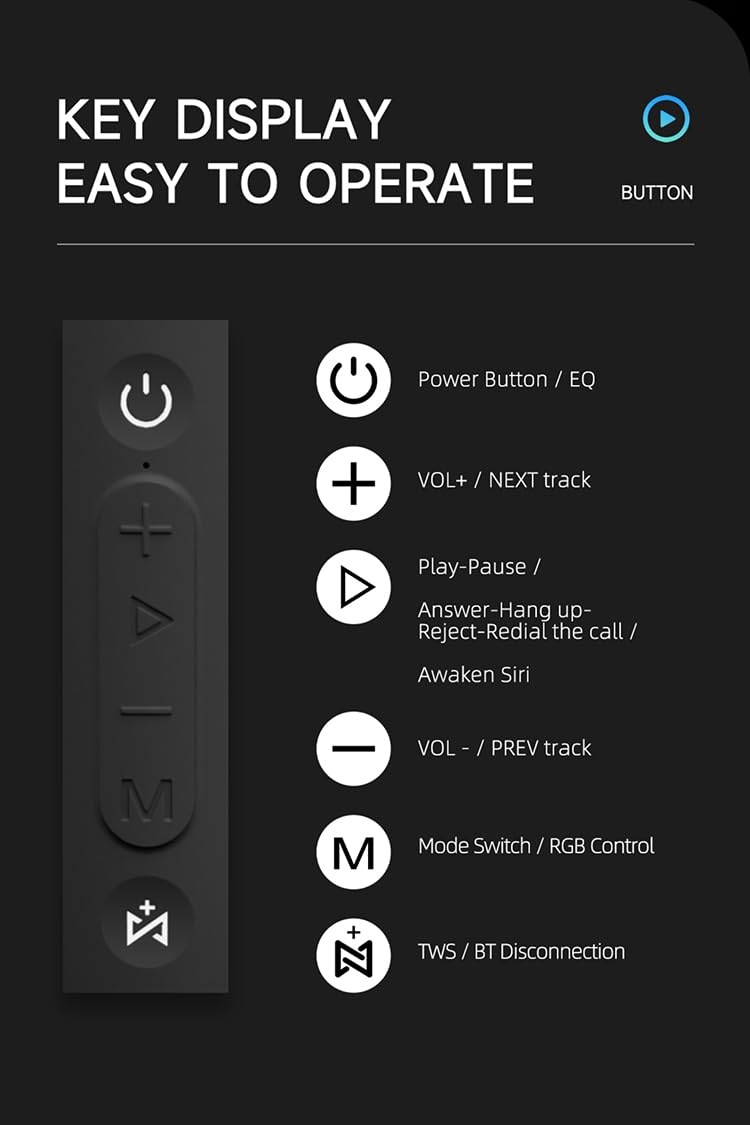
画像: 詳細な view of the SODLK T21 speaker's control panel, showing buttons for Power/EQ, Volume Up/Next Track, Play/Pause/Answer/Hang Up/Reject/Redial/Awaken Siri, Volume Down/Previous Track, Mode Switch/RGB Control, and TWS/BT Disconnection.
- Power Button / EQ: Press and hold to power on/off. Short press to cycle through EQ modes.
- VOL+ / NEXT track: 短く押すと音量が上がります。長く押すと次のトラックに進みます。
- Play-Pause / Answer-Hang up-Reject-Redial the call / Awaken Siri: Short press for play/pause. Short press to answer/hang up calls. Long press to reject calls. Double press to redial. Triple press to awaken Siri (or other voice assistant).
- VOL- / PREV track: 短く押すと音量が下がります。長く押すと前のトラックに戻ります。
- Mode Switch / RGB Control: Short press to switch between input modes (Bluetooth, TF card, U disk, AUX). Long press to control RGB lighting effects.
- TWS / BT Disconnection: Short press to initiate TWS pairing. Long press to disconnect Bluetooth.
5. セットアップと操作
5.1 スピーカーの充電
Before first use, fully charge the speaker. Connect the provided USB Type-C cable to the speaker's charging port and the other end to a compatible USB power adapter (5V/1A recommended). The charging time is approximately 3-4 hours.
5.2 電源オン/オフ
を押し続けます 電源ボタン for 2-3 seconds to turn the speaker on or off. An audible prompt will indicate the power status.
5.3Bluetoothペアリング
- スピーカーの電源を入れます。自動的にBluetoothペアリングモードになり、LEDライトが点滅します。
- デバイス(スマートフォン、タブレットなど)で Bluetooth を有効にします。
- 検索する "SODLK T21" in the list of available Bluetooth devices and select it to connect.
- Once connected, the LED light will become solid, and you will hear a confirmation tone.
5.4 TWS(トゥルーワイヤレスステレオ)ペアリング
To achieve stereo sound, you can connect two SODLK T21 speakers together:

Image: Two SODLK T21 speakers shown side-by-side with a TWS icon and dashed lines indicating a wireless connection, illustrating the stereo pairing feature.
- Ensure both SODLK T21 speakers are powered on and not connected to any other Bluetooth device.
- 片方のスピーカー(プライマリスピーカー)で、 TWSボタンスピーカーはTWSペアリングモードに入ります。
- 2つのスピーカーは自動的に接続されます。TWSペアリングが成功すると確認音が鳴ります。
- 次に、セクション5.3の説明に従って、デバイスをBluetooth経由でメインスピーカーに接続します。両方のスピーカーからステレオで音声が再生されます。
5.5 モード切り替え
を短く押す モード切り替えボタン(M) to cycle through available input modes: Bluetooth, TF Card, U Disk, and AUX. The speaker will announce the current mode.
5.6 RGBライトコントロール
長押し モード切り替えボタン(M) to change or turn off the RGB lighting effects.

Image: The SODLK T21 speaker displaying a vibrant rainbow light show, illustrating its 16.8 million color RGB light effect feature.
6. メンテナンス
- スピーカーは柔らかく乾いた布で拭いてください。研磨剤入りの洗剤や溶剤は使用しないでください。
- スピーカーは極端な温度、直射日光、湿気を避けて保管してください。
- スピーカーをご自身で分解したり修理したりしないでください。保証が無効になります。
- 長期間使用しない場合は、スピーカーを涼しく乾燥した場所に保管してください。
7。 トラブルシューティング
| 問題 | 考えられる原因 | 解決 |
|---|---|---|
| スピーカーがオンにならない。 | バッテリー残量が少なくなりました。 | スピーカーを完全に充電してください。 |
| Bluetooth経由でペアリングできません。 | スピーカーはペアリング モードになっていないか、すでに別のデバイスに接続されています。 | Ensure the speaker is in pairing mode (flashing LED). Disconnect from other devices. Restart both speaker and device. |
| 音が出ません。 | 音量が低すぎる、入力モードが正しくない、またはデバイスが再生されていない。 | Increase volume on both speaker and device. Check input mode. Ensure audio is playing on the connected device. |
| TWSペアリングに失敗します。 | スピーカーが離れすぎているか、すでに他のデバイスに接続されています。 | Ensure speakers are within close proximity. Disconnect both speakers from any other Bluetooth devices before initiating TWS pairing. |
8. 仕様

Image: The SODLK T21 speaker with its dimensions (232mm height, 100mm width) and a table of specifications including model number, color, BT version, output, waterproof rating, play time, charging time, working distance, input, speaker size, and speaker weight.
| 特徴 | 詳細 |
|---|---|
| モデル番号 | T21 |
| 色 | 黒 |
| BTバージョン | BT5.3 |
| 出力 | 40W |
| 防水 | IPX7 |
| プレイタイム | 最大18時間 |
| 充電時間 | 3~4時間 |
| 作動距離 | 最大18M |
| 入力 | 5V/1A |
| スピーカーサイズ | 232mm×100mm |
| スピーカー重量 | 1.12キロ |
9. 保証とサポート
The SODLK T21 Portable Bluetooth Speaker comes with a standard manufacturer's warranty. Please refer to the warranty card included in your package for specific terms and conditions. For technical support or service inquiries, please contact your retailer or the SODLK customer service team.