
1.製品オーバーview
The WEILAILIFE Indoor Wi-Fi Security Camera (Model: WEILAI-DPYTJ) is designed for comprehensive indoor surveillance, offering advanced features for home security, pet monitoring, and elderly/child care. Its compact dome design and wireless connectivity ensure seamless integration into any indoor environment.

画像: 正面 view of the WEILAILIFE Indoor Wi-Fi Security Camera.
2. 主な特徴
- ワンタッチ通話機能: Directly initiate a call to a registered smartphone by pressing a button on the camera, ideal for emergencies or quick communication.
- Two-Way Audio & Video Intercom: Communicate with family members from your smartphone anytime, anywhere, enhancing security and connection.
- 自動人物追跡: The camera automatically detects and follows moving human figures, providing efficient and unmanned surveillance over a wide area.
- Wide-Angle Pan/Tilt Coverage: Offers 355° horizontal and 60° vertical rotation, allowing surveillance from any angle in the house.
- Flexible Recording Storage: Supports both secure cloud storage and local TF card recording (up to 256GB), ensuring important footage is saved and accessible.
- 無料モバイルアプリ: Easily manage and monitor your camera with the free 'Im Cam' app, available on iOS and Android, with no monthly fees.
- ナイトビジョン: Equipped with infrared light source for clear monitoring in low-light conditions up to 20 meters.
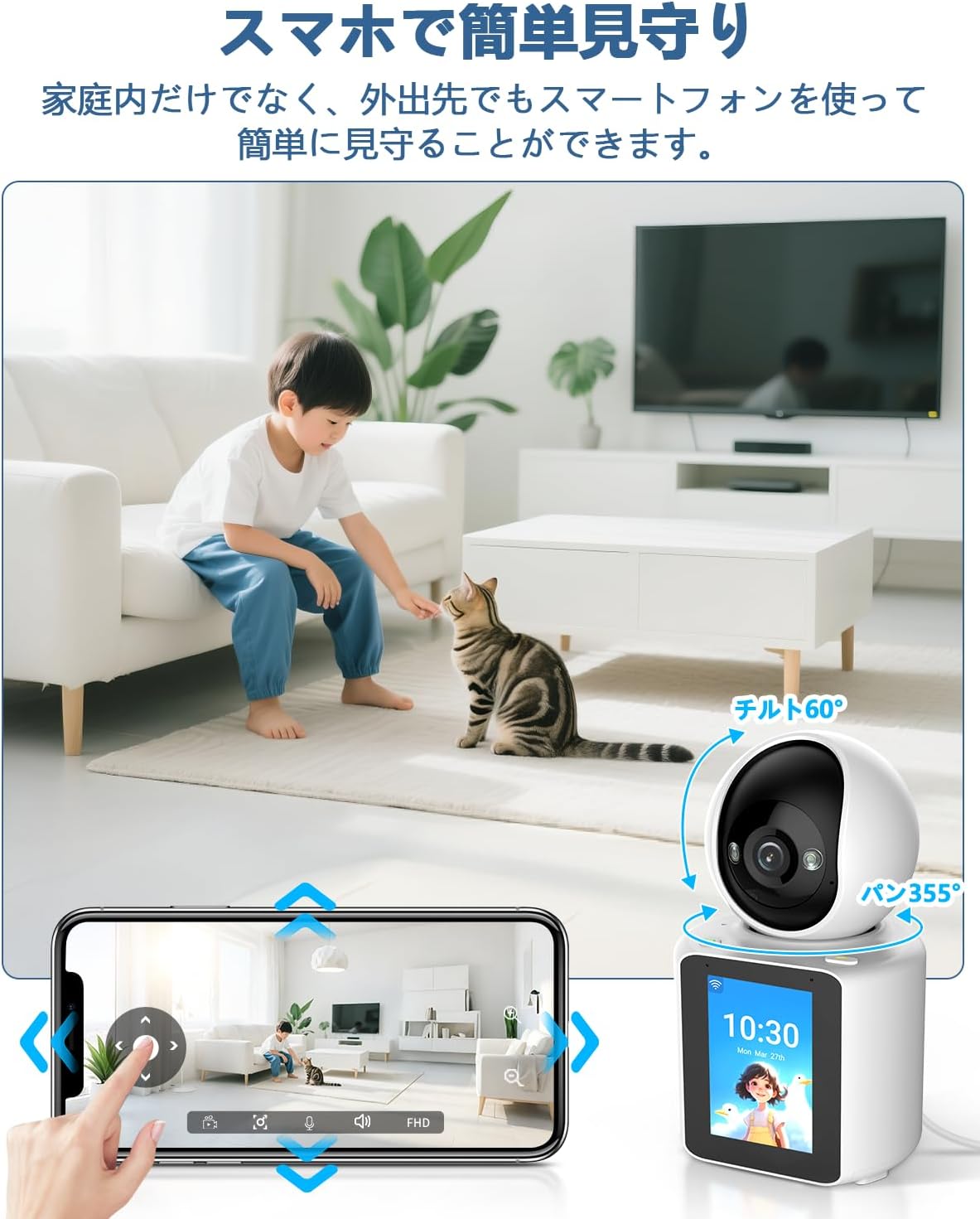
Image: An elderly person interacting with the camera's one-touch call feature, while a smartphone displays a video call.

Image: A child walking, with the camera's automatic human tracking feature highlighted, showing the camera following the child's movement.

Image: A smartphone screen showing pan and tilt controls for the camera, with a child and cat in the camera's view.
3. パッケージ内容
パッケージを開封したら、以下のアイテムがすべて含まれていることを確認してください。
- Camera Body (1 unit)
- 5V電源アダプター
- USBケーブル
- 取り付けブラケット
- スクリューパッケージ
- 取扱説明書

Image: All items included in the WEILAILIFE camera package, laid out neatly.
4. 製品仕様
| 特徴 | 仕様 |
|---|---|
| モデル番号 | WEILAI-DPYTJ |
| 推奨用途 | 屋内セキュリティ |
| 接続技術 | ワイヤレス(Wi-Fi) |
| 特集 | Video Intercom, One-Touch Call, Two-Way Audio, Horizontal 355° Vertical 60°, Automatic Human Tracking |
| Effective Still Image Resolution | 3 MP |
| Video Pixel Count | 1440p |
| フレームレート | 15fps |
| 分野 View | 355度 |
| 暗視範囲 | 20メートル |
| 電源 | コード式電気 |
| 製品本体サイズ | 20 x 10 x 10 cm |
| 外装材 | アクリロニトリルブタジエンスチレン(ABS) |
| Waterproof Type | 防水ではありません |
5.セットアップガイド
5.1 初期設定
- カメラを開梱します。 パッケージからすべてのコンポーネントを慎重に取り出します。
- SD カードを挿入します (オプション): If using local storage, gently lift the camera lens to reveal the SD card slot and insert a TF card (up to 256GB).
- 接続電源: Connect the provided USB cable to the camera's Type-C port and the 5V power adapter. Plug the adapter into a power outlet. The camera will perform an initial rotation and emit a welcome message.
- アプリをダウンロード: Scan the QR code in the instruction manual or search for 'Im Cam' in your smartphone's app store (iOS/Android) to download and install the application.
- アカウント登録: Open the 'Im Cam' app and follow the on-screen instructions to register a new account or log in if you already have one.
- デバイスを追加: In the app, tap the '+' icon to add a new device. Select the WEILAILIFE camera model.
- Wi-Fiに接続します: Enter your 2.4GHz Wi-Fi network name (SSID) and password. The camera does not support 5GHz Wi-Fi.
- QRコードをスキャンします: The app will display a QR code. Hold your smartphone 15-20 cm in front of the camera lens until you hear a beep sound, indicating successful scanning.
- セットアップを完了する: Once connected, the camera will appear in your device list. You can customize its name and location within the app.
5.2 Important Wi-Fi Considerations
The camera requires a stable 2.4GHz Wi-Fi connection. Ensure your Wi-Fi router settings are compatible. If you have multiple Wi-Fi networks, you can pre-set a 'backup Wi-Fi' in the app. If the current Wi-Fi signal is poor or the password changes, the device can automatically or manually switch to the backup Wi-Fi.
注記: The device does not verify if the password is correct during backup Wi-Fi setup. If the password is incorrect, connection may fail. Always verify the correct password manually to ensure proper operation.
Video: A demonstration of the two-way video call function, showing how to initiate a call and communicate through the camera.
6. 操作手順
6.1 ライブ View と再生
- ライブにアクセス View: From the app's home screen, tap on your camera to access the live video feed.
- 解像度を調整: Tap the HD/SD button on the live view screen to switch between high definition (HD) and standard definition (SD) video quality.
- パン/チルト/ズーム (PTZ): Use the directional controls in the app to remotely rotate the camera horizontally (355°) and vertically (60°). Pinch-to-zoom is also available for digital magnification.
- 双方向コミュニケーション: Tap the microphone icon to speak through the camera (two-way audio). Tap the video call icon to initiate a video call.
- 録音したFooの再生tage: Access the playback feature in the app to review recorded events or continuous footage. You can select specific dates and times.
6.2 動きと音の検出
- モーション検出: The camera is equipped with an automatic human tracking feature that detects movement and follows the subject.
- 音の検出: The camera can detect abnormal sounds and send instant notifications to your smartphone.
- アラート: Receive instant notifications on your smartphone when motion or sound is detected, allowing for timely response to suspicious activity or emergencies.
6.3 ナイトビジョン
The camera automatically switches to infrared night vision mode in low-light conditions, providing clear black-and-white video up to 20 meters. You can also manually enable or disable night vision in the app settings.

Image: Split image showing the camera's view in normal light (child sleeping) and in darkness (dog sleeping), demonstrating night vision capability.
7. 記録と保存
The WEILAILIFE camera offers flexible recording and storage options:
- ローカルストレージ(TFカード): Insert a TF card (up to 256GB) into the camera for continuous or event-triggered recording. This allows you to store footagデバイス上で直接実行します。
- クラウドストレージ: The camera supports cloud storage for secure backup of your recordings. This option ensures your data is safe even if the camera is damaged or stolen.

Image: Visual representation of cloud storage and TF card storage options for the camera.
8. 高度な機能
8.1 スマートホーム統合
The WEILAILIFE camera is compatible with Amazon Alexa and Google Assistant, allowing for voice control and integration into your smart home ecosystem.
8.2 ファミリー共有
You can easily share access to the camera's live view そして記録されたfootage with multiple family members through the app, ensuring everyone can stay connected and monitor the home.

画像: 複数の家族 viewスマートフォンのカメラ映像を映し出し、ファミリー共有機能の使い方を説明しています。
9. メンテナンス
- クリーニング: カメラのレンズと本体のお手入れには、柔らかく乾いた布をご使用ください。刺激の強い化学薬品や研磨剤の使用は避けてください。
- ファームウェアの更新: Regularly check the 'Im Cam' app for available firmware updates to ensure optimal performance and security.
- 電源サイクル: カメラに問題が発生した場合は、電源プラグを数秒間抜いてから再度差し込んでみてください。
10。 トラブルシューティング
- 接続の問題: Ensure your Wi-Fi network is 2.4GHz and the password is correct. Check the camera's distance from the router.
- アプリが応答しない: Clear the app's cache or reinstall the app if it becomes unresponsive.
- ビデオ/オーディオなし: Check your internet connection and ensure the camera is powered on. Verify app permissions for microphone and camera access.
- ワンタッチ通話が機能しない: Ensure the smartphone is registered correctly in the app and has an active internet connection.
11. 保証とサポート
The WEILAILIFE Indoor Wi-Fi Security Camera comes with a 12ヶ月の品質保証. Our company maintains strict quality control throughout manufacturing and inspection processes.
For any questions, concerns, or issues during the use of your product, please do not hesitate to contact our dedicated support team. We offer Japanese language support via email.
- メールサポート: info-jp@weilailifetech.com (Response within 24 hours)
- Japanese Service Center Address: Rose Avenue Inage Tendai 1F, 5-8-9 Tendai, Inage-ku, Chiba City, Chiba Prefecture.