
1. はじめに
The NGTeco NG-MB1 4-in-1 APP-Based Time Clock is a versatile attendance management system designed for small businesses. It offers multiple verification methods including facial recognition, fingerprint scanning, RFID card, and PIN entry to accurately track employee work hours. This manual provides detailed instructions for setting up, operating, maintaining, and troubleshooting your device.
2. 安全情報
- Ensure the device is installed indoors and away from direct sunlight, heat sources, and moisture.
- 損傷を防ぐため、付属の電源アダプターのみを使用してください。
- 自分でデバイスを分解したり修理したりしないでください。 サポートが必要な場合は、カスタマー サポートにお問い合わせください。
- デバイスを清潔に保ち、ほこりやごみが付かないようにしてください。
3. パッケージ内容
パッケージにすべてのアイテムが揃っていることを確認します。
- NGTeco NG-MB1 Time Clock Unit
- 電源アダプター
- 壁取り付けブラケット
- 取り付け金具(ネジ、アンカー)
- RFID Cards (multiple)
- USB Drive (for data transfer)
- クイックスタートガイド
- Contact Information Card
4.製品オーバーview
The NGTeco NG-MB1 Time Clock features a compact design with multiple input options for employee verification.
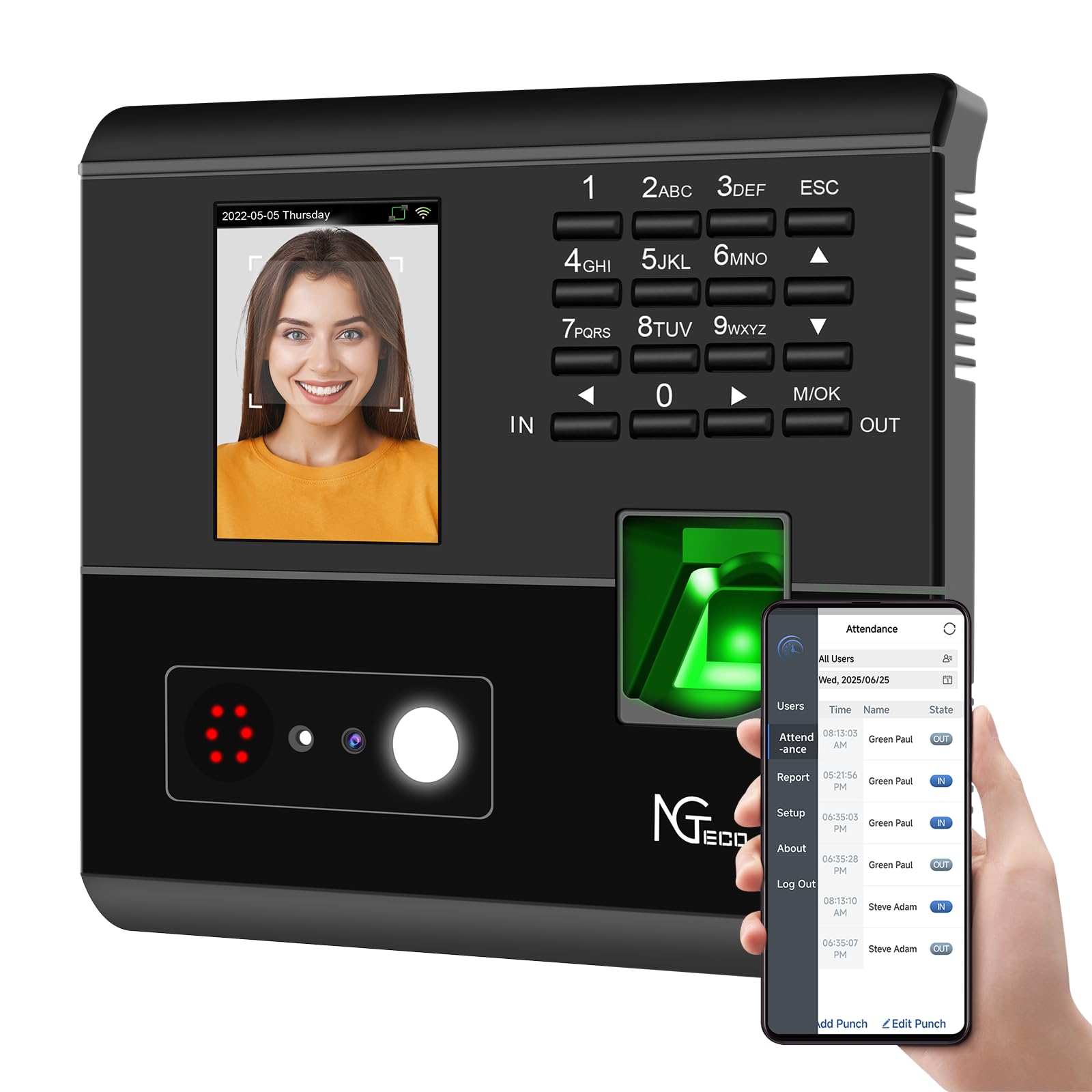
図1: フロント view of the NGTeco NG-MB1 Time Clock highlighting its four verification methods: Face Scan, Fingerprint, RFID Card, and Password.
フロントパネルの機能:
- 表示画面: Shows time, date, user information, and menu options.
- キーパッド: Numeric keys for PIN entry and navigation.
- 指紋リーダー: For biometric fingerprint verification.
- Face Recognition Camera: For facial recognition verification.
- RFID/Card Reading Area: For scanning RFID cards.
Side and Back Panel Features:

図2: 後方 view of the NGTeco NG-MB1 Time Clock, illustrating the power input, Ethernet port, and USB port for connectivity and data transfer.
- USBポート: For direct data transfer using a USB drive.
- 電源ポート: 付属の電源アダプターに接続します。
- イーサネットポート: 有線ネットワーク接続用。
5. セットアップ
5.1 デバイスのインストール
- Choose a suitable indoor location for mounting the time clock, ensuring it is at an appropriate height for all users.
- 付属の取り付けテンプレートを使用して、壁にドリル穴の位置をマークします。
- Secure the wall mounting bracket using the supplied screws and anchors.
- Connect the power adapter and, if desired, an Ethernet cable to the device.
- Attach the time clock unit to the mounted bracket.
5.2アプリのダウンロード
ダウンロード NGTeco Time App from your mobile device's app store (Apple App Store for iOS or Google Play Store for Android). This app is essential for managing users, attendance records, and generating reports.
ビデオ1: This video demonstrates the two methods for registering employee information on the NGTeco Time Clock, including using the device directly and through the NGTeco Time App.
5.3 Wi-Fi接続
デバイスを Wi-Fi ネットワークに接続するには:
- On the device, navigate to the [通信] メニュー。
- 選択 [無線ネットワーク].
- リストから希望の Wi-Fi ネットワークを選択します。
- キーパッドを使用して Wi-Fi パスワードを入力し、確認します。
- The device will attempt to connect to the network. A successful connection will be indicated on the screen.
ビデオ2: This video provides a step-by-step guide on how to configure the Wi-Fi settings on your NGTeco Time Clock device.
6. 操作手順
6.1 ユーザーの追加
Employees can be added directly on the device or through the NGTeco Time App.
Adding Users via Device:
- を押し続けます M / OK メインメニューにアクセスするためのボタン。
- 移動 [ユーザー] 選択して [ユーザーを追加する].
- 入力してください ユーザーID, ファーストネーム, 苗字、およびを設定します ユーザーロール (e.g., Employee, Admin).
- 選択してください 検証モード (Password, Fingerprint, Card, or Face).
- Follow the on-screen prompts to enroll the chosen verification method(s).
Adding Users via NGTeco Time App:
- スマートフォンでNGTeco Timeアプリを開きます。
- に移動 ユーザー section and tap ユーザーを追加.
- Enter the employee's details including ファーストネーム, 苗字, ピン、 そして 許可 レベル。
- Save and sync the data with the device.
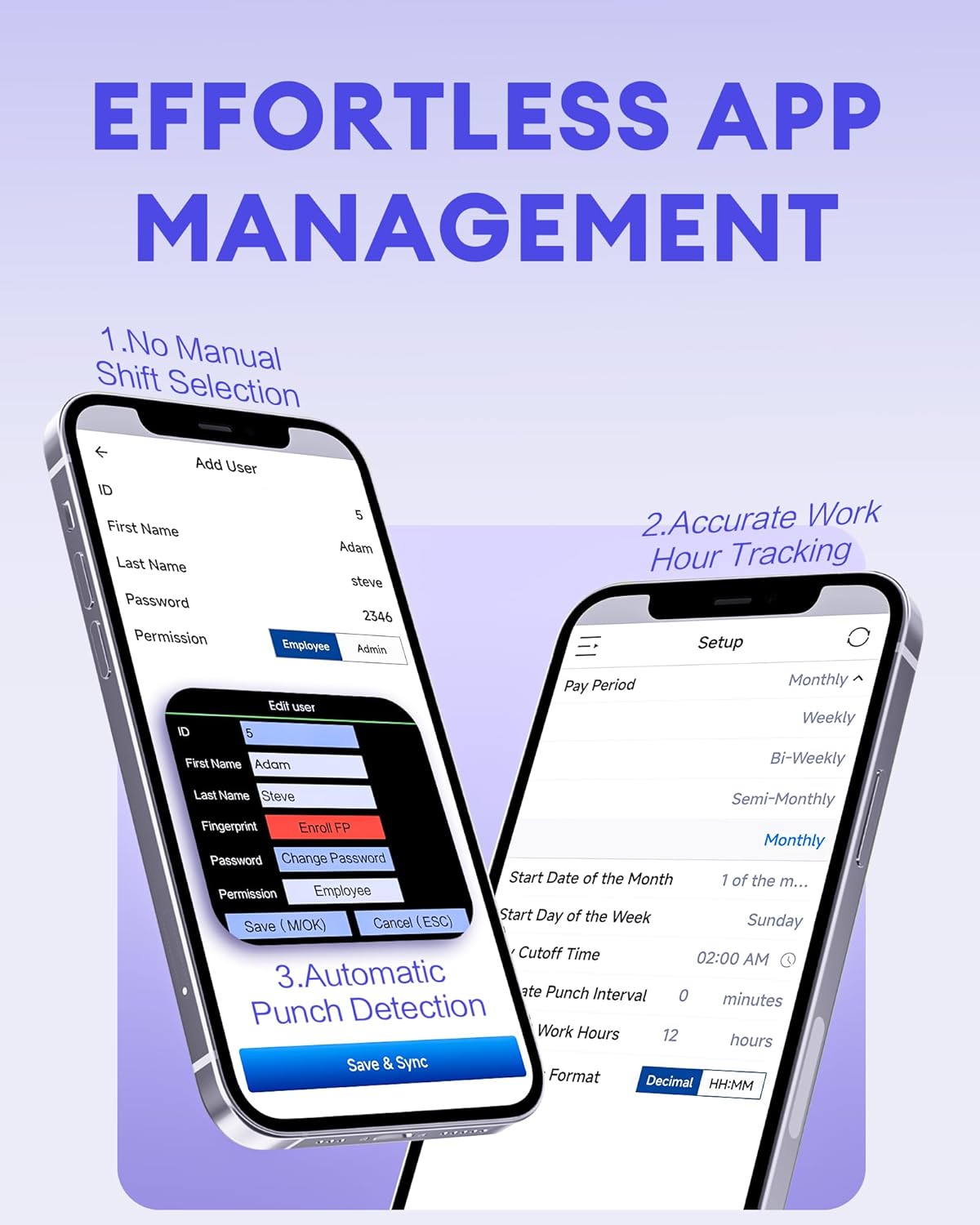
図3: The NGTeco Time App interface for effortless management, including adding users, setting up work hour tracking, and automatic punch detection.
6.2 Enrolling Biometrics and Cards
指紋登録:
For optimal fingerprint recognition:
- Always use clean fingers and avoid angled or tilted finger positions during enrollment.
- Place your finger belly completely in the middle of the reader.
- Do not slide the finger while enrolling. Apply some pressure for 1 second until the result is shown.
- If a finger is dry, gently breathe on it to moisten it before scanning.

図4: Visual representation of the high-precision fingerprint module, emphasizing reliable, fast, and secure access.
顔登録:
Follow the on-screen instructions to position your face correctly in front of the camera for enrollment.
RFID Card Enrollment:
When prompted, hold the RFID card near the designated reading area on the device until it is successfully registered.
6.3 Clocking In and Out
The NGTeco NG-MB1 supports automatic detection for clocking in and out, eliminating the need to press specific 'IN' or 'OUT' keys. Simply present your chosen verification method (face, fingerprint, RFID card, or enter your PIN) to the device.
ビデオ3: This video demonstrates the four recognition methods (Face, Fingerprint, RFID, PIN) for clocking in on the NGTeco Time Clock.
6.4 Managing Attendance Records
Attendance records can be modified directly on the device or through the NGTeco Time App.
Adding/Editing Missing Punches:
- デバイス経由: Access the menu, navigate to [時間データ]、 それから [足りないパンチを追加]. Select the user, date, time, and punch state (Check In/Check Out).
- アプリ経由: In the NGTeco Time App, go to the 出席 section. You can add a new punch or edit an existing one by selecting the user, date, time, and punch state.

図5: The NGTeco Time App's punch record correction feature, allowing easy fixes for errors or missing punches.
ビデオ4: This video illustrates how to modify attendance records directly on the NGTeco Time Clock device and through the mobile application.
6.5 レポートの生成
The NGTeco Time Clock supports various payroll cycles and offers multiple ways to download attendance reports.

図6: The NGTeco Time Clock supports various payroll cycles, including Monthly, Semi-Monthly, Bi-Weekly, and Weekly, for flexible attendance management.
Report Download Options:
- アプリメールダウンロード: Use the NGTeco Time App to email detailed reports directly to your inbox.
- USBドライブのダウンロード: Insert the provided USB drive into the device's USB port to download attendance data.

図7: Illustration of the two convenient methods for downloading attendance reports: directly to a USB drive or via email through the NGTeco Time App.
7. メンテナンス
- クリーニング: Regularly wipe the device's screen, keypad, and fingerprint sensor with a soft, dry cloth. Avoid using abrasive cleaners or liquids.
- ソフトウェアアップデート: Check the NGTeco Time App or website for any available firmware or software updates to ensure optimal performance and security.
- データのバックアップ: Periodically back up your attendance data using the USB drive or through the app to prevent data loss.
8。 トラブルシューティング
- デバイスの電源が入っていない: 電源アダプタがデバイスと正常な電源コンセントの両方にしっかりと接続されていることを確認します。
- Wi-Fi 接続の問題: Verify your Wi-Fi password and ensure the device is within range of your router. Restarting the device or router may help.
- Fingerprint/Face Recognition Failure: Ensure the sensor/camera is clean. For fingerprints, ensure fingers are clean and placed correctly with adequate pressure. Re-enrollment may be necessary if issues persist.
- アプリの同期の問題: Check your device's internet connection and ensure the time clock is connected to the same Wi-Fi network as your phone.
- Missing Punches: Refer to Section 6.4 for instructions on adding or editing missing punches.
For further assistance, consult the Quick Start Guide or contact NGTeco customer support.
9. 仕様
| 特徴 | 詳細 |
|---|---|
| ブランド | NGテコ |
| モデル番号 | NG-MB1 |
| 色 | 黒 |
| 表示タイプ | デジタル |
| 特集 | Face/Fingerprint/Card/PIN |
| 製品寸法 | 幅5インチ x 高さ4インチ |
| 電源 | コード式電気 |
| 接続技術 | Wi-Fi |
| アイテム重量 | 0.79キログラム |
| 材質タイプ | プレミアム ABS プラスチック |
10. 保証とサポート
- 保証: The NGTeco NG-MB1 comes with a 1-year manufacturer's warranty.
- テクニカルサポート: Enjoy free lifetime technical support from NGTeco's U.S.-based service team. Support is available Monday to Friday, 6 AM to 6 PM EST.
- For support, refer to the contact information provided in your Quick Start Guide or visit the official NGTeco webサイト。