
Baseus Baseus 145W Power Bank & 100W Charger Kit
Baseus 145W Power Bank & 100W Charger Kit User Manual
Model: Baseus 145W Power Bank & 100W Charger Kit (ASIN: B0FF4HSXP7)
1. はじめにview
This manual provides detailed instructions for the safe and efficient use of your Baseus 145W Power Bank and 100W USB C Charger Block. This kit is designed to provide high-speed charging for a wide range of devices, including laptops, tablets, and smartphones, offering both portable power and a versatile wall charging solution.
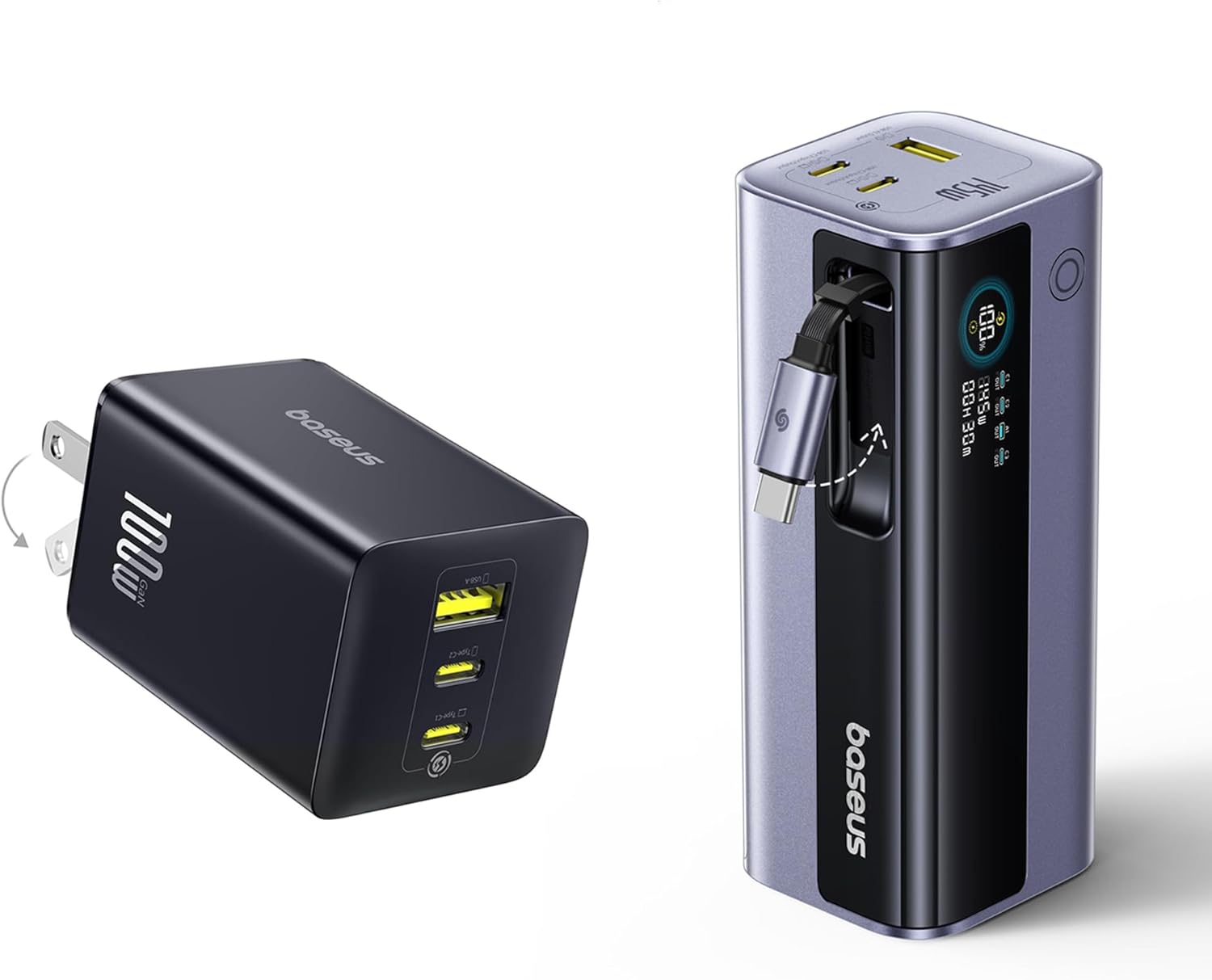
Figure 1: Baseus 145W Power Bank and 100W Charger Kit. The image shows the compact 100W charger block on the left and the 145W power bank with its retractable cable on the right.
2. パッケージ内容
パッケージにすべてのアイテムが含まれていることを確認してください。
- Baseus 145W Power Bank (20,000mAh) x 1
- Baseus 100W 3-Port USB C Charger Block x 1
3 製品の特徴
- Ultra-Fast 100W Triple USB-C Charging (Power Bank): The power bank features three USB-C ports capable of delivering up to 100W each. It can charge a 16-inch MacBook Pro to 43% in approximately 30 minutes. The dual-port output provides a combined 145W, ideal for simultaneous charging of laptops, tablets, and phones.

Figure 2: Power Bank 145W Total Output. Illustrates the power bank simultaneously charging a MacBook Pro at 100W and an iPhone at 45W, demonstrating its high-speed dual-device charging capability.
- Built-in 100W Retractable Cable (Power Bank): Equipped with a convenient 1.97ft (60cm) retractable USB-C cable, eliminating cable clutter. This durable cable is tested to withstand 30,000 stretches, ensuring longevity and ease of use.

Figure 3: Power Bank Charging Four Devices. Shows the power bank connected to a laptop, tablet, and two smartphones, highlighting its ability to charge multiple devices simultaneously using its various ports and the built-in retractable cable.
- 20,000mAh Large Capacity (Power Bank): 提供する ample power to charge devices multiple times. For example, it can charge an iPhone 16 approximately 3 times, a MacBook Air 2022 about 1 time, an iPad Pro 2022 about 1.4 times, and a Galaxy S25 Ultra about 2.2 times.

Figure 4: Power Bank Capacity Overview. Displays the 20,000mAh capacity and estimated charge cycles for various devices like iPhone, MacBook Air, iPad Pro, and Galaxy S25 Ultra, with a user charging a laptop on a train.
- 100W Ultra-Fast Charging (Charger Block): Each USB-C port on the charger block delivers a full 100W, capable of charging a MacBook Pro 16" (M4) to 100% in approximately 1.77 hours.

Figure 5: Charger Block 100W Laptop Charging. Shows the 100W charger block connected to a laptop, illustrating its capability for high-speed laptop charging.
- 3-in-1 Multi-Port Fast Charger (Charger Block): Equipped with two USB-C ports and one USB-A port, supporting simultaneous charging for up to three devices. Baseus exclusive BPS 3.0 smart power allocation technology dynamically delivers optimal power to each connected device, ensuring stable and efficient multi-device charging.

Figure 6: Charger Block Multi-Device Charging. Depicts the 100W charger block simultaneously charging a laptop, tablet, and smartphone, showcasing its multi-port functionality.
- Effective Temperature Drop & Cooling Technology: Both the power bank and charger block utilize advanced high-polymer silicon material for superior heat dissipation and Baseus Cooling Technology (BCT) for real-time temperature monitoring. This ensures safe fast charging and extends the battery lifespan of your devices.
- Travel-Friendly Portability (Charger Block): The 100W charger block features a compact design, approximately 43% smaller than standard chargers, and includes foldable pins for easy packing and a scratch-free design.

Figure 7: Charger Block Compact Design. Highlights the compact size of the 100W charger block compared to larger alternatives and shows its foldable pins for easy storage.
- ユニバーサル互換性: Compatible with a wide range of devices including smartphones (iPhone, Samsung, Huawei, Honor, Xiaomi, Vivo, OPPO), tablets (iPad, MatePad, Mi Pad), laptops (MacBook, MateBook, Xiaomi, Lenovo, Dell), and other devices (AirPods, Apple Watch, DJI Camera Drone, Switch).

Figure 8: Charger Block Universal Compatibility. Illustrates the broad compatibility of the charger block with various devices including smartphones, tablets, laptops, and other gadgets.
4. セットアップと初期使用
4.1. パワーバンクの初期充電
- Before first use, it is recommended to fully charge your Baseus 145W Power Bank.
- Connect the 100W USB C Charger Block to a wall outlet.
- Use a USB-C to USB-C cable (or the power bank's built-in retractable cable) to connect one of the power bank's USB-C input/output ports to a USB-C port on the charger block.
- The power bank's digital display will show the charging status and current battery percentage.
- Charging time will vary depending on the power source, but using the included 100W charger block will provide the fastest recharge.
4.2. Using the 100W USB C Charger Block
- Unfold the pins on the charger block.

Figure 9: 100W Charger Block. A close-up view of the 100W charger block, showing its foldable pins and the USB-A and USB-C ports.
- 充電器ブロックを標準の壁のコンセントに差し込みます。
- Connect your device's charging cable to one of the available USB-C or USB-A ports on the charger block.
- The charger block will automatically detect your device and deliver optimal power.
5. 操作手順
5.1. Charging Devices with the Power Bank
- Using the Built-in Retractable Cable: Gently pull the retractable USB-C cable from the side of the power bank until it extends to the desired length. Connect the USB-C end to your compatible device. To retract, gently pull the cable again slightly, and it will automatically retract into the power bank.
- 外部ケーブルの使用: Connect your device's charging cable (USB-C to USB-C, USB-C to Lightning, or USB-A to compatible connector) to one of the available USB-C or USB-A output ports on the power bank.
- パワーバンクは自動的にデバイスの充電を開始します。デジタルディスプレイにバッテリー残量(%)が表示されます。tage and real-time output information.
- For optimal fast charging, use the USB-C ports with compatible devices and cables.
5.2. 同時充電
Both the power bank and the charger block support simultaneous charging of multiple devices. The intelligent power allocation system (BPS 3.0 for the charger block) will distribute power optimally across connected devices. Note that total output power will be shared among devices.
6. メンテナンス
- クリーニング: Wipe the surfaces of the power bank and charger block with a soft, dry cloth. Do not use harsh chemicals or abrasive materials.
- ストレージ: デバイスは、直射日光、極端な温度、湿度を避け、涼しく乾燥した場所に保管してください。
- バッテリーケア(パワーバンク): For optimal battery longevity, avoid fully discharging the power bank frequently. Recharge it when the battery level is low. If storing for extended periods, charge it to about 50-70% every 3-6 months.
- 引き込み式ケーブル: Ensure the retractable cable is clean and free of debris to prevent jamming. Do not force the cable if it resists retraction.
7。 トラブルシューティング
- Device not charging from Power Bank/Charger Block:
- - Ensure the power bank is sufficiently charged. Check its digital display.
- - Verify that the charging cable is securely connected to both the power bank/charger block and your device.
- - Try a different charging cable or port.
- - Ensure your device is compatible with the charging output (e.g., some devices require specific USB-C Power Delivery profiles)。
- 充電が遅い:
- - Ensure you are using a high-quality cable that supports fast charging protocols (e.g., USB-C PD cables).
- - If multiple devices are connected, the power output is shared, which may reduce individual charging speeds.
- - Check if your device supports the fast charging protocols provided by the Baseus products.
- Power Bank display is off or unresponsive:
- - Press the power button on the power bank to activate the display.
- - Try charging the power bank to see if it responds.
- Retractable cable not retracting smoothly:
- - Gently pull the cable slightly further out, then release it slowly. Do not force it.
- - Ensure there is no debris obstructing the retraction mechanism.
8. 仕様
| 特徴 | 仕様 |
|---|---|
| 製品名 | Baseus 145W Power Bank & 100W Charger Kit |
| パワーバンク容量 | 20,000mAh |
| パワーバンク最大出力 | 145W(合計) |
| パワーバンクポート | 2x USB-C (Input/Output), 1x USB-A (Output), 1x Built-in Retractable USB-C Cable (Input/Output) |
| Charger Block Max Output | 100W(合計) |
| Charger Block Ports | USB-C x 2、USB-A x 1 |
| テクノロジー | Power Delivery (PD), Quick Charge (QC), Baseus Power Split (BPS 3.0), Baseus Cooling Technology (BCT) |
| ASIN | B0FF4HSXP7 |
| 初回利用可能日 | 25年2025月XNUMX日 |
9. 安全情報
- デバイスを水、湿気、または極端な温度にさらさないでください。
- Avoid dropping, disassembling, or attempting to repair the devices yourself. This will void the warranty and may cause damage or injury.
- お子様の手の届かない場所に保管してください。
- Do not use the devices if they are visibly damaged or show signs of overheating.
- Ensure proper ventilation when charging, especially for high-power devices.
- Dispose of the power bank responsibly according to local regulations for lithium-ion batteries.
10. 保証とサポート
Baseus products typically come with a limited warranty. Please refer to the warranty card included with your product or visit the official Baseus web詳細な保証条件については、サイトをご覧ください。
For technical support, troubleshooting assistance, or warranty claims, please contact Baseus customer service through their official website or the retailer from whom you purchased the product. You can find more information and contact details on the AmazonのBaseusストア.
Ask a question about this manual
Ask about setup, troubleshooting, compatibility, parts, safety, or missing instructions. Manuals+ will review the question and use this page’s manual context to help answer it.