
1. はじめに
This manual provides detailed instructions for the safe and effective use of your AFEXOA DY20 Night Light Bluetooth Speaker Alarm Clock. Please read this manual thoroughly before operating the device and retain it for future reference.
2 製品の特徴
- 多機能デバイス: Integrates a 20W Hi-Fi speaker, white noise machine, sleep sound machine with timer, multi-color touch control LED lamp, night light, and bedside alarm clock.
- 高忠実度ステレオサウンド: Delivers clear, undistorted sound with powerful bass, compatible with all Bluetooth devices.
- デジタル目覚まし時計: Features 7 selectable alarm sounds (soft music, natural sounds), 30 adjustable volume levels (up to 110 dB), and an unlimited 9-minute snooze function.
- Sensitive Touch Activated Lamp: Offers 8 RGB color options (Red, Green, Blue, Yellow, Purple, Indigo, White, Color cycle) and 3 levels of warm white light for various moods and occasions.
- 30 Soothing Sounds & Sleep Timer: Includes 5 white noise, 5 fan sounds, 6 lullaby sounds, and 14 natural sounds. Features a 15, 30, 60, or 90-minute sleep timer for automatic sound and light shut-off.
- MP3 Player Support: Supports music playback via USB Flash Drive and Micro SD/TF Card input.
3. パッケージ内容
- 1 x AFEXOA DY20 Night Light Bluetooth Speaker Alarm Clock
- USB充電ケーブル x 1
- ユーザーマニュアル x 1
4.製品オーバーview
デバイスのコンポーネントとコントロールについて理解しておきましょう。
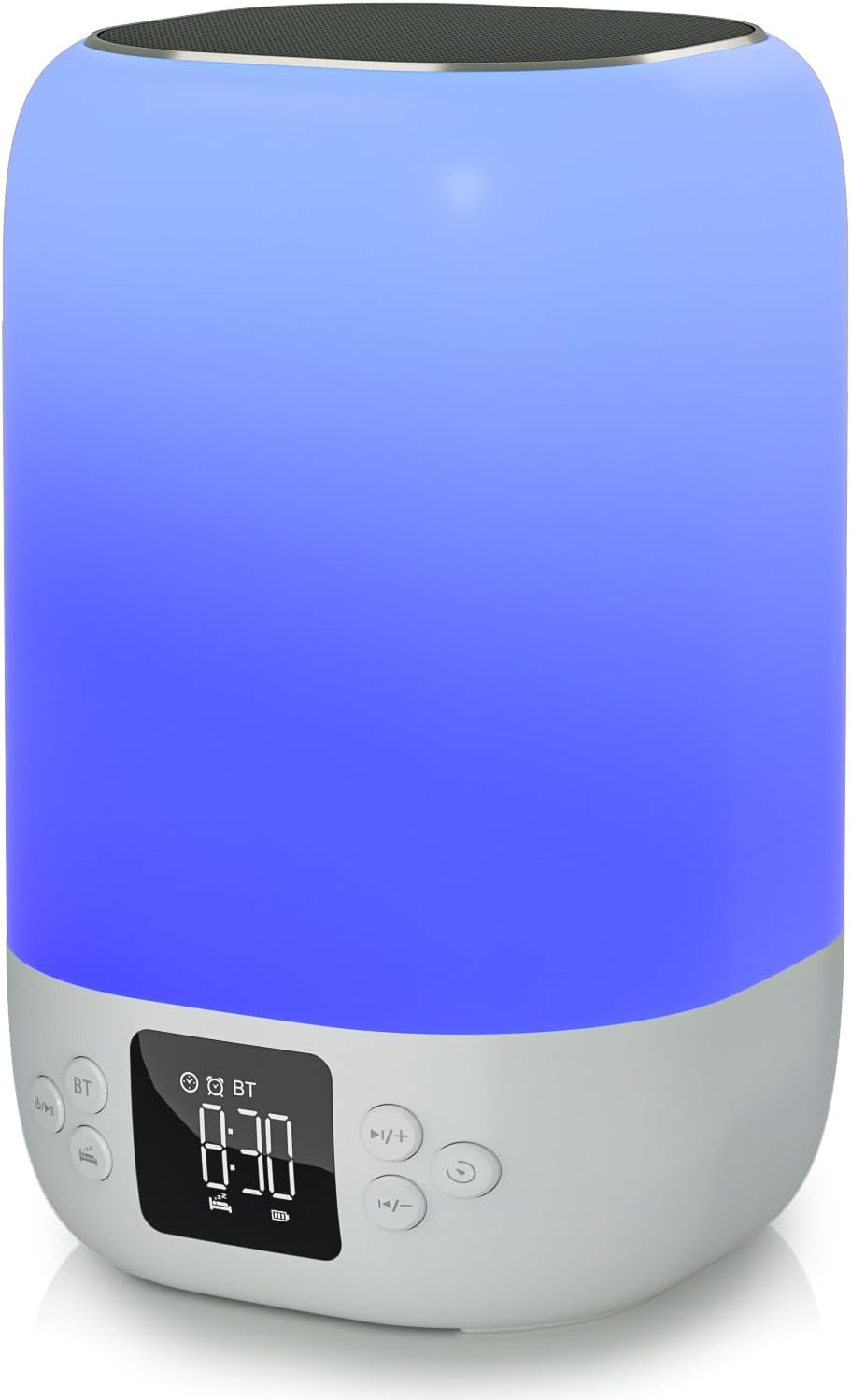
フロント view of the AFEXOA DY20 device, showcasing the digital time display and control buttons.

An illustrative image detailing the five primary functions of the AFEXOA DY20: sound machine, MP3 player, night light, alarm clock, and Bluetooth speaker.

The device connected via Bluetooth to a smartphone playing music, with an inset showing the USB and Micro SD card input ports for MP3 playback.
コントロール:
- 電源/モードボタン: Turns the device on/off and switches between modes (Bluetooth, Sound Machine, MP3).
- Bluetooth (BT) ボタン: Bluetoothペアリングモードを有効にします。
- Volume Up (+)/Next Track Button: Increases volume or skips to the next track/sound.
- Volume Down (-)/Previous Track Button: Decreases volume or goes to the previous track/sound.
- スヌーズ/ライトボタン: Activates snooze during an alarm or changes light modes.
- 時間表示: Digital display for time and settings.
ポート:
- USB ホスト ポート: MP3 再生用の USB フラッシュ ドライブを接続します。
- マイクロSD/TFカードスロット: For inserting a Micro SD/TF card for MP3 playback.
- Type-C充電ポート: For connecting the USB charging cable to power the device.
5. セットアップ
5.1 初期充電
- Connect the provided USB charging cable to the Type-C port on the device.
- ケーブルのもう一方の端を互換性のある USB 電源アダプター (別売) またはコンピューターの USB ポートに差し込みます。
- Allow the device to fully charge before first use. The battery indicator on the display will show charging status.
5.2 電源のオン/オフ
- 電源をオンにするには、電源/モード ボタンを長押しします。
- 電源を切るには、電源/モードボタンをもう一度押し続けます。
6. 操作手順
6.1 時間設定
- In normal time display mode, press the 'Time Set' button (often labeled with a clock icon) to enter time setting mode. The hour digits will flash.
- 「+」ボタンと「-」ボタンを使用して時間を調整します。
- Press 'Time Set' again to move to minute setting. Use '+' and '-' to adjust minutes.
- Press 'Time Set' a third time to confirm and exit time setting.
- To switch between 12-hour and 24-hour format, short press the 'Time Set' button.
6.2 アラーム設定

The device displaying the time in alarm clock mode, with text indicating 7 wake-up ringtones, 1-30 level volume, and 9-minute snooze.
- Press the 'Alarm 1 Set' button (often labeled with an alarm clock icon) to set the first alarm. The hour digits will flash.
- 「+」ボタンと「-」ボタンを使用してアラームの時間を調整します。
- Press 'Alarm 1 Set' again to set the alarm minutes. Use '+' and '-' to adjust minutes.
- Press 'Alarm 1 Set' a third time to select the alarm sound (7 options available). Use '+' and '-' to cycle through sounds.
- Press 'Alarm 1 Set' again to confirm.
- To activate/deactivate Alarm 1, use the dedicated 'Alarm 1 ON/OFF' switch or button. Repeat for Alarm 2 if available.
- When the alarm sounds, press the 'Snooze/Light' button to activate snooze for 9 minutes. Press any other button to turn off the alarm.
6.3 Bluetoothスピーカーモード
- Turn on the device. Press the Power/Mode button until 'BT' appears on the display, indicating Bluetooth mode.
- On your smartphone or other Bluetooth-enabled device, enable Bluetooth and search for 'AFEXOA DY20' (or similar name).
- ペアリングするデバイスを選択します。ペアリングが成功すると確認音が鳴ります。
- You can now play audio from your connected device through the speaker. Use the '+/-' buttons on the speaker or your phone to adjust volume.
6.4 Sound Machine Mode (White Noise)

A person relaxing in bed with the AFEXOA DY20 emitting a warm light and soothing sounds, illustrating its sound machine capabilities.
- If not already in Sound Machine mode, press the Power/Mode button until the sound machine icon or 'FO' (for sound files) appears.
- Use the '+' and '-' buttons to cycle through the 30 available soothing sounds (white noise, fan sounds, lullabies, natural sounds).
- 「+」ボタンと「-」ボタンを使用して音量を調整します。
- To set a sleep timer, press the 'Timer' button (if available) and select 15, 30, 60, or 90 minutes. The device will automatically turn off sound and light after the set time.
6.5 ナイトライトモード
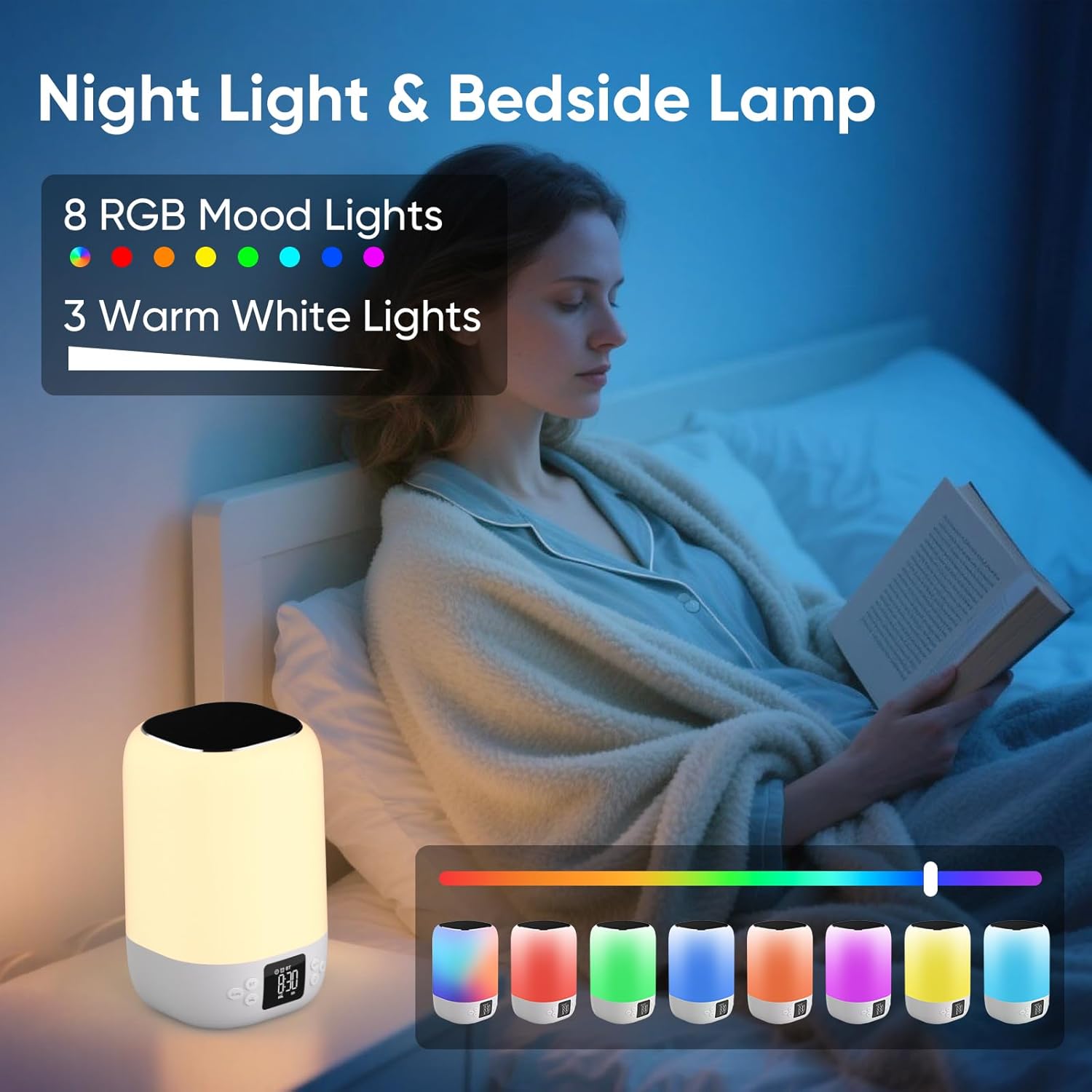
A person reading in bed with the AFEXOA DY20 displaying various light colors, highlighting its 8 RGB mood lights and 3 warm white light options.

A child sleeping peacefully with the AFEXOA DY20 emitting a soft blue light, demonstrating its sleep aid function with an adjustable auto-off timer.
- 温白色光: Short press the 'Snooze/Light' button to cycle through 3 levels of warm white light (low, medium, high).
- RGB色の変更: Long press the 'Snooze/Light' button to activate the 8 RGB color changing mode. Short press again to pause on a specific color. Long press again to turn off the light.
6.6 MP3プレーヤーモード(USB/Micro SD)
- Insert a USB flash drive into the USB Host port or a Micro SD/TF card into its dedicated slot.
- The device should automatically switch to MP3 player mode and begin playback. If not, press the Power/Mode button to cycle to this mode.
- Use the '+' and '-' buttons to skip tracks.
- Use the Power/Mode button (short press) to play/pause.
6.7 Charging Other Devices (if applicable)
The product specifications do not explicitly list external device charging capabilities. Please refer to the product packaging or manufacturer's website for confirmation if this feature is desired.
7. メンテナンス
- クリーニング: 柔らかく乾いた布で拭いてください。研磨剤入りの洗剤や溶剤は使用しないでください。
- ストレージ: デバイスは直射日光や極端な温度を避け、涼しく乾燥した場所に保管してください。
- バッテリーのケア: バッテリーの寿命を延ばすには、デバイスを頻繁に完全に放電させないでください。長期間使用しない場合でも、定期的に充電してください。
8。 トラブルシューティング
| 問題 | 考えられる解決策 |
|---|---|
| デバイスの電源が入りません。 | Ensure the device is charged. Connect to power and try again. |
| Bluetoothが接続されていません。 | Ensure the device is in Bluetooth pairing mode. Check your phone's Bluetooth settings and try re-pairing. Ensure no other devices are connected. |
| スピーカーから音が出ません。 | Check volume levels on both the device and your connected source. Ensure the correct mode (Bluetooth/MP3/Sound Machine) is selected. |
| ライトが機能していません。 | Ensure the device is powered on. Press the 'Snooze/Light' button to activate or cycle through light modes. |
| アラームが鳴らない。 | Verify alarm time and ensure the alarm is activated (ON). Check alarm volume settings. |
| MP3 再生の問題。 | Ensure USB drive or Micro SD card is inserted correctly and contains compatible MP3 files. Try re-inserting or using a different storage device. |
| デバイスが応答しません。 | Locate the 'RESET' button (often a small pinhole) and use a thin object (like a paperclip) to press it. This will restart the device. |
9. 仕様
- ブランド: アフェソア
- モデル: DY20
- 色: 白
- 表示タイプ: デジタル
- 電源: 電池式(リチウムイオン電池1個付属)
- 製品寸法: 幅3.93インチ x 高さ7.87インチ
- 商品の重量: 1.32 ポンド (600 グラム)
- フレーム素材: プラスチック
- 特集: 大きな警報
- 部屋タイプ: 寝室
10. 保証とサポート
For warranty information or technical support, please refer to the documentation included with your purchase or contact AFEXOA customer service directly. Contact details can typically be found on the product packaging or the official AFEXOA webサイト。