
1. はじめに
Thank you for choosing the Veken 55 x 28 Inch Electric Standing Desk. This desk is designed to provide a versatile and ergonomic workspace, allowing you to easily switch between sitting and standing positions. Please read this manual carefully before assembly and use to ensure proper operation and safety.
2. 重要な安全情報
- Always follow the user manual for proper assembly and use.
- 重量制限を超えないでください 154ポンド(70kg) 安定性を確保し、損傷を防ぎます。
- Use the desk in a well-lit area and keep it away from heat sources.
- Be cautious when adjusting the height to avoid injury or pinching.
- Always maintain proper ergonomics when using the desk to prevent strain.
- 高さ調整中につまずいたり損傷したりしないように、すべてのケーブルが適切に管理されていることを確認してください。
3. パッケージ内容
組み立てを始める前に、すべてのコンポーネントが揃っていることを確認してください。
- Desktop (joined pieces)
- Desk Legs (cold-rolled steel frame)
- メモリプリセット付きコントロールパネル
- Motor and Transmission Rod
- ケーブルクリップ
- Feet Pads (4x)
- ヘッドホンフック
- ユーザーマニュアル(このドキュメント)
- All necessary assembly tools (hex key, screws)
4. 組み立て手順
Assembly is designed to be straightforward. All holes are pre-drilled, and accessories are pre-labeled for ease of installation. It is recommended to assemble the desk on a soft, clean surface to prevent scratches.
ステップバイステップの組み立てガイド
- コンポーネントを解凍します: Carefully remove all parts from the packaging. Verify against the package contents list.
- デスクの脚を組み立てる: Attach the desk legs to the main frame using the provided screws. Ensure all connections are secure.
- トランスミッションロッドを取り付ける: Insert the transmission rod between the two legs. Ensure it is correctly aligned and secured.
- デスクトップを添付: Carefully place the desktop onto the assembled frame. Align the pre-drilled holes and secure the desktop with the provided screws. Be careful not to overtighten screws to avoid stripping the particle board.
- コントロール パネルとアクセサリをインストールします。 Attach the control panel to the underside of the desktop in the designated area. Install the headphone hook and cable clips as desired.
- 接続電源: Connect the power cable to the control panel and then to a power outlet.

Figure 1: Quick and Simple Installation Overview
組み立てビデオガイド
Video 1: Veken Electric Standing Desk - Installation Steps. This video provides a visual guide to the assembly process.
5. 操作手順
The Veken Electric Standing Desk features an intuitive control panel for easy height adjustment and personalized settings.
高さ調整
- The desk offers a wide height range from 27.9インチから45.6インチ.
- 使用 上へ(▲) そして 下へ(▼) arrow buttons on the control panel to manually adjust the desk to your desired height.
メモリプリセット
The control panel includes four memory preset buttons (1, 2, 3, 4) to save and quickly recall your preferred sitting and standing heights.
- プリセットを保存するには: Adjust the desk to your desired height using the arrow buttons. Press and hold one of the numbered preset buttons (1-4) until the display flashes or beeps, indicating the height has been saved.
- プリセットを呼び出すには: 対応する番号のプリセットボタン(1~4)を押すだけで、デスクは自動的に保存された高さまで移動します。
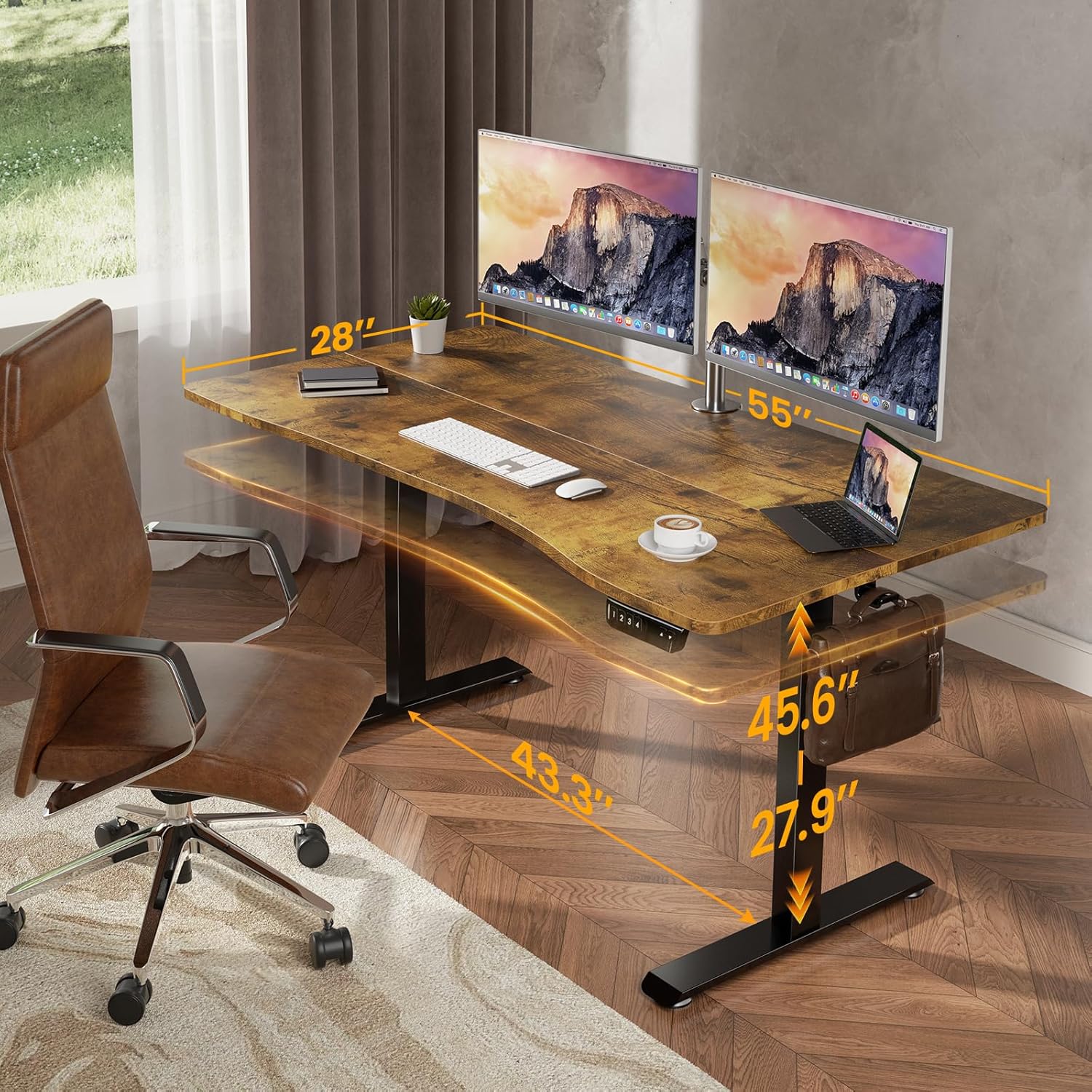
Figure 2: Desk Dimensions and Height Range
Ergonomic Design & Features
- 人間工学に基づいた湾曲したエッジ: The desktop features a smooth, human-centric curved edge to reduce arm strain and allow easy access to items, enhancing comfort and productivity.
- Spacious Worksurface: The 55" x 28" desktop accommodates multiple monitors and office supplies, providing ample space for an organized workflow.
- ヘッドホンフック: A convenient hook is included for hanging headphones or bags, keeping your workspace tidy.

Figure 3: Ergonomic Desktop Design
Video 2: Veken - Choose Your Favorite Standing Desk. This video demonstrates the desk's versatility in various settings.
6. メンテナンス
To ensure the longevity and optimal performance of your Veken Electric Standing Desk, follow these maintenance guidelines:
- クリーニング: デスクトップとフレームを柔らかくて乾いた布で拭きます。amp 布で拭いてください。仕上げを傷める可能性のある、刺激の強い化学薬品や研磨剤入りの洗剤は使用しないでください。
- ケーブル管理 Periodically check and adjust cable clips to keep wires tidy and prevent them from getting caught during height adjustments.
- ファスナーチェック: Occasionally inspect all screws and fasteners to ensure they are tight. Retighten if necessary, but avoid overtightening.
- モーターケア: The motor is designed for durability. If you notice any unusual sounds or resistance during adjustment, refer to the troubleshooting section.
7。 トラブルシューティング
If you encounter any issues with your Veken Electric Standing Desk, please refer to the following common problems and solutions:
- Desk Not Adjusting / Uneven Legs: If one leg is not moving synchronously with the other, or the desk is not adjusting, it may indicate an incorrect installation of the transmission rod. Ensure the transmission rod is fully inserted into the hexagonal nut on the left leg's hole position.
- Vibration During Adjustment: A slight vibration when lowering the desk might occur. This is often due to the legs catching slightly. Regular use typically smooths this out. If persistent, ensure all connections are secure.
- Stripped Screw Holes: The desktop is made of particle board. When assembling, avoid overtightening screws to prevent stripping the pre-drilled holes. If a hole is stripped, consider using wood glue and a larger screw, or a repair kit.
トラブルシューティングビデオガイド
Video 3: Incorrect Installation Direction of the Side Plate. This video provides guidance on correcting common assembly errors related to the side plates.
8. 仕様
| 特徴 | 詳細 |
|---|---|
| ブランド | ヴィーケン |
| モデル番号 | ODHOME123 |
| 製品寸法(奥行き×幅×高さ) | 奥行き28インチ x 幅55インチ x 高さ27.9インチ |
| 最小高さ | 27.9インチ |
| 最大高さ | 45.6インチ |
| アイテム重量 | 39.9 ポンド |
| 重量容量 | 154ポンド(70kg) |
| デスクトップ素材 | Blockboard (Laminated) |
| ベース素材 | 冷間圧延鋼 |
| 特集 | Adjustable Height, Electric, Ergonomic, Memory Preset |
| 組み立てが必要 | はい(ツール付属) |

Figure 4: Desk Load-Bearing Capacity
9. 保証とサポート
メーカー保証: This product comes with a limited manufacturer warranty. For specific details regarding the warranty period and coverage, please refer to the documentation included in your product packaging or contact Veken customer support.
カスタマーサポート: If you have any questions, suggestions, or require assistance with your Veken Electric Standing Desk, please do not hesitate to contact Veken customer support. Contact information can typically be found on the product packaging or the official Veken webサイト。