
1. はじめに
Thank you for choosing the WiMiUS P62 Pro 4K Projector. This manual provides essential information for setting up, operating, and maintaining your projector to ensure optimal performance and longevity. Please read this manual thoroughly before use and retain it for future reference.
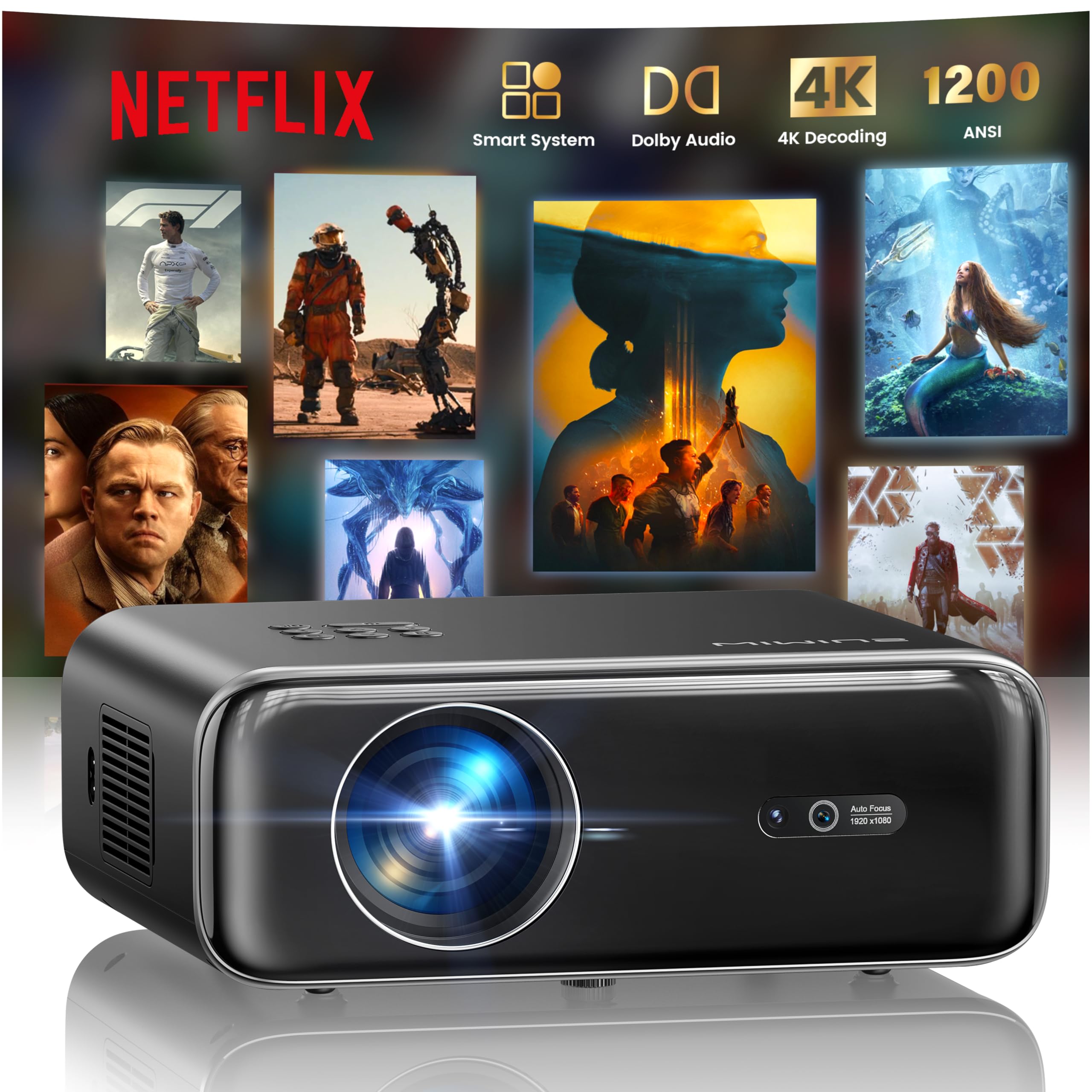
The WiMiUS P62 Pro 4K Projector, a compact and powerful device designed for home entertainment.
2. 箱の中身
Carefully unpack your WiMiUS P62 Pro projector and ensure all items are present:
- WiMiUS P62 Pro Projector (Netflix included)
- リモートコントロール
- レンズキャップ
- 電源コード
- HDMIケーブル
- クリーニングキット
- クイックスタートガイド

Contents of the WiMiUS P62 Pro package, including the projector, remote, and essential cables.
3.製品オーバーview および主な機能
The WiMiUS P62 Pro is a versatile 4K-supported projector designed for a superior home cinema experience. Its key features include:
- 高輝度: 1400 ANSI lumens for clear images even in ambient light.
- ネイティブ1080P解像度: Supports 4K Ultra HD input for crisp visuals.
- Smart OS with Official Apps: Pre-installed Netflix, YouTube, Prime Video, Plex, and access to over 20,000 apps.
- AI Intelligent Adjustment: Automatic focus, keystone correction, obstacle avoidance, and screen alignment.
- ドルビーオーディオ: Integrated dual 36W speakers with Dolby Audio for immersive sound.
- 多彩な接続性: WiFi 6, Bluetooth 5.4 (bidirectional), HDMI (ARC & CEC), USB.
- ポータブルデザイン: Compact dimensions (25.7 x 20 x 10.3 cm) and lightweight (1.8 kg) for easy transport.
- 目の保護: Utilizes diffuse reflection imaging technology to reduce eye strain.

The WiMiUS P62 Pro offers a revolutionary home cinema experience with integrated streaming apps like Netflix, YouTube, and Prime Video.

Experience exceptional audio quality with integrated Dolby Audio and powerful Hi-Fi speakers.
4. セットアップ
プロジェクターの初期セットアップについては、次の手順に従ってください。
- 配置: Position the projector on a stable, flat surface or mount it (ceiling or tripod). Ensure adequate ventilation around the device. The projector can be placed between 1 to 6 meters from the projection surface.
- 電源接続: 電源コードをプロジェクターに接続し、電源コンセントに接続します。
- 電源オン: プロジェクターまたはリモコンの電源ボタンを押して電源を入れます。
- 自動調整: The projector features AI-powered auto-focus and auto-keystone correction. It will automatically adjust the image for clarity and shape. It also includes intelligent obstacle avoidance and automatic screen alignment.
- Manual Adjustments (if needed): If further adjustments are required, use the remote control to access settings for focus, keystone, and zoom (50%-100%).

The projector features intelligent screen adaptation 3.0, including auto-focus, auto-keystone correction, and obstacle avoidance.
5. 操作手順
5.1 電源オン/オフ
- 電源を入れるには: プロジェクターまたはリモコンの電源ボタンを押します。
- 電源を切るには: 電源ボタンをもう一度押します。プロンプトが表示されたらシャットダウンを確認します。
5.2 ナビゲーションとソース選択
- Use the remote control's directional buttons and OK button to navigate the on-screen menu.
- Select your desired input source (HDMI 1, HDMI 2, USB, or Smart Apps) from the main menu.
5.3 画像とサウンドの設定
- Access the settings menu to adjust picture parameters such as brightness, contrast, color, and aspect ratio.
- Adjust sound volume and audio modes. The integrated Dolby Audio provides rich sound.

Enjoy an ultimate gaming experience with low latency and a 60Hz refresh rate.

Easily display your work or presentations on a larger screen.
6. 接続性
The WiMiUS P62 Pro offers multiple connectivity options:
- HDMIポート(x2): Connect devices like laptops, gaming consoles, Blu-ray players. HDMI 2 supports ARC (Audio Return Channel) and CEC (Consumer Electronics Control) for simplified audio setup and control.
- USBポート(x2): Play media directly from USB drives or connect external devices.
- WiFi 6: Connect to your home network for internet access and streaming. Supports screen mirroring from iOS, Android, and Windows 10 devices for seamless content sharing.
- Bluetooth 5.4(双方向): Connect external Bluetooth speakers or headphones for enhanced audio. The projector can also act as an independent Bluetooth speaker when connected to a phone.

The rear panel of the projector features multiple connectivity ports including HDMI and USB.

Synchronize and enjoy with multiple connectivity options for seamless entertainment.
7. スマートな機能
7.1 Integrated Streaming Applications
The projector comes with officially certified streaming applications pre-installed, providing direct access to a vast library of content:
- ネットフリックス
- YouTube
- プライムビデオ
- プレックス
- And more via the integrated App Store.

Access official integrated apps like Netflix and Plex directly from your projector.

Explore more applications through the integrated App Store.
7.2 AI-Powered Image Adjustment
The projector utilizes advanced AI algorithms for automatic image optimization:
- オートフォーカス: Automatically adjusts the image sharpness.
- 自動台形補正: 歪んだ画像を完全な長方形に修正します。
- インテリジェントな障害物回避: パス上のオブジェクトを回避するために投影を検出して調整します。
- 自動画面調整: 投影面に合わせて画像を最適化します。

AI-optimized intelligent configuration ensures the best image quality wherever you are.
7.3 Web ブラウジング
Navigate the internet directly on your projector using the integrated web browser. This allows you to access websites, news, and online content without needing an external computer.

閲覧する web directly on your projector with the integrated navigation feature.
8. メンテナンス
適切なメンテナンスを行うことで、プロジェクターの寿命とパフォーマンスが維持されます。
- レンズクリーニング: Use the provided cleaning kit or a soft, lint-free cloth to gently clean the projector lens. Avoid abrasive materials or harsh chemicals.
- 換気: 過熱を防ぐため、プロジェクターの通気口が塞がれていないことを確認してください。空気の流れを妨げる可能性のある柔らかい表面にプロジェクターを置かないでください。
- ほこりの除去: Periodically clean the exterior of the projector with a soft, dry cloth to remove dust.
- ストレージ: 長期間使用しない場合は、プロジェクターを涼しく乾燥した場所に保管してください。元の梱包または保護ケースに入れるのが理想的です。
9。 トラブルシューティング
If you encounter issues with your WiMiUS P62 Pro projector, refer to the following common problems and solutions:
| 問題 | 考えられる原因 | 解決 |
|---|---|---|
| 画像が表示されない | 電源ケーブルが外れている、入力ソースが正しくない、レンズキャップが装着されている。 | 電源接続を確認し、正しい入力ソースを選択し、レンズキャップを取り外します。 |
| 画像がぼやけている | 焦点が合っていません。プロジェクターが動いています。 | Allow auto-focus to engage or manually adjust focus using the remote. |
| 画像が歪んでいる(台形) | プロジェクターがスクリーンに対して垂直ではありません。 | Allow auto-keystone correction to engage or manually adjust keystone settings. |
| 音が出ない | 音量が低すぎる、外部オーディオデバイスが接続されていない、オーディオ出力が正しくない。 | Increase volume, check external audio connections, ensure correct audio output is selected. |
| WiFi/Bluetoothに接続できない | Incorrect password, device out of range, network issue. | Verify password, move devices closer, restart router/projector. |
さらにサポートが必要な場合は、保証およびサポート セクションの連絡先情報を参照してください。
10. 仕様
Detailed technical specifications for the WiMiUS P62 Pro Projector:
- ブランド: WiMiUS
- モデル: P62プロ
- 輝度: 1400 ANSIルーメン(38000ルーメン)
- ネイティブ解像度: 1920×1080P
- 最大ディスプレイ解像度: 3840 x 2160 (4K Ultra HD Support)
- コントラスト比: 40000:1
- 表示タイプ: LCDまたはLED
- 接続技術: Bluetooth 5.4、HDMI、USB、Wi-Fi 6
- 推奨用途: Home Cinema, Gaming, Live TV & Sports, Outdoor, Camping
- 特別な機能: AI Auto Focus/Keystone, Obstacle Avoidance, Screen Alignment, Official Apps (Netflix, etc.), Dolby Audio, HDMI ARC/CEC
- 投影距離: 1~6メートル
- 画像サイズ: 40~300インチ
- コントロールタイプ: リモートコントロール
- 重さ: 1.8キログラム
- 寸法: 25.7 x 20 x 10.3 cm
- ビデオエンコーディング: 264、265

The projector boasts 1400 ANSI lumens and a 40000:1 contrast ratio for remarkable brilliance.

楽しむ viewing without harmful blue light, reducing eye fatigue.
11. 保証とサポート
The WiMiUS P62 Pro Projector comes with a 2-year warranty. For any questions or support needs regarding your projector, please refer to the service information provided in the Quick Start Guide or contact WiMiUS customer support directly. You can often find support contact details on the manufacturer's official webサイトまたは購入プラットフォームを通じて購入できます。