
MOBAPAD Huben2 H6
MOBAPAD Huben2 ワイヤレス スイッチ コントローラー Pro 取扱説明書
Model: Huben2 H6 | Brand: MOBAPAD
1. はじめに
This manual provides detailed instructions for the setup, operation, and maintenance of your MOBAPAD Huben2 Wireless Switch Controller Pro. Please read this manual thoroughly before using the product to ensure optimal performance and longevity.
2. 安全情報
- コントローラーを水やその他の液体から遠ざけてください。
- コントローラーを極端な温度にさらさないでください。
- コントローラーを落としたり、強い衝撃を与えたりしないでください。
- Do not attempt to disassemble or repair the controller yourself. Contact customer support for assistance.
- 充電には付属の充電ケーブルまたは認定された USB-C ケーブルのみを使用してください。
3. パッケージ内容
パッケージにすべてのアイテムが含まれていることを確認します。
- MOBAPAD Huben2 Wireless Controller Pro
- USB-C充電ケーブル
- Wireless Dongle (2.4G)
- PU Travel Case
- Replaceable D-pad (Cross/Circle)
- 取扱説明書(本書)
4. コントローラーのレイアウト
Familiarize yourself with the buttons and features of your Huben2 controller.

図4.1: 前面 view of the MOBAPAD Huben2 Wireless Controller Pro. Shows the joysticks, face buttons (A, B, X, Y), D-pad, and central function buttons.
- 左/右アナログスティック: Capacitive joysticks with 4,096-step precision.
- A/B/X/Y ボタン: Omron mechanical face buttons.
- 十字キー: Replaceable cross or circle D-pad.
- L1/R1(ショルダーボタン): 標準のショルダーボタン。
- L2/R2(トリガー): Dual-mode triggers (Hall Effect and Microswitch).
- M1/M2/M3/M4 ボタン: Four programmable back buttons.
- ホームボタン: Powers on/off and returns to system home screen.
- スクリーンショットボタン: スクリーンショットをキャプチャします。
- プラス/マイナスボタン: Standard system menu buttons.
- ターボボタン: ターボ機能を有効/無効にします。
- USB-Cポート: 充電と有線接続用。

図4.2:背面 view showing the four programmable M1, M2, M3, M4 back buttons.
5. セットアップ
5.1 コントローラの充電
Before first use, fully charge the controller. Connect the provided USB-C cable to the controller's USB-C port and the other end to a USB power source (e.g., console, PC, or USB wall adapter). The charging indicator will show the charging status.
- A full charge provides approximately 15 hours of gameplay.

Figure 5.1: The controller features a 1000mAh battery for extended gameplay.
5.2 接続モード
The Huben2 controller supports three connection methods:

Figure 5.2: The controller supports 2.4G wireless, Bluetooth, and wired connections across various platforms.
- 2.4G Wireless (via Dongle):
- Compatible with Windows PC, Steam, and Android TV.
- 2.4G ワイヤレス ドングルをデバイスの USB ポートに挿入します。
- コントローラーの電源を入れます。ドングルに自動的に接続されます。
- Bluetoothワイヤレス:
- Compatible with Nintendo Switch, Nintendo Switch 2, Android, and iOS devices.
- デバイスで Bluetooth 設定に移動し、Bluetooth を有効にします。
- On the controller, press and hold the Bluetooth pairing button (refer to controller layout for exact location) until the indicator lights flash rapidly.
- Select "MOBAPAD Huben2" from the list of available devices on your system to pair.
- For Nintendo Switch, the controller can wake the console from sleep mode after initial pairing and firmware update via the Mobapad app.
- 有線接続:
- Compatible with Windows PC and Android TV.
- Connect the controller to your device using the USB-C cable. The controller will be recognized automatically.
6. 操作手順
6.1 電源オン/オフ
- 電源オン: ホームボタンを押します。
- 電源を切る: Press and hold the Home button for 3-5 seconds. The controller will also power off automatically after a period of inactivity.
6.2 デュアルトリガーモード
The L2 and R2 triggers feature dual modes for different gaming experiences:

Figure 6.1: Visual representation of the 2mm Microswitch Trigger and 10mm Hall Linear Trigger modes.
- Microswitch Trigger (2mm): Provides a short, tactile click for rapid input, ideal for FPS games.
- Hall Effect Linear Trigger (10mm): Offers analog input with a longer travel distance, suitable for racing or simulation games.
- スイッチングモード: Use the physical switches located near the L2/R2 triggers to toggle between modes.
6.3 Customizable Features (Back Buttons, Macros, App Support)
The Huben2 controller offers extensive customization options:
- プログラム可能なバックボタン(M1-M4): Assign single button presses or complex macros to the four back buttons using the dedicated Mobapad PC/mobile application.
- Rapid-Fire Turbo Mode: Activate turbo functionality for any button. Refer to the Mobapad app or controller manual for specific button combinations to enable/disable.
- Mobapad App: Download the official Mobapad application for Windows or mobile devices to:
- ジョイスティックのデッドゾーンと応答曲線を調整します。
- 振動の強度をカスタマイズします。
- マクロを作成および管理します。
- コントローラーのファームウェアを更新します。
6.4 HD Rumble and ALPS Linear Motors
The controller features dual ALPS linear motors for precise HD Rumble feedback, reacting to in-game sound and motion with 0ms startup time.
6.5 6軸モーションコントロール
The integrated 6-axis motion sensor provides precise motion control for compatible games.

Figure 6.2: The controller's internal 6-axis sensing motors enable precise motion control.
6.6 Replaceable D-pad and Faceplate
The controller allows for customization of the D-pad and faceplate.
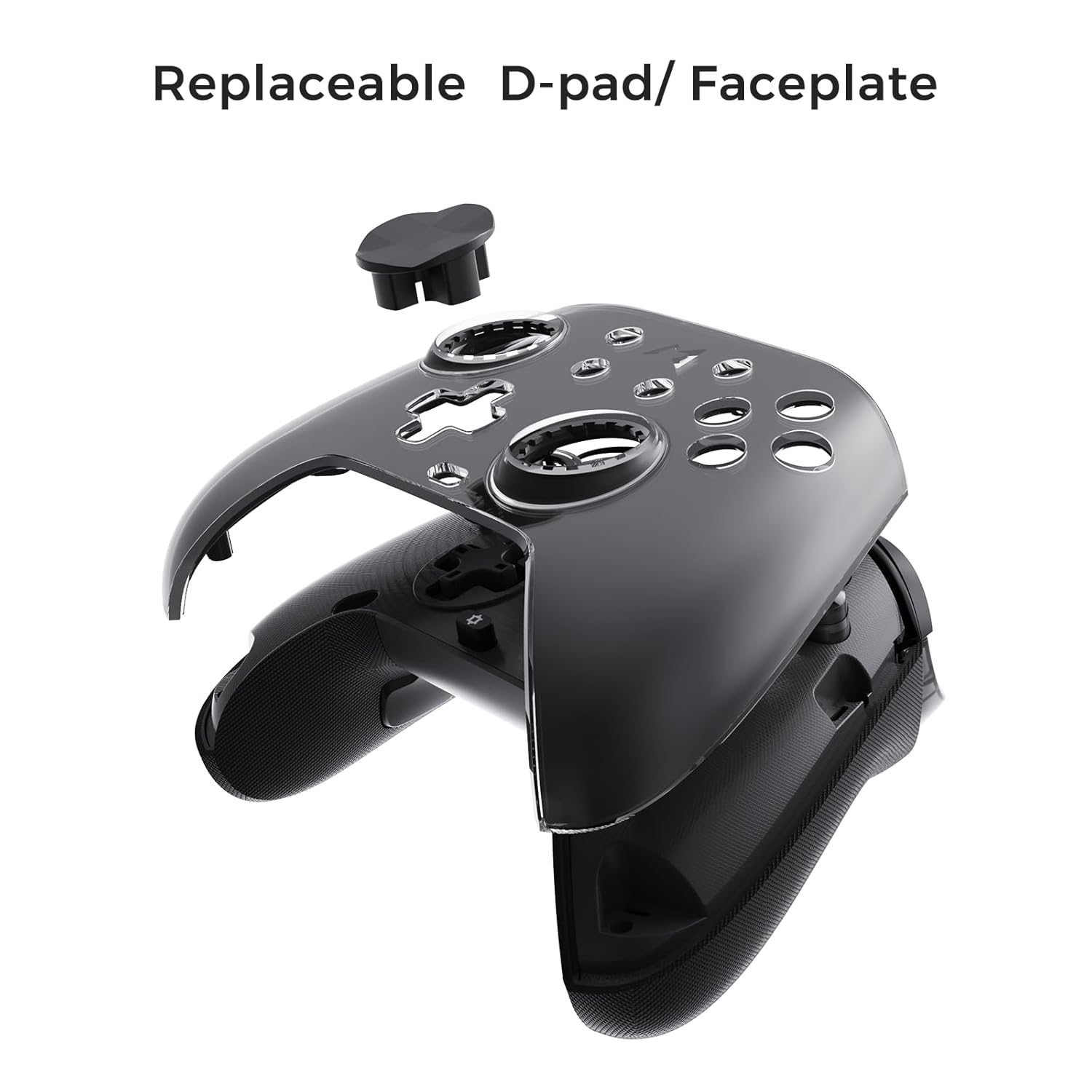
Figure 6.3: The D-pad and faceplate can be replaced for customization or preference.
- To replace the D-pad, gently remove the magnetic faceplate and then lift out the D-pad. Insert the desired D-pad (cross or circle) and reattach the faceplate.
7. メンテナンス
- クリーニング: コントローラーのお手入れには、柔らかく乾いた布を使用してください。頑固な汚れには、軽くamp布を水で拭いてください。刺激の強い化学薬品や研磨剤入りの洗剤は使用しないでください。
- ストレージ: Store the controller in a cool, dry place, away from direct sunlight and extreme temperatures. When not in use for extended periods, store it in the provided PU travel case.
- バッテリーのケア: バッテリーの寿命を延ばすには、コントローラーを頻繁に完全に放電させないでください。頻繁に使用しない場合でも、定期的に充電してください。
8。 トラブルシューティング
| 問題 | 考えられる原因 | 解決 |
|---|---|---|
| コントローラの電源が入らない。 | バッテリー残量が少なくなりました。 | コントローラーを少なくとも 30 分間充電してください。 |
| コントローラーがワイヤレスで接続されません。 | Not in pairing mode; out of range; interference; incorrect mode selected. | Ensure controller is in pairing mode. Move closer to the device. Check for other wireless devices causing interference. Verify correct connection mode (2.4G or Bluetooth). |
| 入力遅延または接続の切断。 | Wireless interference; low battery; outdated firmware. | Reduce distance to device. Charge controller. Update firmware via Mobapad app. Try wired connection. |
| ボタンやジョイスティックが反応しません。 | Software glitch; physical obstruction; calibration issue. | Restart the controller and the connected device. Check for physical debris. Calibrate joysticks via Mobapad app. |
| HD 振動が動作しません。 | Feature disabled in game/system settings; low battery. | Ensure rumble is enabled in game and system settings. Charge controller. |
If you encounter issues not listed here, please refer to the official MOBAPAD support webサイトをご覧いただくか、カスタマーサービスにお問い合わせください。
9. 仕様
| 特徴 | 詳細 |
|---|---|
| モデル番号 | Mobapad Huben2 H6 |
| 接続性 | 2.4Gワイヤレス、Bluetooth、有線(USB-C) |
| 互換性 | Nintendo Switch, Nintendo Switch 2, Windows, Steam, Android, iOS |
| ジョイスティック | Capacitive, 4,096-step precision, 1000Hz polling rate |
| トリガー | Dual Mode: 2mm Omron Microswitch, 10mm Hall Effect Linear |
| ボタン | Omron Mechanical Face Buttons, Programmable Back Buttons (M1-M4) |
| 振動 | Dual ALPS Linear Motors (HD Rumble) |
| モーションコントロール | 6-Axisジャイロスコープ |
| バッテリー容量 | 1000mAhリチウムイオン |
| バッテリー寿命 | 最大15時間(目安) |
| 寸法 | 6.3 x 4.13 x 2.76インチ |
| 重さ | 1.87ポンド |
10. 保証とサポート
MOBAPAD products are designed and manufactured to the highest quality standards. For warranty information, technical support, or customer service inquiries, please visit the official MOBAPAD website or contact their authorized support channels. Please retain your proof of purchase for warranty claims.
Ask a question about this manual
Ask about setup, troubleshooting, compatibility, parts, safety, or missing instructions. Manuals+ will review the question and use this page’s manual context to help answer it.