
MOBAPAD Huben2
MOBAPAD Huben2 ワイヤレス スイッチ コントローラー Pro 取扱説明書
Model: Huben2
導入
The MOBAPAD Huben2 is a versatile wireless controller designed for use with Nintendo Switch, PC, Android, and iOS devices. It features advanced components such as ALPS linear motors for precise haptic feedback, Omron mechanical buttons for tactile response, and capacitive joysticks for enhanced accuracy. This manual provides detailed instructions for setting up, operating, and maintaining your Huben2 controller.

フロント view of the MOBAPAD Huben2 Wireless Controller in white, showcasin人間工学に基づいたデザインとボタンレイアウト。
設定
1. パッケージ内容
- MOBAPAD Huben2 Wireless Controller
- USB-Cケーブル
- 2.4G Wireless Dongle (if included with your model)
- Travel Case (if included with your model)
- 取扱説明書(本書)
2. コントローラーの充電
Before first use, fully charge the controller. Connect the included USB-C cable to the controller's charging port and the other end to a USB power source (e.g., computer, wall adapter). The charging indicator will show the charging status and turn off when fully charged. A full charge provides approximately 15 hours of battery life.

The controller features a 1000mAh battery, providing up to 15 hours of gameplay on a single charge.
3. 接続モード
The Huben2 controller supports three primary connection methods:

Visual representation of the three connection modes: 2.4G for Windows/Android TV, Bluetooth for Switch/Switch 2/iOS/Android, and Wired for Windows/Android TV.
- 2.4G Wireless (via Dongle): Insert the 2.4G dongle into a USB port on your device. The controller will automatically connect.
- ブルートゥース: For Nintendo Switch, Switch 2, Android, and iOS devices.
- ニンテンドースイッチ: Navigate to the 'Controllers' menu on your Switch, then select 'Change Grip/Order'. Press and hold the pairing button on the Huben2 controller until the indicator lights flash. The Switch will detect and pair with the controller.
- Android/iOS: Enable Bluetooth on your mobile device. Press and hold the pairing button on the Huben2 controller. Select "MOBAPAD Huben2" from the list of available Bluetooth devices.
- 有線(USB-C): Connect the controller directly to your device using the provided USB-C cable. The controller will be recognized as a wired input device.
操作手順
1. ボタンのレイアウトと機能
Familiarize yourself with the controller's button layout. The Huben2 features standard gaming buttons, including A/B/X/Y, D-pad, L/R, ZL/ZR, Home, Capture, Plus, Minus, and four programmable back buttons (M1, M2, M3, M4).

A user demonstrating gameplay with the MOBAPAD Huben2 controller, highlighting its ergonomic design during use.
2. Dual Trigger Modes
The Huben2 offers two distinct trigger modes for L2/R2 buttons, switchable via a physical mechanism:
- Microswitch Trigger (2mm travel): Provides a short, tactile click, ideal for rapid inputs in shooting games.
- Hall Linear Trigger (10mm travel): Offers a smooth, analog response, suitable for racing games or precise acceleration control.
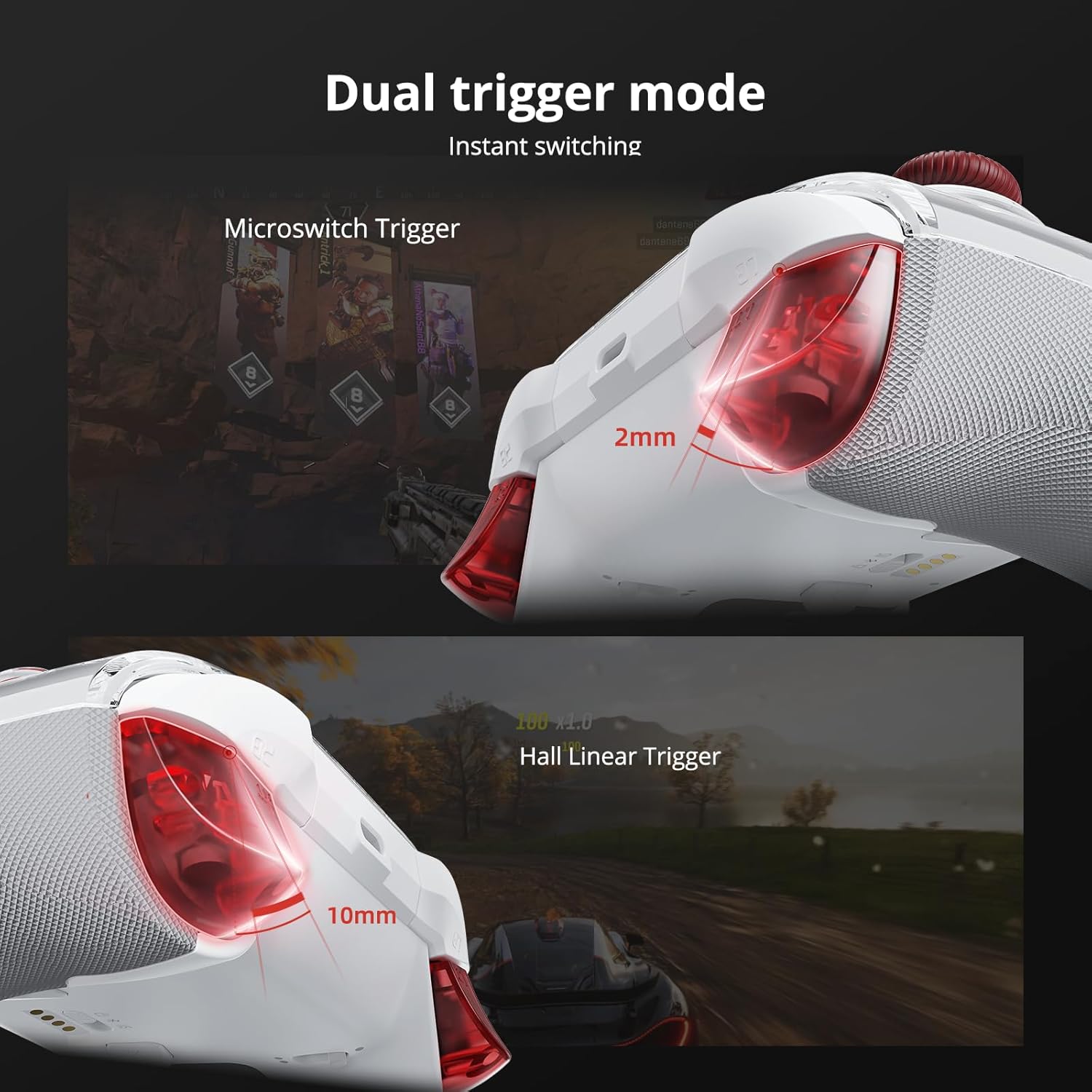
詳細 view of the dual trigger mechanism, showing the short travel of the microswitch trigger and the longer, linear travel of the Hall effect trigger.
3. Capacitive Joysticks
The controller is equipped with capacitive thumbsticks that provide 4,096-step precision and a 1ms response rate, designed to minimize drift and enhance control accuracy.

内部図はasing the technology behind the Mobapad capacitive joysticks, emphasizing their precision.
4. Omron Mechanical Buttons
The face buttons (A/B/X/Y) utilize Omron mechanical switches, offering a distinct tactile feel and rapid actuation for competitive gaming.

断面図 view revealing the Omron mechanical buttons, highlighting their internal structure.
5. 6-Axis Motion Control
The integrated 6-axis motion sensor provides precise tilt and rotation control, enhancing gameplay in compatible titles.

Visual representation of the controller's 6-axis motion sensing capabilities.
6. プログラム可能なバックボタン(M1~M4)
The four rear buttons (M1, M2, M3, M4) can be programmed for custom macros or remapped to other functions using the MOBAPAD PC/mobile application. Refer to the application's guide for detailed programming instructions.

Close-up of the controller's underside, highlighting the four customizable back buttons.
7. ターボ機能
The controller includes a Turbo function for rapid, repeated button presses. Activate and configure the Turbo function via the dedicated button or the companion application.

Detail of the controller's Turbo function button.
8. Customization via Application
Further customization options, including macro programming, vibration intensity adjustment, and stick sensitivity tuning, are available through the MOBAPAD PC/mobile application. Download the application from the official MOBAPAD webサイトまたはデバイスのアプリ ストアをご覧ください。
メンテナンス
- クリーニング: コントローラーの清掃には、柔らかく乾いた布をご使用ください。研磨剤入りの洗剤や溶剤は使用しないでください。
- ストレージ: Store the controller in a cool, dry place, away from direct sunlight and extreme temperatures. Use the included travel case for protection during transport.
- バッテリーのケア: バッテリーの寿命を延ばすには、コントローラーを頻繁に完全に放電させないでください。長期間使用しない場合でも、定期的に充電してください。
- Removable Faceplate: The controller features a removable magnetic faceplate. Handle with care when detaching or reattaching.

An exploded diagram illustrating the removable faceplate and internal structure of the controller.
トラブルシューティング
- コントローラーが接続されていません:
- コントローラーが充電されていることを確認してください。
- Verify the correct connection mode (2.4G, Bluetooth, Wired) is selected for your device.
- Bluetooth の場合、デバイスの Bluetooth が有効になっていて、コントローラーがペアリング モードになっていることを確認します。
- コントローラーと接続しているデバイスの両方を再起動してみてください。
- 入力遅延または応答なし:
- Ensure the controller is within range of the wireless receiver (2.4G or Bluetooth).
- 他のワイヤレス デバイスからの干渉を最小限に抑えます。
- For wired connection, ensure the USB-C cable is securely connected.
- Update controller firmware via the MOBAPAD application.
- スティックドリフト:
- While capacitive joysticks are designed to prevent drift, if issues occur, try recalibrating them using the MOBAPAD application.
- 短いバッテリー寿命:
- 使用する前にコントローラーが完全に充電されていることを確認してください。
- Reduce vibration intensity via the MOBAPAD application to conserve battery.
- 長期間使用すると、バッテリーの性能が徐々に低下する可能性があります。
仕様
| 特徴 | 詳細 |
|---|---|
| モデル番号 | Mobapad Huben2 H6 |
| 接続性 | 2.4Gワイヤレス、Bluetooth、USB-C有線 |
| 互換性 | Nintendo Switch, Switch 2, iOS, Windows, Android |
| ジョイスティック | Capacitive, 4,096-step precision, 1ms response |
| ボタン | Omron Mechanical Buttons |
| トリガー | Dual Mode (Microswitch / Hall Linear) |
| 振動 | Dual ALPS Linear Motors (HD Rumble) |
| モーションコントロール | 6-Axisジャイロスコープ |
| プログラム可能なボタン | 4 Rear Macro Buttons (M1-M4) |
| バッテリー | 1 Lithium Ion (included), 1000mAh, approx. 15-hour life |
| 製品寸法 | 4.33 x 2.95 x 6.3インチ |
| アイテム重量 | 1.87ポンド |
| メーカー | Mobapad |
保証とサポート
For warranty information and technical support, please refer to the official MOBAPAD web購入サイトをご覧いただくか、カスタマーサービスまでお問い合わせください。保証請求のために購入証明書を保管してください。
オンラインリソース: 訪問する MOBAPAD Store on Amazon 追加の製品情報とアップデートについては、こちらをご覧ください。
Ask a question about this manual
Ask about setup, troubleshooting, compatibility, parts, safety, or missing instructions. Manuals+ will review the question and use this page’s manual context to help answer it.