
1. はじめに
Thank you for choosing the JAIOTlink 2K Light Bulb Security Camera. This wireless surveillance solution is designed for both indoor and outdoor use, offering advanced features for comprehensive home security. Its discreet light bulb design allows for seamless integration into various environments. This manual provides detailed instructions for setup, operation, and maintenance to ensure optimal performance of your device.

Image 1.1: JAIOTlink 2K Light Bulb Security Camera and its mobile application interface, highlighting 2K resolution and dual-band 2.4G+5G WiFi connectivity.
2. パッケージ内容
パッケージにすべてのアイテムが含まれていることを確認してください。
- JAIOTlink 2K Light Bulb Security Camera (Pet Camera body)
- E27 Light Bulb Socket
3. セットアップ
3.1 インストール
- 場所を選択: Select an indoor or outdoor location with a standard E27 light bulb socket and within range of your Wi-Fi network.
- 電源を切る: Ensure the power to the light socket is turned off before installation to prevent electrical hazards.
- ねじ込み: Carefully screw the JAIOTlink 2K Light Bulb Security Camera into the E27 light bulb socket until it is securely fastened.
- 電源オン: ライトソケットに電源を戻してください。カメラの電源が入り、起動シーケンスが開始されます。

Image 3.1: The JAIOTlink camera's easy and quick installation process, demonstrating how it screws into a standard E27 universal bulb socket, suitable for various home environments.
3.2 アプリのダウンロードと接続
- アプリをダウンロード: 検索する the dedicated mobile application (e.g., "EseeCloud" as seen in product images) in your smartphone's app store (App Store for iOS or Google Play Store for Android). Download and install the application.
- アカウントを作成する: アプリを開き、画面の指示に従って新しいユーザー アカウントを作成するか、既にアカウントがある場合はログインします。
- デバイスを追加: In the app, select the option to add a new device. Follow the prompts to scan a QR code on the camera or manually select your camera model.
- Wi-Fiに接続します: The camera supports dual-band 5GHz and 2.4GHz Wi-Fi. Select your home Wi-Fi network and enter the password when prompted. Ensure your smartphone is connected to the same Wi-Fi network during the pairing process.
- セットアップを完了します: 接続したら、カメラに名前を付けて初期設定を行うことができます。
4. 操作手順
4.1 ライブ View と解像度
Access the live video feed from your camera through the mobile application. The camera provides crystal-clear 2K resolution, allowing for detailed monitoring of your property.

Image 4.1: Visual comparison demonstrating the enhanced clarity and detail provided by 3MP (2K) resolution compared to standard resolution footage from a security camera.
4.2 双方向オーディオ
The camera features built-in two-way audio, enabling you to communicate with individuals near the camera. Use the microphone icon in the app to speak and the speaker icon to listen.
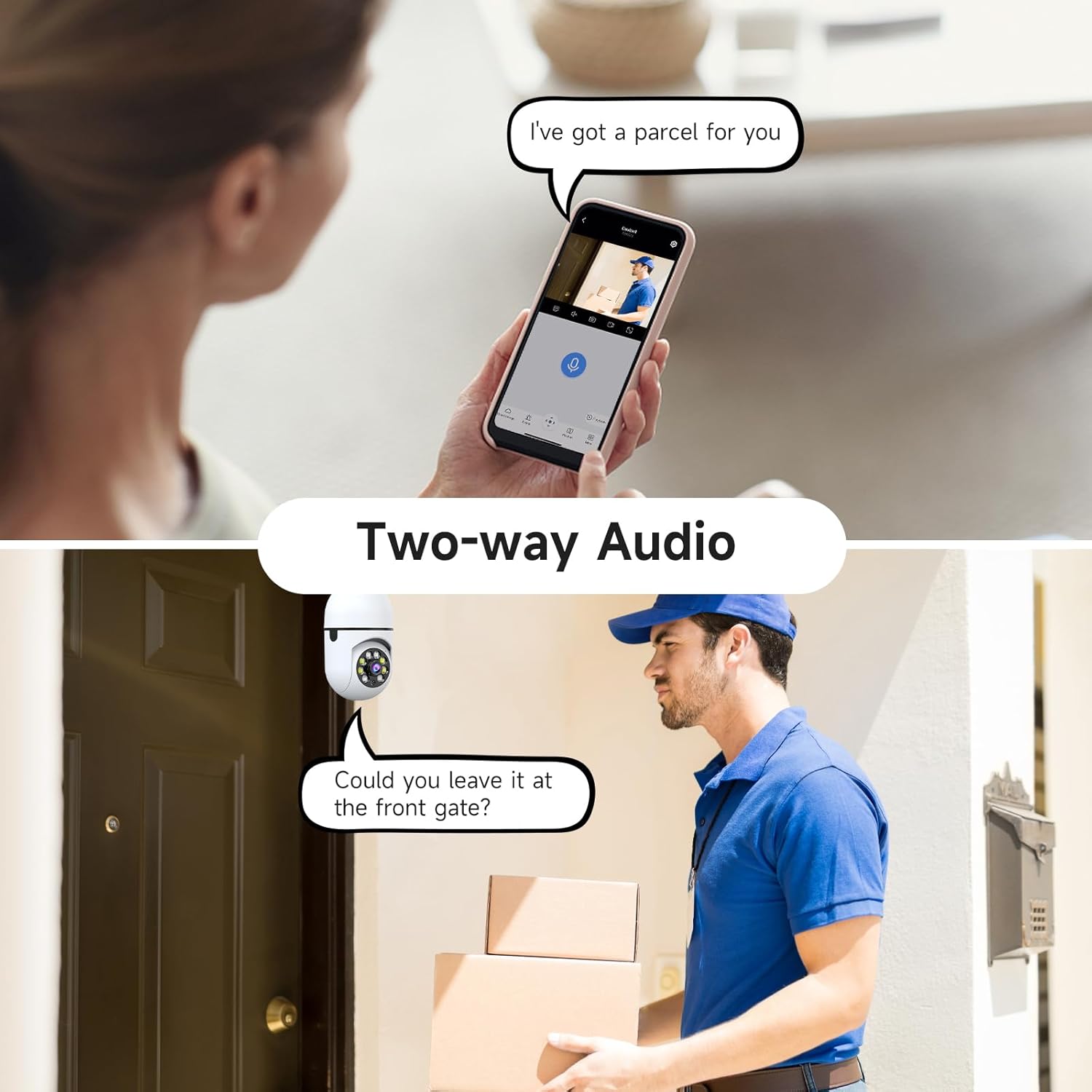
Image 4.2: Illustration of the two-way audio function, showing a user speaking through the app to a person at the door.
4.3 モーション検出とAIによる人間検出
The camera is equipped with advanced motion detection and AI-powered human detection. This technology helps reduce false alerts by distinguishing human movement from other environmental factors like pets or swaying branches. When motion is detected, you will receive real-time notifications on your smartphone.

Image 4.3: A smartphone screen showing an alert notification for AI human detection, indicating the camera's ability to filter false alarms.
4.4 自動追跡
When motion is detected, the camera can automatically track the moving object within its 360-degree viewing angle. After tracking, it will return to its preset monitoring position.

Image 4.4: The camera's motion detection and auto-tracking feature, illustrating how it follows movement and returns to its original position.
4.5 カラーナイトビジョン
The camera provides color night vision, offering clear and vivid images even in low-light conditions, surpassing traditional black and white night vision.
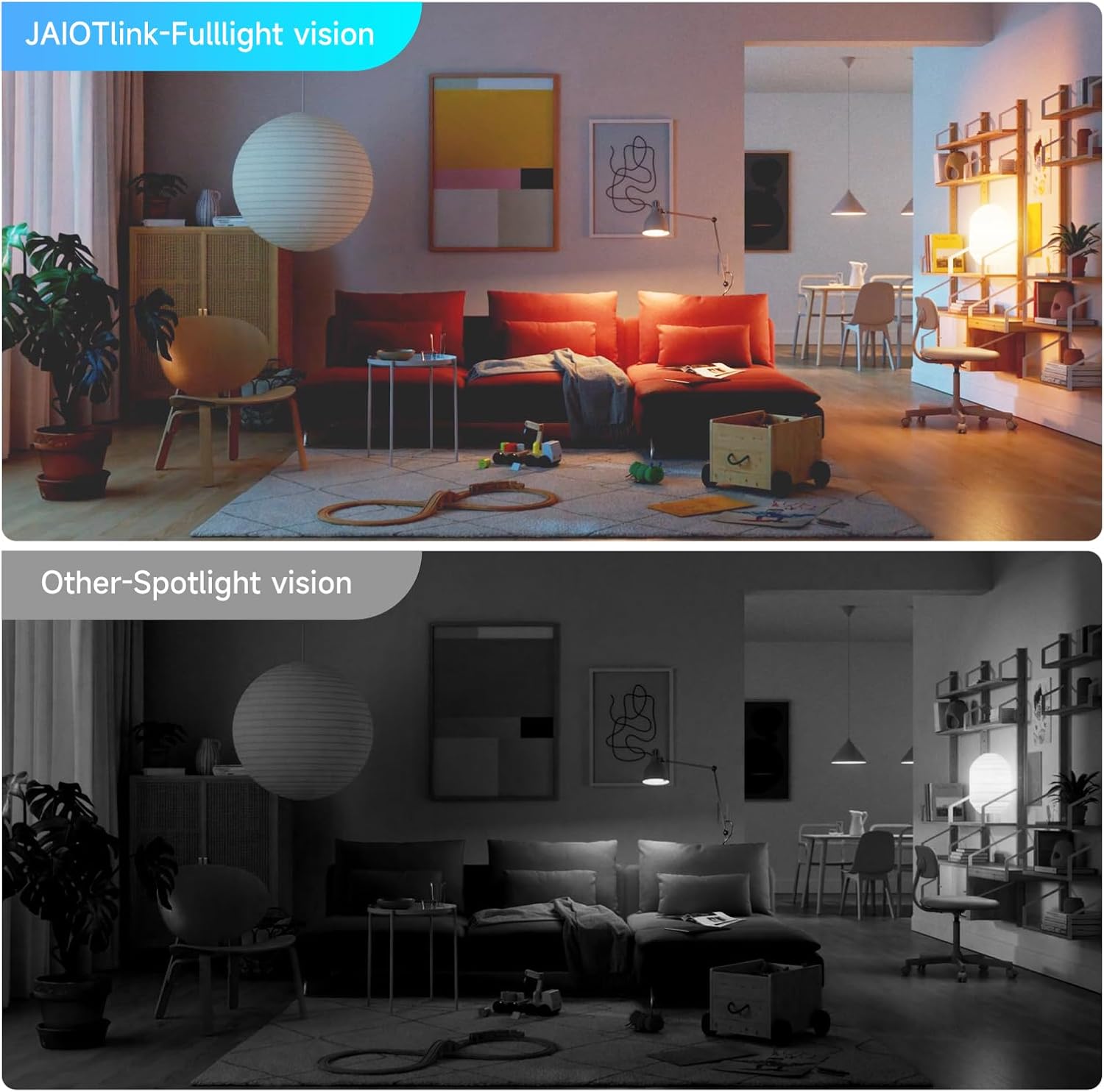
Image 4.5: A comparison showing the superior clarity and color rendition of JAIOTlink's Full-light vision compared to standard spotlight vision in a low-light indoor setting.
4.6 記録と保存
The camera supports local storage via a Micro SD card (up to 256GB). Insert a compatible Micro SD card into the designated slot on the camera to enable continuous recording or event-triggered recording. Manage recording settings and review フーtagモバイル アプリケーションを通じて。
4.7 Alexa互換性
The JAIOTlink camera is compatible with Amazon Alexa. Link your camera to your Alexa account through the Alexa app to enable voice-activated viewing of your camera's live feed on compatible Alexa-enabled devices.
5. メンテナンス
5.1 クリーニング
最適な画質を維持するために、カメラのレンズは定期的に柔らかく乾いた布で拭いてください。レンズを傷つける可能性のある、刺激の強い化学薬品や研磨剤の使用は避けてください。
5.2ファームウェアアップデート
Ensure your camera's firmware is up to date. The mobile application will typically notify you of available updates. Follow the in-app instructions to perform firmware updates, which can improve performance and add new features.
5.3 ストレージ管理
If using a Micro SD card for storage, regularly check its capacity through the app. You may need to format the card periodically or replace it if it becomes full or corrupted. Back up important footagフォーマットする前にeを入力します。
6。 トラブルシューティング
- カメラがWi-Fiに接続できない:
- Ensure your Wi-Fi network is 2.4GHz or 5GHz and that your router is within range.
- アプリに入力した Wi-Fi パスワードが正しいことを確認します。
- ルーターとカメラを再起動します。
- 頻繁な誤報:
- アプリでモーション検出の感度設定を調整します。
- AI 人間検出機能を利用して、人間以外の動きを除外します。
- カメラの視野が view is clear of objects that might cause unwanted triggers (e.g., swaying branches, reflective surfaces).
- ビデオフィードなし:
- カメラの電源がオンになっていて、Wi-Fi に接続されているかどうかを確認します。
- スマートフォンのインターネット接続が安定していることを確認してください。
- Restart the camera and the mobile application.
- 双方向オーディオが機能しない:
- アプリ内のマイクとスピーカーの設定を確認してください。
- 携帯電話の音量が上がっていること、アプリにマイクの権限があることを確認してください。
- カメラのマイクやスピーカーを遮る障害物がないことを確認します。
7. 仕様
| 特徴 | 仕様 |
|---|---|
| モデル番号 | JA-CA42 |
| ビデオキャプチャ解像度 | 2K(3MP有効静止画解像度) |
| 接続技術 | ワイヤレス(Wi-Fi) |
| 無線通信技術 | Wi-Fi(2.4GHzおよび5GHz) |
| 屋内/屋外での使用 | 屋内、屋外 |
| 取り付けタイプ | Light Socket (E27) |
| View角度 | 360度 |
| 暗視範囲 | 33フィート |
| 低照度テクノロジー | 夜の色 |
| 特集 | 2-Way Audio, AI Human Detection, Auto Tracking, Alexa Compatible |
| ストレージ | マイクロSD(最大256GB) |
| 電源 | コード式電気 |
| 巻tage | 240ボルト |
| ワットtage | 5ワット |
| 寸法(長さ×幅×高さ) | 2.68 x 2 x 6.1インチ |
| 材料 | アクリロニトリルブタジエンスチレン(ABS) |
8. 保証とサポート
8.1 保証情報
The JAIOTlink 2K Light Bulb Security Camera comes with a 12-month reliable warranty from the date of purchase. This warranty covers manufacturing defects and ensures the product functions as intended under normal use. Please retain your proof of purchase for warranty claims.
8.2 カスタマーサポート
技術的なサポート、トラブルシューティング、保証に関するお問い合わせは、カスタマー サポート チームまでご連絡ください。
- メールアドレス: E-Mingxun@outlook.com