
1. はじめに
The PWAYTEK Wireless CarPlay Adapter converts your car's wired CarPlay or Android Auto system into a wireless connection. This device allows for seamless integration of your smartphone's features directly onto your car's infotainment screen without the need for cables. It supports 5GHz WiFi and Bluetooth 5.0 for stable and fast connectivity.
2. 主な特徴
- ワイヤレス接続: 有線 CarPlay/Android Auto をワイヤレスに変換します。
- 高速データ: 5GHz WiFi を利用し、高速かつ安定したデータ転送を実現します。
- Bluetooth 5.0: Enhanced Bluetooth for reliable pairing and audio performance.
- プラグアンドプレイ: Simple setup with no additional drivers or software required.
- 自動接続: Automatically connects to your paired smartphone upon car startup.
- コンパクトなデザイン: Miniaturized for easy portability and discreet placement.
- Original Control Support: Retains full functionality of your car's original controls, including voice assistant, touch screen, scroll wheel, and OEM knobs.
3. 互換性
This adapter is compatible with most cars manufactured in 2016 or later that feature a factory-installed wired CarPlay or Android Auto system. It supports iPhones running iOS 10 and above, and Android phones running Android 11 and above.
To check specific car compatibility for Apple CarPlay, visit: Apple CarPlay対応モデル
To check specific car compatibility for Android Auto, visit: Android Auto対応車両
4. パッケージ内容
- PWAYTEK Wireless CarPlay Adapter Unit
- USB-A to USB-C Adapter Cable
- ユーザーマニュアル

5. セットアップ手順
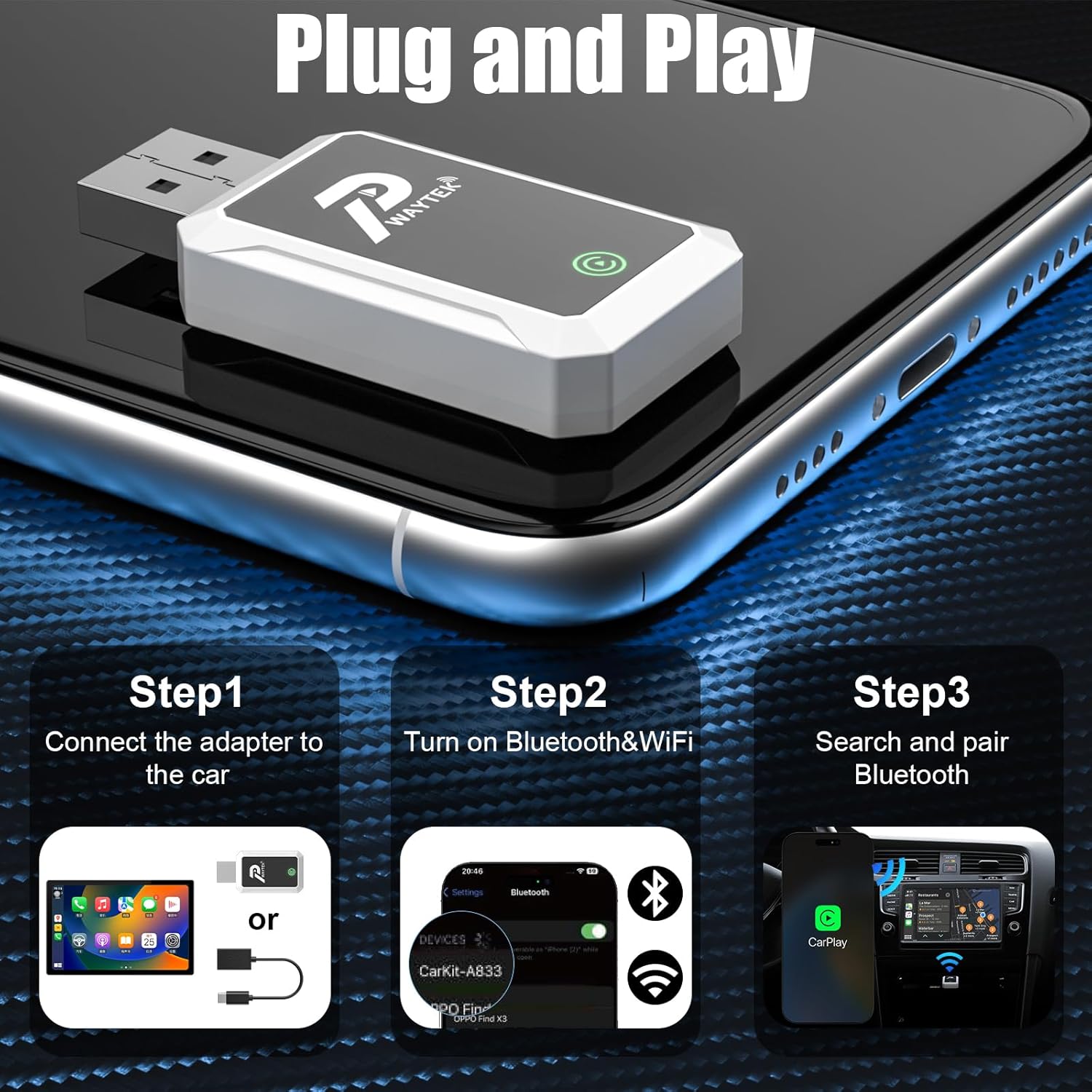
Follow these steps for initial setup of your PWAYTEK Wireless CarPlay Adapter:
- アダプターを接続します: Plug the PWAYTEK Wireless CarPlay Adapter into your car's USB port that supports wired CarPlay or Android Auto. If your car has a USB-C port, use the included USB-A to USB-C adapter cable. The adapter's indicator light will illuminate.
- BluetoothとWiFiを有効にする: On your iPhone or Android phone, ensure both Bluetooth and WiFi are turned on.
- Bluetooth経由でペアリング: On your phone, go to Bluetooth settings and search for available devices. Select the device named "SmartBox-FA03" (or similar, as indicated by the adapter). Confirm the pairing request on both your phone and your car's infotainment screen.
- 自動接続: Once paired, your car's infotainment system should automatically launch CarPlay or Android Auto. For subsequent uses, the adapter will automatically connect to your phone when you start your car.
6. 操作手順
Once connected, your car's display will mirror your smartphone's CarPlay or Android Auto interface. You can interact with your phone's apps and features using your car's built-in controls.
- ナビゲーション: Use your preferred navigation apps (e.g., Apple Maps, Google Maps, Waze) directly on the car screen.
- 音楽とオーディオ: Access your music, podcasts, and audiobooks through apps like Spotify, Apple Music, YouTube Music, etc.
- コミュニケーション: 電話をかけたり受けたり、メッセージを送信したり、連絡先にアクセスしたりできます。
- 音声アシスタント: Activate Siri or Google Assistant using your car's voice command button for hands-free control.
- 車のコントロール: Utilize your car's touch screen, scroll wheel, and physical buttons (OEM knobs) to navigate the interface.

7. メンテナンス
To ensure the longevity and optimal performance of your PWAYTEK Wireless CarPlay Adapter, please follow these maintenance guidelines:
- デバイスを乾燥した状態に保ち、湿気を避けてください。
- アダプタを極端な温度にさらさないでください。
- 柔らかく乾いた布でデバイスを拭いてください。刺激の強い化学薬品や研磨剤入りの洗剤は使用しないでください。
- Handle the adapter and cables gently to prevent damage to connectors.
8。 トラブルシューティング
If you encounter issues with your PWAYTEK Wireless CarPlay Adapter, try the following solutions:
| 問題 | 解決 |
|---|---|
| アダプタの電源が入りません。 | Ensure the adapter is securely plugged into a functional USB port in your car. Try a different USB port if available. |
| CarPlay/Android Autoに接続できません。 |
|
| 断続的な接続または遅延。 |
|
| オーディオの問題 (音が出ない、歪む)。 |
|
If the problem persists, please contact PWAYTEK customer support for further assistance.
9. 仕様
| 特徴 | 詳細 |
|---|---|
| ブランド | プウェイテック |
| モデル番号 | B0FDF48GCJ |
| 接続性 | Wireless (5GHz WiFi, Bluetooth 5.0) |
| サポートされているシステム | Apple CarPlay、Android Auto |
| 車の互換性 | 工場出荷時に有線接続されたCarPlay/Android Auto搭載車(2016年以降) |
| 電話の互換性 | iPhone(iOS 10以上)、Android(Android 11以上) |
| アイテム重量 | 0.04キログラム |
| 色 | 白 |
| ポート数 | 2 (USB-A, USB-C via adapter) |
| 欧州連合 | 717331823856 |
10. 保証とサポート
PWAYTEK products are designed for reliability and performance. For warranty information, product registration, or technical support, please refer to the documentation included with your purchase or visit the official PWAYTEK website. If you require assistance, please contact PWAYTEK customer service directly.