
1. はじめに
The Hushing Sound Machine Alarm Clock F4 is a versatile 3-in-1 device designed to enhance sleep and simplify daily routines. It combines a sound machine with 30 soothing sounds, a dual alarm clock with 15 wake-up sounds, and a night light with 12 color options. This device features a backup battery for alarm functionality during power outages, a memory function to retain settings, and adjustable display brightness.

図1: 前面 view of the Hushing Sound Machine Alarm Clock F4.
2 製品の特徴
- 3-in-1 機能: Integrates a sound machine, dual alarm clock, and night light.
- サウンドマシン: Offers 30 soothing sounds, including white noise, pink noise, brown noises, lullabies, and natural sounds (rain, thunderstorm, sea waves, river, campfire, water drop, singing birds).
- デュアルアラーム: Two independent alarms for different schedules.
- 目覚まし音: 15 options, including classic beeps, light music, and ambient sounds.
- スヌーズ機能: Provides an additional 9 minutes of rest.
- ナイトライト: 12 colors with 10 adjustable brightness levels. Can be turned off independently.
- 時間表示: 12/24-hour mode with 4 levels of adjustable brightness.
- 音量コントロール: 32つの調整可能な音量レベル。
- Sleep Timers: Auto-off options for 30, 60, 90, or 120 minutes, or continuous playback.
- メモリ機能: Retains last settings after power failure or reboot.
- バックアップバッテリー: Ensures alarm functionality during power outages (device requires constant power for full operation).

図2:以上view 3 in 1 機能の。

Figure 3: Detailed list of 30 soothing sounds available.
3. セットアップ
- 電源接続: Connect the device to a power source using the provided USB cable and adapter. The device requires continuous power for full operation. The internal battery serves as a backup for the alarm function only.
- 初期費用: For optimal performance, ensure the device is fully charged before first use.
- 時間設定:
- Press and hold the "12/24H Time Set" button to enter time setting mode.
- 「+」または「-」ボタンを使用して時間を調整します。
- Press the "Next Song" button (right arrow) to move to minute adjustment.
- 「+」または「-」ボタンを使用して分を調整します。
- Press the "Next Song" button again to confirm and exit time setting.
- 12/24時間形式: Short press the "12/24H Time Set" button to toggle between 12-hour (AM/PM) and 24-hour formats.
Video 1: Guide on how to set the alarm clock and other settings.
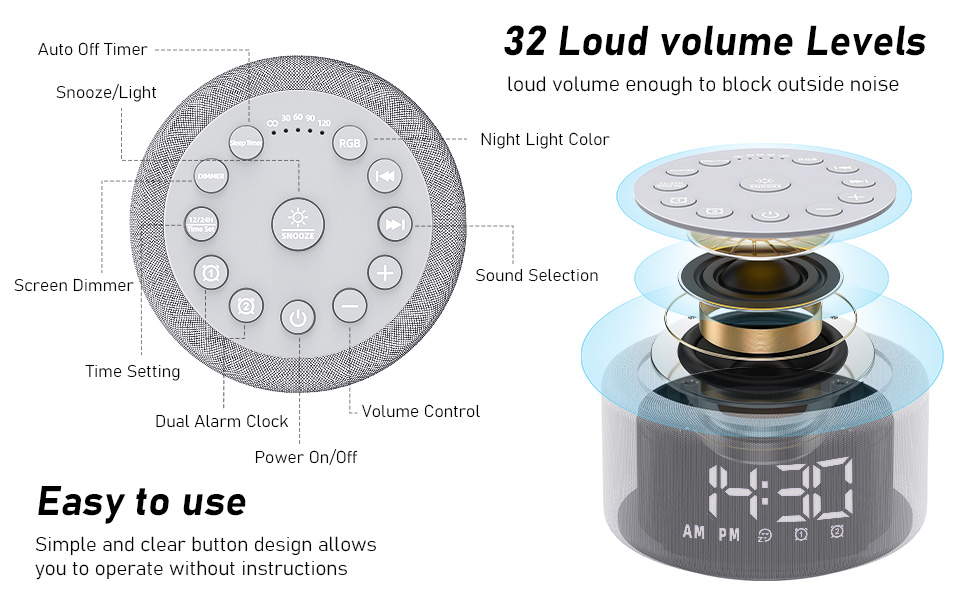
図 4: 簡単に操作できるボタンのレイアウトと機能。
4. 操作手順
4.1.アラームの設定
- Set Alarm 1 or 2:
- Press and hold the "Alarm 1" or "Alarm 2" button to enter alarm setting mode.
- 「+」または「-」ボタンを使用してアラームの時間を調整します。
- Press the "Next Song" button (right arrow) to move to minute adjustment.
- 「+」または「-」ボタンを使用して、アラームの分数を調整します。
- Press the "Next Song" button again to select the alarm sound (15 options). Use "+" or "-" to cycle through sounds.
- Press the "Next Song" button again to adjust alarm volume. Use "+" or "-" to set the volume.
- Press the "Next Song" button again to confirm and exit alarm setting. The alarm icon will appear on the display.
- アラームのオン/オフ: Short press the "Alarm 1" or "Alarm 2" button to activate or deactivate the alarm. The alarm icon will appear/disappear on the display.
- スヌーズ: When the alarm sounds, press the "Snooze" button to temporarily silence it for 9 minutes.
- アラーム停止: To turn off the alarm completely, press any button other than "Snooze" when the alarm is sounding.
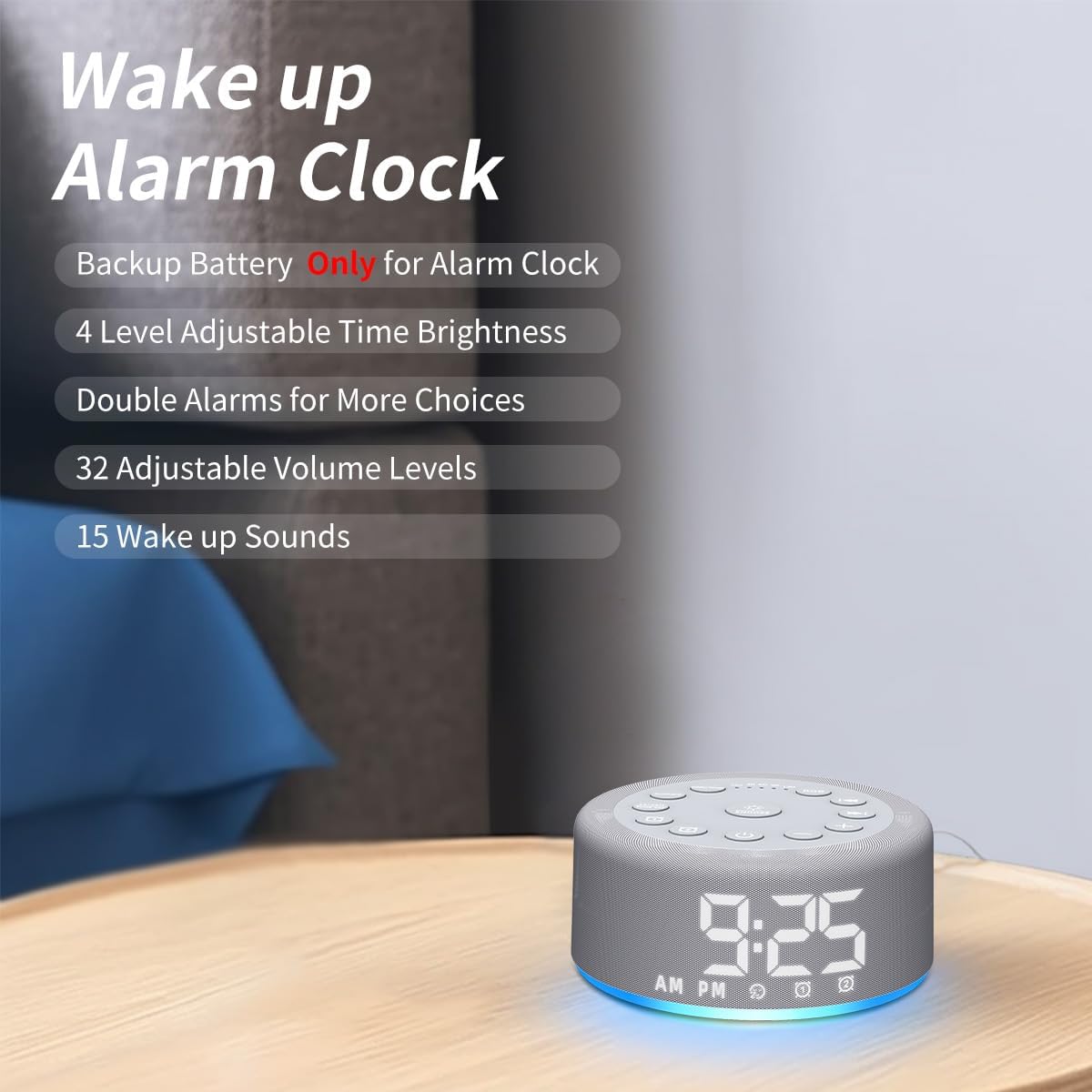
Figure 5: Key features of the alarm clock function.

図6:例amples of wake-up sounds.
4.2. Using the Sound Machine
- オン/オフ: Press the power button (bottom center) to turn the sound machine on or off.
- サウンドを選択: Use the "Previous Song" (left arrow) or "Next Song" (right arrow) buttons to cycle through the 30 available sounds.
- 音量を調整: Use the "+" or "-" buttons to increase or decrease the volume (32 levels).
- スリープタイマーを設定する: Short press the "Sleep Timer" button to set an auto-off timer for 30, 60, 90, or 120 minutes. Press repeatedly to cycle through options or select continuous play (indicated by "CO").

Figure 7: Internal speaker design and volume capabilities.
4.3. 夜間照明操作
- オン/オフ: Press the "RGB" button to turn the night light on or off.
- 色の変更: Short press the "RGB" button to cycle through 12 different colors.
- 明るさを調整: Use the "+" or "-" buttons to adjust the brightness of the night light (10 levels).

Figure 8: Night light features and benefits.
4.4.ディスプレイの明るさ
- ディスプレイの明るさを調整します。 Short press the "Dimmer" button to cycle through 4 levels of display brightness (low, medium, high, off).
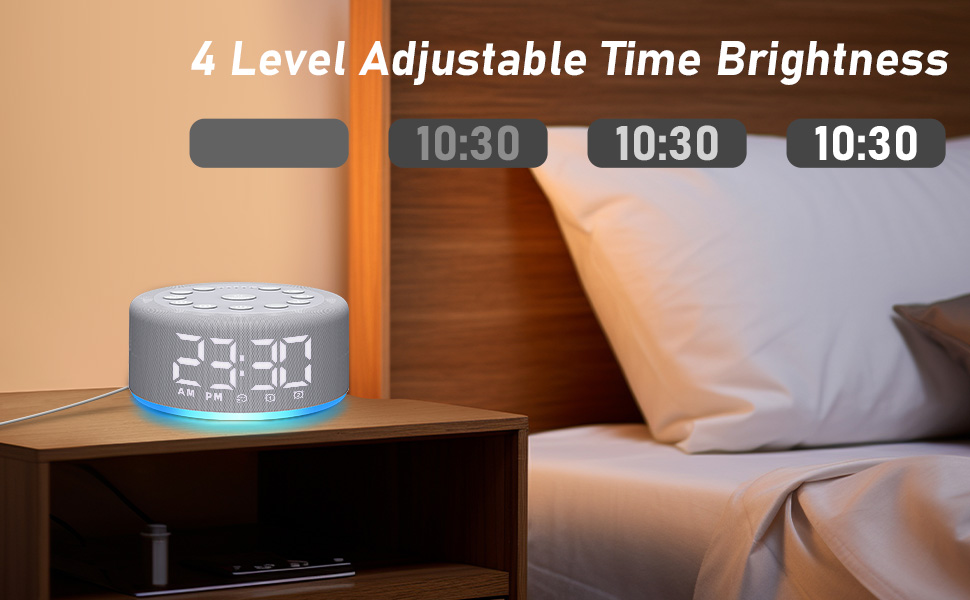
Figure 9: Adjustable time display brightness levels.
5. メンテナンス
- クリーニング: 柔らかく乾いた布で拭いてください。液体クリーナーや研磨剤は使用しないでください。
- ストレージ: 長期間使用しない場合は、涼しく乾燥した場所に保管してください。
- 力: Ensure the device remains plugged into a power source for continuous functionality, especially for the sound machine and night light features. The backup battery is solely for the alarm function during power interruptions.
6。 トラブルシューティング
- デバイスの電源が入らない: Ensure the device is properly plugged into a working power outlet. Check the USB cable and adapter for damage.
- アラームが鳴らない: Verify that the alarm is set and activated (alarm icon visible on display). Check the alarm volume setting. Ensure the device is plugged in, as the backup battery only supports the alarm function for a limited time during power outages。
- 音質の問題: Ensure the device is placed on a flat, stable surface. The speaker is located on the bottom of the unit, so avoid placing it on soft surfaces that might muffle the sound.
- ディスプレイが明るすぎる/暗すぎる: Use the "Dimmer" button to adjust the display brightness to your preference.
- 設定が保存されない: The device has a memory function. If settings are not retained, ensure the device is not completely losing power for extended periods beyond the backup battery's capacity.
7. 仕様
- 製品寸法: 4.25 x 4.25 x 2.2インチ
- 商品の重量: 7.68オンス
- モデル名: HAC-F4
- 電池: 1 Lithium Polymer battery required (included, for backup alarm function)
- メーカー: 急いで
8. 保証とサポート
For warranty information or technical support, please refer to the contact details provided with your purchase or visit the official Hushing webサイトをご覧ください。保証請求に備えて購入レシートを保管してください。