
Alienware Alienware Aurora R16 Desktop
Alienware Aurora R16 ゲーミングデスクトップ ユーザーマニュアル
Model: Alienware Aurora R16 Desktop
1. はじめに
This manual provides essential information for setting up, operating, maintaining, and troubleshooting your Alienware Aurora R16 Gaming Desktop. Please read this manual thoroughly before using your system to ensure optimal performance and longevity.

Figure 1.1: Alienware Aurora R16 Gaming Desktop with included keyboard and mouse.
The Alienware Aurora R16 features the new Legend 3 design, focusing on minimalism and functionality while optimizing for any desktop gaming setup.

Figure 1.2: The Alienware Aurora R16's Legend 3 design emphasizes a minimalist and functional aesthetic.
2. 箱の中身
パッケージ内にすべてのコンポーネントが揃っていることを確認します。
- Alienware Aurora R16 ゲーミングデスクトップ
- 電源ケーブル
- キーボード
- ねずみ
- ドキュメント(クイックスタートガイド、安全情報)
If any items are missing or damaged, contact Alienware support immediately.
3. 初期設定
Follow these steps to set up your Alienware Aurora R16 Desktop:
- システムを開梱します。 デスクトップをパッケージから慎重に取り出します。
- 周辺機器を接続します。
- Connect your monitor(s) to the appropriate display ports (DisplayPort, HDMI) on the graphics card.
- キーボードとマウスを使用可能な USB ポートに接続します。
- スピーカー、ヘッドフォン、外付けドライブなどのその他の周辺機器を接続します。

Figure 3.1: Rear I/O ports for connecting display, USB devices, and audio.

Figure 3.2: Front I/O ports including USB 3.2 Gen 1, USB 3.2 Gen 2 Type-C, and headphone/line out.
- 電源に接続: Plug the power cable into the power supply unit on the back of the desktop, then plug the other end into a wall outlet or surge protector.
- 電源オン: Press the power button located on the front of the desktop. The system will boot up and guide you through the Windows 11 Pro initial setup.
4. デスクトップの操作
4.1 最初の起動とWindowsのセットアップ
Upon first power-on, the system will guide you through the Windows 11 Pro setup process. Follow the on-screen instructions to configure your region, language, network settings, and user account.
4.2 エイリアンウェア コマンドセンター
The Alienware Command Center software allows you to customize your system's performance profiles, monitor thermals, and manage lighting effects. This software is pre-installed and can be accessed from the Windows Start Menu.

Figure 4.1: Alienware Command Center interface for system customization.
4.3 パフォーマンスとゲーム
Your Alienware Aurora R16 is equipped with a 14th Gen Intel Core i9-14900KF processor and NVIDIA GeForce RTX 4080 SUPER graphics, designed for high-performance gaming and demanding applications. Ensure your graphics drivers are up to date for optimal performance.

Figure 4.2: The Alienware Aurora R16 is designed for immersive gaming experiences.

図 4.3: 元ample of a complete gaming setup featuring the Alienware Aurora R16.
5. メンテナンス
5.1 クリーニング
Regular cleaning helps maintain system performance and longevity:
- Use a soft, lint-free cloth to wipe down the exterior of the desktop.
- For dust accumulation in vents, use compressed air. Ensure the system is powered off and unplugged before cleaning.
- 液体クリーナーをコンポーネントに直接使用しないでください。
5.2 空気の流れと冷却
The Aurora R16 features an optimized airflow design and a 240mm liquid CPU cooler to ensure efficient thermal management. Ensure the desktop is placed in a well-ventilated area and that air vents are not obstructed.

Figure 5.1: Optimized internal design for efficient airflow and cable management.
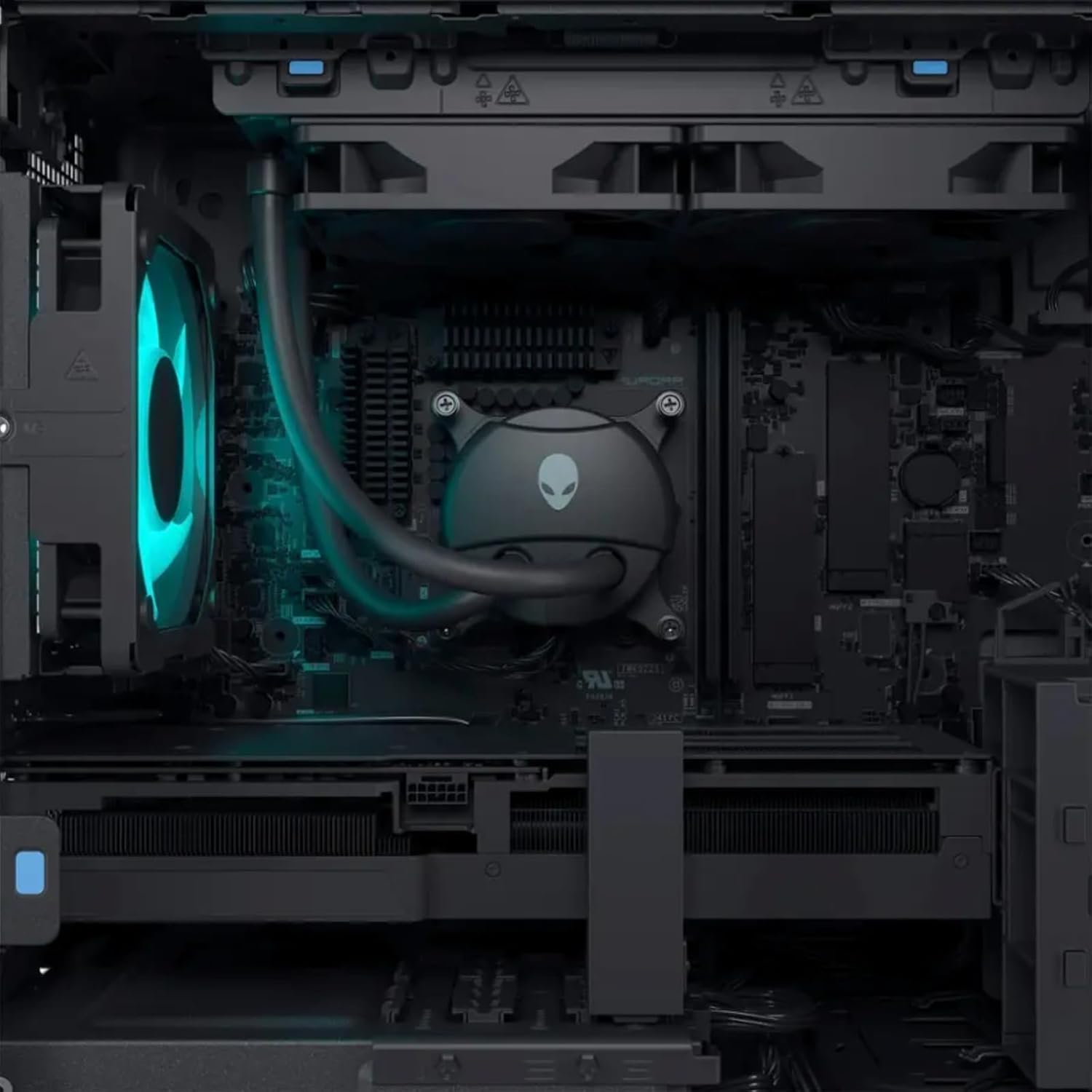
図5.2:内部 view highlighting the liquid CPU cooling system and other components.

図5.3: トップダウン view of the internal layout, showing components and fan.

Figure 5.4: Angled internal view, providing a clearer look at the internal structure.
6。 トラブルシューティング
This section provides solutions to common issues. For more complex problems, refer to the Alienware support webサイトをご覧いただくか、テクニカル サポートにお問い合わせください。
| 問題 | 考えられる解決策 |
|---|---|
| システムの電源が入らない。 |
|
| モニターに何も表示されない。 |
|
| System is running slow or freezing. |
|
| 周辺機器(キーボード/マウス)が応答しません。 |
|
7. 仕様
Detailed technical specifications for the Alienware Aurora R16 Gaming Desktop:
| 成分 | 仕様 |
|---|---|
| プロセッサ | 14th Gen Intel Core i9-14900KF (24 Cores, 32 Threads, up to 6 GHz) |
| グラフィックカード | NVIDIA GeForce RTX 4080 SUPER 16GB GDDR6X |
| ラム | Up to 64GB DDR5 RAM (5600MHz) |
| ストレージ | Up to 8TB SSD + 2TB HDD |
| オペレーティング·システム | ウィンドウズ11プロ |
| ワイヤレス接続 | Wi-Fi 6E(802.11ax)、Bluetooth |
| CPU冷却システム | Liquid Cooling (240mm) |
| GPU Cooling System | 空冷 |
| 表示ポート | 4 x DisplayPort 1.4, 1 x Mini DisplayPort (Total 5 DisplayPort Outputs) |
| USBポート | 3 x USB-C 3.2, 5 x USB-A 3.2, 4 x USB-A 2.0 (Total 12 USB Ports) |
| 寸法(高さx幅x奥行き) | 7.76 x 18.05 x 16.5インチ |
| 重さ | 33.89ポンド |
8. 保証とサポート
8.1 保証情報
Your Alienware Aurora R16 Gaming Desktop comes with a standard manufacturer's warranty. For detailed terms and conditions, including warranty duration and coverage, please refer to the warranty documentation included with your product or visit the official Alienware support webサイト。
8.2 テクニカルサポート
For technical assistance, driver downloads, or further troubleshooting, please visit the official Alienware support web販売店のウェブサイトをご覧いただくか、カスタマーサービスまでお問い合わせください。サポートにお問い合わせの際は、製品のシリアル番号をご用意ください。
Alienware サポート Webサイト: support.dell.com/alienware