
導入
This manual provides comprehensive instructions for the SAFFUN 2.4 GHz Wireless GameCube Switch2 Pro Controller. It covers product features, setup, operation, maintenance, and troubleshooting to ensure optimal performance and user experience. Please read this manual thoroughly before using the product.
パッケージ内容
以下にリストされているすべてのアイテムがパッケージに含まれていることを確認してください。
- Wireless Controller (2 units)
- GameCube Receiver (2 units)
- USB Receiver (2 units)
- 充電ケーブル(2本)
- ユーザーマニュアル

Image: Contents of the SAFFUN 2.4 GHz Wireless GameCube Switch2 Pro Controller package, including two controllers and their receivers.
製品終了view
The SAFFUN Wireless GameCube Switch2 Pro Controller is designed to provide a familiar GameCube layout with modern wireless capabilities and multi-platform compatibility. Key features include:
- GameCube Layout: Retains the original GameCube button and stick configuration.
- 2.4GHzワイヤレス: Offers a reliable connection up to 10 meters (33 feet).
- Built-in Rumble: Provides immersive vibration feedback.
- 充電式バッテリー: Integrated 500mAh lithium battery for extended usage.
- Precision Analog Sticks: Features Japanese imported 3D analog sticks and ALPS buttons for accuracy.
- マルチプラットフォームサポート: Compatible with NGC GameCube Console, Nintendo Switch, PC, and Steam Deck.
- Player Indicator & Low Battery LED: Visual indicators for status.
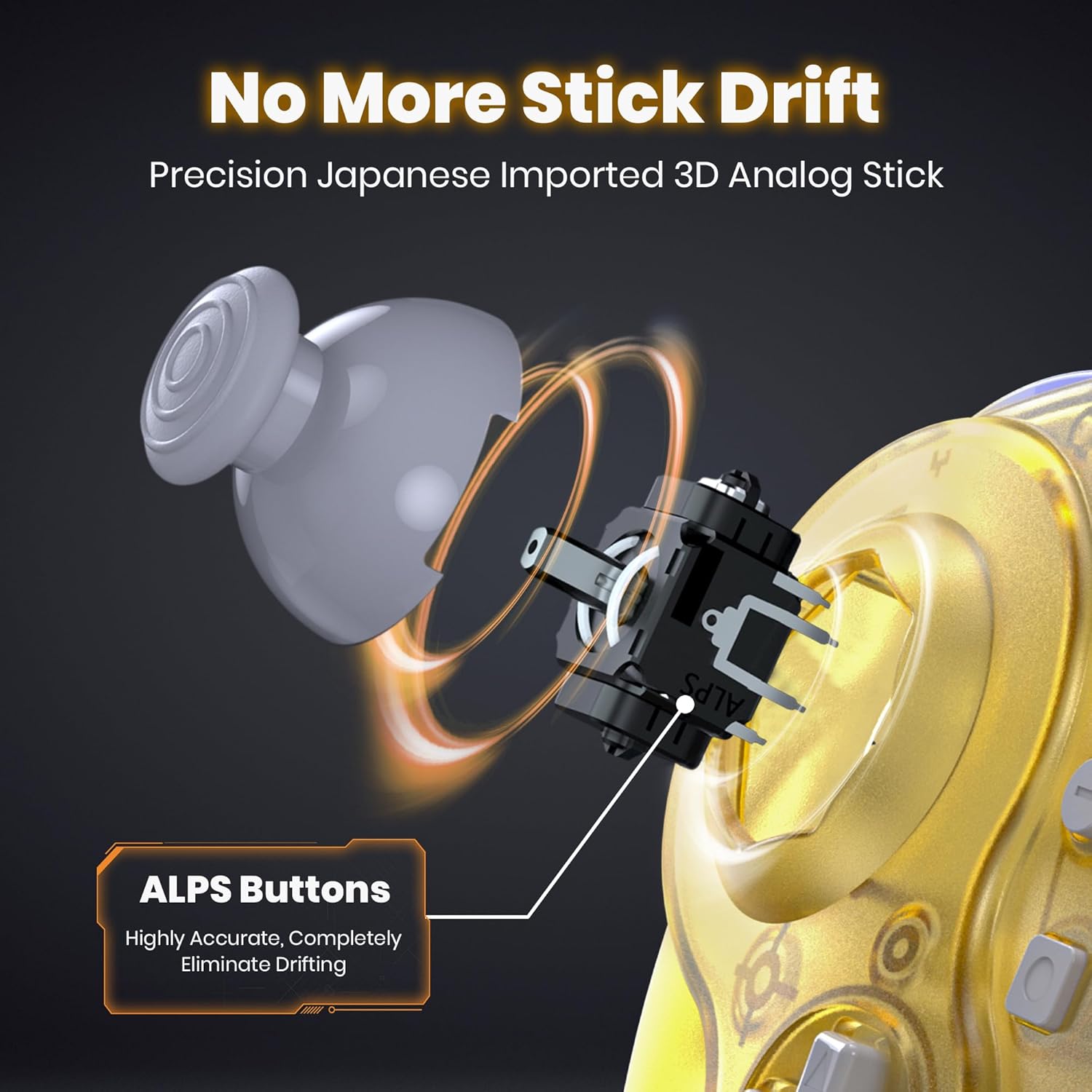
画像: 内部 view of the controller's analog stick mechanism, emphasizing precision components.

画像: 複数 views of the clear yellow controller, showcasing そのデザイン。
設定
1. コントローラーの充電
The controller is equipped with a built-in rechargeable lithium battery. Before first use, or when the low battery LED indicates, charge the controller using the provided USB charging cable.
- Connect the small end of the charging cable to the controller's charging port.
- Connect the large end of the charging cable to a USB power source (e.g., computer USB port, USB wall adapter).
- Ensure the controller's ON/OFF switch is in the "ON" position for charging to initiate.
- The charging indicator LED will illuminate during charging and turn off when fully charged.
- フル充電には約 2.5 時間かかり、最大 10 時間使用できます。

Image: Battery specifications and charging details for the controller.
2. Connecting to Consoles/Devices
The controller supports multiple platforms using two types of receivers:
- GameCube Receiver: For NGC GameCube Console.
- USBレシーバー: For Nintendo Switch, PC, Steam Deck, iOS Mac, and Raspberry Pi.
2.1. Connecting to NGC GameCube Console
- Insert the GameCube Receiver into a controller port on your NGC GameCube Console.
- Ensure the controller's ON/OFF switch is in the "ON" position.
- Press the SYNC button on the GameCube Receiver and the SYNC button on the controller simultaneously. The indicator lights on both devices will flash and then become solid when connected.
2.2. Connecting to Nintendo Switch, PC, Steam Deck
- Insert the USB Receiver into an available USB port on your Nintendo Switch dock, PC, or Steam Deck.
- Ensure the controller's ON/OFF switch is in the "ON" position.
- Press the SYNC button on the USB Receiver and the SYNC button on the controller simultaneously. The indicator lights on both devices will flash and then become solid when connected.
- For Nintendo Switch, ensure "Pro Controller Wired Communication" is enabled in the system settings if connecting via the dock.

Image: Multi-platform compatibility of the controller, including Nintendo Switch, GameCube, Steam Deck, and PC.
操作手順
1. 電源のオン/オフ
- 電源をオンにするには、オン/オフスイッチを「オン」の位置にスライドします。
- 電源を切るには、オン/オフスイッチを「オフ」の位置にスライドします。
2. Player Indicator and Low Battery Warning
- The controller features an LED player indicator to show which player number it is assigned to.
- A flashing LED will indicate a low battery level. Recharge the controller promptly when this occurs.
3. Rumble Feature
The controller includes built-in vibration motors to enhance your gaming experience with tactile feedback. This feature is automatically active when supported by the game.

Image: Visual representation of the controller's built-in vibration motor functionality.
4. 人間工学に基づいたデザイン
The controller is ergonomically designed to fit comfortably in your hands, providing a secure grip during extended gaming sessions.

Image: A user holding the clear yellow controller, highlighting its ergonomic design.

Image: A user holding the clear red controller, highlighting its ergonomic design.
メンテナンス
- Keep the controller and receivers dry. Avoid exposure to humidity or liquids.
- コントローラーは柔らかく乾いた布で拭いてください。刺激の強い化学薬品や研磨剤は使用しないでください。
- コントローラーは、直射日光や極端な温度を避け、涼しく乾燥した場所に保管してください。
- コントローラーを落としたり、強い衝撃を与えたりしないでください。
トラブルシューティング
| 問題 | 考えられる原因 | 解決 |
|---|---|---|
| コントローラの電源が入らない。 | 電池が消耗しています。 | Charge the controller for at least 2.5 hours. Ensure the ON/OFF switch is in the "ON" position during charging. |
| Controller does not connect to console/PC. | Not paired correctly; receiver not properly inserted; out of range. | Ensure the correct receiver is used and fully inserted. Re-attempt pairing by pressing SYNC buttons on both controller and receiver. Ensure controller is within 10 meters of the receiver. |
| 入力遅延または接続の切断。 | Interference; low battery; too far from receiver. | Move closer to the receiver. Ensure no other 2.4 GHz devices are causing interference. Charge the controller. |
| Rumble feature not working. | Game does not support rumble; rumble disabled in game settings. | Verify that the game supports vibration feedback. Check in-game settings to ensure rumble is enabled. |
| Controller charges but does not turn on. | ON/OFFスイッチが「OFF」の位置になっています。 | ON/OFFスイッチを「ON」の位置にスライドします。 |
仕様
- モデル: 2.4 GHz Wireless GameCube Switch2 Pro Controller
- 接続性: 2.4GHzワイヤレス
- 無線範囲: 最大10メートル(33フィート)
- バッテリー: 500mAh リチウムポリマー(付属)
- 充電時間: 約2.5時間
- 使用時間: 最大10時間
- 互換性: NGC GameCube Console, Nintendo Switch, PC, Steam Deck, iOS Mac, Raspberry Pi
- 製品寸法: 8 x 6 x 0.72インチ
- 商品の重量: 1.37ポンド
- メーカー: サファン
- ASIN: B0FD2FQB6N
保証とサポート
SAFFUN products are designed for reliability and performance. For any issues or questions regarding your SAFFUN 2.4 GHz Wireless GameCube Switch2 Pro Controller, please refer to the following:
- 保証: 保証請求の際は購入証明書を保管してください。具体的な保証条件は地域や販売店によって異なる場合があります。
- カスタマーサポート: For technical assistance or support, please contact the retailer where the product was purchased or visit the official SAFFUN support webサイト(利用可能な場合)。