
導入
This manual provides detailed instructions for the installation, operation, and maintenance of your Ctronics 4K Hybrid Zoom 10x Outdoor WiFi Surveillance Camera, Model 930-4KD. This camera is designed for outdoor security, featuring dual lenses, 10x hybrid zoom, auto-tracking, human detection, color night vision, two-way audio, and an IP66 weatherproof rating.
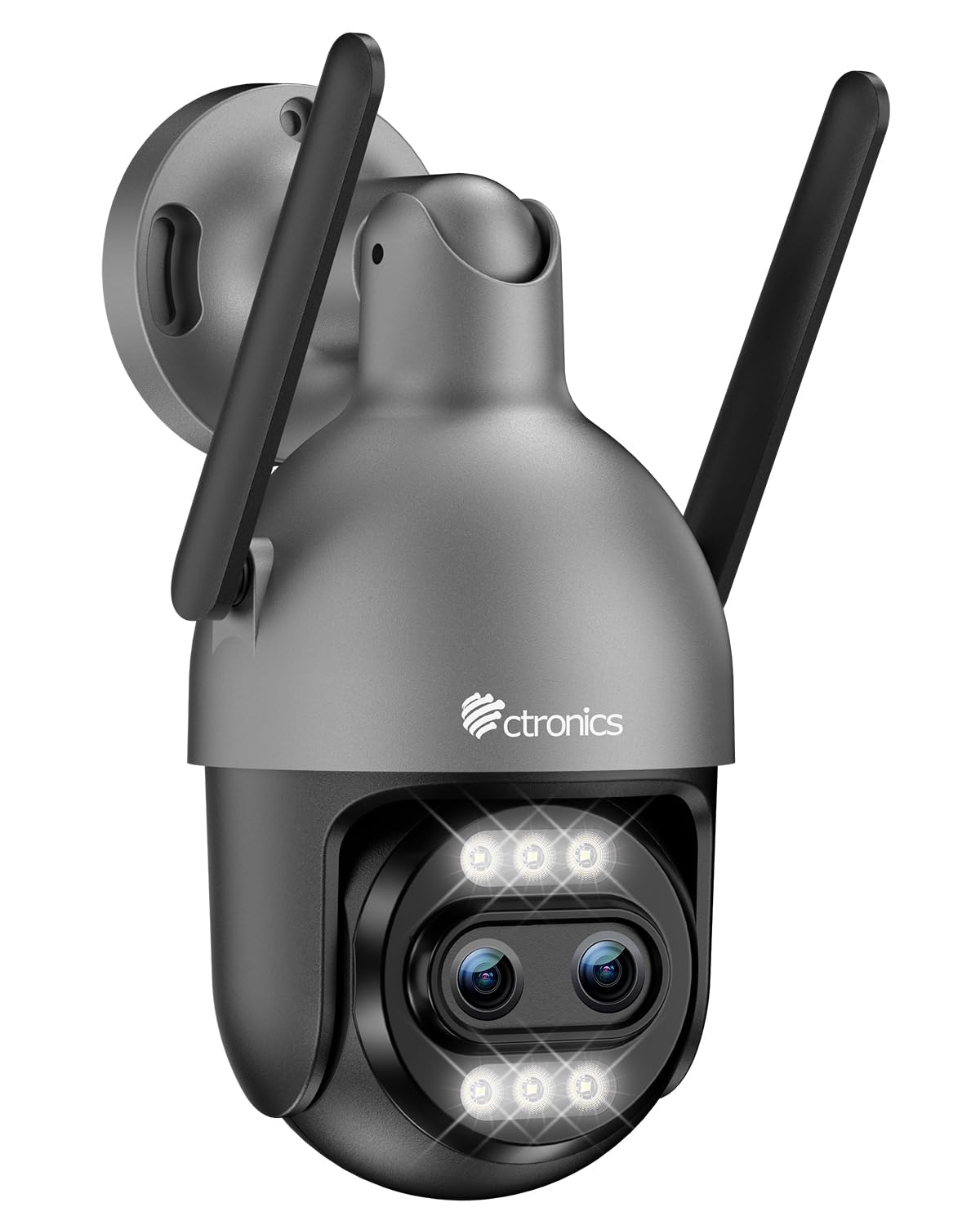
Image: Ctronics 4K Hybrid Zoom 10x Outdoor WiFi Surveillance Camera, Model 930-4KD.
1. セットアップとインストール
1.1 パッケージ内容
パッケージにすべてのコンポーネントが含まれていることを確認します。
- Ctronics 4K Hybrid Zoom 10x Outdoor WiFi Surveillance Camera (Model 930-4KD)
- 電源アダプター
- 取り付けネジとアンカー
- ネットワークケーブル用防水キット
- ユーザーマニュアル(このドキュメント)
1.2物理的な設置
The camera is designed for outdoor use and ceiling mounting. Choose a location that provides optimal surveillance coverage and has a stable surface for mounting. Ensure the camera is within range of your Wi-Fi network or close to an Ethernet connection point.
- Mark the drilling positions on the wall or ceiling using the mounting template (if provided, otherwise use the camera base).
- 穴を開けて壁アンカーを挿入します。
- 付属のネジを使用してカメラベースを表面に固定します。
- Adjust the camera angle as needed before final tightening.

画像: Example of a Ctronics dual-lens PTZ camera, similar to Model 930-4KD, mounted for outdoor surveillance.
1.3 電源とネットワーク接続
Connect the camera to power using the provided power adapter. For network connectivity, you have two options:
- Wi-Fi接続: Ensure your Wi-Fi network is 2.4GHz or 5GHz compatible. Follow the in-app instructions for Wi-Fi setup.
- 有線接続: Connect an Ethernet cable from your router to the camera's network port. Use the waterproof kit to protect the connection if installed outdoors.
1.4 アプリのインストールと設定
Download the official Ctronics Pro app from your smartphone's app store (iOS or Android). Alternatively, use the HiP2P Client software for Windows or Mac OS.
- Install the Ctronics Pro app on your smartphone or HiP2P Client on your computer.
- アカウントを登録してログインします。
- Follow the on-screen prompts to add your camera. This typically involves scanning a QR code on the camera or manually entering its ID.
- タイムゾーン、録画設定、アラート通知などの初期設定を構成します。

Image: The Ctronics multi-platform software interface, showing compatibility with desktop, laptop, tablet, and smartphone devices.
2. 操作手順
2.1 ライブ View 録音
Once connected, access the live feed through the Ctronics Pro app or HiP2P Client. You can view real-time video, initiate manual recordings, and capture screenshots.
2.2つの高度な機能
- 10倍ハイブリッドズーム: Utilize the digital controls in the app to zoom in and out, combining optical and digital zoom for detailed views.
- Auto Zoom Tracking: Enable this feature to allow the camera to automatically track detected human movement and zoom in for clearer identification.
- 人間の検出: Configure motion detection zones and sensitivity. The camera will send alerts upon detecting human shapes, reducing false alarms.
- カラーナイトビジョン: The camera employs Starlight vision technology and LED lights to provide full-color video even in low-light conditions, up to 30 meters.
- 双方向オーディオ: Use the built-in microphone and speaker to communicate with visitors or deter intruders remotely.
- PTZコントロール: Pan, Tilt, and Zoom the camera remotely via the app to adjust the viewing angle and cover a 360-degree area.

Image: The Ctronics 10x Hybrid Zoom camera, highlighting its advanced optical capabilities.
2.3 ストレージオプション
The camera supports local recording to a Micro SD card (up to 256GB). Ensure the card is inserted correctly and formatted through the app. Cloud storage options may also be available through the Ctronics service.
3. メンテナンス
- クリーニング: カメラのレンズとハウジングを定期的に柔らかくてきれいな布で拭いてください。amp 鮮明な画像を保つために布で拭いてください。刺激の強い化学薬品は使用しないでください。
- ファームウェアの更新: Check the Ctronics Pro app periodically for firmware updates. Keeping your camera's firmware updated ensures optimal performance and security.
- 電源: 電源アダプタとケーブルが損傷していないことを確認してください。
4。 トラブルシューティング
| 問題 | 解決 |
|---|---|
| カメラがWi-Fiに接続できない | Ensure the camera is within Wi-Fi range. Check Wi-Fi password. Try resetting the camera and re-adding it to the app. Verify your router supports 2.4GHz/5GHz. |
| 画像が表示されない、または画面が黒くなる | Check power connection. Ensure network connection is stable. Restart the camera and the app. |
| 動き検出アラートが頻繁すぎる/頻度が低い | Adjust motion detection sensitivity and detection zones in the app settings. |
| 双方向オーディオが機能しない | Check microphone and speaker permissions in the app. Ensure volume levels are adequate. |
| SDカードに録画されない | Ensure the SD card is inserted correctly and formatted within the app. Check if the card is full or corrupted. Replace if necessary. |
5. 仕様
| 特徴 | 詳細 |
|---|---|
| モデル名 | 930-4KD |
| ブランド | クトロニクス |
| 接続技術 | 有線、WiFi |
| 特集 | Two-Way Audio, Local Recording, UHD Resolution, PTZ Technology, Night Vision |
| 使用法 | 屋外 |
| 対応デバイス | コンピューター、ノートパソコン、スマートフォン、タブレット |
| 電源 | 電気ケーブル(12ボルト) |
| 取り付けタイプ | 天井マウント |
| 色 | Silver (argenté) |
| フォームファクター | ドーム |
| 材料 | 金属 |
| アラートの種類 | オーディオとモーション |
| 光源の種類 | 導かれた |
| Effective Capture Resolution | 8メガピクセル |
| 国際保護格付け | IP66 |
| 制御方法 | 応用 |
| ワイヤレステクノロジー | Bluetooth (for initial setup/pairing, likely) |
| Screen Capture Resolution | 4K |
| 有効なビデオ解像度 | 3840.0 (likely 3840x2160 for 4K) |
| 暗視範囲 | 30メートル |
| ナイトビジョンタイプ | スターライト |
| 寸法(長さ×幅×高さ) | 15 x 15 x 15 cm |
| ビデオキャプチャフォーマット | MP4 |
| 光学ズーム | 6x |
| フォーカスタイプ | オートフォーカス |
| ズームタイプ | 6x Optical Zoom + 4x Digital Zoom (10x Hybrid) |
| 光センサー技術 | シーモス |
| フラッシュメモリタイプ | マイクロSD |
| サポートされる最大フラッシュメモリ | 256ギガバイト |
6. 保証とサポート
For warranty information, technical support, or further assistance, please refer to the official Ctronics website or contact their customer service directly. Details are typically provided on the product packaging or the official Ctronics support page.
You can also find additional resources and FAQs on the Ctronics official webサイト: www.ctronics.com