
1.製品オーバーview
The NETUM GY80U is an ultra-rugged industrial barcode scanner designed for demanding environments. It features advanced DPM (Direct Part Mark) scanning capabilities, IP67 waterproof and dustproof rating, and a robust design capable of withstanding drops from up to 3 meters. This scanner supports 1D, 2D, and QR codes, including those that are blurry, damaged, or dirty. Connectivity options include 2.4G wireless, Bluetooth, and wired (USB HID, RS232), ensuring wide compatibility with various operating systems and devices.
2.製品コンポーネント
パッケージには通常、次の項目が含まれます。
- NETUM GY80U Industrial Barcode Scanner
- Charging Stand / Multi-Function Dock
- 2 x 3200mAh Removable Batteries
- USBケーブル(充電および有線接続用)
- RS232 Cable (for serial connection)
- ユーザーマニュアル(このドキュメント)

Figure 2.1: NETUM GY80U Barcode Scanner, Charging Stand, and Connectivity Cables.

図2.2:詳細 view of the Multi-Function Dock, showing battery charging bay, magnetic charging port, and functional indicators.
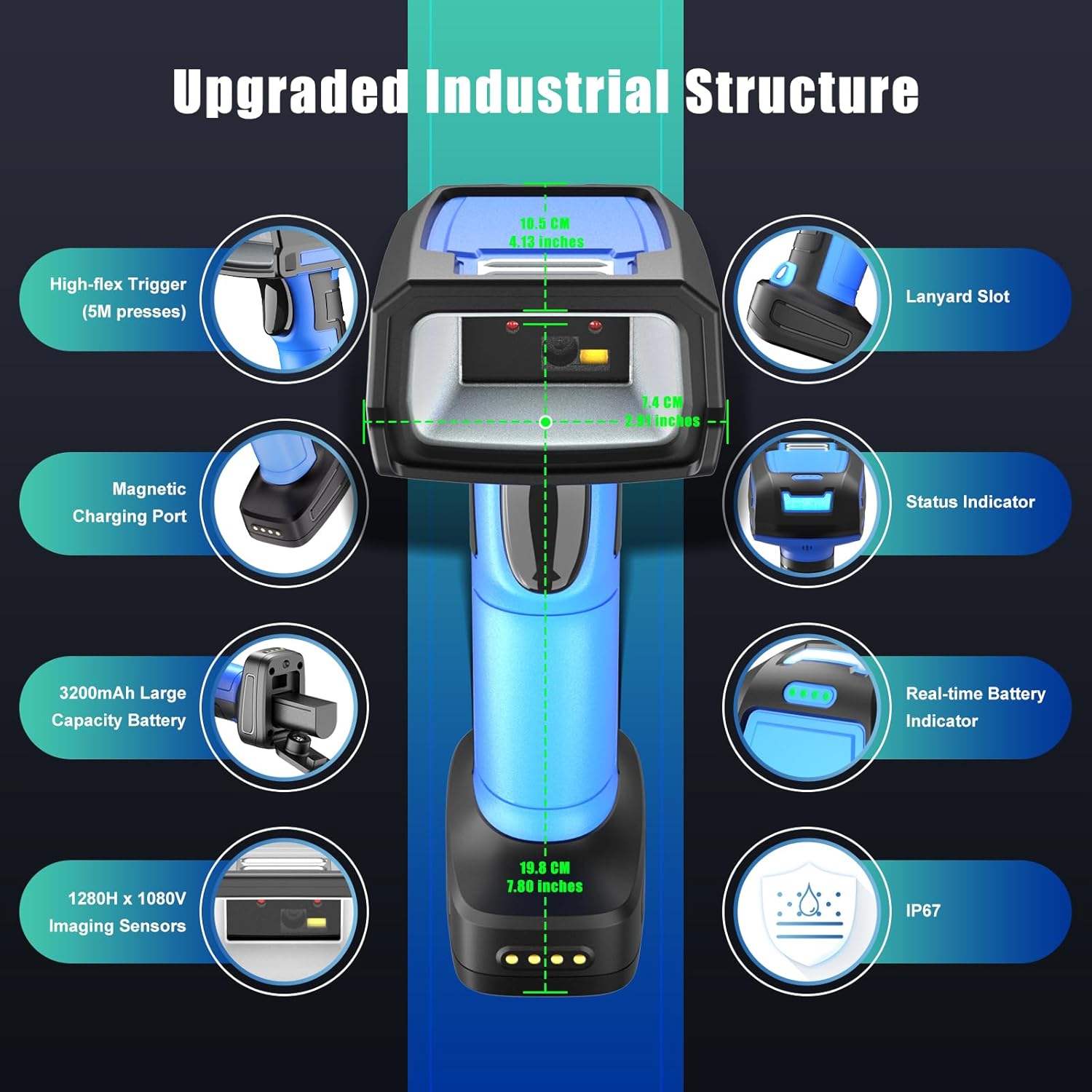
図2.3:以上view of the scanner's industrial structure, highlighting the high-flex trigger, lanyard slot, status indicator, real-time battery indicator, magnetic charging port, 3200mAh battery, 1280H x 1080V imaging sensors, and IP67 rating.
3. セットアップ手順
3.1 バッテリーの取り付けと充電
- バッテリーの取り付け: Open the detachable battery cover on the scanner. Insert one of the provided 3200mAh batteries into the battery compartment, ensuring correct polarity. Close the cover securely.
- Charge Scanner Battery: Place the scanner into the charging bay of the multi-function dock. The battery charging indicator on the dock will blink to indicate charging. It will turn solid when fully charged.
- 予備バッテリーを充電する: The dock also features a dedicated bay for charging a spare battery simultaneously. Insert the second 3200mAh battery into this bay.
- 接続電源: Connect the USB cable from the charging dock to a power source (e.g., computer USB port, USB wall adapter).
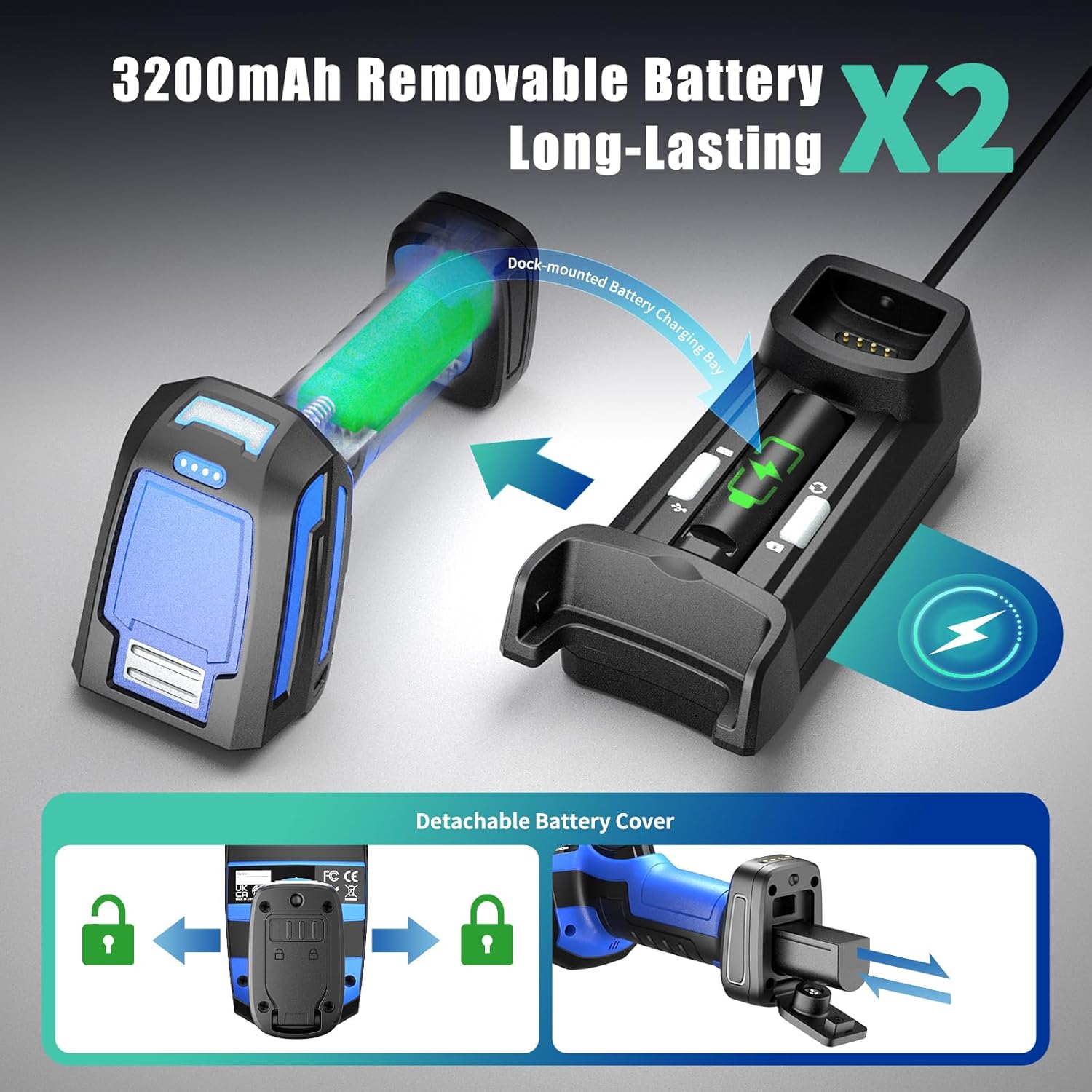
Figure 3.1: Battery installation and simultaneous charging of scanner and spare battery in the dock.
3.2 初期接続
The scanner supports three connection modes: 2.4G Wireless, Bluetooth, and Wired (USB/RS232). Choose the appropriate mode for your application.

図3.2:以上view of the scanner's versatile connectivity options.
3.2.1 2.4Gワイヤレス接続
- Ensure the charging dock is connected to your computer via the USB cable. The dock acts as the 2.4G wireless receiver.
- スキャナーの電源をオンにします。
- The scanner will automatically attempt to connect to the dock. A successful connection is indicated by a specific sound or light pattern (refer to scanner's LED indicator guide for details).
- The 2.4G wireless connection offers an extended transmission range of up to 500 meters (1640 feet) in open areas.
3.2.2 Bluetooth接続
- スキャナーの電源をオンにします。
- Scan the Bluetooth pairing barcode (usually found in a separate quick start guide or on the scanner itself).
- On your host device (e.g., computer, tablet, smartphone), enable Bluetooth and search for available devices.
- Select "NETUM GY80U" or a similar name from the list of devices to pair.
- 接続が成功すると、特定の音または光のパターンによって通知されます。
- Bluetooth connection supports HID, SPP, and BLE data transmission modes with a range of up to 20 meters (66 feet).
3.2.3 Wired Connection (USB HID / RS232)
- Connect the scanner directly to your computer using the provided USB cable for USB HID (keyboard emulation) or USB COM mode.
- Alternatively, use the RS232 cable to connect the scanner to a device with a serial port.
- The scanner will be recognized by your operating system. No additional drivers are typically required for USB HID mode. For USB COM or RS232, specific drivers or software configurations might be needed depending on your system.
4. 操作手順
4.1 基本的なスキャン
- Ensure the scanner is powered on and connected to your host device via one of the supported modes.
- スキャナーのイメージング ウィンドウをスキャンするバーコードに向けます。
- Press and hold the trigger button. An aimer will project onto the barcode.
- Position the aimer to cover the entire barcode.
- Upon a successful scan, the scanner will emit a beep and/or the status indicator will change color. The decoded data will be transmitted to your host device.
The GY80U features superior 1280H x 1080V imaging sensors, allowing it to accurately read 1D and 2D barcodes as small as 3 mil. It can decode various code types, including QR-code, DataMatrix, PDF-417, and challenging DPM codes.
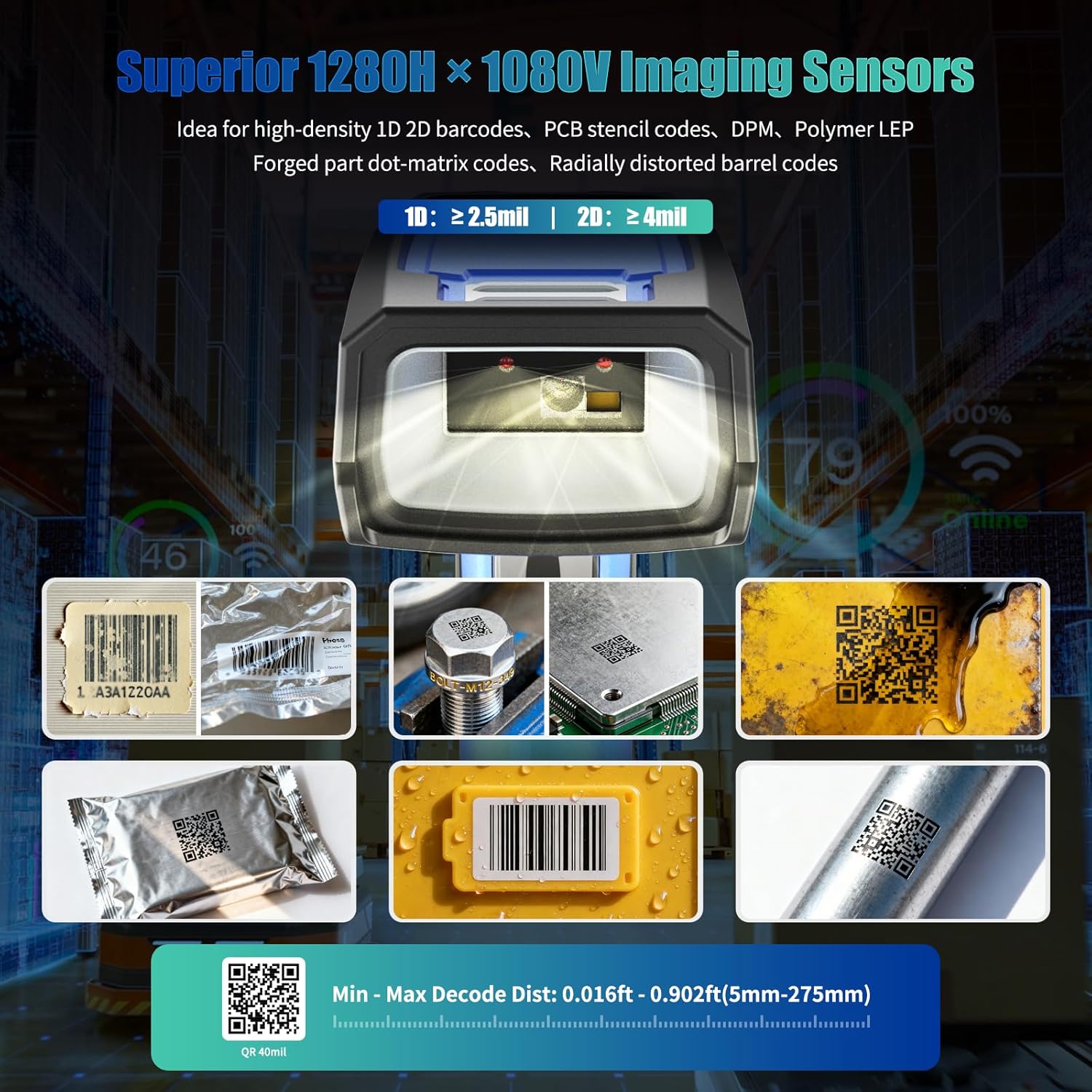
Figure 4.1: The scanner's advanced imaging capabilities for diverse barcode types, including DPM codes on metal, cast, oily, and curved surfaces.
4.2 DPM (Direct Part Mark) Scanning
The NETUM GY80U is specifically designed for DPM barcode scanning. It can read codes that are:
- Laser-etched on reflective metal surfaces
- Dot-peen marked on cast surfaces
- Engraved on oily or dirty surfaces
- Cut-out codes on PCB boards
- Laser-marked on resin
- Laser-engraved on cylindrical objects
For optimal DPM scanning, ensure proper lighting and angle. The integrated LED aimer assists in targeting these challenging codes.
4.3アプリケーションシナリオ

図4.2:例amples of the scanner's use in warehouse inventory, manufacturing, and quality control for scanning barcodes on packages, circuit boards, industrial parts, and lumber.
5. メンテナンス
5.1 スキャナのクリーニング
- Regularly clean the scanner's imaging window with a soft, lint-free cloth.
- 頑固な汚れには、軽くamp布に水または低刺激性の非研磨性洗浄液を含ませてください。スキャナーに直接液体を吹きかけないでください。
- Avoid using harsh chemicals, solvents, or abrasive materials, as these can damage the scanner's housing or imaging window.
5.2 環境保護
The NETUM GY80U is designed with an IP67 rating, making it waterproof and dustproof. It is also built with sturdy ABS and thickened soft TPU material, allowing it to withstand drops from up to 3 meters (9.84 feet).
- While rugged, avoid unnecessary exposure to extreme temperatures, direct sunlight for prolonged periods, or corrosive substances.
- Ensure the battery cover is securely closed to maintain the IP67 rating.

Figure 5.1: The scanner's durable housing provides IP67 protection and resistance to drops from significant heights.
5.3バッテリーケア
- Use only the original 3200mAh batteries provided with the scanner.
- Charge batteries using the dedicated charging dock.
- 予備電池は涼しく乾燥した場所に保管してください。
- If the scanner will not be used for an extended period, remove the battery.
6。 トラブルシューティング
| 問題 | 考えられる原因 | 解決 |
|---|---|---|
| スキャナーの電源が入りません。 | バッテリーが消耗しているか、正しく取り付けられていません。 | Ensure battery is fully charged and correctly inserted. Try a different charged battery. |
| スキャナーがワイヤレスで接続されません。 | Out of range, incorrect pairing, or interference. | Move scanner closer to the receiver/host device. Re-pair the scanner. Check for other wireless devices causing interference. |
| スキャナーがバーコードを読み取りません。 | Barcode damaged, dirty, or incorrect symbology enabled. Imaging window is dirty. | Clean the imaging window. Ensure the barcode is readable. Check scanner settings to enable the required barcode symbology. Try scanning a known good barcode. |
| スキャンされたデータが正しくないか不完全です。 | Partial scan, incorrect data format settings. | Ensure the entire barcode is within the aimer. Review scanner programming guide for data format settings. |
| 充電インジケータが機能しません。 | Power cable not connected, faulty dock/cable. | Check power connections. Try a different USB port or cable. Ensure the scanner/battery is correctly seated in the dock. |
7. 仕様
| 特徴 | 詳細 |
|---|---|
| モデル番号 | DPM-GY80U |
| 寸法 | 19.81 x 10.49 x 10.49 cm |
| アイテム重量 | 1.4キログラム |
| バッテリー | 2 x 3200mAh C batteries (included) |
| 接続技術 | 2.4G wireless, Bluetooth (HID, SPP, BLE), USB (HID, COM), RS232 |
| 光センサー技術 | CMOS (1280H x 1080V Imaging Sensors) |
| デコード機能 | 1D, 2D, QR codes, DPM (Direct Part Mark) codes as small as 3 mil |
| 耐久性 | IP67 Waterproof & Dustproof, 3M (9.84 ft) Drop-resistant |
| 互換性 | Windows, Mac, iOS, Android, iPad OS, Linux |
8. 保証とサポート
The NETUM GY80U Industrial Barcode Scanner comes with a 1年間保証 ご購入日から有効です。この保証は、通常の使用における製造上の欠陥および故障を対象としています。
For technical support, warranty claims, or further assistance, please contact NETUM customer service. Refer to the product packaging or the official NETUM web最新の連絡先情報については、サイトをご覧ください。
メーカー: GUANGZHOU NETUM ELECTRONIC TECHNOLOGY CO., LTD
住所: Room 301, 6th Floor and full 3rd Floor, Building A, Guangzhou, Guangdong, 511300, CN