
導入
This manual provides detailed instructions for the setup, operation, and maintenance of your TANALAZ K71Pro Portable Karaoke Machine. Please read this manual thoroughly before using the product to ensure proper function and longevity. Keep this manual for future reference.
製品終了view
含まれるコンポーネント:
- 1 x TANALAZ K71Pro Karaoke Speaker
- 2xワイヤレスマイク
- 1 x Microphone Base/Holder
- 1 x USB-C充電ケーブル
- ユーザーマニュアル x 1
主な特徴:
- コンパクトでポータブルなデザイン: Measures 3.7 x 3.14 x 3.42 inches, weighing 0.65 lbs, with a hand strap for easy transport.
- デュアルワイヤレスマイク: Allows for duet singing with 5 voice-changing effects (original, female, male, monster, baby voice).
- Integrated Microphone Base: Provides organized storage and prevents microphones from falling. Compatible with TANALAZ K8, K21, K32, K79 microphones.
- Bluetooth 5.3接続: Ensures stable and long-distance wireless transmission for audio streaming from smartphones, tablets, and computers.
- Multi-functional Speaker: Can be used as a standalone Bluetooth speaker.
- Vibrant LED Party Lights: Dynamic color-changing lights integrated into the speaker to enhance the user experience.
- 複数の再生オプション: Supports Bluetooth, AUX input, and TF Card (MicroSD card, not included) for versatile audio sources.
- 長いバッテリー寿命: Built-in 1200mAh battery provides 4-6 hours of continuous use.
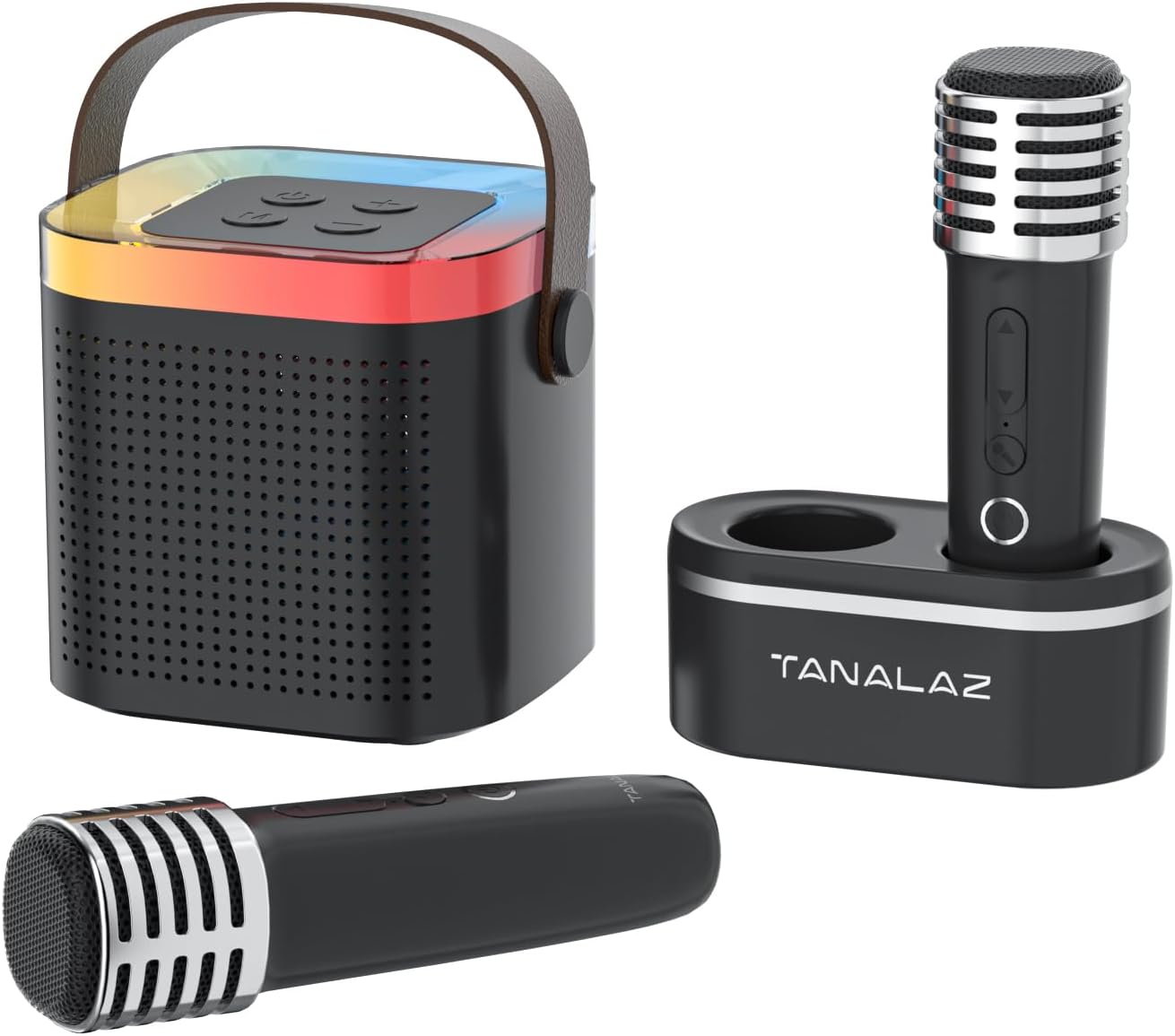
Image: The TANALAZ K71Pro karaoke machine, featuring the main speaker unit, two wireless microphones, and a dedicated microphone base for storage.

画像: 爆発した view illustrating the internal speaker components of the TANALAZ K71Pro, alongside the two wireless microphones and their base.
設定
- デバイスの充電:
- Connect the provided USB-C charging cable to the charging port on the karaoke speaker and a suitable USB power adapter (not included).
- Connect the USB-C charging cable to the charging ports on each wireless microphone and a suitable USB power adapter.
- The charging indicator lights will illuminate during charging and turn off or change color when fully charged. Allow sufficient time for a full charge before first use.
- 電源オン:
- Press and hold the power button on the karaoke speaker until you hear a power-on prompt and the LED lights activate.
- Press and hold the power button on each wireless microphone until they power on.
- Bluetoothのペアリング:
- Ensure the karaoke speaker is powered on and in Bluetooth pairing mode (usually indicated by a flashing LED light).
- スマートフォン、タブレット、その他の Bluetooth 対応デバイスで、Bluetooth 設定に移動します。
- 検索する "K71Pro" (or similar name) in the list of available devices and select it to pair.
- ペアリングが完了すると、スピーカーから確認音が聞こえます。

Image: The TANALAZ K71Pro speaker demonstrating its wide compatibility and Bluetooth 5.3 connection with a laptop, tablet, and smartphone.
手術
スピーカーコントロール:
- 電源ボタン: 長押しすると電源のオン/オフ、短く押すと音楽の再生/一時停止になります。
- 音量ボタン(+/-): 短く押すとスピーカーの音量を調整します。
- モードボタン: 押すと、Bluetooth、AUX、TF カード モードを切り替えます。
- LEDライト: The speaker features integrated LED lights that change color automatically.
マイクコントロール:
- 電源ボタン: 長押しするとオン/オフになります。
- Volume/Echo Buttons: Use to adjust microphone volume and echo effect.
- ボイスチェンジャーボタン: Short press to cycle through 5 voice effects:
- オリジナルボイス
- 女声
- 男性の声
- モンスターボイス
- 赤ちゃんの声

Image: The two wireless microphones highlighting the five available voice-changing effects for enhanced entertainment.
Connecting via AUX/TF Card:
- AUX入力: Connect an audio device using a 3.5mm AUX cable (not included) to the AUX port on the speaker. Switch the speaker to AUX mode.
- TFカード: Insert a TF (MicroSD) card (not included) with pre-loaded music into the TF card slot on the speaker. Switch the speaker to TF Card mode.
メンテナンス
- クリーニング: Use a soft, dry cloth to clean the surface of the speaker and microphones. Do not use liquid cleaners or abrasive materials.
- ストレージ: Store the device in a cool, dry place away from direct sunlight and extreme temperatures. Use the microphone base to store microphones securely.
- バッテリーのケア: バッテリーの寿命を延ばすには、デバイスを頻繁に完全に放電することは避けてください。長期間使用しない場合でも、定期的に充電してください。
- 水への露出: このデバイスは防水ではありません。水や高湿度にさらさないでください。
トラブルシューティング
| 問題 | 考えられる原因 | 解決 |
|---|---|---|
| 電源が入らない/デバイスが起動しない | バッテリー残量が少ないか、デバイスの電源がオフになっています。 | Charge the speaker and microphones fully. Press and hold the power button to turn on. |
| Bluetoothでペアリングできない | Bluetooth not enabled, device too far, or already paired to another device. | Ensure Bluetooth is enabled on your device. Move closer to the speaker. Disconnect from other devices and try pairing again. |
| スピーカーから音が出ない | 音量が低すぎるか、モードが正しくないか、デバイスが接続されていません。 | Increase speaker volume. Ensure correct mode (Bluetooth, AUX, TF Card) is selected. Verify successful Bluetooth pairing or cable connection. |
| マイクが機能しない | Microphone off, low battery, or volume too low. | Turn on the microphone. Charge the microphone. Increase microphone volume. |
| ボイスチェンジャーが動作しない | ボタンの押し方が間違っています。 | Ensure you are short-pressing the voice changer button to cycle through effects. |
仕様
- モデル番号: K71プロ
- ブランド: タナラズ
- 寸法: 3.7 x 3.14 x 3.42 inches (Speaker)
- 重さ: 0.65 lbs (Speaker)
- 接続性: Bluetooth 5.3、AUX、TFカード
- スピーカー数: 1
- バッテリー容量: 1200mAh(スピーカー)
- バッテリー寿命: 4-6 hours (Speaker)
- 充電ポート: USBタイプC
- 対応デバイス: スマートフォン、タブレット、ノートパソコン、テレビ
- 含まれるコンポーネント: Speaker, 2 Wireless Microphones, Microphone Base, USB-C Cable, User Manual

Image: Detailed dimensions of the TANALAZ K71Pro karaoke speaker and wireless microphone.
保証とサポート
For warranty information and customer support, please refer to the contact details provided with your purchase or visit the official TANALAZ webサイトでご確認ください。保証請求の際は購入証明として領収書を保管してください。
For further assistance, please contact TANALAZ customer service.