
フィアースX
ATK Fierce X Lightweight Wireless Gaming Mouse
ユーザーマニュアル
1. はじめに
Thank you for choosing the ATK Fierce X Lightweight Wireless Gaming Mouse. This manual provides essential information for setting up, operating, and maintaining your new gaming mouse. Designed for competitive gamers, the Fierce X combines an ultra-light magnesium alloy shell with a high-performance sensor and optical switches to deliver unparalleled precision and speed.

図1.1:上 view of the ATK Fierce X Lightweight Wireless Gaming Mouse, showcasing its black magnesium alloy shell and symmetrical design.
2. パッケージ内容
パッケージにすべてのアイテムが含まれていることを確認してください:
- ATK Fierce X Lightweight Wireless Gaming Mouse
- USB-C - USB-A ケーブル(有線接続および充電用)
- 8KHz Wireless Dongle (USB receiver)
- ユーザーマニュアル(このドキュメント)
- Additional Mouse Feet (Teflon)
3 製品の特徴
The ATK Fierce X mouse is engineered with cutting-edge technology to enhance your gaming experience:
- Ultra-Light 42g Magnesium Alloy Shell: Provides extreme lightness and superior structural durability.
- PAW3950 Ultra Sensor: Offers up to 30,000 DPI, 750 IPS tracking speed, and 50G acceleration for professional-grade precision.
- Adjustable 8KHz Polling Rate: Switch between 125Hz to 8000Hz for ultra-responsive tracking and reduced input latency.
- 光マイクロスイッチ: Ensures fast, crisp actuation with long-lasting durability, rated for 70 million+ clicks.
- 人間工学に基づいた対称デザイン: Optimized shape (119.6 × 61.0 × 36.3mm) suitable for various grip styles, ideal for medium to small hands.
- デュアルモード接続: Seamlessly switch between 2.4GHz Wireless and USB Wired modes.
- ノルディック 52840 MCU: Powers the pro-grade wireless technology for ultra-low latency and stable connection.
- Customizable via ATK Software: Tune DPI steps, macros, polling rate, and more using the official desktop app or webベースのコンフィギュレーター。
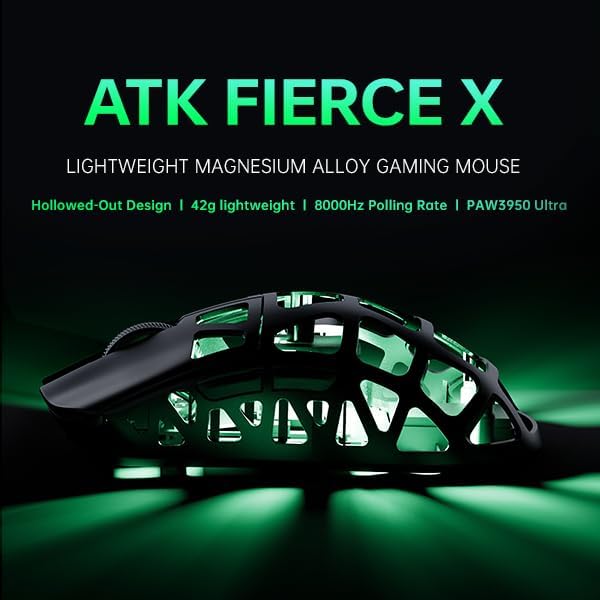
図3.1:以上view of the ATK Fierce X's key features, highlighting its lightweight design, 8000Hz polling rate, and PAW3950 Ultra sensor.

Figure 3.2: The ATK Fierce X mouse, demonstrating its featherlight 42-gram weight for agile and precise movements.

図3.3:詳細 view of the PAW3950 Ultra Sensor within the mouse, illustrating its advanced tracking capabilities.

Figure 3.4: The Nordic 52840 Flagship Chip, responsible for the mouse's Smartspeed Wireless Gen-2 Low-Latency Technology and professional esports firmware.

Figure 3.5: Diagram illustrating the Omron Optical Micro Switch, highlighting its instantaneous response and long-lasting performance.
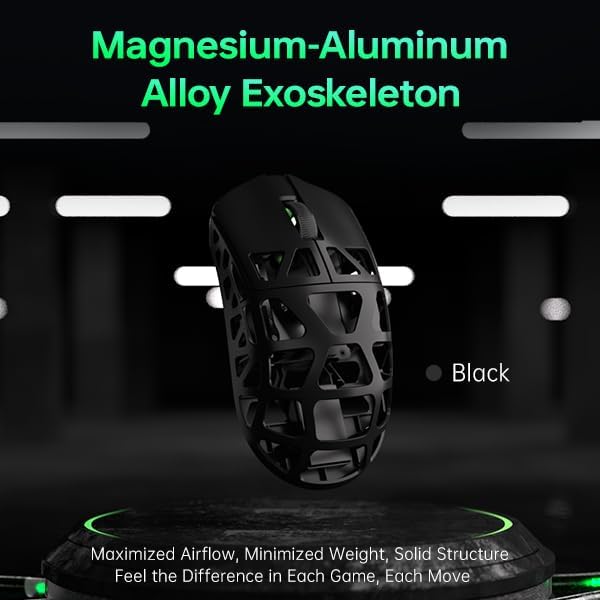
図3.6:側面 view of the ATK Fierce X, showcasing its magnesium-aluminum alloy exoskeleton designed for maximized airflow, minimized weight, and solid structure.
4. セットアップ
4.1.有線接続
- Connect the USB-C end of the provided cable to the front port of the ATK Fierce X mouse.
- ケーブルの USB-A 端子をコンピューターの使用可能な USB ポートに接続します。
- マウスは自動的に検出され、使用できるようになります。
4.2. ワイヤレス接続(2.4GHz)
- Locate the 8KHz Wireless Dongle (USB receiver) included in the package.
- Plug the wireless dongle into an available USB port on your computer. For optimal performance, use a USB 2.0 or 3.0 port directly on your motherboard or a front panel port.
- Ensure the mouse is powered on. The mouse should automatically connect to the dongle.
- If the connection is not established, refer to the troubleshooting section or the ATK software for pairing instructions.
5. 操作手順
5.1. DPI調整
The ATK Fierce X features a dedicated DPI button (usually located behind the scroll wheel) to cycle through preset DPI levels. You can customize these levels and add more steps using the ATK software.
5.2. Polling Rate Adjustment (8KHz)
The mouse supports an adjustable polling rate from 125Hz up to 8000Hz. To utilize the 8000Hz polling rate, ensure your system meets the recommended requirements:
- CPU: Intel Core i7 9700K以上、AMD Ryzen 7 3700X以上
- モニター: 240Hz以上のリフレッシュレート
- グラフィックカード: NVIDIA GTX 1080以上、AMD RX 5700以上
- メモリ: 16GB以上
Polling rate settings can be configured via the ATK software.

Figure 5.1: Visual representation of the 8000 Hz polling rate capability and a reminder of the recommended system specifications for optimal performance.
5.3. カスタマイズソフトウェア
Download the official ATK software from the manufacturer's website to unlock the full potential of your Fierce X mouse. The software allows you to:
- Customize button assignments and macros.
- DPIを調整するtagesと感度。
- ポーリング レートを設定します。
- リフトオフ距離 (LOD) を管理します。
- ファームウェアを更新します。
- アクセス web-based configurator for advanced settings.
6. メンテナンス
To ensure the longevity and optimal performance of your ATK Fierce X mouse, follow these maintenance guidelines:
- クリーニング: Use a soft, dry, lint-free cloth to wipe the mouse surface. For stubborn dirt, slightly dampen the cloth with water. Avoid using harsh chemicals, solvents, or abrasive materials.
- センサーのケア: マウス底面の光学センサーを清潔に保ち、ほこりやゴミを取り除いてください。必要に応じて綿棒やエアダスターを使用してください。
- ストレージ: 使用していないときは、マウスを極端な温度や直射日光を避け、清潔で乾燥した環境に保管してください。
- ケーブル管理 損傷を防ぐため、USB ケーブルを極端に曲げたり、ねじったりしないでください。
7。 トラブルシューティング
If you encounter issues with your ATK Fierce X mouse, please refer to the following common solutions:
- マウスが反応しない(有線):
- USB ケーブルがマウスとコンピュータの両方にしっかりと接続されていることを確認します。
- コンピュータの別のUSBポートを試してください。
- システム固有の問題を排除するために、別のコンピューターでマウスをテストします。
- マウスが応答しない(ワイヤレス):
- Ensure the 8KHz wireless dongle is securely plugged into a USB port.
- マウスの電源がオンになっており、十分に充電されていることを確認します。
- 干渉を減らすには、マウスをドングルに近づけます。
- ドングルを別の USB ポートに接続してみてください。
- Re-pair the mouse with the dongle using the ATK software if available.
- Inconsistent Tracking or Lag:
- マウスの底面にある光学センサーを清掃します。
- マウスを適切なマウス パッドまたは表面で使用していることを確認してください。
- 他のデバイス (Wi-Fi ルーター、その他のワイヤレス周辺機器など) からのワイヤレス干渉がないか確認します。
- Update the mouse firmware via the ATK software.
- For 8KHz polling rate, ensure your system meets the recommended specifications (refer to Section 5.2).
- ボタンが機能しない:
- ATK ソフトウェアでボタンの割り当てを確認します。
- ボタンを押すのを妨げる物理的な障害物がないことを確認します。
If the issue persists, please contact ATK customer support for further assistance.
8. 仕様

Figure 8.1: Detailed specifications of the ATK Fierce X Lightweight Gaming Mouse, including dimensions, sensor type, and battery life.
| 特徴 | 詳細 |
|---|---|
| 製品名 | ATK Fierce X Lightweight Gaming Mouse |
| モデル番号 | フィアースX |
| 重さ | 42±2g |
| 寸法(長さ×幅×高さ) | 119.6 × 61.0 × 36.3mm |
| センサー | PAW3950 Ultra (30,000 DPI, 750 IPS, 50G Accel.) |
| マイレージ | 北欧52840 |
| ポーリングレート | Adjustable from 125Hz to 8000Hz (Wired & Wireless) |
| スイッチタイプ | ATK Optical Micro Switches (Omron Optical Switch) |
| 接続性 | 2.4GHz Wireless + USB Wired |
| バッテリー | 230mAh |
| バッテリー寿命 | 70 Hours (at 1000Hz polling rate) |
| ソフトウェアサポート | Yes (Windows App + Web コンフィギュレーター) |
| 色 | Black / White / Silver Gray |
| 材料 | Top Shell: Aluminum-Magnesium Alloy, Bottom Shell: ABS |
9. 保証とサポート
The ATK Fierce X Lightweight Wireless Gaming Mouse comes with a standard manufacturer's warranty. Please refer to the warranty card included in your product packaging or visit the official ATKGEAR web詳細な保証条件については、サイトをご覧ください。
For technical support, troubleshooting assistance, or warranty claims, please contact ATKGEAR customer service through their official website or the contact information provided in your product documentation. Ensure you have your product model number (FIERCE X) and proof of purchase ready when contacting support.
© 2025 ATKGEAR. 無断複写・転載を禁じます。
Ask a question about this manual
Ask about setup, troubleshooting, compatibility, parts, safety, or missing instructions. Manuals+ will review the question and use this page’s manual context to help answer it.