
アジャズ 308i
AJAZZ 308i Wireless Bluetooth Keyboard User Manual
モデル: 308i
導入
ご購入ありがとうございますasing the AJAZZ 308i Wireless Bluetooth Keyboard. This manual provides detailed instructions on how to set up, operate, and maintain your keyboard. Please read this manual carefully before use to ensure optimal performance and longevity of your device.
製品終了view
The AJAZZ 308i is a compact 84-key wireless Bluetooth keyboard featuring a unique typewriter-inspired design with round keycaps. It offers multi-system compatibility and a comfortable typing experience.

Figure 1: AJAZZ 308i Wireless Bluetooth Keyboard (Gradient Green)
主な特徴:
- Typewriter-Inspired Design: Round keycaps provide a retro aesthetic and comfortable typing feel.
- コンパクトな84キーレイアウト: Lightweight and portable, measuring 32cm x 13.6cm x 3cm, making it easy to carry.
- ワイヤレスBluetooth接続: Stable connection up to 10 meters, compatible with various devices.
- マルチシステム互換性: Supports Windows, Mac OS, iOS, and Android operating systems.
- スマートな省電力: 15 分間操作がないと、バッテリーを節約するために自動的にスリープ モードになります。
- 静かなタイピング: Soft chocolate keys ensure a smooth and silent typing experience.
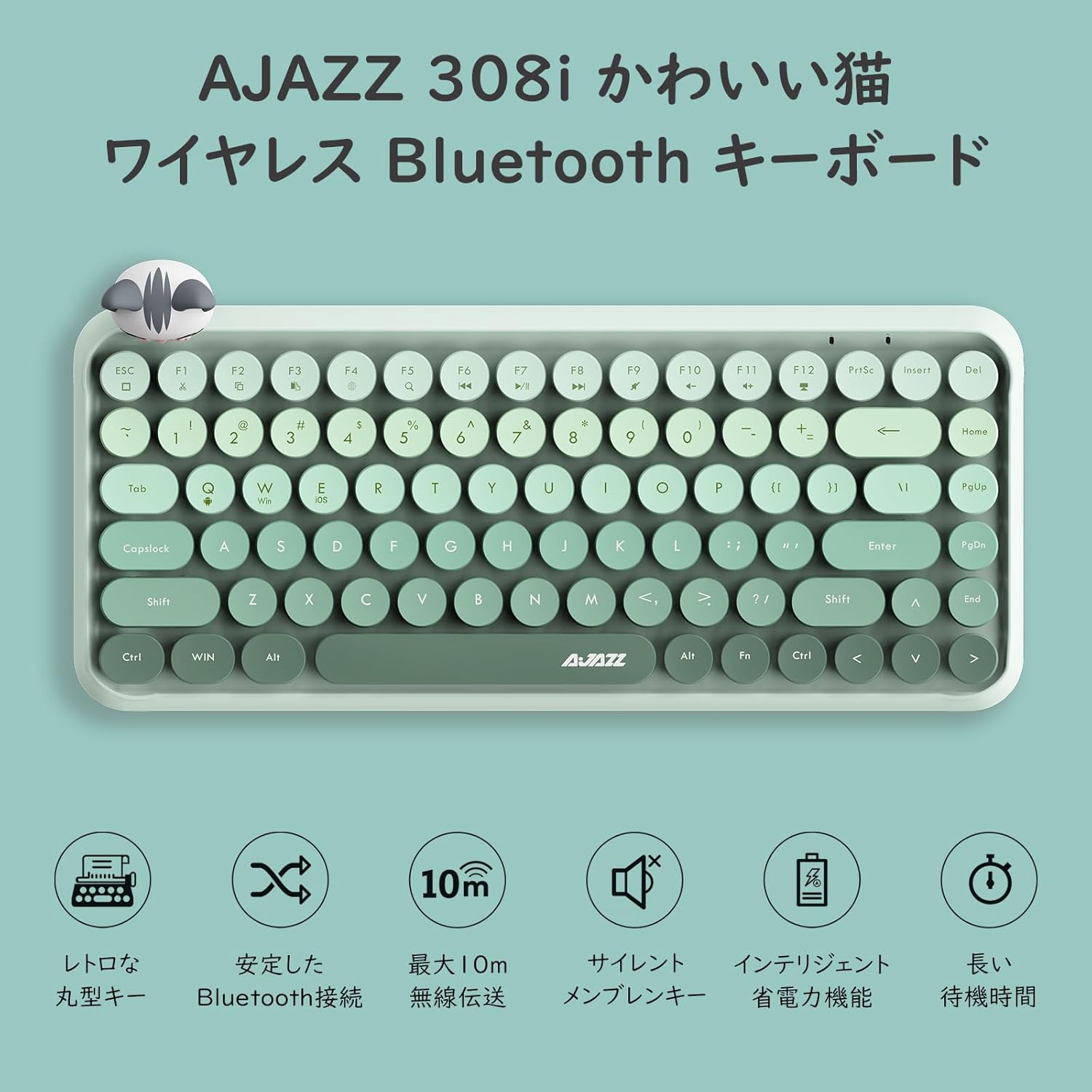
図2:以上view of AJAZZ 308i Keyboard Features
セットアップ: Bluetoothペアリング
Follow these steps to connect your AJAZZ 308i keyboard via Bluetooth:
- Ensure your device's Bluetooth is turned ON.
- 振り向く ON the power switch on the keyboard.
- を押し続けます FN+C keys simultaneously on the keyboard. The keyboard will enter Bluetooth device search mode.
- On your device (tablet, smartphone, computer), search for Bluetooth devices.
- When "AJAZZ BLUETOOTH 5.0 KEYBOARD" appears in the list of available devices, tap or click on it to initiate pairing.
- A code will be displayed on your device's screen. Type this code using the AJAZZ 308i keyboard and press 入力.
- The keyboard is now successfully connected to your device.

Figure 3: Multi-device compatibility and connection example
操作手順
メディアキー:
The keyboard includes dedicated media function keys, accessible by pressing the FN キーとFキーの組み合わせ:
- FN+F1: カット
- FN+F2: コピー
- FN+F3: ペースト
- FN+F5: 検索
- FN+F6: 前のトラック
- FN+F7: 再生/一時停止
- FN+F8: 次のトラック
- FN+F9: ミュート
- FN+F10: 音量を下げる
- FN+F11: 音量を上げる
- FN+F12: ロック
Note: On some devices like iPad, certain F-keys (e.g., F2, F3) might function directly without the FN key for copy/paste. Experimentation may be required depending on your operating system.
省電力モード:
The AJAZZ 308i features a smart power-saving mechanism. If there is no key operation for more than 15 minutes, the keyboard will automatically enter sleep mode. To reactivate it, simply double-click any key.
メンテナンス
バッテリーの取り付けと交換:
The keyboard is powered by two AAA alkaline batteries. To install or replace batteries:
- キーボードの裏側にある電池ボックスを見つけます。
- 電池ボックスのカバーを開きます。
- 正しい極性 (+/-) を確認して、新しい AAA アルカリ電池 2 本を挿入します。
- 電池カバーをしっかりと閉じてください。
With smart power-saving technology, two AAA alkaline batteries can last for several months under normal use. Avoid using rechargeable lithium batteries as their performance degradation can lead to keyboard malfunction.
トラブルシューティング
Key Layout Differences (English vs. Japanese Input):
The AJAZZ 308i keyboard has an English layout. When using Japanese input, some characters output may not match the characters printed on the keycaps. In such cases:
- Switch your device's input method to English and type according to the characters displayed on the keycaps.
- Alternatively, for Japanese input, refer to the standard Japanese keyboard layout for character mapping.
If you encounter any other issues or have questions, please refer to the warranty and support section for assistance.
仕様
| 特徴 | 詳細 |
|---|---|
| ブランド | AJAZZ |
| モデル番号 | 308i |
| 接続技術 | ブルートゥース5.0 |
| 対応デバイス | Windows, Mac OS, iOS, Android (Bluetooth function required) |
| キーの数 | 84 |
| キーボードレイアウト | QWERTY (English Layout) |
| キースイッチタイプ | Membrane (Chocolate Key) |
| ワイヤレス範囲 | 最大10メートル |
| 電源 | 2 x AAAアルカリ乾電池 |
| アイテム重量 | 590グラム |
| 寸法 | 32cm×13.6cm×3cm |
| 含まれるコンポーネント | Magnetic Cat Figurine |
| 色 | グラデーショングリーン |
保証とサポート
The AJAZZ 308i Wireless Bluetooth Keyboard comes with a 12ヶ月保証 購入日より。
If you have any questions, concerns, or require technical assistance, please do not hesitate to contact our customer support. Contact details can typically be found on the product packaging or the retailer's web購入したサイト。
関連文書 - 308i
 |
Ajazz 308i 猫套装 无线键盘 用户手册 Ajazz 308i 猫套装无线键盘的官方用户手册,包含产品规格、连接指南、功能介绍以及用户满意度调查。 |
 |
AJAZZ 308i Cat Set ワイヤレスキーボード ユーザーマニュアル AJAZZ 308i Cat Setワイヤレスキーボードのユーザーマニュアル。セットアップ、接続、システム切り替え、トラブルシューティング、製品仕様について詳しく説明しています。多言語サポート情報も含まれています。 |
 |
AJAZZ AK680 MAX ライトなし有線バージョンメカニカルキーボード ユーザーマニュアル AJAZZ AK680 MAX ライトなし有線バージョンメカニカルキーボードの包括的なユーザー マニュアル。機能、仕様、パッケージの内容、およびシステム互換性について詳しく説明しています。 |
 |
Ajazz NK68 V2 Wired Mechanical Keyboard User Manual Detailed specifications and features of the Ajazz NK68 V2, a 68-key single-mode wired mechanical keyboard with RGB lighting and hot-swappable switch support. |
 |
AJAZZ AK873 87キーメカニカルキーボード ユーザーマニュアル AJAZZ AK873 87キーメカニカルキーボードのユーザーマニュアル。機能、接続オプション(USB有線、2.4Gワイヤレス、Bluetooth 5.0)、ライティングエフェクト、キー機能の詳細を記載しています。製品仕様、保証情報、システム互換性も記載されています。 |
 |
AJAZZ 308i ワイヤレスキーボード ユーザーマニュアル AJAZZ 308i ワイヤレス キーボードの包括的なユーザー マニュアル。仕様、機能、インジケータ ライト、Android、Windows、iOS デバイスの Bluetooth 接続手順、FCC コンプライアンス情報などが記載されています。 |
Ask a question about this manual
Ask about setup, troubleshooting, compatibility, parts, safety, or missing instructions. Manuals+ will review the question and use this page’s manual context to help answer it.