
1. はじめに
Thank you for choosing the venveal Mini Power Distribution Box. This device is designed to provide versatile and reliable power distribution for various applications, including outdoor adventures, camping, RV use, and emergency situations. It features multiple output ports, including Anderson connectors, USB 3.0, Type-C fast charging, and 12V cigarette lighter sockets, all integrated into a compact and durable unit.
This manual provides essential information for the safe and efficient operation of your power distribution box. Please read it thoroughly before use and retain it for future reference.
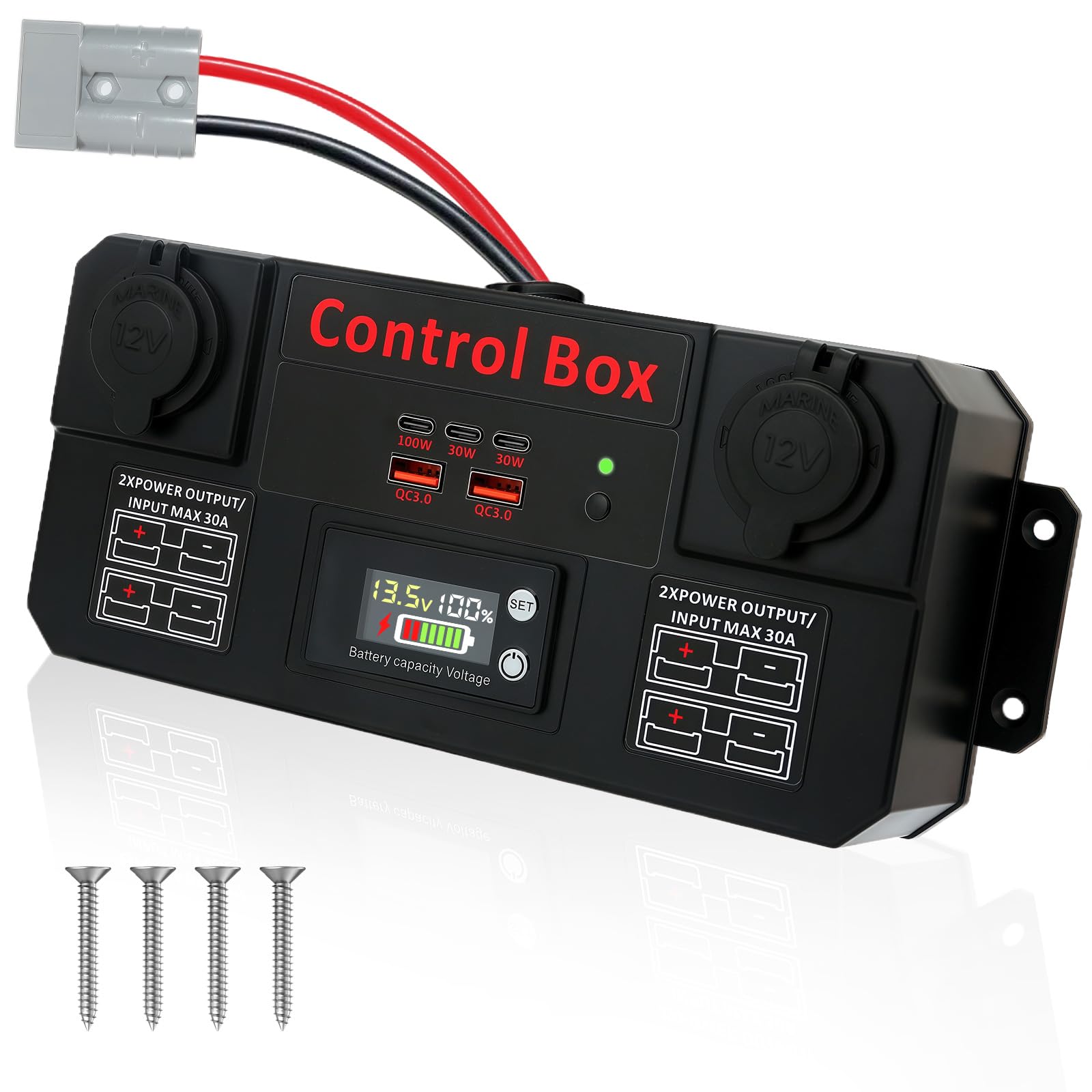
図1:以上view of the venveal Mini Power Distribution Box, highlighting its various input and output ports.
2 製品の特徴
- High-Efficiency Multi-Device Power: Equipped with 2x QC 3.0 USB ports, 3x Type-C fast charging ports (100W+30W+30W), 2x 12V cigarette lighter sockets, and 4x 30A Anderson input/output connectors. This allows for stable power supply to multiple high-wattage devices simultaneously, such as smartphones, tablets, car refrigerators, camping lights, and air compressors.
- Mini Distribution Box Design: Supports 12V/24V 30A voltage input. Connect directly to a battery via Anderson cables or positive/negative wires to intelligently distribute power to various devices. Ensure the input voltage is 12V to prevent damage to connected equipment.
- 幅広いアプリケーション互換性: Fully compatible with various battery types, including lithium and lead-acid batteries. Anderson connectors allow direct connection to solar panels and energy storage batteries, simplifying power system setup.
- LEDデジタルディスプレイ: リアルタイムvoltage monitoring via an LED digital display ensures electrical safety and allows for quick verification of outdoor power consumption. Supports 12-24V intelligent power solutions.
- 簡単なインストール: Compact body design (approximately 10 x 4 inches) allows for easy placement in tight spaces, such as RV control panels or marine battery compartments. Pre-set screw holes on the back support wall-mounting, flat mounting, or flush mounting for quick and secure installation.
- High-Quality Durable Materials: Constructed from high-quality ABC flame-retardant material, offering effective dust protection suitable for both indoor and outdoor use. Built-in triple intelligent protection against over-voltage, over-current, and short-circuit ensures stable operation in harsh environments, providing a reliable power solution for outdoor activities and professional operations.
3. セットアップ
3.1 開梱と検査
Carefully remove the power distribution box from its packaging. Inspect the unit for any signs of damage during transit. Ensure all components are present as listed in the packaging.
3.2 電源への接続
The Mini Power Distribution Box supports 12V/24V 30A input. It can be connected to a battery (lithium or lead-acid) or a solar panel system.
- Using Anderson Connectors: Connect your battery or solar panel's Anderson cable directly to one of the 30A Anderson input ports on the distribution box. Ensure a secure connection.
- 直接有線接続: If using bare wires, connect the positive (+) wire from your power source to the positive terminal and the negative (-) wire to the negative terminal on the distribution box. Ensure proper polarity to avoid damage.
重要: 入力ボリュームを確認するtage from your power source is 12V or 24V as required by your devices. Inconsistent voltage can damage connected equipment.

図2:例ample of the power distribution box set up outdoors, connected to a battery and charging a mobile device.
3.3取り付けオプション
The compact design allows for flexible mounting:
- 平面取り付け: Place the unit on any stable, flat surface.
- Wall/Flush Mounting: Utilize the pre-drilled screw holes on the back of the unit to securely mount it to a wall or flush into a panel. Ensure adequate ventilation around the unit.
4. 操作手順
4.1 電源のオン/オフ
Once connected to a power source, the LED digital display will illuminate, indicating the current battery voltage and capacity. There is no separate power button; the unit is active when connected to a power source.
4.2 出力ポートの使用
デバイスを適切なポートに接続します。
- USB 3.0ポート: Use for charging smartphones, tablets, and other USB-powered devices.
- Type-C Fast Charging Ports: Ideal for devices that support USB Power Delivery (PD) for rapid charging, such as laptops, modern smartphones, and tablets.
- 12V Cigarette Lighter Sockets: Connect 12V accessories like car refrigerators, air compressors, or camp点灯します。
- 30A Anderson Output Connectors: Use for high-current 12V/24V devices or to connect to other power systems.

図3:詳細 view of the various charging and power output ports on the distribution box.
4.3 LEDデジタルディスプレイ
LED ディスプレイにはリアルタイムの情報が表示されます。
- 巻tage(V): Shows the current input voltage from the connected battery.
- バッテリー容量(%): バッテリー残量の推定値を表示します。
- バッテリータイプの設定: The 'SET' button allows you to cycle through different battery types (P for lead-acid, L for ternary lithium, F for iron-lithium) and adjust voltage parameters for accurate readings. Refer to the specifications section for default settings.
To adjust battery type settings:
- Press and hold the 'SET' button for a few seconds until the display flashes.
- Short press 'SET' to cycle through battery types (P, L, F) and series (e.g., L03 to L20).
- Once the desired battery type is selected, wait a few seconds for the setting to save automatically.
5. メンテナンス
- クリーニング: 本体の外装を清掃する際は、柔らかく乾いた布をご使用ください。研磨剤入りの洗剤や溶剤は使用しないでください。
- 接続: すべてのケーブル接続が安全で腐食がないことを定期的に確認してください。
- ストレージ: When not in use for extended periods, disconnect the unit from the power source and store it in a cool, dry place away from direct sunlight and extreme temperatures.
6。 トラブルシューティング
- 電源なし/ディスプレイオフ:
- Check if the power source (battery) is connected correctly and has sufficient charge.
- Ensure all cables are securely connected to the distribution box.
- 充電されないデバイス:
- Verify that the distribution box is receiving power and the display is active.
- Check the charging cable and the device itself. Try a different port or device.
- Ensure the device's power requirements do not exceed the port's output capacity.
- 不正確なバッテリー読み取り:
- Confirm that the correct battery type (P, L, F) and series are selected on the LED digital display. Refer to section 4.3 for adjustment instructions.
- 過熱:
- Ensure the unit has adequate ventilation and is not covered.
- Reduce the number of connected high-power devices if the unit feels excessively hot.
ここに記載されていない問題が発生した場合は、カスタマー サポートにお問い合わせください。
7. 仕様

Figure 4: Dimensions of the venveal Mini Power Distribution Box.
| 特徴 | 仕様 |
|---|---|
| ブランド | venveal |
| モデル番号 | SF20251007B0FC5S5F4K |
| 電源 | 電池駆動 |
| 入力ボリュームtage | 12V / 24V (30A Max) |
| USBポート | 2 x QC 3.0 USB |
| タイプCポート | 3 x Type-C (100W, 30W, 30W) |
| シガーライターソケット | 2のx 12V |
| アンダーソンコネクタ | 4 x 30A Input/Output |
| 取り付けタイプ | Wall Mount / Flat / Flush Mount |
| 材料 | ABC Flame-Retardant Material |
| 寸法(約) | 10 x 4 インチ (25cm x 10cm) |
| LEDディスプレイ | 巻tage, Battery Capacity, Battery Type Setting |
| Battery Type Settings (Default) | P = Lead-acid (DC12V, 36V, 48V, 60V, 72V, 84V) L = Ternary Lithium (L03-L20 series) F = Iron-Lithium (F03-F23 series) |
| 低ボリュームtage Alarm (Lithium) | 11.5V (Customizable) |
8. 保証とサポート
This product comes with a standard manufacturer's warranty. For specific warranty details, please refer to the product packaging or contact your retailer. If you have any questions, require technical assistance, or need to report an issue, please contact venveal customer support through the platform where you purchased the product.