
1. はじめに
The Genérico NA4 is a professional 4-channel audio mixer designed for a variety of applications including music production, podcasts, DJ performances, live streaming, and home recording. This analog mixer integrates a digital sound card, offering versatile connectivity options such as USB and Bluetooth, along with 48V phantom power for condenser microphones. It features 24 DSP effects, custom function settings, and a convenient console design to enhance your mixing experience.
Equipped with a high-speed ARM chip, the NA4 mixer ensures ultra-low background noise and high-fidelity sound quality, delivering clear and bright vocals. Its robust processing capabilities include variable sound, reverb, delay, and electric sound effects.
2. 安全情報
- デバイスを操作する前に、すべての指示をよくお読みください。
- Do not expose this device to rain or moisture to prevent fire or electric shock.
- 電源のボリュームを確認してくださいtage は、デバイスで指定された要件に一致します。
- cを開けないでくださいasing. すべての修理は資格を持った担当者に依頼してください。
- Keep the device away from heat sources such as radiators, heat registers, or other heat-producing appliances.
- メーカー指定のアタッチメント/アクセサリのみを使用してください。
3.製品オーバーview
Familiarize yourself with the various inputs, outputs, and controls of your NA4 mixer.

図3.1: フロントパネルのコントロールと接続
主なコントロールとポート:
- MIC/LINE入力(チャンネル1~2) Combo jacks for musical instruments, dynamic microphones, or 48V phantom power microphones.
- +48V PHANTOM (CH1-2) Switch: チャンネル 1 と 2 のコンデンサー マイク用の 48V ファンタム電源を有効にします。
- HPF(ハイパスフィルター): 低周波ノイズを低減します。
- ゲイン調整: 各チャンネルの入力感度を制御します。
- HIGH/LOW Adjustments: Treble and Bass equalization for each channel.
- FX/PC REC: Effect send and PC recording level.
- ピークインジケーター: 入力信号が高すぎる場合に点灯し、クリッピングの可能性があることを示します。
- Channel Volume Knobs: Adjust the output level for individual channels.
- REC出力: 録音用のRCA出力。
- LINE Input (3/L, 4/R): RCA inputs for line-level devices.
- メイン出力(L/R): 接続用のメインステレオ出力 ampリファイアーまたはパワードスピーカー。
- PC/USB入力: Connects to a computer for audio interface functions or USB playback.
- 24 DSP: Digital Signal Processor with 24 built-in effects.
- Function Selection Buttons (UP/DOWN/MODE): Navigate and select DSP effects and input modes.
- Digital Signal Volume Control: Adjusts the volume of digital inputs (USB, Bluetooth).
- MAIN FX Volume: メイン ミックスに送信されるエフェクトの全体的なレベルを制御します。
- 消音ボタン: Mutes the main output.
- Mobile Live Stream Input: Connects to a mobile phone for live streaming.
- Headphone Monitoring Connector: 3.5mm jack for headphone monitoring.
- モニターの音量: Adjusts the headphone monitoring level.
- メインボリューム: Controls the overall main output level.
- 伴奏入力: Input for external accompaniment audio.
4. セットアップ
4.1電源接続
The NA4 mixer is powered via USB, offering flexibility with various power sources.
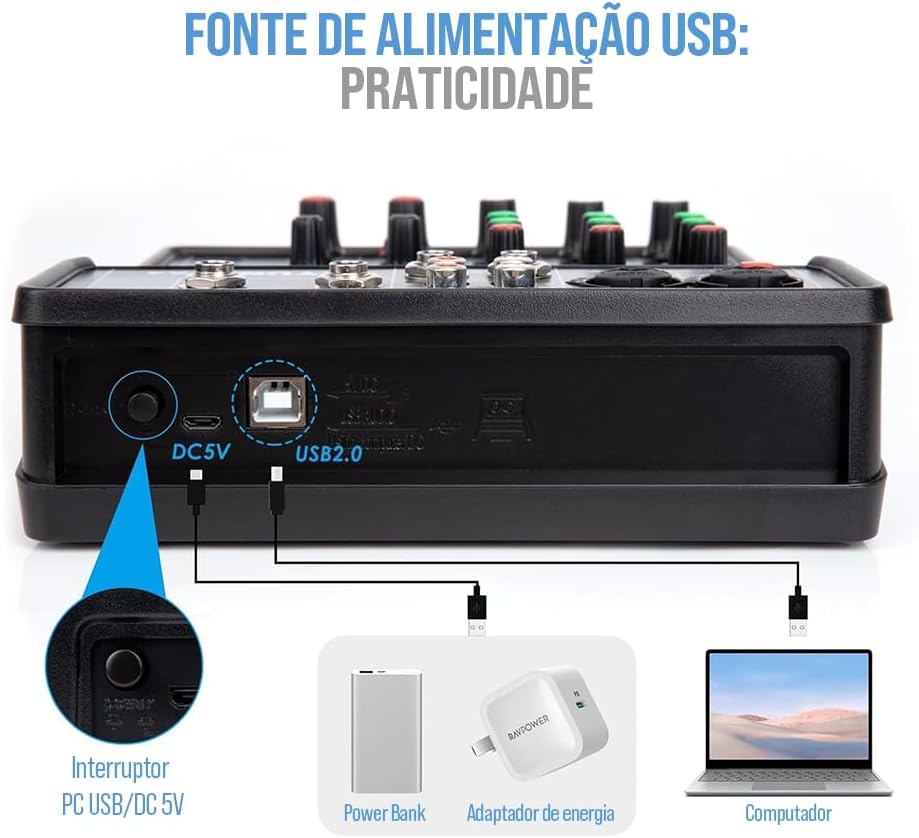
図4.1: USB電源オプション
Connect the mixer to a power source using the provided USB cable. You can use a power bank, a standard USB power adapter (DC 5V), or a computer's USB port.
4.2 オーディオデバイスの接続
The NA4 mixer offers broad compatibility with various audio devices.

図4.2: デバイスの互換性
- マイク: Connect dynamic microphones or 48V condenser microphones to the MIC/LINE inputs (Channels 1-2). Activate the +48V PHANTOM switch for condenser microphones.
- 楽器: Connect musical instruments like guitars or synthesizers to the MIC/LINE inputs or LINE inputs (3/L, 4/R).
- 外部オーディオソース: Connect CD players, media players, or other line-level devices to the LINE inputs (3/L, 4/R).
- コンピューター: Use the PC/USB port to connect the mixer to your computer for digital audio input/output and recording.
- モバイルデバイス: Connect your mobile phone to the dedicated live stream input for broadcasting.
- 出力装置: Connect the MAIN OUT (L/R) to your amplifier, powered speakers, or recording interface. Use the Headphone Monitoring Connector for personal monitoring.
5. 操作手順
5.1 基本操作
- 電源オン: Connect the mixer to a power source. The power indicator will light up.
- 入力レベル調整: For each connected channel, adjust the GAIN knob to achieve an optimal input level. The PEAK indicator should flash only occasionally, not constantly.
- イコライゼーション: Use the HIGH and LOW knobs to adjust the treble and bass frequencies for each channel to shape your sound.
- チャンネル音量: Adjust the individual channel volume knobs to balance the levels of all inputs.
- メイン出力ボリューム: Use the MAIN volume knob to control the overall output level of the mixer.
5.2 Bluetooth接続
The NA4 mixer supports wireless Bluetooth connectivity for audio playback from mobile devices.
図5.1: Bluetoothペアリング
- Press the MODE button on the mixer's digital display panel until 'BLUE' appears, indicating Bluetooth mode.
- On your electronic device (smartphone, tablet), enable Bluetooth and search for available devices.
- Select the mixer (usually named 'NA4' or similar) from the list to pair.
- Once connected, you can play audio from your device through the mixer. Adjust the digital signal volume control for Bluetooth playback.
5.3 USB再生と録音
- USB再生: Insert a USB 2.0 compatible audio device into the USB port. The mixer supports lossless audio playback. Use the function selection buttons to navigate and play tracks.
- コンピューターの接続性: Connect the mixer to your PC via the PC/USB port. The mixer will function as a digital sound card, allowing you to record audio directly to your computer or play audio from your computer through the mixer. The flexible LOOPBACK function is ideal for recording and web鋳造。
5.4 DSPエフェクト
The NA4 mixer includes 24 Digital Signal Processor (DSP) effects to enhance your audio.
- Use the UP/DOWN buttons to cycle through the 24 available DSP effects.
- Adjust the FX/PC REC knob on each channel to send the desired amount of signal to the effects processor.
- Control the overall volume of the effects using the MAIN FX Volume knob.
6. メンテナンス
- クリーニング: Use a soft, dry cloth to clean the mixer's surface. Do not use liquid cleaners or aerosols.
- ストレージ: ミキサーは直射日光や極端な温度を避け、涼しく乾燥した場所に保管してください。
- 取り扱い: ミキサーを落としたり、強い衝撃を与えたりしないでください。
- 換気: 過熱を防ぐために、ミキサーの周囲に適切な換気を確保してください。
7。 トラブルシューティング
| 問題 | 考えられる原因 | 解決 |
|---|---|---|
| 電源なし | 電源ケーブルが接続されていません。電源に障害があります。 | Check power cable connection; try a different USB power source. |
| 音声出力なし | Main volume too low; output cables disconnected; incorrect input selection. | Increase MAIN volume; check all output cable connections; ensure correct input mode is selected. |
| 歪んだ音 | Input GAIN too high; output volume too high. | Reduce GAIN for the affected channel; lower MAIN volume. Ensure PEAK indicators are not constantly lit. |
| Bluetoothが接続されない | ミキサーが Bluetooth モードではありません。デバイスが遠すぎます。干渉があります。 | Ensure mixer is in 'BLUE' mode; bring device closer; restart both devices. |
| ファンタム電源が機能しない | +48V switch not activated. | Ensure the +48V PHANTOM switch is engaged for channels 1-2. |
8. 仕様
- ブランド: Genérico
- モデル: NA4
- チャンネル数: 4
- 接続技術: USB、ブルートゥース
- オーディオ入力: USB, Bluetooth, Microphone (XLR with 48V support)
- DSP 効果: 24種類の内蔵エフェクト
- 電源: USB経由のDC 5V
9. 保証とサポート
保証情報およびテクニカルサポートについては、ご購入時に付属のマニュアルをご参照いただくか、販売店にお問い合わせください。保証請求の際に必要となるため、購入証明書は保管してください。