
導入
This manual provides essential information for setting up, operating, maintaining, and troubleshooting your Acer AL15-33P laptop. Please read this guide thoroughly to ensure proper use and to maximize the lifespan of your device.
設定
1. 開梱と初期検査
Carefully remove the laptop and all accessories from the packaging. Check for any visible damage. The package should include the laptop, power adapter, and this user manual.

フロント view of the Acer AL15-33P laptop with the screen displaying the Windows desktop.
2. 電源の接続
- Connect the AC adapter cable to the power adapter.
- Plug the DC output connector of the power adapter into the power input port on the side of your laptop.
- AC電源コードを電源コンセントに差し込みます。
バッテリーは自動的に充電を開始します。初めて使用する前に、バッテリーをフル充電することをお勧めします。
3. 初期起動とWindowsのセットアップ
- ノートパソコンの蓋を開けます。
- Press the power button, typically located on the keyboard deck or side, to turn on the laptop.
- Follow the on-screen instructions to complete the Windows 11 setup process. This includes selecting your region, language, accepting terms, and setting up a user account.
ノートパソコンの操作
1. キーボードとタッチパッドの使い方
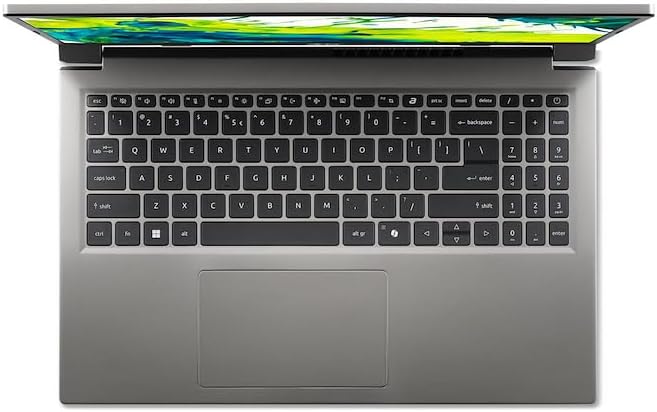
トップダウン view ノートパソコンのキーボードとタッチパッドの。
- キーボード: The laptop features a full-size keyboard. Use the function (Fn) key in combination with F-keys for special functions like adjusting brightness, volume, or enabling/disabling Wi-Fi.
- タッチパッド: The integrated touchpad supports multi-touch gestures. Tap to click, use two fingers to scroll, and pinch to zoom.
2. 周辺機器の接続
Your Acer AL15-33P laptop is equipped with various ports for connecting external devices.

Right side of the laptop showing ports including USB and audio jack.

Left side of the laptop showing ports including power, USB-C, HDMI, and USB-A.
- USB ポート: 外付けハードドライブ、マウス、キーボードなどの USB デバイスを接続します。
- HDMIポート: Connect an external monitor or TV for a larger display.
- オーディオジャック: ヘッドホンまたは外部スピーカーを接続します。
- USB-Cポート: For data transfer and potentially display output or charging, depending on the specific model configuration.
3.ワイヤレス接続
- Wi-Fi: ワイヤレス ネットワークに接続するには、タスクバーの Wi-Fi アイコンをクリックし、ネットワークを選択して、必要に応じてパスワードを入力します。
- ブルートゥース: To pair Bluetooth devices, go to Windows Settings > Bluetooth & devices, and turn on Bluetooth.
4.電力管理
- スリープモード: ノートパソコンを低電力状態にするには、カバーを閉じるか、スタート メニューから [スリープ] を選択します。
- シャットダウン: To turn off the laptop completely, go to the Start menu, click the Power icon, and select 'Shut down'.
- 再起動: To restart the laptop, go to the Start menu, click the Power icon, and select 'Restart'.
メンテナンス
1. ノートパソコンの掃除
- 柔らかく糸くずの出ない布で軽く拭き取ってください。ampディスプレイを清掃するには、水またはスクリーンクリーナーを使用してください。
- キーボードとシャーシには柔らかい布を使用してください。刺激の強い化学薬品や研磨剤は使用しないでください。
- Periodically use compressed air to clear dust from the cooling vents to prevent overheating.
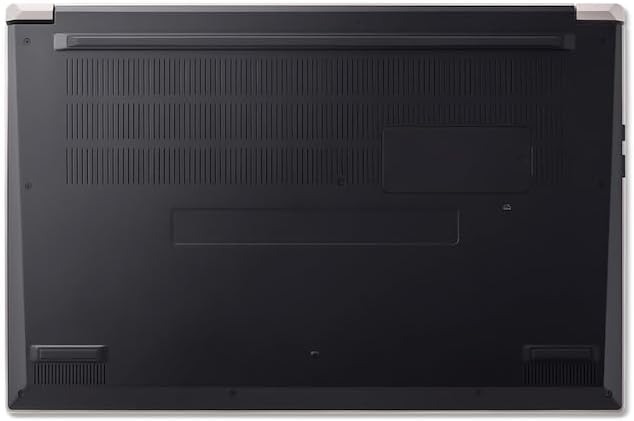
底 view of the laptop, highlighting the ventilation grilles.
2. バッテリーのお手入れ
- バッテリーを頻繁に完全に放電することは避けてください。
- ノートパソコンを長期間保管する場合は、バッテリーが約 50 ~ 70% 充電されていることを確認してください。
- Operate the laptop in a moderate temperature environment.
3. ソフトウェアの更新
Regularly update your operating system and drivers to ensure optimal performance and security. Windows Update can be accessed via Settings > Windows Update.
4. ストレージ管理
定期的に再view 不要なものを削除する files to free up storage space. Utilize cloud storage or external drives for backups of important data.
トラブルシューティング
This section addresses common issues you might encounter with your Acer AL15-33P laptop.
| 問題 | 考えられる解決策 |
|---|---|
| ノートパソコンの電源が入りません。 | 電源アダプターがしっかりと接続され、コンセントが機能していることを確認してください。別のコンセントをお試しください。バッテリーが完全に消耗している場合は、プラグを差し込んでから電源が入るまで数分かかる場合があります。 |
| ディスプレイが空白または黒になります。 | Check if the laptop is powered on. Try pressing Fn + F6 (or the corresponding display toggle key) to cycle through display modes. Connect an external monitor to check if the issue is with the laptop's screen. |
| Wi-Fi接続の問題。 | Ensure Wi-Fi is enabled (Fn + F3 or check Windows settings). Restart your router and modem. Check if other devices can connect to the Wi-Fi network. Update Wi-Fi drivers. |
| ノートパソコンの動作が遅いです。 | Close unnecessary applications. Check Task Manager for processes consuming high CPU or memory. Run a disk cleanup. Ensure Windows and drivers are up to date. |
仕様
The following are key specifications for the Acer AL15-33P model. Note that specific configurations may vary.
- モデル: Acer AL15-33P
- プロセッサ: Intel Core i3-N355
- ラム: 8GB
- ストレージ: 512GB SSD
- 画面: 15.6インチ
- オペレーティング·システム: ウィンドウズ11
- ブランド: エイサー
保証とサポート
Your Acer AL15-33P laptop comes with a standard manufacturer's warranty. Please refer to the warranty card included with your product for specific terms and conditions, including the warranty period and coverage details.
テクニカルサポート、ドライバーのダウンロード、またはサービスに関するお問い合わせは、Acerの公式サポートサイトをご覧ください。 website or contact Acer customer service directly. Have your laptop's serial number ready when contacting support.
Acer サポート Webサイト: www.acer.com/support