
1. はじめに
This manual provides comprehensive instructions for the operation and maintenance of your BAOFENG UV-32 Ham Radio. Please read this manual thoroughly before using the device to ensure proper function and safety.

Image: The BAOFENG UV-32 Ham Radio, showcasing its display and robust design.
2 製品の特徴
- Dual GPS/BeiDou Tracking: Share and request location coordinates in real-time, essential for off-grid communication.
- Bluetooth APPプログラミング: Wirelessly configure up to 1000 channels using a mobile application.
- 調整可能な出力: Select between 10W, 5W, or 1W to optimize range and battery life.
- One-touch Frequency Scan: Quickly clone channels for efficient setup.
- HDオーディオ: Equipped with a 40mm speaker for clear communication in noisy environments.
- Multi-band Monitoring: Supports AM/FM/VHF/UHF bands, including 108-136MHz for aviation.
- 1000-Channel Storage: Organize channels across 10 zones for various operational needs.
- USB-C充電: Convenient charging via USB-C ports, power banks, or car adapters.
- Dual Display/Dual Guard: 2つの周波数を同時に監視します。

Image: Visual representation of the BAOFENG UV-32's key functions and features.
3. パッケージ内容
パッケージにすべてのアイテムが含まれていることを確認します。
- BAOFENG UV-32 無線ユニット
- アンテナ
- バッテリー(非標準バッテリー)
- Charger (Desktop Dock and AC Adapter)
- ストラップ
- ユーザーマニュアル(このドキュメント)
- Back Clip (for "1 Pack Black+Back Clip" variant)

Image: The BAOFENG UV-32 radio with its back clip, demonstrating portability.
4.セットアップガイド
4.1 バッテリーの取り付け
- バッテリー パックをラジオの背面にある溝に合わせます。
- カチッと音がするまでバッテリーを上方向にスライドさせます。
- 取り外すには、バッテリーリリースラッチ(ある場合)を押し、バッテリーを下方にスライドさせます。
4.2 アンテナの取り付け
- アンテナをラジオ上部のコネクタに時計回りに回し、指でしっかりと締め付けます。締めすぎにご注意ください。
4.3 バッテリーの充電
The UV-32 supports two charging methods:
- デスクトップ充電器: Place the radio (with battery installed) into the charging dock. Ensure the charging contacts align. The indicator light will show charging status.
- USB-C直接充電: Connect a USB-C cable to the port on the side of the radio and to a power source (e.g., computer, wall adapter, power bank, car charger).
初めて使用する前に、バッテリーを完全に充電してください。通常、フル充電には数時間かかります。

Image: Demonstrates the versatility of Type-C charging for the BAOFENG UV-32.
5. 操作手順
5.1 電源のオン/オフと音量
- 電源オン: 回転する パワー/ボリューム カチッという音がするまでノブを時計回りに回します。
- 音量を調整: Continue rotating the knob to increase or decrease the volume.
- 電源を切る: Rotate the knob counter-clockwise until you hear a click.
5.2チャンネルの選択
使用 上/下 arrow keys or the numeric keypad to select a channel. The display will show the current channel number and frequency.
5.3 送信(PTT)
送信するには、 PTT (プッシュ・トゥ・トーク) button on the side of the radio. Speak clearly into the microphone. Release the PTT button to receive.
5.4 Dual Display / Dual Guard
The UV-32 can monitor two frequencies simultaneously. Activate the Dual Guard function through the radio's menu or a dedicated button (refer to the on-screen interface for specific options).

Image: The radio's screen displaying the Dual Watch feature, allowing simultaneous monitoring of two channels.
5.5 APP Programming (Bluetooth)
- Download the "Radio Frequency Programmer" mobile application from your device's app store.
- Enable Bluetooth on your mobile device and the UV-32 radio.
- Open the app and follow the on-screen instructions to connect to your radio.
- You can then wirelessly edit channel information, frequencies, and other settings.

Image: The BAOFENG UV-32 in programming mode, with a smartphone displaying the channel programming application.
5.6 One-touch Frequency Scan / Copy Frequency
This feature allows for quick cloning of frequencies from another radio. Press and hold the designated scan button (e.g., SK1) to initiate the smart scan and copy process. The radio will detect and store the active frequency.

Image: Illustration of the one-key frequency pairing feature between two BAOFENG UV-32 radios.
5.7 Adjustable Power Output
Access the menu to select your desired power output: 10W (High), 5W (Mid), or 1W (Low). Higher power provides greater range but consumes more battery. Lower power conserves battery for shorter distances.
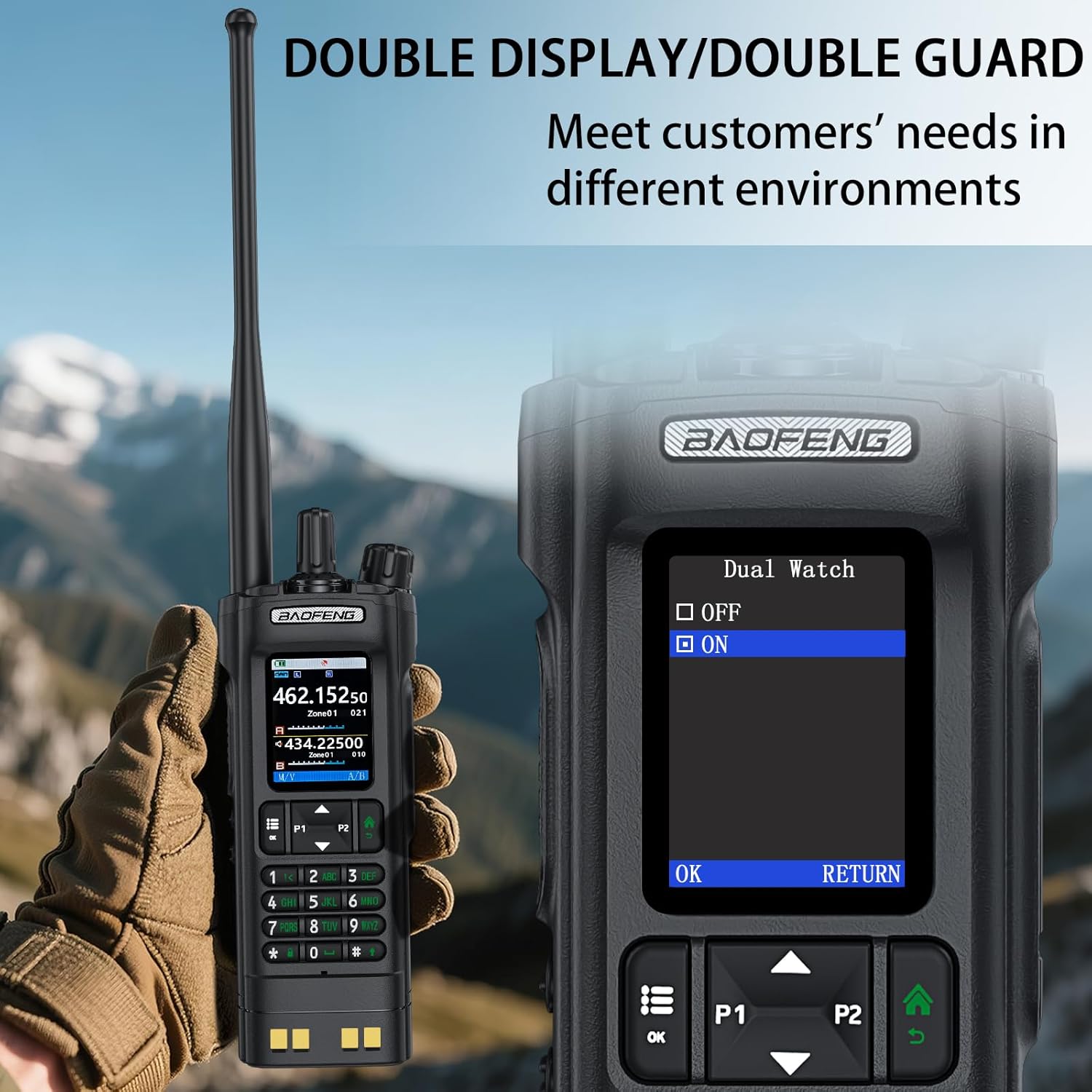
Image: The BAOFENG UV-32's power adjustment menu, showing options for 10W, 5W, and 1W output.
5.8 GPS/BeiDou Tracking
The integrated GPS/BeiDou module allows for real-time location sharing. Refer to the radio's menu for GPS functions, including sending your coordinates and requesting those of other UV-32 users.
6. メンテナンス
- クリーニング: 柔らかくてamp ラジオの外装を拭く際は布を使用してください。刺激の強い化学薬品や溶剤は使用しないでください。
- バッテリーのケア: バッテリーを頻繁に完全に放電することは避けてください。長期間使用しない場合は、ラジオとバッテリーを涼しく乾燥した場所に保管してください。
- アンテナ: アンテナがしっかりと取り付けられていることを確認してください。ただし、締めすぎないようにしてください。アンテナを曲げたり、負担をかけたりしないでください。
- 耐水性: このデバイスは 耐水性はありません. Protect it from rain, splashes, and immersion in water.
7。 トラブルシューティング
| 問題 | 考えられる原因 | 解決 |
|---|---|---|
| ラジオの電源が入りません。 | バッテリー残量が少ないか、正しく取り付けられていません。 | バッテリーを充電するか、しっかりと取り付け直してください。 |
| 送信も受信もできません。 | 周波数/チャンネルが正しくない、バッテリー残量が少ない、またはアンテナに問題がある。 | Verify frequency, charge battery, check antenna connection. Ensure you are within range of other radios. |
| 音質が悪い。 | 信号強度が低い、干渉がある、またはスケルチ設定が正しくありません。 | Move to an area with better signal, adjust squelch level, check for sources of interference. |
| APP programming fails to connect. | Bluetooth not enabled, app not updated, or radio not in programming mode. | Ensure Bluetooth is on for both devices, update the app, and follow app instructions to put the radio in programming mode. |
8. 仕様
| ブランド | バオフェン |
| モデル番号 | 紫外線32 |
| チャンネル数 | 1000 |
| 周波数範囲 | UHF350-390/400-520MHz, VHF136-174MHz/220-260MHz |
| 通話範囲最大 | 10キロメートル(約6.2マイル) |
| 出力 | 10W / 5W / 1W (Adjustable) |
| 巻tage | 7.4 ボルト (DC) |
| 耐水性レベル | 耐水性はありません |
| 接続プロトコル | ブルートゥース |
| 充電タイプ | USB-C, Desktop Dock |
| 寸法(約) | 高さ: 6.26インチ、幅: 2.28インチ、奥行き: 1.57インチ |
| 重量(約) | 13.58オンス |

Image: Detailed dimensions and weight of the BAOFENG UV-32 radio.
9. 保証とサポート
Your BAOFENG UV-32 Ham Radio comes with a 1年間保証 ご購入日から有効です。この保証は通常の使用における製造上の欠陥をカバーします。
For technical support, warranty claims, or service inquiries, please contact BAOFENG customer service through their official webご購入いただいたサイトまたは販売店にお問い合わせください。保証の有効性を確認するため、購入証明書を保管してください。