
1. はじめに
ご購入ありがとうございますasing the AIKELA ZJ-027 5-in-1 Induction Bluetooth Speaker. This versatile device combines a wireless induction speaker, Bluetooth speaker, power bank, phone stand, and LED light, designed to enhance your audio and mobile experience. Please read this manual carefully to ensure proper use and optimal performance.
2. 安全情報
- デバイスを水、湿気、極端な温度から遠ざけてください。
- 自分でデバイスを分解したり修理したりしないでください。 サポートが必要な場合は、カスタマー サポートにお問い合わせください。
- 付属の充電ケーブルまたは認定された同等品のみを使用してください。
- 装置の上に重いものを置かないでください。
- お子様の手の届かない場所に保管してください。
3. パッケージ内容
パッケージにすべてのアイテムが含まれていることを確認します。
- AIKELA 5-in-1 Induction Speaker (Model: ZJ-027) x 1
- タイプC充電ケーブル x 1
- ユーザーマニュアル x 1
- クイックスタートガイドx1

Image: What you will receive with your AIKELA ZJ-027 speaker.
4.製品オーバーview
The AIKELA ZJ-027 is a multifunctional device designed for convenience and enhanced audio. It features:
- Induction Speaker: Play audio by simply placing your phone on the stand, no Bluetooth pairing needed.
- ブルートゥーススピーカー: Connect wirelessly via Bluetooth 5.3 for stable, high-quality audio.
- 電話スタンド: Adjustable 360° vertical rotation for optimal view角度を変える。
- パワー・バンク: Built-in 3500mAh battery for emergency phone charging.
- LEDライト: Colorful ambient lighting with multiple modes.

Image: The AIKELA ZJ-027 5-in-1 Induction Speaker in use, highlighting its multiple functions.

画像: 詳細 view of the speaker driver, illustrating its capability for massive, booming sound with crystal-clear quality.
5. セットアップ
5.1 スピーカーの充電
Before first use, fully charge the speaker. Connect the provided Type-C cable to the charging port on the speaker and the other end to a USB power adapter (not included). A full charge takes approximately 2 hours and provides 5-8 hours of playtime, depending on volume levels.

画像: バッテリー寿命と充電時間に関する情報。
5.2 Adjusting the Phone Stand
The integrated phone stand can be rotated 360° vertically to achieve your desired viewing angle. Ensure the non-slip silicone on the base, back, and slot keeps your phone secure.
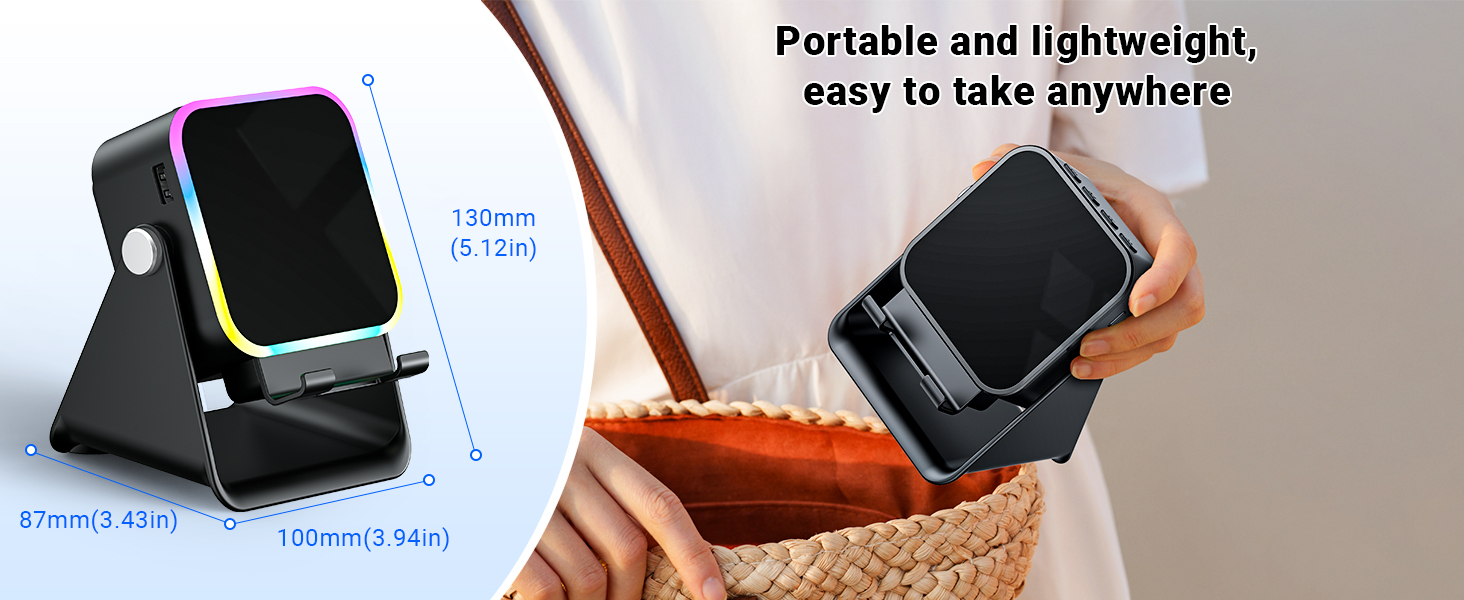
Image: Adjustable stand with 360° rotation and non-slip base for stability.
6. 操作
6.1 電源オン/オフ
電源ボタンを長押し (⏻)をクリックしてデバイスの電源をオンまたはオフにします。
6.2 Switching Modes (Induction / Bluetooth)
After powering on, the device will typically start in Induction Mode. To switch between Induction Mode and Bluetooth Mode, short press the 'M' button.
Video: Demonstrates how to use both Induction and Bluetooth modes, including switching between them and proper phone placement.
6.3 誘導モード
In Induction Mode, no Bluetooth connection is required. Simply place your smartphone correctly on the stand. The speaker's inductive chip will capture and amplify audio directly from your phone.
- 電話の配置: Ensure your phone is placed correctly on the stand, typically in portrait orientation, for optimal sound transfer.
- 音量調整: Adjust your phone's volume to 50% or higher for the best playback experience. You can also use the volume buttons on the speaker.
- 互換性: Induction mode is primarily compatible with smartphones. It does not support iPads or tablets.
- 自動オフ: The speaker will automatically turn off after 10 minutes of standby in Induction Mode.

Image: Guide on how to correctly place your phone and adjust volume for Induction Mode.
6.4Bluetoothモード
For wireless audio streaming, switch to Bluetooth Mode:
- 電源ボタンを長押ししてスピーカーの電源をオンにします。
- Short press the 'M' button to switch to Bluetooth Mode (you will hear an audible prompt).
- On your phone or tablet, go to Bluetooth settings and search for "ZJ-027".
- Select "ZJ-027" to pair. For Android devices, enable "Sync volume with phone" in Bluetooth settings after pairing for optimal control.
- 接続すると、デバイスからのオーディオをスピーカーから再生できます。
In Bluetooth mode, you can place your phone horizontally or vertically on the stand. The Bluetooth range is approximately 10 meters.

Image: Visual representation of Induction Mode (no Bluetooth) and Bluetooth Mode (10m range).
6.5 LEDライトの機能
The speaker features colorful LED lights:
- 照明モードの切り替え: Single-click the 'M' button to cycle through different light colors and patterns.
- ライトのオン/オフ: Long-press the 'M' button to turn the LED lights on or off.

Image: Multiple light strip patterns to choose from.
6.6 Power Bank Function (Emergency Charge)
The speaker can act as an emergency power bank for your phone. Connect your phone's charging cable (not included) to the USB-A output port on the speaker and to your phone. This is a wired charging function, not wireless charging.
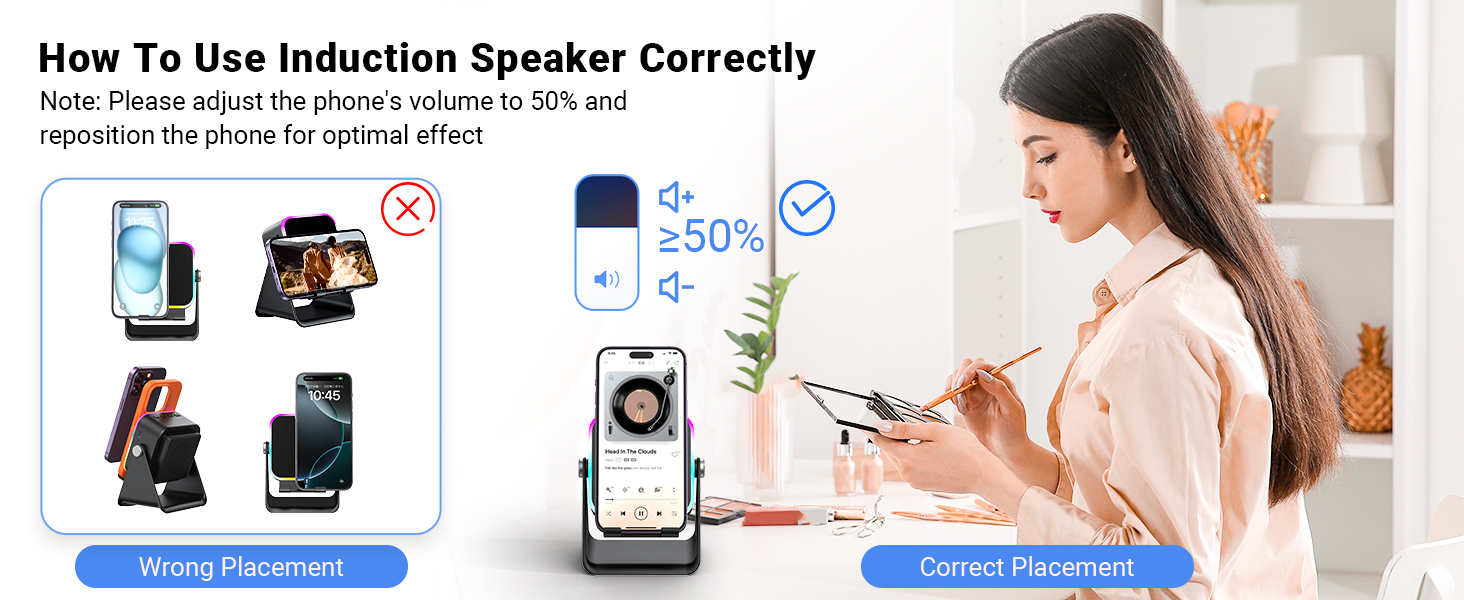
Image: The speaker's 3500mAh power bank function for emergency charging.
7. メンテナンス
- 柔らかく乾いた布でデバイスを拭いてください。研磨剤入りの洗剤や溶剤は使用しないでください。
- デバイスを直射日光に長時間さらさないでください。
- デバイスを使用しないときは、涼しく乾燥した場所に保管してください。
8。 トラブルシューティング
Q1: What should I do if the volume is too low?
- If in Induction mode, place the phone correctly on the holder, and then adjust the phone's volume to 50% or higher.
- If you are using an Android device and using Bluetooth mode, first pair the Bluetooth device. Then enable "Sync volume with phone" in your phone's Bluetooth settings.
Q2: What should I do if the sound cuts in and out in Induction mode?
- Ensure the phone is correctly placed on the holder.
- The working principle of Induction mode is that the speaker's inductive chip captures audio from the phone and amplifies it through the speaker. The louder the phone's volume, the louder the speaker's output. Therefore, we recommend setting the phone's volume to 50% or higher to ensure uninterrupted playback.
9. 仕様
| 特徴 | 詳細 |
|---|---|
| モデル名 | ZJ-027 |
| スピーカータイプ | ポータブルスピーカー |
| 特集 | Bluetooth Speaker, Built-In Powerbank, Induction Speaker, LED Light, Phone Stand |
| 対応デバイス | Android Phone, iPad, iPhone |
| 色 | 黒 |
| 製品寸法 | 奥行き5インチ x 幅2インチ x 高さ3インチ |
| アイテム重量 | 0.34キログラム(12オンス) |
| Bluetoothの最大範囲 | 10メートル |
| バッテリー | 1 A 電池が必要 (付属) |
| メーカー | アイケラ |
| スピーカー最大出力 | 1ワット |
| 接続技術 | Bluetooth, Induction |
| 材料 | アクリロニトリルブタジエンスチレン(ABS) |
10.保証とサポート
AIKELA provides 12 months of support for your Phone Amplifier Speaker. If you encounter any issues or have questions, please contact customer service. You can typically find contact information by navigating to 'Find Order' on the platform where you purchased the product.
