
導入
This manual provides detailed instructions for the installation, operation, and maintenance of your Generic HI-M505 Radio Receiver. Designed for 12V and 24V systems, this unit features DAB, AM, FM radio, USB connectivity, and Bluetooth, making it suitable for various applications, including compatibility with Komatsu, Kobelco, and Sumitomo excavator parts.
パッケージ内容
以下にリストされているすべてのアイテムがパッケージに含まれていることを確認してください。
- 1 x Car Radio Stereo With Frame
- GPSケーブル×1
- USBケーブル2本
- 1 x Power Cable With Canbus
- 1 x RCAケーブル
- カメラ入力ケーブル x 1
- ラジオアダプターケーブル x 1
- ユーザーマニュアル (本書) x 1
セットアップとインストール
Proper installation is crucial for optimal performance. If you are unsure about any steps, consult a qualified technician.
1. 安全上の注意
- 電気的なショートを防ぐため、取り付けを始める前に車両のバッテリーを外してください。
- Ensure the unit is compatible with your vehicle's electrical system (12V or 24V).
- 運転者の視界を妨げるような場所にユニットを設置しないでください。 view または車両の運行に支障をきたします。
2. ユニットの取り付け
- Carefully remove the existing radio or blank panel from the dashboard.
- Insert the HI-M505 radio stereo with its frame into the dashboard opening.
- Secure the unit using appropriate mounting hardware (not included unless specified).
3. 配線接続
Connect the provided cables as follows:
- Power Cable with Canbus: Connect to the vehicle's power supply and ground. Ensure correct polarity. The Canbus connection facilitates communication with the vehicle's system.
- ラジオアダプターケーブル: Connect to the vehicle's antenna input.
- GPSケーブル: Connect the GPS antenna to the unit and mount the antenna in a location with a clear view 空の。
- USBケーブル(2本) Connect to the unit's USB ports. These can be routed to a convenient location for connecting USB devices.
- RCAケーブル: 外部接続用 amplifiers or other audio/video devices.
- カメラ入力ケーブル: リアの接続用view カメラ(カメラは付属しません)。
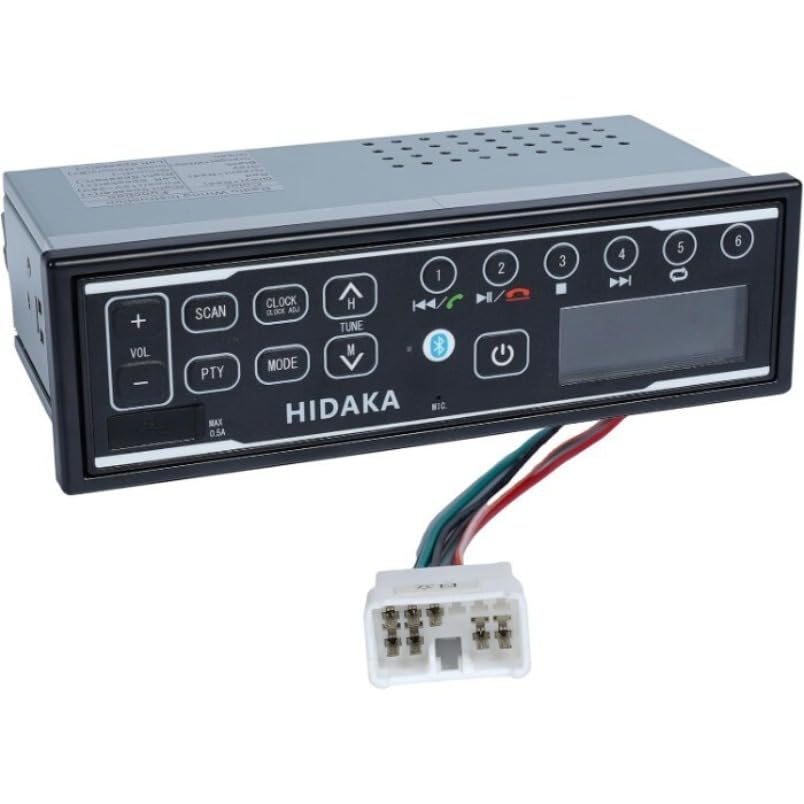
画像: 正面 view of the HI-M505 Radio Receiver, showing the display and control buttons. This image illustrates the general appearance of the unit.
操作手順
The HI-M505 operates on an Android platform, offering a user-friendly interface.
1. 電源のオン/オフ
Press and hold the power button (usually marked with a power symbol) to turn the unit on or off. A short press typically mutes the audio or changes the source.
2. Radio Functions (DAB, AM, FM)
- ソースの選択: Tap the "Radio" icon on the main screen or use the source button to select AM, FM, or DAB (if available in your region).
- 走査: Use the seek buttons to automatically scan for available stations.
- プリセット: お気に入りの放送局をプリセット ボタンに保存して、すぐにアクセスできるようにします。
3.USB再生
Insert a USB drive into one of the provided USB ports. The unit will automatically detect the drive and display its contents. Use the media player application to browse and play audio or video files.
4. Bluetooth接続
- Go to the unit's settings menu and select "Bluetooth".
- Enable Bluetooth and make the unit discoverable.
- On your mobile device, search for available Bluetooth devices and select "HI-M505" (or similar name).
- ペアリングコードの確認を求められた場合は、それを確認します。
- ペアリングすると、オーディオをストリーミングしたり、ハンズフリー通話を行ったりできるようになります。
5. Wi-Fi and Apple CarPlay
- Wi-Fi: Access the Wi-Fi settings to connect to a local Wi-Fi network or a mobile hotspot. This enables internet access for apps and updates.
- アップルカープレイ: Connect your iPhone via USB to activate Apple CarPlay. This allows you to use compatible iPhone apps directly on the unit's display.
メンテナンス
Regular maintenance ensures the longevity and optimal performance of your HI-M505 radio receiver.
- クリーニング: ディスプレイと外装の清掃には、柔らかく乾いた布をご使用ください。研磨剤入りの洗剤や溶剤の使用は避けてください。
- ソフトウェアアップデート: 最新の機能とバグ修正が適用されていることを確認するために、Wi-Fi 経由でソフトウェア アップデートを定期的に確認してください。
- ケーブル接続: すべてのケーブルがしっかりと接続され、損傷がないことを確認してください。
トラブルシューティング
問題が発生した場合は、次の一般的な問題と解決策を参照してください。
- 電源なし:
- Check the power cable connections and ensure they are secure.
- 車のラジオのヒューズが切れていないことを確認します。
- 車両のバッテリーが充電され、接続されていることを確認してください。
- 音が出ない:
- 音量レベルを確認し、ユニットがミュートされていないことを確認します。
- スピーカーの接続を確認します。
- 外付けを使用する場合 amp充電器の場合は、電源と接続を確認してください。
- ラジオの受信状態が悪い:
- Ensure the radio antenna is properly connected and not damaged.
- Check for obstructions or interference in the area.
- Bluetooth ペアリングの問題:
- ユニットとモバイル デバイスの両方で Bluetooth が有効になっていることを確認します。
- 両方のデバイスで以前のペアリングを削除し、再度ペアリングを試みてください。
- Move closer to the unit to ensure a strong signal.
- USBデバイスが認識されません:
- Ensure the USB device is formatted correctly (e.g., FAT32).
- 別の USB デバイスまたはケーブルを試してください。
- USB ポートが破損していないか確認してください。
問題が解決しない場合は、カスタマー サポートにお問い合わせください。
仕様
| 特徴 | 詳細 |
|---|---|
| モデル | HI-M505 |
| ブランド | ジェネリック |
| 接続技術 | Bluetooth wifi |
| コントローラータイプ | アンドロイド |
| 特集 | Apple CarPlay, Built-In Wi-Fi |
| 対応デバイス | Ampリファイアー |
| コネクタタイプ | USBタイプA |
| オーディオ出力モード | ステレオ |
| アイテム重量 | 4.4 ポンド |
| 電源入力 | 12V / 24V DC (as per product description) |
保証情報
Specific warranty terms and conditions for the Generic HI-M505 Radio Receiver are provided by the seller at the time of purchase. Please refer to your purchase documentation or contact the seller directly for detailed warranty coverage, duration, and claim procedures.
カスタマーサポート
For technical assistance, troubleshooting beyond this manual, or inquiries regarding your HI-M505 Radio Receiver, please contact the seller or retailer from whom you purchased the product. They will be able to provide the most accurate and timely support.