
1. はじめに
This instruction manual provides detailed guidance for the installation, operation, and maintenance of your Light My Bricks 2.0 Light Kit for the LEGO Harry Potter Diagon Alley Wizarding Shops #76444. This kit is designed to enhance your LEGO model with a variety of lights, including warm white, cool white, yellow, red, and green LEDs, illuminating every section of the iconic street. Please read this manual thoroughly before beginning installation to ensure a smooth and successful experience.
2. 安全情報
警告:小さな部品による窒息の危険があります。3歳未満のお子様には与えないでください。
- Always handle LED components and wires with care to prevent damage.
- Ensure all connections are secure to avoid short circuits.
- Do not expose the lighting components to water or excessive moisture.
- Use only the recommended power sources (USB Power Bank or USB Wall Adaptor) to prevent damage to the kit.
- Keep the kit away from extreme temperatures.
3. 含まれるもの
Your Light My Bricks 2.0 Light Kit includes the following components:
- ライト38個
- ベルト5本
- ドック x 5
- フラックスパワー×1
- アクセサリー x 8
- 32 x アソートレンガ
- 照明部品
Note: A USB Power Bank or USB Wall Adaptor (to connect to a mains outlet) is required but not included in this light kit.
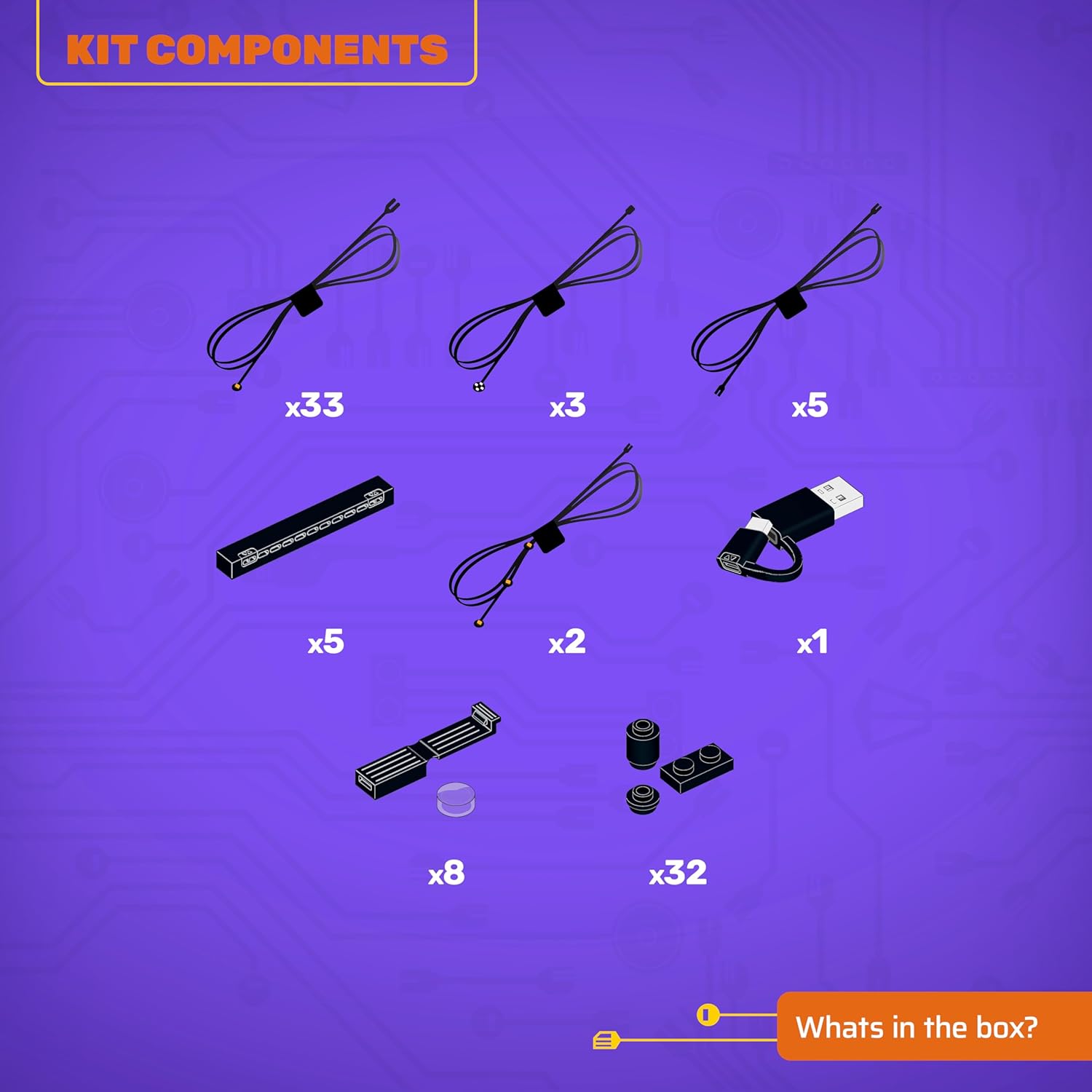
Figure 3.1: Kit Components Overview
4. セットアップとインストール
This LEGO Light Kit is designed for flexible installation. You can choose to light your LEGO model as you build it, or after the model is fully assembled. For detailed, step-by-step instructions, please refer to the 3D installation guides provided by Light My Bricks.
4.1 Accessing 3D Installation Guides
To access the comprehensive 3D installation guides, scan the QR code located on the side of the product box. These guides are carefully crafted to ensure precise placement of every brick and component, regardless of your chosen building method.
4.2電源接続
Once the lighting components are installed according to the 3D guide, connect the Flux Power unit to a compatible USB Power Bank or USB Wall Adaptor. Ensure the power source is stable and provides adequate power for all connected lights.
5. 操作手順
After successful installation and power connection, your Light My Bricks kit will illuminate your LEGO model. Some kits may include a remote control for adjusting lighting effects, brightness, or turning lights on/off. Refer to your specific kit's instructions for remote control functionality.
Video 5.1: Demonstration of the Light My Bricks kit illuminating the LEGO Diagon Alley model, showcasing various lighting effects and remote control operation.
Video 5.2: Another demonstration of the LED Light Kit for LEGO 76444 Diagon Alley Wizarding Shops, highlighting the vibrant illumination of different sections.
6. メンテナンス
ライトキットの寿命を延ばし、最適なパフォーマンスを確保するには:
- Keep the components clean and free from dust. Use a soft, dry cloth for cleaning.
- Avoid bending or pulling the wires excessively, as this can cause internal damage.
- Store the kit in a cool, dry place when not in use or if disassembled.
7。 トラブルシューティング
If you encounter any issues with your light kit, please refer to the following common solutions:
- ライトが点灯しない:
- Check if the power source (USB Power Bank or Wall Adaptor) is properly connected and functional.
- Ensure all wires are securely plugged into the expansion boards and the Flux Power unit.
- Verify that the power source is providing sufficient power.
- 個々のライトが動作しない:
- Inspect the specific light and its connection for any loose or damaged wires.
- Ensure the light is correctly inserted into its designated brick or component.
- ちらつく光:
- 接続が緩んでいないか確認してください。
- 電源が安定しており、過負荷になっていないことを確認してください。
これらの手順を実行しても問題が解決しない場合は、Light My Bricks カスタマー サポートに問い合わせて、さらにサポートを受けてください。
8. 仕様
| 特徴 | 詳細 |
|---|---|
| ブランド名 | ライトマイブリック |
| モデル名 | Light Kit Compatible with LEGO Harry Potter Diagon Alley Wizarding Shops #76444 |
| モデル番号 | 2.0-76444 |
| 材質タイプ | LEDライト |
| 個数 | 89 (lighting components and assorted bricks) |
| アイテムの寸法 | 5.7 x 4.5 x 2.75インチ(パッケージ) |
| 組み立てが必要 | はい |
| 年齢範囲の説明 | Adult (Manufacturer Minimum Age: 144 Months) |
| 追加機能 | LEDライト |
9. 製品のビジュアル
Explore how the Light My Bricks kit transforms your LEGO Harry Potter Diagon Alley model with these illuminated views.

Figure 9.1: Illuminated Diagon Alley - Wide View

Figure 9.2: Illuminated Diagon Alley - Street Level Detail

Figure 9.3: Illuminated Diagon Alley - Front View

Figure 9.4: Illuminated Diagon Alley - Detailed Front View
10.保証とサポート
Light My Bricks products are designed for quality and durability. For information regarding warranty coverage, returns, or technical support, please visit the official Light My Bricks web購入サイトをご覧いただくか、カスタマーサービスに直接お問い合わせください。購入証明書としてレシートを保管してください。