
1.製品オーバーview
The Commercial Electric Slim LED Color Changing Recessed Kit is a versatile lighting solution designed for both new construction and retrofit projects. This 4-inch fixture offers adjustable color temperatures from warm white (2700K) to daylight (5000K), along with a dedicated night light function. Its ultra-slim profile eliminates the need for a traditional can, allowing for easy installation in various ceiling types. With a rated life of 50,000 hours and 650 lumens of brightness, it provides efficient and long-lasting illumination.

画像の説明: This image displays the complete Commercial Electric Slim LED Recessed Kit. It shows the main LED light fixture connected by a cable to a separate junction box. An inset in the bottom right corner illustrates the difference between the bright main light mode and the softer amber night light mode.
2. 安全情報
設置を始める前に、すべての指示をよく読んで理解してください。指示を守らないと、感電、火災、その他の危険が発生し、怪我や物的損害を引き起こす可能性があります。
- 器具の設置やメンテナンスを行う前に、必ず回路ブレーカーで電源をオフにしてください。
- 設置手順が不明な場合は、資格のある電気技師にご相談ください。
- すべての電気接続が地域の規則や条例に従って行われていることを確認してください。
- Do not install in areas with excessive moisture or direct water exposure unless specifically rated for such environments.
- いかなる場合でも器具を改造しないでください。
3. パッケージ内容
インストールを続行する前に、すべてのコンポーネントが存在していることを確認してください。
- LED Wall Pack Light (includes integrated LED fixture and remote junction box)
4. 製品仕様
| 特徴 | 仕様 |
|---|---|
| モデル番号 | 1005596102 |
| 光源の種類 | 導かれた |
| 輝度 | 650 Lumens (4-inch model) |
| 色温度 | 選択可能: 2700K、3000K、3500K、4000K、5000K |
| 常夜灯機能 | Yes (Amber) |
| 定格寿命 | 50,000時間 |
| 巻tage | 120ボルト |
| 電源 | ハードワイヤード |
| 材料 | アルミニウム |
| 認証 | 電子商取引 |

画像の説明: This image presents a visual comparison of four different sizes of canless recessed lights: 3-inch (550 Lumens, 10-Watts), 4-inch (650 Lumens, 11-Watts), 6-inch (900 Lumens, 15-Watts), and 8-inch (1800 Lumens, 30-Watts). The image helps to illustrate the range of available products, with the 4-inch model being the subject of this manual.
5. セットアップとインストール
5.1インストール前
Before installing the fixture, select your desired color temperature using the slide switch located on the side of the metal junction box. This setting cannot be changed after installation without removing the junction box.

画像の説明: クローズアップ view of the metal housing box (junction box) for the recessed light. A small slide switch is visible on the side, with labels indicating different color temperature options: 2700K, 3000K, 3500K, 4000K, and 5000K. This switch allows the user to pre-select the light's color output.
5.2配線
- ブレーカーで電源をオフにします。
- Open the cover of the remote junction box.
- Connect the supply wires to the wires inside the junction box using appropriate wire connectors: black to black (live), white to white (neutral), and green/bare copper to green (ground).
- Secure the junction box cover.
5.3 取り付け
The fixture is designed for easy installation into a ceiling cutout. Ensure the cutout diameter matches the fixture size (4 inches).
- Connect the LED fixture cable to the junction box cable, ensuring a secure connection.
- Push the junction box through the ceiling cutout.
- One at a time, flip the spring clamps on the fixture upward and insert the fixture into the opening in the ceiling.
- 両方がamps are inside the cutout, gently push the fixture upward until the trim is flush with the ceiling surface. The spring clamps will hold the fixture securely in place.

画像の説明: This image provides a close-up of the underside of the LED downlight, highlighting the spring-loaded clamps used for installation. The text overlay emphasizes the 'Ultra-Slim' design, suitable for low clearance or sloped ceilings.

画像の説明: 裏側 view of the 4-inch LED recessed light fixture. The image clearly shows the two spring clips on opposite sides of the fixture, which are used to secure the light within the ceiling opening.
6. 操作手順
6.1 Changing Light Modes (Main Light / Night Light)
This fixture features two distinct light modes: a bright white main light and a soft amber night light. You can switch between these modes using your existing wall switch or dimmer switch.
- To change modes, quickly flip the wall switch (or dimmer switch) OFF and then ON again within 3 seconds.
- Each quick cycle will alternate between the main white light mode and the accent/nightlight mode.

画像の説明: A diagram showing how to operate the light modes. It illustrates a standard wall switch and a dimmer switch, demonstrating that flipping the switch ON/OFF/ON within 3 seconds will toggle between the 'White Light Mode' and 'Accent/Nightlight Mode'.

画像の説明: This image shows two recessed lights installed in a ceiling. The top light is illuminated in 'MAIN LIGHT' mode, displaying a bright white light. The bottom light is in 'NIGHT LIGHT' mode, emitting a soft, warm amber glow.

画像の説明: A split image showing a kitchen area. The left side depicts the kitchen illuminated by the bright, main white light mode of the recessed fixtures. The right side shows the same kitchen with the lights set to the softer, amber night light mode, creating a different ambiance.
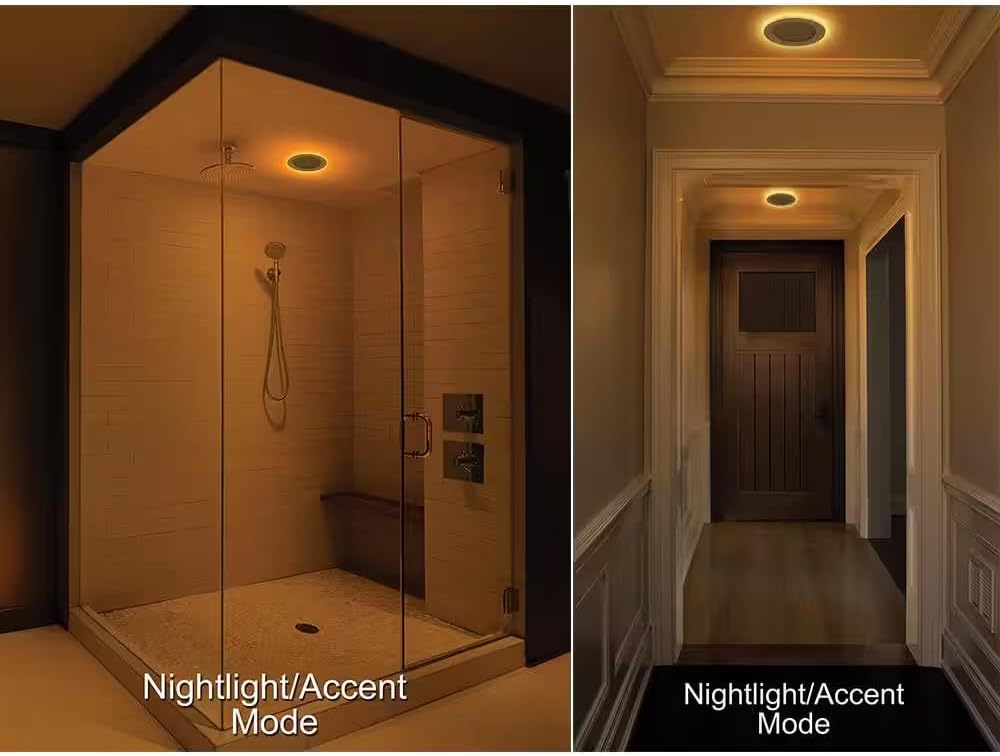
画像の説明: This image displays two different interior settings utilizing the nightlight/accent mode. On the left, a shower area is softly lit with an amber glow from a recessed light. On the right, a hallway also features the same warm, subtle illumination from a recessed night light.
6.2色温度調整
The color temperature (2700K, 3000K, 3500K, 4000K, 5000K) is selected via a slide switch on the junction box during pre-installation. This setting is static once installed and cannot be changed without accessing the junction box.
6.3調光
This fixture is dimmable. Ensure you use a compatible LED dimmer switch for optimal performance. Refer to your dimmer switch's instructions for proper operation.
7. メンテナンス
The LED light source is integrated and does not require replacement. For cleaning, ensure the power is off at the circuit breaker.
- 器具を柔らかく乾いた布、または軽く湿らせた布で拭いてください。amp 布。
- Do not use harsh chemicals, abrasive cleaners, or solvents, as these may damage the finish or electrical components.
8. トラブルシューティングガイド
If you experience issues with your LED recessed kit, refer to the following table for common problems and solutions:
| 問題 | 考えられる原因 | 解決 |
|---|---|---|
| ライトが点灯しない | No power to the fixture; Loose wiring connection; Faulty switch. | Check circuit breaker; Verify all wiring connections are secure; Test the wall switch. |
| 照明が不適切にちらついたり暗くなったりする | 互換性のない調光スイッチ、緩んだ配線。 | Ensure an LED-compatible dimmer is used; Check wiring connections. |
| 色温度を変更できない | Color temperature switch is set internally. | Color temperature is set on the junction box before installation. It cannot be changed via the wall switch. |
| 夜間照明モードが機能しない | 切り替えシーケンスが正しくありません。 | Ensure you are cycling the wall switch OFF/ON within 3 seconds to toggle modes. |
9. 保証情報
This Commercial Electric product is backed by a manufacturer's warranty against defects in materials and workmanship. Please retain your proof of purchase for warranty claims. For specific warranty terms and duration, refer to the product packaging or contact customer support.
10. カスタマーサポート
If you have any questions, require technical assistance, or need to report a problem, please contact Commercial Electric customer support. Contact information can typically be found on the product packaging or the manufacturer's official webサイト。