
1. はじめに
This manual provides detailed instructions for the operation and maintenance of your CCYLEZ 5K 75MP Digital Camera. Please read this manual thoroughly before using the camera to ensure proper function and to maximize your photographic experience. This camera is designed to capture high-resolution 75MP images and record vibrant 5K HD video, featuring an 18X digital zoom, a 3.0-inch 180-degree flip screen, macro auto-focus capabilities, and integrated Wi-Fi for easy sharing.
2. 箱の中身
パッケージを開封したら、以下のアイテムがすべて含まれていることを確認してください。
- CCYLEZ 5K 75MP Digital Camera Body
- Rechargeable Lithium-Ion Battery (BL-5C)
- USB充電ケーブル
- リストストラップ
- クリーニングクロス
- ユーザーマニュアル

Image: Contents of the camera package, showing the camera, battery, USB cable, wrist strap, and cleaning cloth.
3. セットアップ
3.1. バッテリーの取り付け
- Locate the battery compartment cover on the side of the camera.
- カバーをスライドさせて開きます。
- Insert the BL-5C lithium-ion battery into the compartment, ensuring the contacts align correctly.
- 電池ケースのカバーをカチッと音がするまでしっかりと閉じます。
3.2. メモリーカードの取り付け
This camera supports TF (MicroSD) cards. A memory card is required to save photos and videos.
- 電池ボックスのカバーを開きます。
- Locate the TF card slot next to the battery.
- Insert the TF card with the gold contacts facing down until it clicks into place.
- 電池ボックスのカバーを閉じます。
3.3. バッテリーの充電
初めて使用する前に、バッテリーを完全に充電してください。
- Connect the small end of the USB charging cable to the camera's USB port (located near the battery compartment).
- USB ケーブルのもう一方の端を USB 電源アダプタ (別売) またはコンピュータの USB ポートに接続します。
- 充電インジケーターライトが点灯します。充電が完了すると消灯するか、色が変わります。
3.4.電源のオン/オフ
- To power on: Press and hold the Power button (usually located on the top or side) until the screen illuminates.
- 電源を切るには: 画面がオフになるまで電源ボタンをもう一度押し続けます。
3.5. Adjusting the Flip Screen
The 3.0-inch HD screen can be flipped 180 degrees for various shooting angles, including selfies.
- Gently pull the screen upwards from the top edge.
- Rotate the screen to your desired angle. For selfies, flip it 180 degrees forward.
- To close, gently fold the screen back into its original position until it sits flush with the camera body.
Video: Demonstrates unboxing, battery and memory card installation, and the flip screen mechanism of the camera.

Image: The camera with its flip screen open, ideal for taking selfies or vlogging.
4. 操作手順
4.1. 基本的な写真撮影
写真を撮るには:
- カメラの電源がオンになっていることを確認します。
- Select your desired shooting mode using the mode dial (e.g., Automatic, Scenery, Portrait).
- フリップスクリーンを使用してショットをフレーミングします。
- Press the shutter button halfway to activate auto-focus. The focus indicator will turn green when focus is achieved.
- シャッターボタンを完全に押して画像を撮影します。
4.2.デジタルズーム
The camera features an 18X digital zoom to bring distant subjects closer.
- Use the 'W' (Wide) and 'T' (Telephoto) buttons, typically located near the screen, to zoom in and out.
- Note that digital zoom may reduce image quality compared to optical zoom.
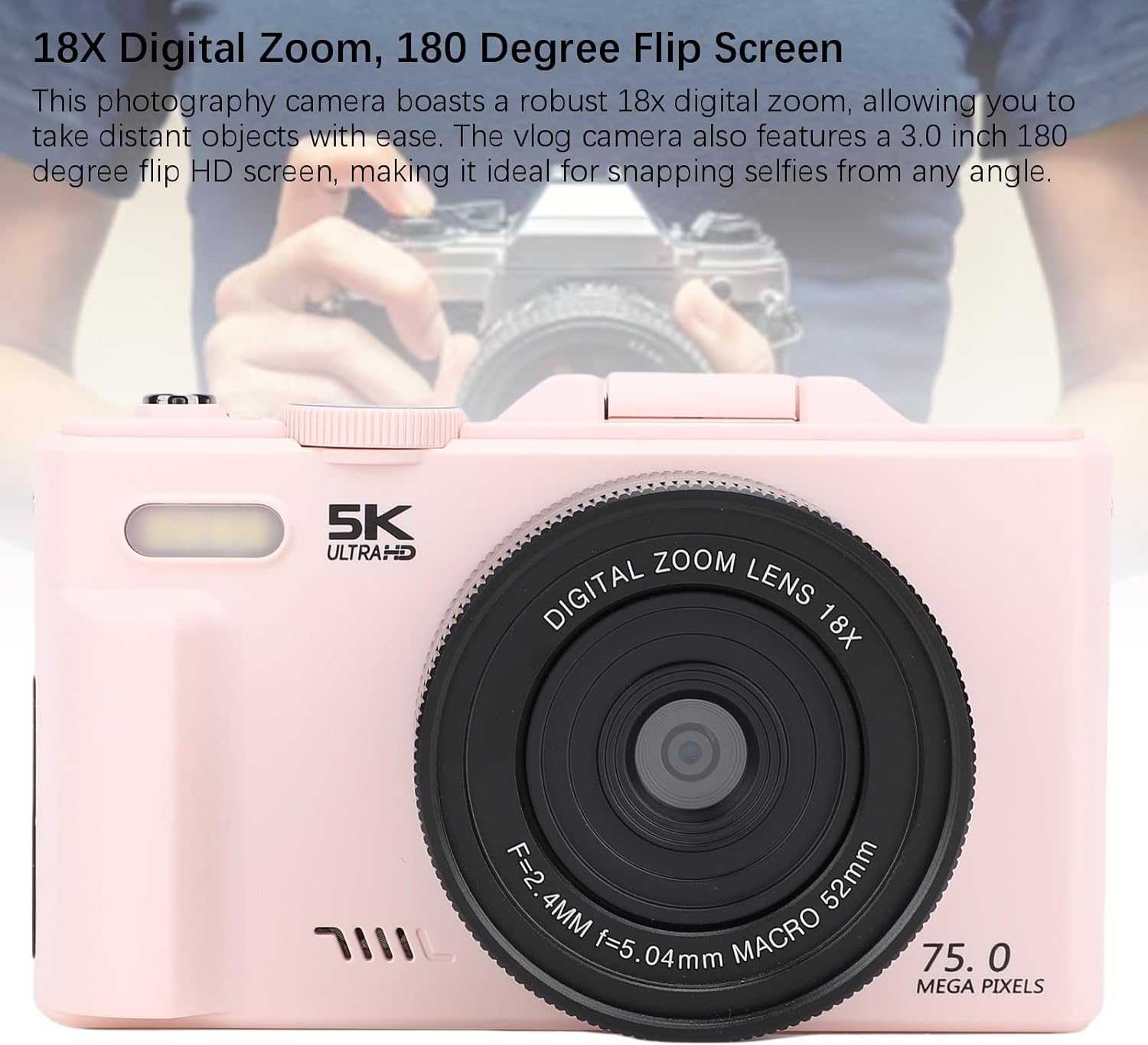
Image: The camera lens, indicating its 18X digital zoom feature.
4.3. マクロ撮影
For detailed close-up shots of small objects like flowers or insects, use the macro mode.
- Select the macro mode from the mode dial or menu.
- Position the camera close to your subject. The camera's F/3.2 large aperture and 7.36mm macro lens will assist in capturing fine details.
- Press the shutter button halfway for auto-focus, then fully to capture.

Image: The camera focusing on a small subject, illustrating macro photography.
4.4.ビデオ録画
ビデオを録画するには:
- Switch the mode dial to video recording mode.
- Press the shutter button to start recording. A red indicator or timer will appear on the screen.
- シャッターボタンをもう一度押すと、記録が停止します。
4.5. WiFi Instant Sharing
The camera features built-in Wi-Fi for wireless transfer of photos and videos to your smartphone or tablet.
- メニュー設定からカメラの Wi-Fi を有効にします。
- Download the dedicated camera app (refer to the camera's on-screen instructions or manual for app name) on your smartphone/tablet.
- Connect your smartphone/tablet to the camera's Wi-Fi network (SSID and password will be displayed on the camera screen).
- アプリを使用して、メディアを閲覧、ダウンロード、共有します。

Image: Camera connected to a smartphone via Wi-Fi, demonstrating wireless sharing.
4.6. 内蔵フラッシュの使用
The built-in flash assists in low-light conditions.
- The flash typically operates in automatic mode, firing when light conditions are insufficient.
- You can manually control flash settings (e.g., On, Off, Red-eye Reduction) through the camera's menu.

Image: Depiction of the camera's flash function in a dark environment.
4.7.撮影モード
The camera offers various shooting modes to suit different scenarios. Rotate the mode dial to select:
- Ordinary & Daily Photography: 日常の撮影に適した標準モード。
- 自動写真撮影: カメラが自動的に設定を調整します。
- Camera Timer: For delayed shots (e.g., 2s, 5s, 10s).
- Scenery: Optimizes settings for landscapes.
- ポートレート: Enhances skin tones and blurs backgrounds for portraits.
- 連続撮影: 複数の写真を連続して撮影します。
- Slow Photography: For slow-motion effects.
- タイムラプス録画: Captures images over time to create a time-lapse video.
- ループ録音: 継続的にビデオを録画し、古いビデオを上書きしますtage.
- Video Recording Photography: Dedicated video mode.
- 夜 View: Optimizes for low-light night scenes.
- パーティー: Settings optimized for indoor party environments.

Image: The camera's mode dial illustrating different available shooting modes.
5. メンテナンス
5.1. カメラのクリーニング
- 付属のクリーニングクロスまたは柔らかく糸くずの出ない布を使用して、カメラ本体と画面を優しく拭いてください。
- For stubborn smudges on the lens, use a specialized lens cleaning solution and cloth. Avoid harsh chemicals.
- Do not use excessive force when cleaning the flip screen.
5.2. ストレージ
- カメラは直射日光や極端な温度を避け、涼しく乾燥した場所に保管してください。
- 長期間保管する場合は、液漏れを防ぐために電池を取り外してください。
- Keep the camera in its protective pouch (if included) to prevent scratches.
5.3. バッテリーのお手入れ
- バッテリーを頻繁に完全に放電することは避けてください。
- バッテリーの寿命を維持するために、使用していない場合でも定期的に充電してください。
- 古い電池は、地域の規制に従って責任を持って処分してください。
6。 トラブルシューティング
カメラに問題が発生した場合は、次の一般的な解決策を参照してください。
| 問題 | 考えられる原因 / 解決策 |
|---|---|
| カメラの電源が入りません。 | バッテリーが消耗しているか、正しく挿入されていません。バッテリーが充電され、正しく取り付けられていることを確認してください。 |
| 写真/ビデオを撮影できません。 | Memory card is full, not inserted, or corrupted. Check card status, replace if necessary. Ensure correct shooting mode is selected. |
| 画像がぼやけてしまいます。 | Camera not focused. Ensure auto-focus engages (half-press shutter). Check for smudges on the lens. Ensure sufficient lighting. |
| Wi-Fi接続の問題。 | Ensure Wi-Fi is enabled on camera and smart device. Verify correct network name (SSID) and password. Restart both devices. |
| フラッシュが発光しません。 | Check flash settings in the menu. Ensure camera is in a mode that allows flash. |
| 画面が空白またはフリーズします。 | Try removing and reinserting the battery. If issue persists, contact customer support. |
7. 仕様
Detailed technical specifications for the CCYLEZ 5K 75MP Digital Camera:
- モデル名: CCYLEZz4wsnqrma7
- フォトセンサー技術: シーモス
- 最大 Webカム画像解像度: 75 MP
- 有効な静止画解像度: 75 MP
- ビデオキャプチャフォーマット: MP4 (5K HD)
- 光学ズーム: 18倍(デジタルズーム)
- レンズタイプ: マクロ
- 最小焦点距離: 7.36ミリメートル
- 最大焦点距離: 7.36ミリメートル
- 絞りモード: F3.2
- 画面サイズ: 3 Inches (180-degree Flip HD Screen)
- 表示タイプ: 液晶
- フォーカスタイプ: Auto Focus (Continuous-Servo AF)
- 露出制御タイプ: 自動、手動
- 光に対する敏感さ: 100-3200 認証
- ホワイトバランス設定: Auto, Cloudy, Fluorescent, Incandescent
- カメラのフラッシュ: Built-In (Automatic modes)
- 接続技術: Wi-Fi, Ethernet (for data transfer/streaming)
- 電池のタイプ: Lithium Ion (BL-5C)
- バッテリー容量: 1150ミリamp 営業時間
- 耐水性レベル: 耐水性はありません
- 対応デバイス: Smartphones, Tablets, TVs, Computers
- 製品の具体的な用途: ビデオブログ
8. 保証とサポート
8.1. 保証情報
Your CCYLEZ 5K 75MP Digital Camera comes with a standard manufacturer's warranty. Please refer to the warranty card included in your package for specific terms, conditions, and duration. This warranty typically covers defects in materials and workmanship under normal use.
8.2. カスタマーサポート
For technical assistance, troubleshooting beyond this manual, or warranty claims, please contact CCYLEZ customer support. Contact information can usually be found on the product packaging, the official CCYLEZ webサイト、または小売店を通じてご購入いただけます。
When contacting support, please have your camera model number (CCYLEZz4wsnqrma7) and purchase details readily available.