
1. はじめに
This manual provides detailed instructions for the installation, configuration, and maintenance of the MSI PRO B850M-P WiFi Motherboard. Designed for efficient and stable performance, this motherboard supports AMD Ryzen 9000, 8000, and 7000 series processors on the AM5 platform. It features advanced connectivity and cooling solutions to ensure optimal system operation.

Figure 1: MSI PRO B850M-P WiFi Motherboard and included packaging.
2.製品オーバーview
The MSI PRO B850M-P WiFi motherboard is built on the AMD B850 chipset, offering robust features for modern computing needs. Key features include:
- プロセッサーのサポート: Compatible with AMD Ryzen 9000, 8000, and 7000 series processors (AM5 socket).
- 電力供給: Direct 7 Phase (P-PAK) VRM for stable power to the CPU, enhanced with Core Boost architecture.
- 冷却: Features 7W/mK MOSFET thermal pads, extra choke thermal pads, an Extended Heatsink, chipset heatsink, and EZ M.2 Shield Frozr II for thermal management.
- メモリ: Four DDR5 DIMM SMT slots supporting memory overclocking speeds up to 8200+ MT/s (1DPC 1R).
- 拡張スロット: One PCIe 5.0 x16 SMT slot with Steel Armor for graphics cards, and additional PCIe 4.0 x16 slots.
- ストレージ: One M.2 Gen5 x4 128Gbps slot with EZ M.2 Shield Frozr II, one M.2 Gen4 x4 64Gbps slot, and one M.2 Gen4 x2 32Gbps slot.
- 接続性: Integrated Wi-Fi 7, Bluetooth 5.4, Realtek 5G LAN, USB 10Gbps Type-C, and 7.1 HD audio with Audio Boost.

図2: トップダウン view of the motherboard, highlighting component layout.

Figure 3: Motherboard showcasing cooling features and durable PCB design.

図4:詳細 view of the rear input/output panel, including USB, LAN, Wi-Fi, and audio ports.
3. セットアップとインストール
取り付けを始める前に、システムの電源がオフになっていること、および電源プラグが抜かれていることを確認してください。静電気放電を防ぐため、マザーボードの端を持って取り扱ってください。
3.1. CPUの取り付け
- CPUソケットレバーを開きます。
- CPU をソケットに慎重に位置合わせし、CPU の三角形のマークがソケットのマークと一致していることを確認します。
- 無理に力を入れずに、CPU をソケットにゆっくりと差し込みます。
- ソケットレバーを閉じてCPUを固定します。
3.2. CPUクーラーの取り付け
Install your chosen CPU cooler according to its manufacturer's instructions. Ensure proper thermal paste application for effective heat dissipation.
3.3. メモリ(RAM)のインストール
- DDR5 DIMM スロットの両端のクリップを開きます。
- メモリ モジュールをスロットに合わせて、モジュールの切り込みがスロットのキーと一致していることを確認します。
- クリップがカチッと音がするまで、メモリ モジュールの両端をしっかりと押し下げます。
3.4. M.2 SSDのインストール
The motherboard includes EZ M.2 Shield Frozr II for M.2 SSDs.
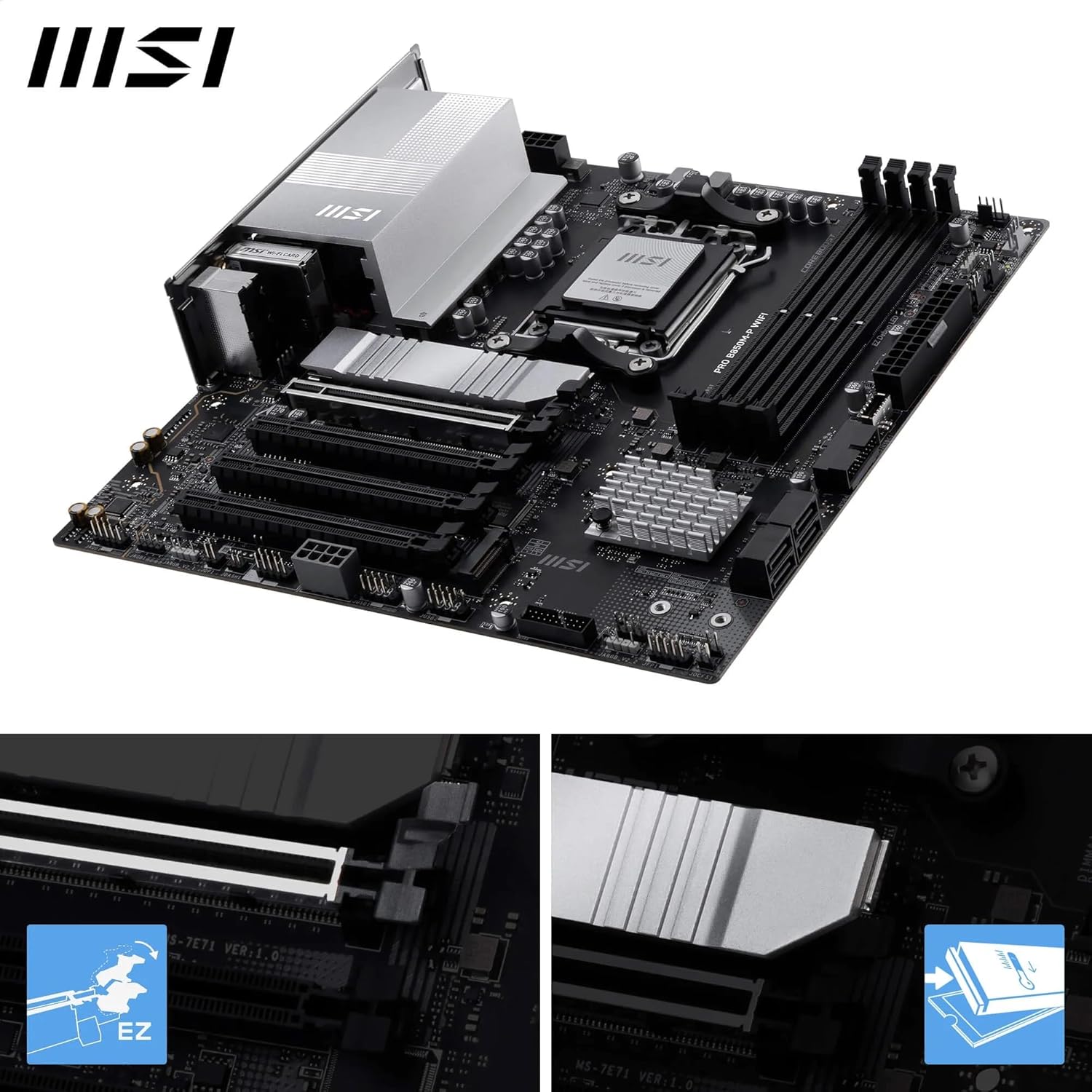
図 5: 拡大図 view of the M.2 Shield Frozr II, demonstrating its easy removal and installation.
- Unscrew and remove the EZ M.2 Shield Frozr II from the desired M.2 slot.
- M.2 SSD を斜めにしてスロットに挿入します。
- M.2 SSD をゆっくりと押し下げ、付属のネジまたは工具不要のラッチで固定します。
- Reattach the EZ M.2 Shield Frozr II.
3.5. グラフィックカード(GPU)のインストール

Figure 6: Motherboard highlighting the PCIe 5.0 x16 slot and M.2 Gen5 slots.
- PCIe 5.0 x16 スロットのラッチを開きます。
- グラフィック カードをスロットに合わせて、カチッと音がするまでしっかりと押し下げます。
- グラフィック カードをネジで PC ケースに固定します。
3.6.電源接続
24 ピン ATX 電源コネクタと 8 ピン (または 4+4 ピン) CPU 電源コネクタを電源装置からマザーボードに接続します。
3.7. フロントパネルコネクタ
Connect the power button, reset button, HDD LED, power LED, and front panel USB/audio connectors to their respective headers on the motherboard. Refer to the motherboard layout diagram for exact locations.
3.8. 付属品
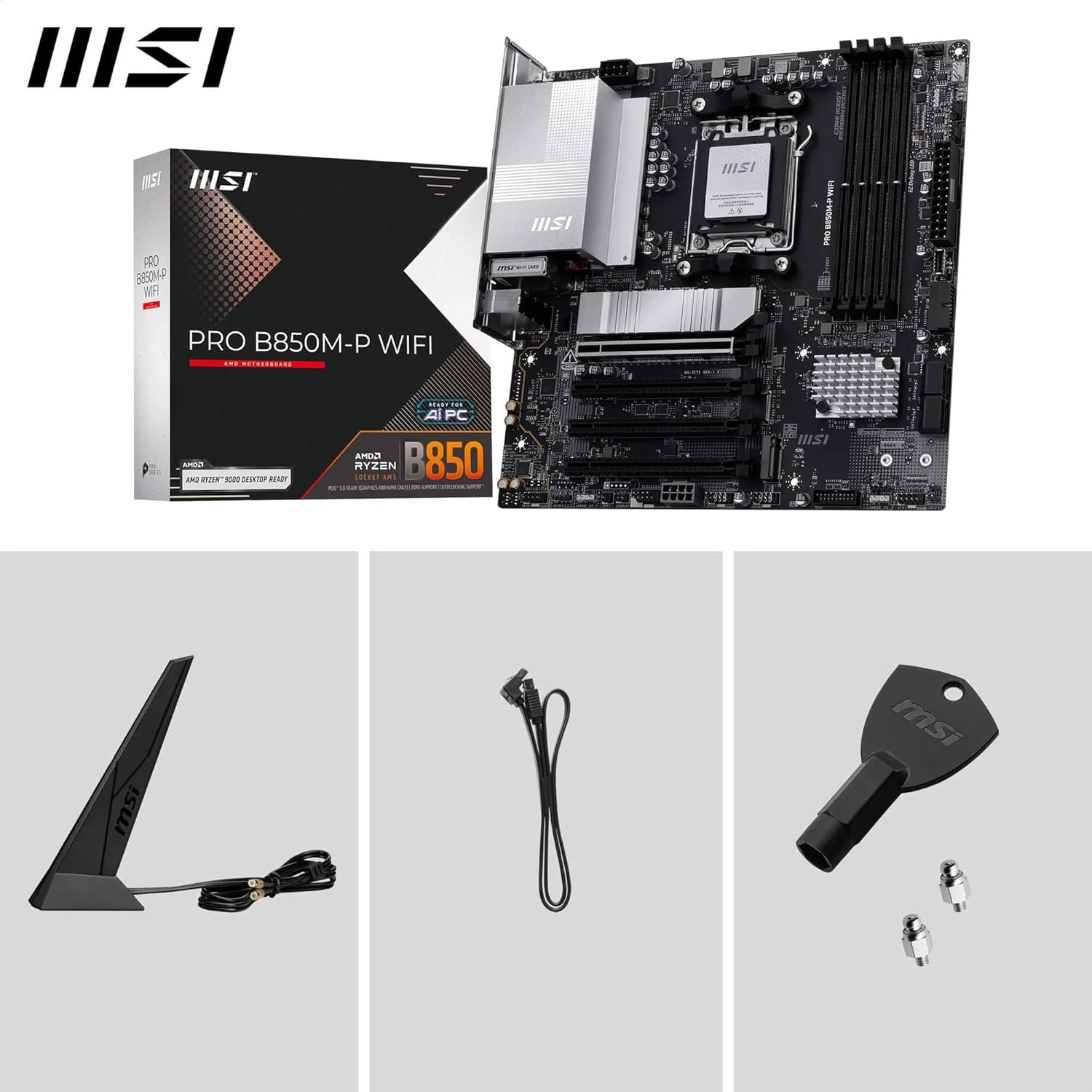
Figure 7: The motherboard shown with its standard accessories, including the Wi-Fi antenna, SATA cables, and M.2 screws.
4. 操作手順
4.1. BIOS/UEFIセットアップ
BIOS/UEFIセットアップユーティリティに入るには、システムの電源を入れ、 削除 key during the boot process. Here you can configure system settings, boot order, and monitor hardware status.
4.2. ドライバーのインストール
After installing your operating system, install the necessary drivers for the motherboard's components. These can typically be found on the included driver CD/USB or downloaded from the official MSI website. Essential drivers include chipset, LAN, Wi-Fi, Bluetooth, and audio drivers.
4.3. MSI Software Utilities
MSI provides various software utilities to enhance your user experience, such as MSI Center for system monitoring and Mystic Light for RGB control. Download these from the MSI webサイト。
5. メンテナンス
5.1. 清掃
ほこりの蓄積を防ぐため、コンピューター内部を定期的に清掃してください。ほこりは過熱の原因となります。圧縮空気を使用して、ファン、ヒートシンク、その他のコンポーネントからほこりを取り除きます。清掃する前に、システムの電源をオフにし、電源プラグを抜いてください。
5.2. BIOSアップデート
MSIを定期的にチェックする website for BIOS updates. BIOS updates can improve system stability, add support for new hardware, or fix bugs. Follow the instructions provided by MSI carefully when performing a BIOS update to avoid system damage.
6。 トラブルシューティング
マザーボードに問題が発生した場合は、次の一般的なトラブルシューティング手順を参照してください。
- 電源なし/起動なし: Ensure all power cables (24-pin ATX, 8-pin CPU) are securely connected. Check the power supply unit (PSU) for proper function.
- 表示なし: Verify that the graphics card is properly seated in its PCIe slot and that the display cable is connected to the graphics card (not the motherboard's integrated graphics ports, unless using an APU).
- DRAM/CPU LED Indicators: If the motherboard's EZ Debug LEDs (CPU, DRAM, VGA, BOOT) illuminate, it indicates an issue with that specific component. For example, a red CPU light or yellow DRAM light suggests a problem with the CPU or memory, respectively. Try reseating the component or testing with known-good parts.
- システムの不安定性: Ensure all drivers are up to date. Check memory compatibility and run memory diagnostic tools. Verify CPU and GPU temperatures to rule out overheating.
- BIOSフラッシュバック: If a BIOS update fails or the system becomes unbootable, use the BIOS Flashback feature (if available on your model) to restore the BIOS. Refer to the MSI webこの機能の使用に関する具体的な手順については、サイトをご覧ください。
7. 仕様
| 特徴 | 仕様 |
|---|---|
| ブランド | MSI |
| モデル名 | プロB850M-P |
| CPUソケット | ソケットAM5 |
| 互換性のあるプロセッサ | AMD Ryzen 9000/8000/7000 Series Desktop Processors |
| チップセットタイプ | B850 について |
| RAMメモリ技術 | DDR5 |
| メモリスロット | 4 x DDR5 DIMM SMT slots |
| Max Memory Speed (OC) | 8200+ MT/s |
| PCIeスロット | 1 x PCIe 5.0 x16 (with Steel Armor), 1 x PCIe 4.0 x16 |
| M.2コネクタ | 1 x M.2 Gen5 x4 128Gbps, 1 x M.2 Gen4 x4 64Gbps, 1 x M.2 Gen4 x2 32Gbps |
| 無線LAN | リアルテック 5G LAN |
| ワイヤレス接続 | Wi-Fi 7、Bluetooth 5.4 |
| USBポート(背面) | USB 10Gbps Type-C, USB 10Gbps Type-A, USB 5Gbps Type-A, USB 2.0 |
| オーディオ | オーディオブースト付き7.1 HDオーディオ |
| ビデオ出力 | HDMI, DisplayPort (4K/60Hz support) |
| フォームファクター | ATX (based on product title, though description mentions mATX in reviews, relying on title for consistency) |
| 寸法(長さx幅x高さ) | 11.2 x 10.8 x 2.8インチ |
| アイテム重量 | 2.86ポンド |
8. 保証とサポート
保証情報、テクニカルサポート、ドライバーのダウンロード、その他のサポートについては、MSIの公式ウェブサイトをご覧ください。 webサイトをご覧ください。詳細なサポートリソース、FAQ、カスタマーサービスの連絡先情報が見つかります。
MSI公式 Webサイト: www.msi.com
Always refer to the latest documentation available on the MSI web製品に関する最新情報については、こちらのサイトをご覧ください。