
1. はじめに
ご購入ありがとうございますasing the Elett Handy Polisher with Extension Handle. This versatile cleaning tool is designed to simplify your cleaning tasks with its interchangeable brush heads and convenient extension handle. Please read this manual thoroughly before first use to ensure proper operation, maintenance, and safety.
2. 安全情報
火災、感電、および人身傷害のリスクを軽減するために、電気製品を使用するときは常に基本的な安全上の注意事項に従ってください。
- デバイスを子供やペットの手の届かない場所に保管してください。
- Do not immerse the main unit in water or other liquids. The device is not waterproof.
- 電池の極性が正しいことを確認してください。長期間使用しない場合は、電池を取り外してください。
- 古い電池と新しい電池、または異なる種類の電池を混ぜないでください。
- Use only the specified type and number of batteries (4 x AA dry cell batteries, sold separately).
- Do not use the polisher on delicate surfaces that may be scratched or damaged by abrasive cleaning. Test on an inconspicuous area first.
- Turn off the device before changing brush heads or performing any maintenance.
- ご自身でデバイスの修理や改造を試みないでください。サポートが必要な場合は、カスタマーサポートにお問い合わせください。
3. パッケージ内容
以下にリストされているすべてのアイテムがパッケージに含まれていることを確認してください。
- Elett Handy Polisher Main Unit
- 拡張ハンドル
- Brush Head (Standard)
- Sponge Brush Head
- ブラシカバー
- ユーザーマニュアル(このドキュメント)
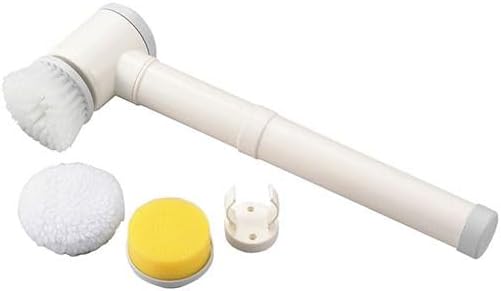
Image 1: Elett Handy Polisher and its included accessories. The main unit is white with grey accents, featuring a handle and a rotating head. Below it are a white fluffy brush, a yellow sponge brush, and a white plastic brush cover.
4. セットアップ
4.1 バッテリーの取り付け
- 本体の電池ボックスの位置を確認します。
- 電池ボックスのカバーを開きます。
- Insert 4 AA dry cell batteries (sold separately) according to the polarity indicators (+/-) inside the compartment.
- 電池カバーをしっかりと閉じてください。
4.2 ブラシヘッドの取り付け
- Select the desired brush head (standard brush or sponge brush) for your cleaning task.
- Align the brush head with the rotating spindle on the main unit.
- ブラシヘッドをカチッと音がしてしっかりと固定されるまで、ゆっくりと押して回します。
- To remove, twist the brush head counter-clockwise and pull it off.
4.3 Attaching the Extension Handle
For extended reach, attach the extension handle:
- Align the end of the main unit with the opening of the extension handle.
- Push the main unit firmly into the extension handle until it locks into place.
- To detach, press the release button (if present) or twist and pull the main unit from the extension handle.
5. 操作手順
5.1 電源のオン/オフ
Press the power button located on the handle of the main unit to turn the polisher ON. Press it again to turn the polisher OFF.
5.2クリーニング手順
- Ensure the correct brush head is securely attached for the surface you intend to clean.
- Apply a small amount of appropriate cleaning solution directly to the surface or to the brush head.
- Turn on the Elett Handy Polisher.
- Gently place the rotating brush head onto the surface to be cleaned. Apply light pressure and move the polisher slowly over the area.
- For stubborn stains, allow the brush to work for a few seconds before moving on.
- After cleaning, turn off the polisher and wipe the cleaned surface with a clean cloth if necessary.

Image 2: The Elett Handy Polisher in operation, demonstrating its use on a textured surface. The brush head is actively rotating, creating foam as it cleans.
5.3 Brush Head Selection Guide
| ブラシタイプ | 推奨用途 |
|---|---|
| 標準ブラシ | General cleaning of hard surfaces like tiles, grout, sinks, and bathtubs. Effective for scrubbing away dirt and grime. |
| スポンジブラシ | Gentle cleaning and polishing of delicate surfaces, or for applying cleaning solutions evenly. Suitable for glass, mirrors, and polished surfaces. |
6. メンテナンスとケア
6.1 ユニットのクリーニング
- After each use, turn off the polisher and remove the brush head.
- 本体を拭いてamp 布で拭いてください。本体を水で洗い流さないでください。
- 保管する前に、ユニットが完全に乾いていることを確認してください。
6.2 ブラシヘッドのクリーニング
- Rinse the brush heads under running water to remove any cleaning solution or debris.
- For thorough cleaning, use mild soap and water.
- Allow brush heads to air dry completely before reattaching or storing.
6.3 ストレージ
Store the Elett Handy Polisher and its accessories in a cool, dry place, away from direct sunlight and moisture. If storing for an extended period, remove the batteries from the main unit.
7。 トラブルシューティング
| 問題 | 考えられる原因 | 解決 |
|---|---|---|
| デバイスの電源が入らない。 | 電池が切れているか、正しく挿入されていません。 | 正しい極性を確認して、新しい電池と交換してください。 |
| Brush head does not rotate or rotates slowly. | Low battery power; brush head not properly attached; excessive pressure applied. | Replace batteries; reattach brush head securely; reduce pressure during use. |
| 洗浄性能が悪い。 | Incorrect brush head for the task; insufficient cleaning solution; brush head is worn. | Select appropriate brush head; apply more cleaning solution; replace worn brush heads. |
8. 仕様
| 特徴 | 詳細 |
|---|---|
| モデル番号 | ET-07H, C6132515 |
| 寸法(約) | 6.5 × 12 × 41 cm(2.56 × 4.72 × 16.14インチ) |
| 材料 | ABS樹脂 |
| 電源 | 4 x AA Dry Cell Batteries (含まれません) |
| 原産国 | 中国 |
9. 保証とサポート
This product is designed for durability and performance. For any questions regarding product operation, maintenance, or troubleshooting not covered in this manual, please contact your retailer or the point of purchase for support. Please retain your proof of purchase for warranty claims, if applicable.
さらにサポートが必要な場合は、 website or contact our customer service department. Contact details may be found on the product packaging or the retailer's webサイト。