
1. はじめに
This instruction manual provides essential information for the safe and efficient operation, maintenance, and troubleshooting of your 3i P10 Ultra Robot Vacuum and Mop Combo. Please read this manual thoroughly before using the product and retain it for future reference.
2. 安全情報
火災、感電、または怪我のリスクを軽減するため、電気製品を使用する際は、必ず基本的な安全上の注意事項に従ってください。この製品は家庭用です。
- お子様にロボットを操作させないでください。ロボットが作動中は、お子様やペットから目を離さないでください。
- パワーボリュームを確認してくださいtag充電ドックの定格ラベルと一致します。
- ロボットを濡れた表面や水が溜まっている場所で使用しないでください。
- Remove loose cables, small objects, and fragile items from the cleaning path before operation.
- Do not use the robot to pick up large or sharp objects, flammable materials, or liquids.
- Only use manufacturer-specified accessories and replacement parts.
- 電源コードが損傷している場合は、危険を避けるために製造元または資格のあるサービス代理店によって交換される必要があります。
3.製品オーバーview
3.1 含まれるコンポーネント
パッケージには以下のアイテムが含まれています:
- ロボット掃除機1台
- 1xベースステーション
- モップパッド2枚
- 2 xサイドブラシ
- 1 x 800ml Cleaning Solution
- 1×取り外し可能なベース
- 1 x電源コード
- ユーザーマニュアル x 1
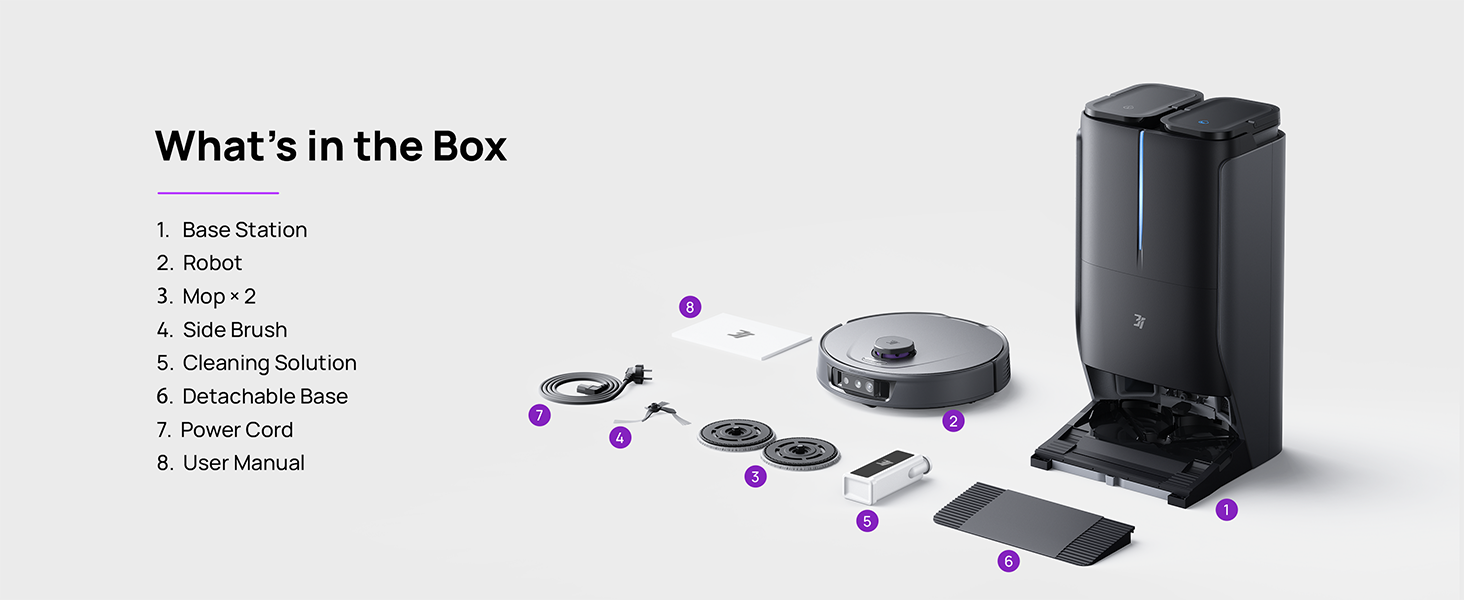
Figure 3.1: Contents of the 3i P10 Ultra package.
3.2 ロボット掃除機の機能
- UltraReach Mop: The auto-extending mop system cleans edges and corners thoroughly. Dual mops spin at 220 RPM for effective stain removal.
- 18,000 Paの吸引力: Provides powerful suction for deep cleaning on various floor types, including carpets and hard floors. Features smart carpet detection to boost suction and lift mops.
- All-in-One Automated Station: Offers automatic hot-water mop washing, hot air drying, solution adding, and hands-free dust collection for up to 70 days.
- 高度なナビゲーション: Utilizes LiDAR for 3D mapping, dual 3D structured light, and an AI camera for obstacle avoidance, threshold crossing, and collision resistance.
- AI-Powered DirtScan: Identifies over 100 household objects and messes, adapting cleaning methods for optimal results, even in low light conditions.
- ヘアケア: Equipped with anti-tangle brushes and a TangleCut blade to prevent hair from wrapping around components.
- Smart Route Planning: Learns home layouts for efficient cleaning routes. Supports scheduled cleaning, no-go zones, and app control. Compatible with Alexa and Google Assistant.
- Wi-Fi接続: Supports both 2.4G and 5G Wi-Fi networks.

図3.2:上 view of the 3i P10 Ultra Robot Vacuum.

Figure 3.3: The 3i P10 Ultra Base Station.
4. セットアップ
4.1開梱と配置
- パッケージからすべてのコンポーネントを慎重に取り出します。
- Choose a suitable location for the base station. Ensure it is placed against a wall, on a hard, level surface, with at least 0.5 meters (1.6 feet) of clear space on both sides and 1.5 meters (4.9 feet) in front. Avoid areas with direct sunlight or strong Wi-Fi interference.
- 電源コードをベースステーションに接続し、電源コンセントに差し込みます。
4.2 ロボットの準備
- Install the side brushes by pressing them into their slots until they click.
- Attach the mop pads to the mop holders on the robot.
- Place the robot onto the base station to charge. Ensure the charging contacts align. The robot will announce its charging status.
4.3 アプリのインストールと接続
- Download the 3i app from your mobile device's app store (iOS or Android).
- Open the app and follow the on-screen instructions to create an account and add your 3i P10 Ultra robot.
- ペアリング プロセス中に、携帯電話が 2.4GHz または 5GHz Wi-Fi ネットワークに接続されていることを確認してください。
5. 操作手順
5.1 Initial Cleaning and Mapping
For the first use, allow the robot to complete a full cleaning cycle to create a map of your home. This map is crucial for advanced features.

Figure 5.1: Precision 3D Mapping in the 3i App.
5.2 クリーニングサイクルの開始
- ロボット経由: 掃除を開始または一時停止するには、ロボットの電源ボタンを 1 回押します。
- アプリ経由: Open the 3i app, select the desired cleaning mode (Vacuum, Mop, Vac & Mop, AI Auto, Custom), and tap 'Start'.
- 音声コントロール経由: Use compatible voice assistants (Alexa, Google Assistant) with commands like "Hey Google, start vacuuming."

Figure 5.2: Using voice control to operate the 3i P10 Ultra.
5.3 アプリの機能
The 3i app provides extensive control and customization options:
- クリーニング設定: Schedule cleaning, select rooms, set no-go zones, customize carpet cleaning.
- マップ設定: View 3D maps, quick mapping, multi-floor maps, edit rooms and furniture.
- Station Settings: Customize dust collection, mop washing, auto-drying, and TangleCut.
- その他の設定: Do Not Disturb mode, Smart Route Planning, Pet Recognition, Child Lock.
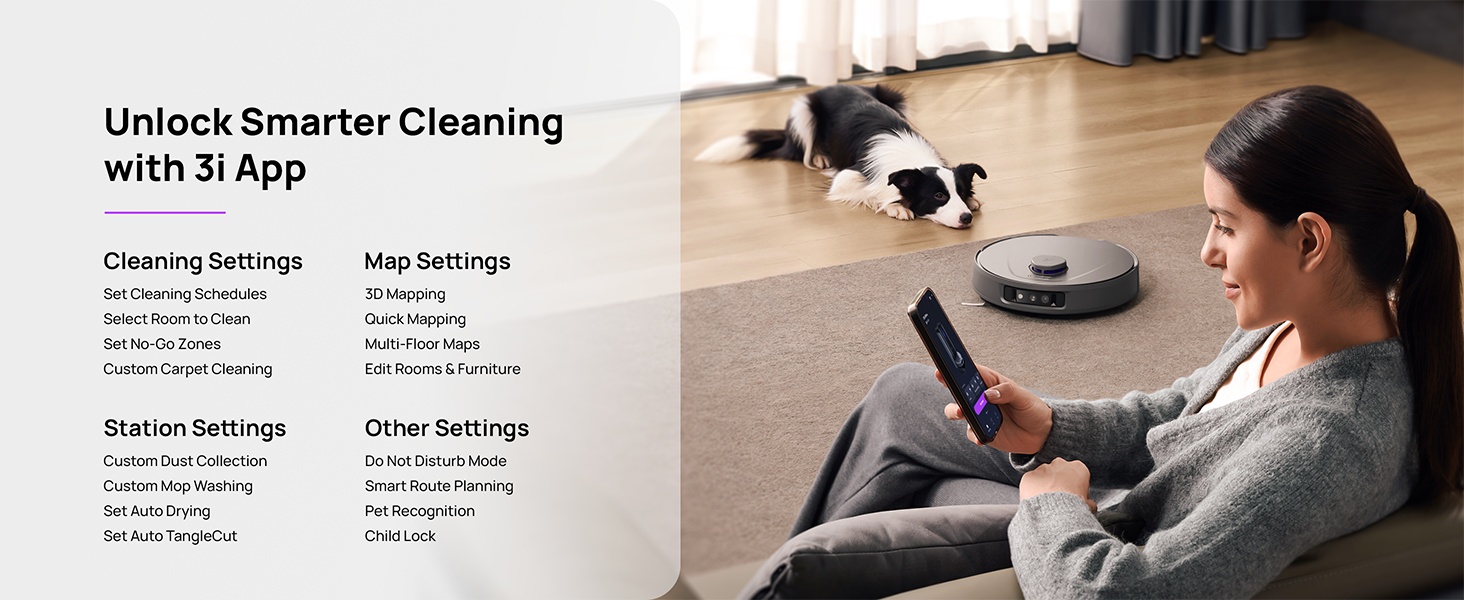
Figure 5.3: The 3i App interface for smart cleaning.
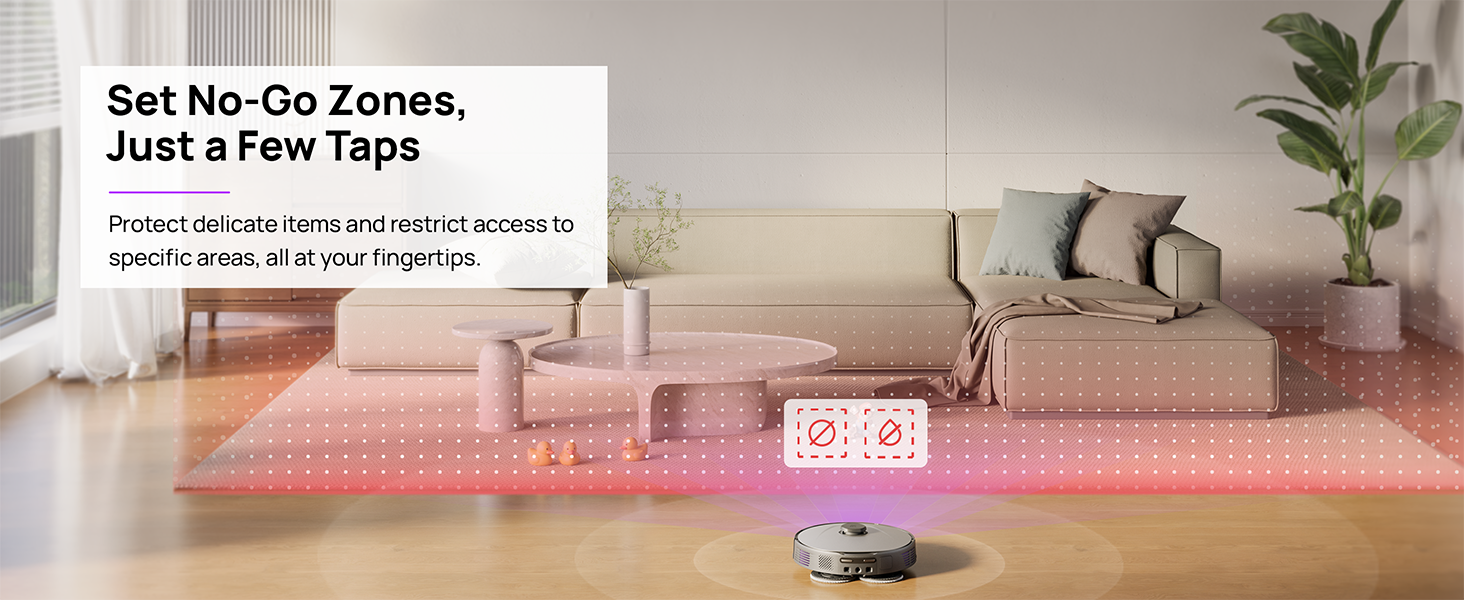
Figure 5.4: Setting No-Go Zones in the 3i App.
6. メンテナンス
Regular maintenance ensures optimal performance and extends the lifespan of your 3i P10 Ultra.
6.1 基地局のメンテナンス
- ゴミ箱を空にする: The base station automatically empties the robot's dustbin into a 3L bag. Replace the dust bag approximately every 70 days, or as indicated by the app.
- モップの洗浄と乾燥: The base station automatically washes mop pads with 140°F / 60°C hot water and dries them with hot air (131°F / 55°C) after each cleaning cycle. Ensure the clean and dirty water tanks are properly installed.
- Water Tank Refilling: The extra-large 4L clean water tank automatically refills the robot. Refill the clean water tank as needed. The base station also collects dirty water into a separate wastewater tank. Empty the wastewater tank regularly.
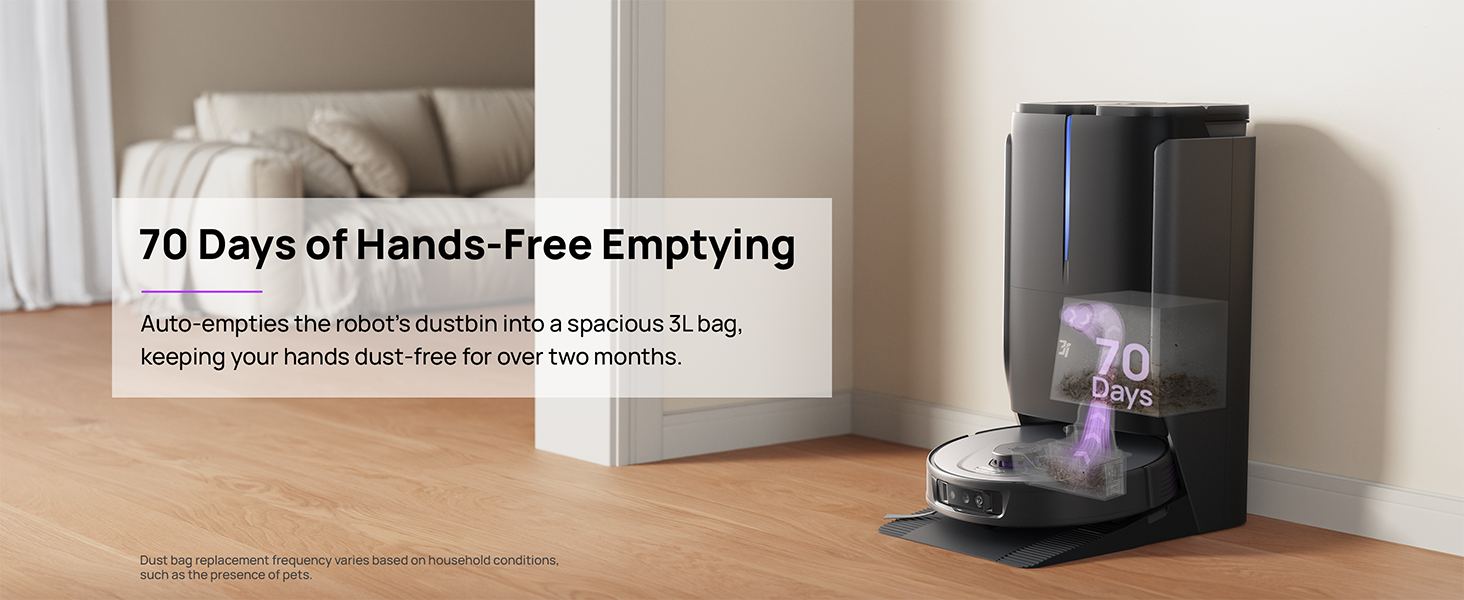
Figure 6.1: Automatic dustbin emptying at the base station.
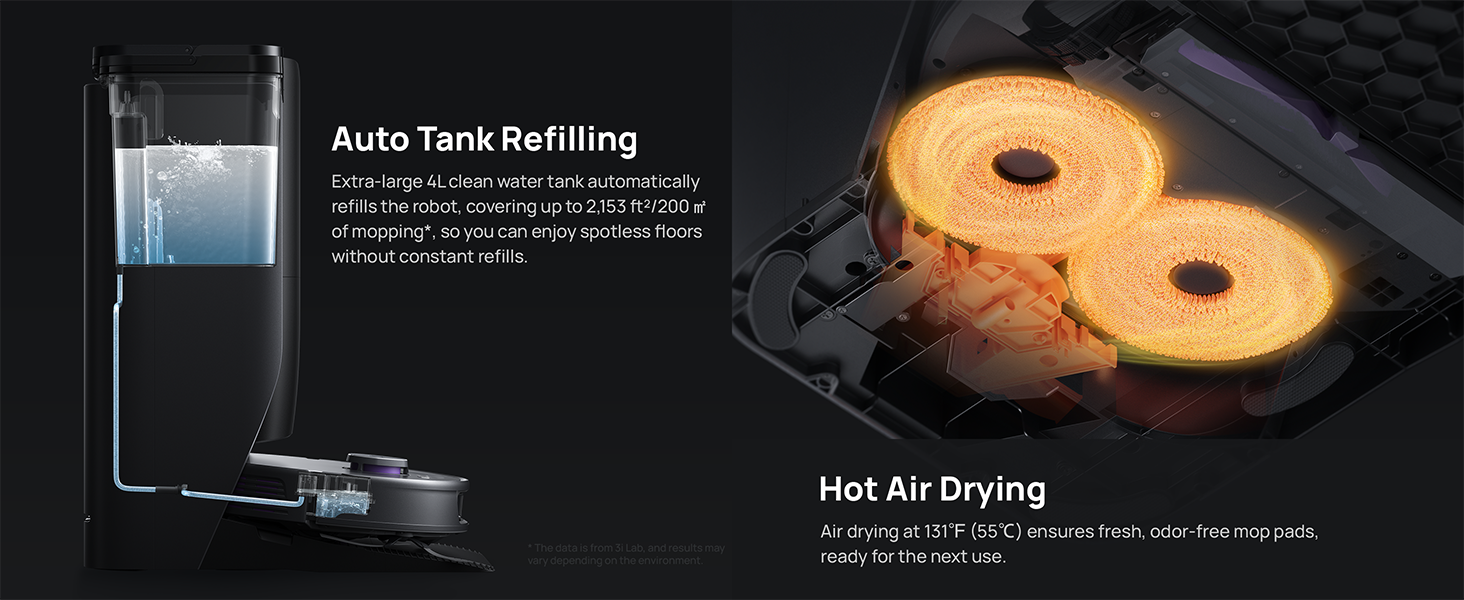
Figure 6.2: Auto tank refilling and hot air drying process.
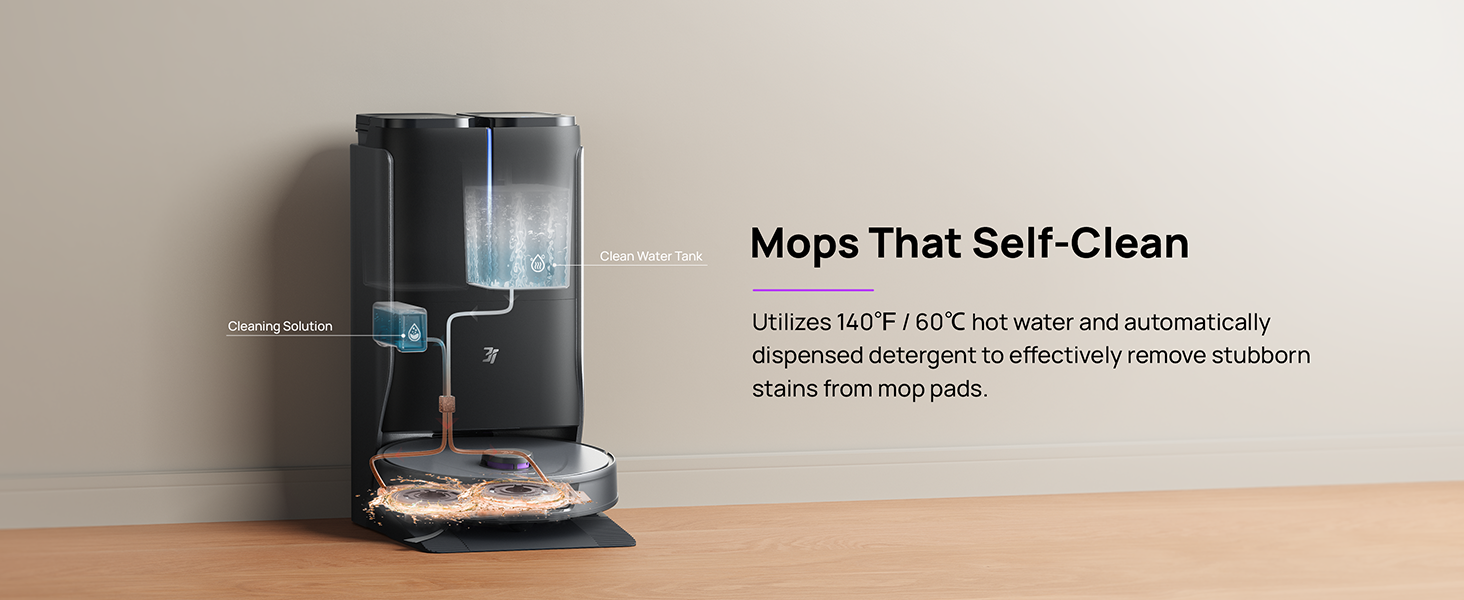
Figure 6.3: Mop self-cleaning function.
6.2 ロボットコンポーネントのメンテナンス
- メインブラシ: Regularly check the main brush for tangled hair or debris. Use the cleaning tool provided to remove any obstructions. The TangleCut blade helps prevent excessive tangling.
- サイドブラシ: Inspect side brushes for wear or damage. Clean them periodically and replace if necessary.
- モップパッド: Although self-cleaned, inspect mop pads for excessive wear or stubborn stains. Replace them when their cleaning effectiveness diminishes.
- フィルター: The filter is washable. Remove and rinse it under running water. Allow it to air dry completely before reinstalling.
- センサー: Wipe all sensors (LDS, anti-drop, wall-following, charging contacts) with a clean, dry cloth to ensure proper function.
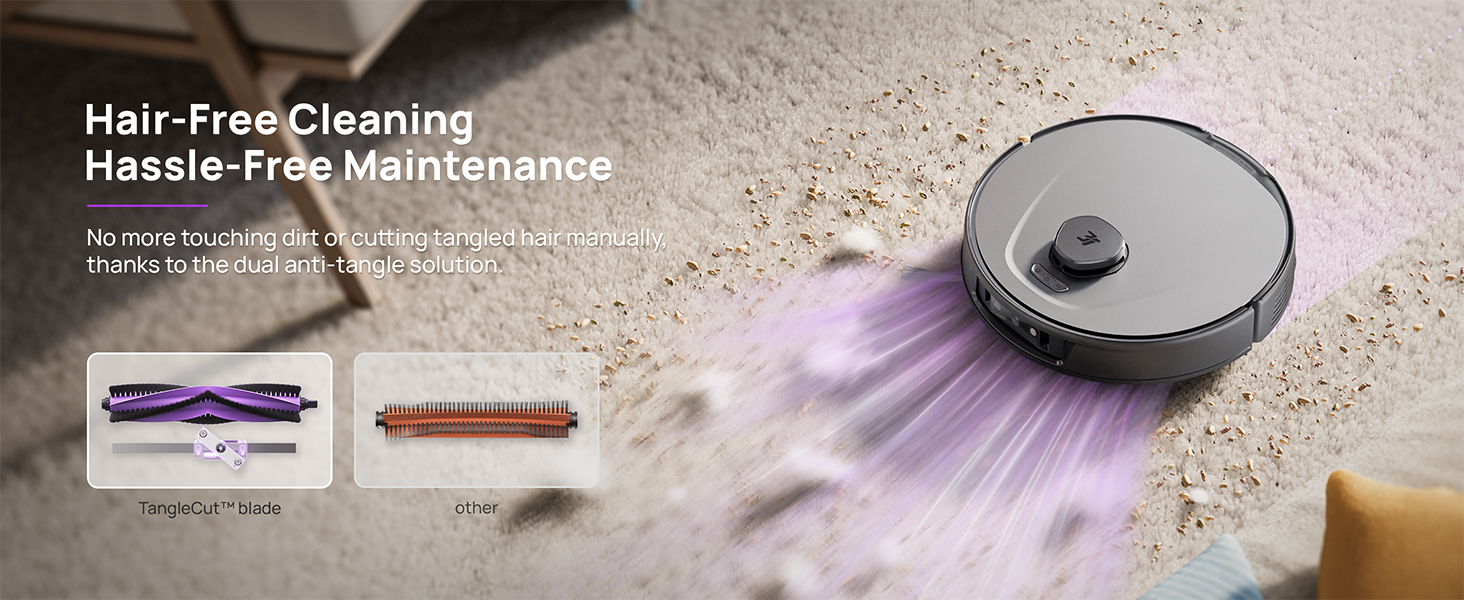
Figure 6.4: Hair-free cleaning with anti-tangle design.
7。 トラブルシューティング
If you encounter issues with your 3i P10 Ultra, refer to the following common problems and solutions:
| 問題 | 考えられる原因 | 解決 |
|---|---|---|
| ロボットが起動しません。 | バッテリー残量が少ない。電源ボタンが正しく押されていません。 | ロボットを充電ドックに置き、電源ボタンを 3 秒間押し続けます。 |
| ロボットが充電ドックを見つけることができません。 | Dock is obstructed or too far; Poor Wi-Fi signal. | Ensure dock is in an open area; Check Wi-Fi connection. |
| 洗浄性能が悪い。 | ゴミ箱がいっぱい、ブラシが絡まっている、フィルターが詰まっている、モップパッドが汚れている。 | Empty dustbin; Clean brushes; Clean/replace filter; Clean/replace mop pads. |
| ロボットが頻繁に動けなくなります。 | 床に障害物があります。センサーが汚れています。 | Clear floor of obstacles; Clean all sensors. |
| アプリの接続の問題。 | Wi-Fi パスワードが正しくありません。ルーターに問題があります。ロボットがオフラインです。 | Verify Wi-Fi password; Restart router; Restart robot; Re-pair device in app. |
For further assistance, please refer to the 3i app's help section or contact customer support.
8. 仕様
| 特徴 | 詳細 |
|---|---|
| ブランド | 3i |
| モデル名 | 3i P10 ウルトラロボット掃除機 |
| 製品寸法(ロボット) | 長さ13.78インチ x 幅13.78インチ x 高さ3.94インチ |
| Product Dimensions (Station) | 長さ12.2インチ x 幅18.43インチ x 高さ23.39インチ |
| アイテム重量 | 37.3ポンド |
| バッテリー寿命 | 180 minutes |
| フィルタータイプ | 洗濯可能 |
| 表面の推奨事項 | カーペット、大理石、木材、タイル |
| 吸引力 | 18,000パ |
| ナビゲーションシステム | LDS LiDAR, Dual 3D Structured Light, AI Camera |
| Wi-Fiサポート | 2.4Gと5G |

Figure 8.1: Dimensions of the 3i P10 Ultra Robot and Base Station.
9. 保証とサポート
For warranty information, please refer to the warranty card included with your product or visit the official 3i website. For technical support, troubleshooting beyond this manual, or to inquire about replacement parts, please contact 3i customer service through the contact information provided on their official website or within the 3i app.